



概述:
这里主要演示flink源码实例中“WordCount”程序的流窗口版本。
此程序连接到socket服务器并从socket读取字符串。最简单的尝试方法是打开一个文本服务器(在端口9999),使用netcat工具
详解界面提交和参数传递,代码很简单可直接从github中获取:
https://github.com/apache/flink/blob/master/flink-examples/flink-examples-streaming/src/main/java/org/apache/flink/streaming/examples/socket/SocketWindowWordCount.java
我这里也贴一下:
/** Licensed to the Apache Software Foundation (ASF) under one* or more contributor license agreements. See the NOTICE file* distributed with this work for additional information* regarding copyright ownership. The ASF licenses this file* to you under the Apache License, Version 2.0 (the* "License"); you may not use this file except in compliance* with the License. You may obtain a copy of the License at** http://www.apache.org/licenses/LICENSE-2.0** Unless required by applicable law or agreed to in writing, software* distributed under the License is distributed on an "AS IS" BASIS,* WITHOUT WARRANTIES OR CONDITIONS OF ANY KIND, either express or implied.* See the License for the specific language governing permissions and* limitations under the License.*/package com.hadoop.ljs.flink.streaming;import org.apache.flink.api.common.functions.FlatMapFunction;import org.apache.flink.api.common.functions.ReduceFunction;import org.apache.flink.api.java.utils.ParameterTool;import org.apache.flink.streaming.api.datastream.DataStream;import org.apache.flink.streaming.api.environment.StreamExecutionEnvironment;import org.apache.flink.streaming.api.windowing.time.Time;import org.apache.flink.util.Collector;/*** Implements a streaming windowed version of the "WordCount" program.** <p>This program connects to a server socket and reads strings from the socket.* The easiest way to try this out is to open a text server (at port 12345)* using the <i>netcat</i> tool via* <pre>* nc -l 12345 on Linux or nc -l -p 12345 on Windows* </pre>* and run this example with the hostname and the port as arguments.*/@SuppressWarnings("serial")public class SocketWordCount {public static void main(String[] args) throws Exception {// the host and the port to connect tofinal String hostname;final int port;try {final ParameterTool params = ParameterTool.fromArgs(args);hostname = params.has("hostname") ? params.get("hostname") : "localhost";port = params.getInt("port");/*hostname = "10.124.165.98";port = 9999;*/} catch (Exception e) {System.err.println("No port specified. Please run 'SocketWordCount " +"--hostname <hostname> --port <port>', where hostname (localhost by default) " +"and port is the address of the text server");System.err.println("To start a simple text server, run 'netcat -l <port>' and " +"type the input text into the command line");return;}// get the execution environmentfinal StreamExecutionEnvironment env = StreamExecutionEnvironment.getExecutionEnvironment();// get input data by connecting to the socketDataStream<String> text = env.socketTextStream(hostname, port, "\n");// parse the data, group it, window it, and aggregate the countsDataStream<WordWithCount> windowCounts = text.flatMap(new FlatMapFunction<String, WordWithCount>() {@Overridepublic void flatMap(String value, Collector<WordWithCount> out) {for (String word : value.split("\\s")) {out.collect(new WordWithCount(word, 1L));}}}).keyBy("word").timeWindow(Time.seconds(5)).reduce(new ReduceFunction<WordWithCount>() {@Overridepublic WordWithCount reduce(WordWithCount a, WordWithCount b) {return new WordWithCount(a.word, a.count + b.count);}});// print the results with a single thread, rather than in parallelwindowCounts.print().setParallelism(1);env.execute("Socket Window WordCount");}// ------------------------------------------------------------------------/*** Data type for words with count.*/public static class WordWithCount {public String word;public long count;public WordWithCount() {}public WordWithCount(String word, long count) {this.word = word;this.count = count;}@Overridepublic String toString() {return word + " : " + count;}}}
通过maven package打出jar包:flink191-1.0-SNAPSHOT-jar-with-dependencies
直接提交到flink在yarn中已启动的一个session中,从flink界面上传jar:
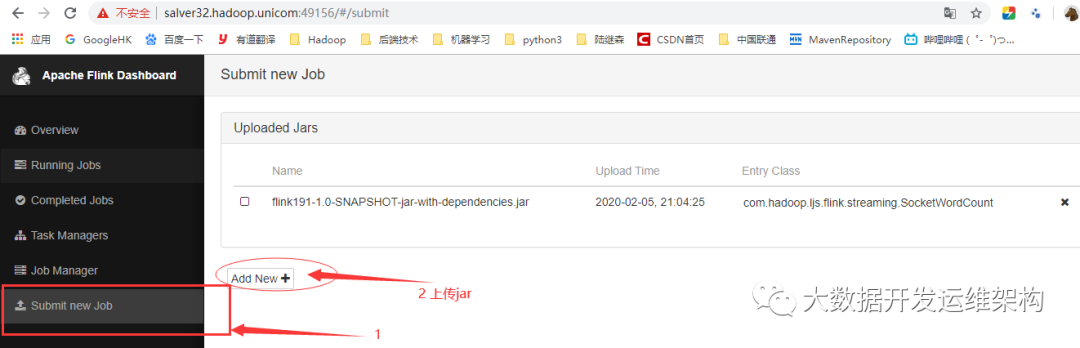
上传后,选中jar前面的复选框,可直接填写相关参数:
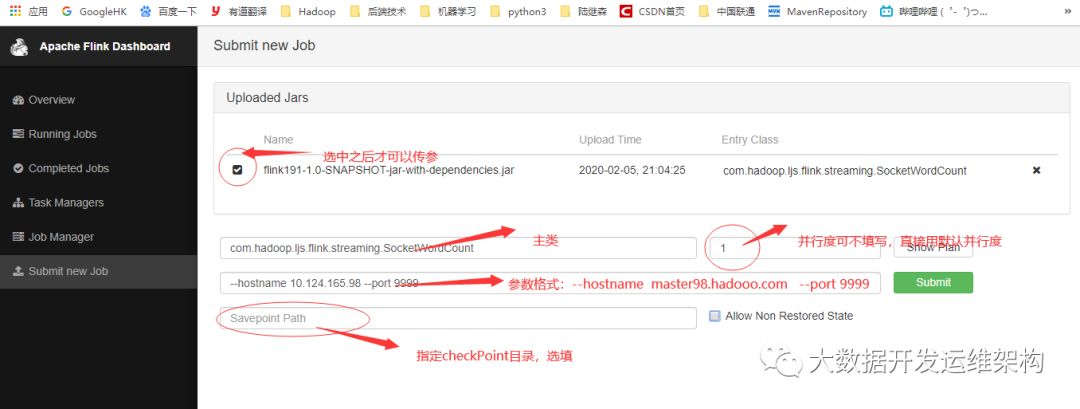
参数格式:--参数名 参数值 --参数名2 参数值2
参数获取是通过上面代码第49行的工具类获取(固定格式):
ParameterTool params = ParameterTool.fromArgs(args);
最后点击“Submit”按钮,提交任务运行即可。
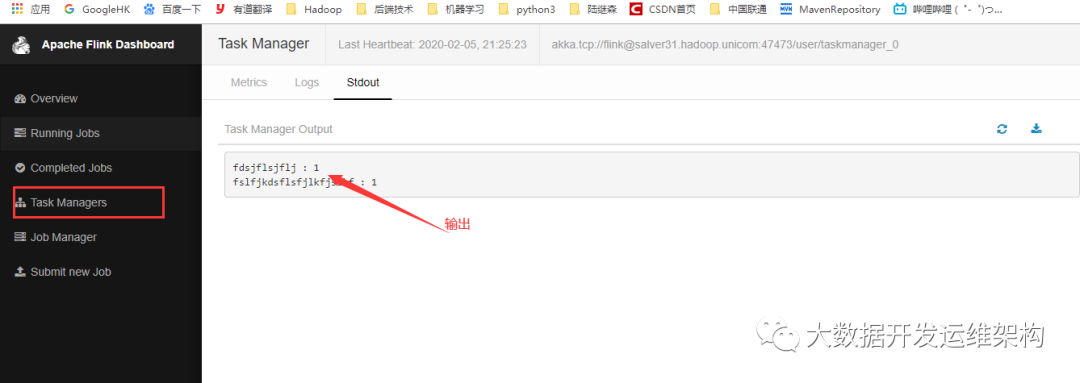
界面也可查看日志和输出:
文章转载自大数据开发运维架构,如果涉嫌侵权,请发送邮件至:contact@modb.pro进行举报,并提供相关证据,一经查实,墨天轮将立刻删除相关内容。
