



报错信息:
...[Step 5]: starting Harbor ...Creating network "harbor_harbor" with the default driverERROR: Failed to Setup IP tables: Unable to enable SKIP DNAT rule: (iptables failed: iptables --wait -t nat -I DOCKER -i br-9803204bb769 -j RETURN: iptables: No chain/target/match by that name. (exit status 1))
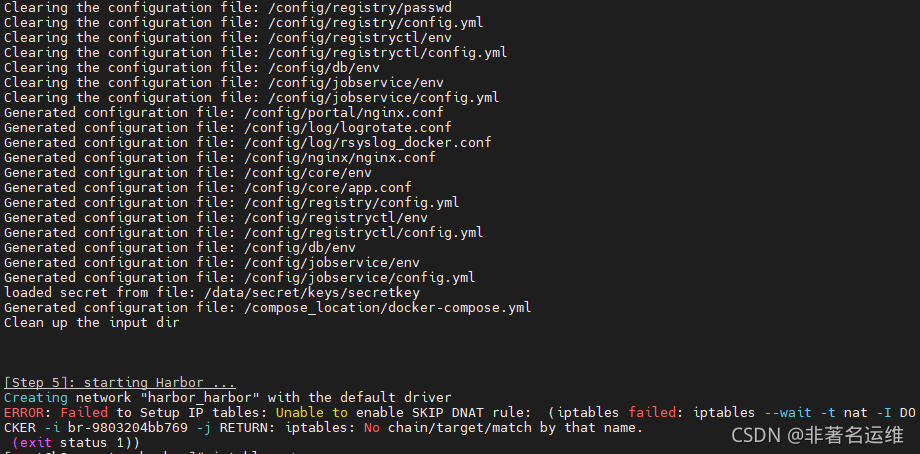
[root@k8s-master harbor]# ./install.sh //执行Harbor安装脚本[Step 0]: checking if docker is installed ...Note: docker version: 19.03.13[Step 1]: checking docker-compose is installed ...Note: docker-compose version: 1.18.0[Step 2]: loading Harbor images ...103076ba7411: Loading layer [==================================================>] 121.2MB/121.2MBfde3b64438e3: Loading layer [==================================================>] 3.072kB/3.072kB249a34ecfbe2: Loading layer [==================================================>] 59.9kB/59.9kB35783e12f32a: Loading layer [==================================================>] 61.95kB/61.95kBLoaded image: goharbor/redis-photon:v2.3.27301dee185fe: Loading layer [==================================================>] 8.746MB/8.746MBLoaded image: goharbor/nginx-photon:v2.3.2......loaded secret from file: /data/secret/keys/secretkeyGenerated configuration file: /compose_location/docker-compose.ymlClean up the input dir[Step 5]: starting Harbor ...Creating network "harbor_harbor" with the default driverERROR: Failed to Setup IP tables: Unable to enable SKIP DNAT rule: (iptables failed: iptables --wait -t nat -I DOCKER -i br-9803204bb769 -j RETURN: iptables: No chain/target/match by that name. (exit status 1))
解决:
说明docker网关是关闭的,docker network无法对新的container进行网络配置,重启一下docker就行。
[root@k8s-master harbor]# systemctl restart docker //重启docker服务
重新安装验证:
[root@k8s-master harbor]# ./install.sh[Step 0]: checking if docker is installed ...Note: docker version: 19.03.13[Step 1]: checking docker-compose is installed ...Note: docker-compose version: 1.18.0[Step 2]: loading Harbor images ...Loaded image: goharbor/redis-photon:v2.3.2Loaded image: goharbor/nginx-photon:v2.3.2Loaded image: goharbor/harbor-portal:v2.3.2Loaded image: goharbor/trivy-adapter-photon:v2.3.2Loaded image: goharbor/chartmuseum-photon:v2.3.2Loaded image: goharbor/notary-signer-photon:v2.3.2Loaded image: goharbor/harbor-core:v2.3.2Loaded image: goharbor/harbor-log:v2.3.2Loaded image: goharbor/harbor-registryctl:v2.3.2Loaded image: goharbor/harbor-exporter:v2.3.2Loaded image: goharbor/notary-server-photon:v2.3.2Loaded image: goharbor/prepare:v2.3.2Loaded image: goharbor/harbor-db:v2.3.2Loaded image: goharbor/harbor-jobservice:v2.3.2Loaded image: goharbor/registry-photon:v2.3.2[Step 3]: preparing environment ...[Step 4]: preparing harbor configs ...prepare base dir is set to /root/harborWARNING:root:WARNING: HTTP protocol is insecure. Harbor will deprecate http protocol in the future. Please make sure to upgrade to httpsClearing the configuration file: /config/portal/nginx.confClearing the configuration file: /config/log/logrotate.confClearing the configuration file: /config/log/rsyslog_docker.confClearing the configuration file: /config/nginx/nginx.confClearing the configuration file: /config/core/envClearing the configuration file: /config/core/app.confClearing the configuration file: /config/registry/passwdClearing the configuration file: /config/registry/config.ymlClearing the configuration file: /config/registryctl/envClearing the configuration file: /config/registryctl/config.ymlClearing the configuration file: /config/db/envClearing the configuration file: /config/jobservice/envClearing the configuration file: /config/jobservice/config.ymlGenerated configuration file: /config/portal/nginx.confGenerated configuration file: /config/log/logrotate.confGenerated configuration file: /config/log/rsyslog_docker.confGenerated configuration file: /config/nginx/nginx.confGenerated configuration file: /config/core/envGenerated configuration file: /config/core/app.confGenerated configuration file: /config/registry/config.ymlGenerated configuration file: /config/registryctl/envGenerated configuration file: /config/registryctl/config.ymlGenerated configuration file: /config/db/envGenerated configuration file: /config/jobservice/envGenerated configuration file: /config/jobservice/config.ymlCreating harbor-log ... doneGenerated configuration file: /compose_location/docker-compose.ymlClean up the input dirCreating redis ... doneCreating harbor-core ... doneCreating network "harbor_harbor" with the default driverCreating nginx ... doneCreating registryctl ...Creating redis ...Creating registry ...Creating harbor-portal ...Creating harbor-db ...Creating harbor-core ...Creating harbor-jobservice ...Creating nginx ...✔ ----Harbor has been installed and started successfully.----[root@k8s-master harbor]# docker-compose ps //查看运行的harbor相关容器 Name Command State Ports--------------------------------------------------------------------------------------harbor-core /harbor/entrypoint.sh Upharbor-db /docker-entrypoint.sh 96 13 Upharbor-jobservice /harbor/entrypoint.sh Upharbor-log /bin/sh -c /usr/local/bin/ ... Up 127.0.0.1:1514->10514/tcpharbor-portal nginx -g daemon off; Upnginx nginx -g daemon off; Up 0.0.0.0:80->8080/tcpredis redis-server /etc/redis.conf Upregistry /home/harbor/entrypoint.sh Upregistryctl /home/harbor/start.sh Up
可以看到Harbor已经成功重新安装并运行。
温馨提示
如果您喜欢本文,就请动动您的发财手为本文留言转发在看,想获取更多运维相关内容,请记得关注我。
点个[在看],是对我最大的支持!

文章转载自非著名运维,如果涉嫌侵权,请发送邮件至:contact@modb.pro进行举报,并提供相关证据,一经查实,墨天轮将立刻删除相关内容。
