



1.依赖工具
Idea Git Maven
2.从GitHub拉取源码
从官方仓库 https://github.com/mybatis/mybatis-3 Fork
出属于自己的仓库。调试阅读源代码时候我们会写一些注释,有了自己的仓库可以进行提交。
我是用的Mybatis的版本是 Mybatis-3.5.5
。
3.调试
MyBatis要调试的话,很方便,只需要打开org.apache.ibatis.autoconstructor.AutoConstructorTest
单元测试类,任意一个单元测试方法,邮件,开始调试即可。整体结构大致如下图。
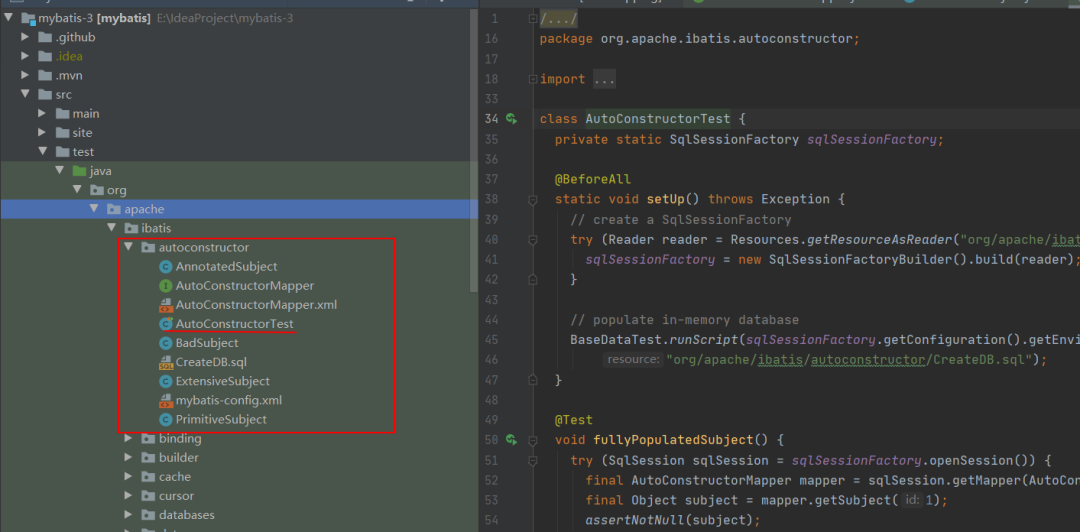
4.mybatis-config.xml
<?xml version="1.0" encoding="UTF-8" ?>
<!DOCTYPE configuration
        PUBLIC "-//mybatis.org//DTD Config 3.0//EN"
        "http://mybatis.org/dtd/mybatis-3-config.dtd">

<configuration>

    <!-- autoMappingBehavior should be set in each test case -->

    <environments default="development">
        <environment id="development">
          <!-- 配置事务管理 -->
            <transactionManager type="JDBC">
                <property name="" value=""/>
            </transactionManager>
          <!-- 配置数据库 -->
            <dataSource type="UNPOOLED">
                <property name="driver" value="org.hsqldb.jdbcDriver"/>
                <property name="url" value="jdbc:hsqldb:mem:automapping"/>
                <property name="username" value="sa"/>
            </dataSource>
        </environment>
    </environments>
  <!-- 扫描 Mapper 文件  -->
    <mappers>
        <mapper resource="org/apache/ibatis/autoconstructor/AutoConstructorMapper.xml"/>
    </mappers>

</configuration>
在 <environments >
标签中,配置了事务管理和数据源。考虑到减少外部依赖,所以使用了HSQLDB
。在 <mappers >
标签中,配置了需要扫描的 Mapper 文件。目前,仅仅扫描AutoConstructorMapper.xml
文件。
5. AutoConstructorMapper.xml
<!DOCTYPE mapper
    PUBLIC "-//mybatis.org//DTD Mapper 3.0//EN"
    "http://mybatis.org/dtd/mybatis-3-mapper.dtd">

<mapper namespace="org.apache.ibatis.autoconstructor.AutoConstructorMapper">
</mapper>
对应的接口为 org.apache.ibatis.autoconstructor.AutoConstructorMapper
这个Mapper接口AutoConstructorMapper
详细代码如下,SQL采用注解的方式。
import java.util.List;

import org.apache.ibatis.annotations.Select;

public interface AutoConstructorMapper {
  @Select("SELECT * FROM subject WHERE id = #{id}")
  PrimitiveSubject getSubject(final int id);

  @Select("SELECT * FROM subject")
  List<PrimitiveSubject> getSubjects();

  @Select("SELECT * FROM subject")
  List<AnnotatedSubject> getAnnotatedSubjects();

  @Select("SELECT * FROM subject")
  List<BadSubject> getBadSubjects();

  @Select("SELECT * FROM extensive_subject")
  List<ExtensiveSubject> getExtensiveSubjects();
}
6.CreateDB.sql
数据库的插入语句已经给好,我们只需要手动执行就OK了。
DROP TABLE subject
IF EXISTS;

DROP TABLE extensive_subject
IF EXISTS;

CREATE TABLE subject (
  id     INT NOT NULL,
  name   VARCHAR(20),
  age    INT NOT NULL,
  height INT,
  weight INT,
  active BIT,
  dt     TIMESTAMP
);

CREATE TABLE extensive_subject (
  aByte      TINYINT,
  aShort     SMALLINT,
  aChar      CHAR,
  anInt      INT,
  aLong      BIGINT,
  aFloat     FLOAT,
  aDouble    DOUBLE,
  aBoolean   BIT,
  aString    VARCHAR(255),
  anEnum     VARCHAR(50),
  aClob      LONGVARCHAR,
  aBlob      LONGVARBINARY,
  aTimestamp TIMESTAMP
);

INSERT INTO subject VALUES
  (1, 'a', 10, 100, 45, 1, CURRENT_TIMESTAMP),
  (2, 'b', 10, NULL, 45, 1, CURRENT_TIMESTAMP),
  (2, 'c', 10, NULL, NULL, 0, CURRENT_TIMESTAMP);

INSERT INTO extensive_subject
VALUES
  (1, 1, 'a', 1, 1, 1, 1.0, 1, 'a', 'AVALUE', 'ACLOB', 'aaaaaabbbbbb', CURRENT_TIMESTAMP),
  (2, 2, 'b', 2, 2, 2, 2.0, 2, 'b', 'BVALUE', 'BCLOB', '010101010101', CURRENT_TIMESTAMP),
  (3, 3, 'c', 3, 3, 3, 3.0, 3, 'c', 'CVALUE', 'CCLOB', '777d010078da', CURRENT_TIMESTAMP);
7. POJO
在 AutoConstructorMapper 中,可以看到有四个 POJO 类。但是,从 CreateDB.sql 中,实际只有两个表。这个是为什么呢?顺着代码往下读。
AnnotatedSubject
package org.apache.ibatis.autoconstructor;

import org.apache.ibatis.annotations.AutomapConstructor;

public class AnnotatedSubject {
  private final int id;
  private final String name;
  private final int age;
  private final int height;
  private final int weight;

  public AnnotatedSubject(final int id, final String name, final int age, final int height, final int weight) {
    this.id = id;
    this.name = name;
    this.age = age;
    this.height = height;
    this.weight = weight;
  }

  @AutomapConstructor
  public AnnotatedSubject(final int id, final String name, final int age, final Integer height, final Integer weight) {
    this.id = id;
    this.name = name;
    this.age = age;
    this.height = height == null ? 0 : height;
    this.weight = weight == null ? 0 : weight;
  }
}
对应 subject 表 @AutomapConstructor
注解,表示 MyBatis 查询后,在创建 AnnotatedSubject 对象,使用该构造方法.这就是一个起到注释作用的类,注释的作用大不大,说大也大,没有注释,代码会让人抓狂
PrimitiveSubject
package org.apache.ibatis.autoconstructor;

import java.util.Date;

public class PrimitiveSubject {
  private final int id;
  private final String name;
  private final int age;
  private final int height;
  private final int weight;
  private final boolean active;
  private final Date dt;

  public PrimitiveSubject(final int id, final String name, final int age, final int height, final int weight, final boolean active, final Date dt) {
    this.id = id;
    this.name = name;
    this.age = age;
    this.height = height;
    this.weight = weight;
    this.active = active;
    this.dt = dt;
  }
}
对应 subject 表
BadSubject
public class BadSubject {
  private final int id;
  private final String name;
  private final int age;
  private final Height height;
  private final Double weight;

  public BadSubject(final int id, final String name, final int age, final Height height, final Double weight) {
    this.id = id;
    this.name = name;
    this.age = age;
    this.height = height;
    this.weight = weight == null ? 0 : weight;
  }

  private class Height {

  }
}
对应 subject 表
ExtensiveSubject
package org.apache.ibatis.autoconstructor;

public class ExtensiveSubject {
    private final byte aByte;
    private final short aShort;
    private final char aChar;
    private final int anInt;
    private final long aLong;
    private final float aFloat;
    private final double aDouble;
    private final boolean aBoolean;
    private final String aString;

    // enum types
    private final TestEnum anEnum;

    // array types

    // string to lob types:
    private final String aClob;
    private final String aBlob;

    public ExtensiveSubject(final byte aByte,
                            final short aShort,
                            final char aChar,
                            final int anInt,
                            final long aLong,
                            final float aFloat,
                            final double aDouble,
                            final boolean aBoolean,
                            final String aString,
                            final TestEnum anEnum,
                            final String aClob,
                            final String aBlob) {
        this.aByte = aByte;
        this.aShort = aShort;
        this.aChar = aChar;
        this.anInt = anInt;
        this.aLong = aLong;
        this.aFloat = aFloat;
        this.aDouble = aDouble;
        this.aBoolean = aBoolean;
        this.aString = aString;
        this.anEnum = anEnum;
        this.aClob = aClob;
        this.aBlob = aBlob;
    }

    public enum TestEnum {
        AVALUE, BVALUE, CVALUE;
    }
}
这是个复杂的对象,几乎涵盖了各种类型的数据
8.AutoConstructorTest单元测视类
8.1 setUp()
  @BeforeAll
  static void setUp() throws Exception {
    // create a SqlSessionFactory  创建SqlSessionFactory  基于 mybatis-config.xml 配置文件
    try (Reader reader = Resources.getResourceAsReader("org/apache/ibatis/autoconstructor/mybatis-config.xml")) {
      sqlSessionFactory = new SqlSessionFactoryBuilder().build(reader);
    }

    // populate in-memory database
    // 初始化数据到内存数据库,基于 CreateDB.sql SQL 文件。
    BaseDataTest.runScript(sqlSessionFactory.getConfiguration().getEnvironment().getDataSource(),
        "org/apache/ibatis/autoconstructor/CreateDB.sql");
  }
8.2 测试方法
右键任一单元测试方法,即可运行起来。
文章转载自地铁上的扣钉,如果涉嫌侵权,请发送邮件至:contact@modb.pro进行举报,并提供相关证据,一经查实,墨天轮将立刻删除相关内容。
