$ ip link set tap1 netns ns1 $ ip link set tap2 netns ns2
4. 分别绑定IP地址
$ ip netns exec ns1 ifconfig tap1 192.168.40.1/24 $ ip netns exec ns2 ifconfig tap2 192.168.40.2/24
5. 测试连通性
$ ip netns exec ns1 ping192.168.40.2 PING 192.168.40.2 (192.168.40.2) 56(84) bytes of data. 64 bytes from 192.168.40.2: icmp_seq=1ttl=64time=0.096 ms 64 bytes from 192.168.40.2: icmp_seq=2ttl=64time=0.049 ms
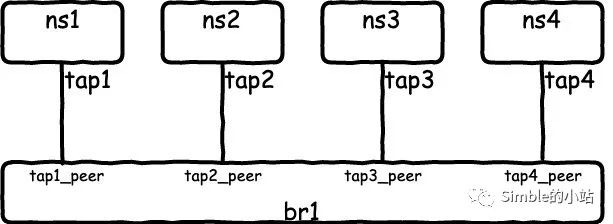
$ ip link add tap1 type veth peer name tap1_peer $ ip link add tap2 type veth peer name tap2_peer $ ip link add tap3 type veth peer name tap3_peer $ ip link add tap4 type veth peer name tap4_peer
2. 创建namespace并迁移tap接口
$ ip netns add ns1 $ ip netns add ns2 $ ip netns add ns3 $ ip netns add ns4 # 迁移tap接口 $ ip link set tap1 netns ns1 $ ip link set tap2 netns ns2 $ ip link set tap3 netns ns3 $ ip link set tap4 netns ns4
$ ip netns exec ns1 ifconfig tap1 192.168.50.1/24
$ ip netns exec ns2 ifconfig tap2 192.168.50.2/24
$ ip netns exec ns3 ifconfig tap3 192.168.50.3/24
$ ip netns exec ns4 ifconfig tap4 192.168.50.4/24
注:此时是无法相互访问
6. 设置网桥及对应接口状态为up
$ ifconfig br1 up
$ ifconfig tap1_peer up
$ ifconfig tap2_peer up
$ ifconfig tap3_peer up
$ ifconfig tap4_peer up
7. 测试连通性
$ ip netns exec ns4 ping192.168.50.1 -c1 PING 192.168.50.1 (192.168.50.1) 56(84) bytes of data. 64 bytes from 192.168.50.1: icmp_seq=1ttl=64time=0.095 ms
---192.168.50.1 ping statistics --- 1 packets transmitted, 1 received, 0% packet loss, time 0ms rtt min/avg/max/mdev =0.095/0.095/0.095/0.000 ms $ ip netns exec ns4 ping192.168.50.2 -c1 PING 192.168.50.2 (192.168.50.2) 56(84) bytes of data. 64 bytes from 192.168.50.2: icmp_seq=1ttl=64time=0.106 ms
---192.168.50.2 ping statistics --- 1 packets transmitted, 1 received, 0% packet loss, time 0ms rtt min/avg/max/mdev =0.106/0.106/0.106/0.000 ms
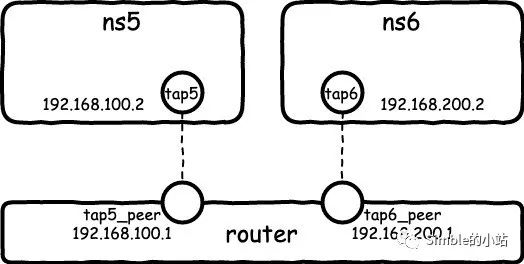
$ ip netns exec ns5 route add -net192.168.200.0/24 gw 192.168.100.1 $ ip netns exec ns6 route add -net192.168.100.0/24 gw 192.168.200.1
5. 测试
$ ip netns exec ns5 ping192.168.200.2 PING 192.168.200.2 (192.168.200.2) 56(84) bytes of data. 64 bytes from 192.168.200.2: icmp_seq=1ttl=63time=0.077 ms 64 bytes from 192.168.200.2: icmp_seq=2ttl=63time=0.087 ms
$ ip link add tap1 type veth peer name tap1_peer
$ ip link add tap2 type veth peer name tap2_peer
$ ip netns add ns1
$ ip netns add ns2
$ ip link set tap1 netns ns1
$ ip link set tap2 netns ns2
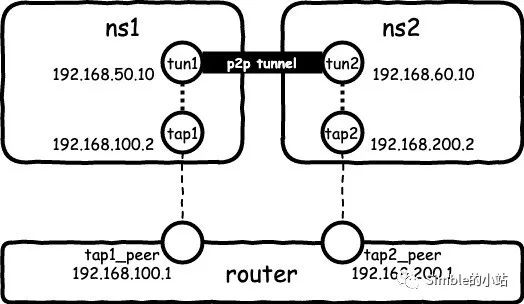
$ ip netns exec ns1 ip tunnel add tun1 mode ipip remote 192.168.200.2 local 192.168.100.2 ttl 255
$ ip netns exec ns1 ip addr add 192.168.50.10 peer 192.168.60.10 dev tun1
$ ip netns exec ns1 ifconfig tun1 up
$ ip netns exec ns1 ifconfig
tap1      Link encap:Ethernet  HWaddr 46:a0:97:02:8c:07
          inet addr:192.168.100.2  Bcast:192.168.100.255  Mask:255.255.255.0
          inet6 addr: fe80::44a0:97ff:fe02:8c07/64 Scope:Link
          UP BROADCAST RUNNING MULTICAST  MTU:1500  Metric:1
          RX packets:12 errors:0 dropped:0 overruns:0 frame:0
          TX packets:12 errors:0 dropped:0 overruns:0 carrier:0
          collisions:0 txqueuelen:1000
          RX bytes:928 (928.0 B)  TX bytes:928 (928.0 B)

tun1      Link encap:IPIP Tunnel  HWaddr
          inet addr:192.168.50.10  P-t-P:192.168.60.10  Mask:255.255.255.255
          UP POINTOPOINT RUNNING NOARP  MTU:1480  Metric:1
          RX packets:0 errors:0 dropped:0 overruns:0 frame:0
          TX packets:0 errors:0 dropped:0 overruns:0 carrier:0
          collisions:0 txqueuelen:1
          RX bytes:0 (0.0 B)  TX bytes:0 (0.0 B)
4. 在ns2中创建tun2
$ ip netns exec ns2 ip tunnel add tun2 mode ipip remote 192.168.100.2 local 192.168.200.2 ttl 255
$ ip netns exec ns2 ip addr add 192.168.60.10 peer 192.168.50.10 dev tun2
$ ip netns exec ns2 ifconfig tun2 up
$ ip netns exec ns2 ifconfig
tap2      Link encap:Ethernet  HWaddr aa:2e:e9:18:94:95
          inet addr:192.168.200.2  Bcast:192.168.200.255  Mask:255.255.255.0
          inet6 addr: fe80::a82e:e9ff:fe18:9495/64 Scope:Link
          UP BROADCAST RUNNING MULTICAST  MTU:1500  Metric:1
          RX packets:12 errors:0 dropped:0 overruns:0 frame:0
          TX packets:12 errors:0 dropped:0 overruns:0 carrier:0
          collisions:0 txqueuelen:1000
          RX bytes:928 (928.0 B)  TX bytes:928 (928.0 B)

tun2      Link encap:IPIP Tunnel  HWaddr
          inet addr:192.168.60.10  P-t-P:192.168.50.10  Mask:255.255.255.255
          UP POINTOPOINT RUNNING NOARP  MTU:1480  Metric:1
          RX packets:0 errors:0 dropped:0 overruns:0 frame:0
          TX packets:0 errors:0 dropped:0 overruns:0 carrier:0
          collisions:0 txqueuelen:1
          RX bytes:0 (0.0 B)  TX bytes:0 (0.0 B)
5. 测试tun的连通性
$ ip netns exec ns1 ping192.168.60.10 PING 192.168.60.10 (192.168.60.10) 56(84) bytes of data. 64 bytes from 192.168.60.10: icmp_seq=1ttl=64time=0.333 ms ...
6. 抓包看看
$ ip netns exec ns2 tcpdump -i tap2 tcpdump: verbose output suppressed, use -v or -vvfor full protocol decode listening on tap2, link-type EN10MB (Ethernet), capture size 262144 bytes 09:55:19.399964 IP 192.168.100.2 > 192.168.200.2: IP 192.168.50.10 > 192.168.60.10: ICMP echo request, id 17197, seq 1, length 64 (ipip-proto-4) 09:55:19.400004 IP 192.168.200.2 > 192.168.100.2: IP 192.168.60.10 > 192.168.50.10: ICMP echo reply, id 17197, seq 1, length 64 (ipip-proto-4) ... $ ip netns exec ns2 tcpdump -i tun2 tcpdump: verbose output suppressed, use -v or -vvfor full protocol decode listening on tun2, link-type RAW (Raw IP), capture size 262144 bytes 09:55:57.735663 IP 192.168.50.10 > 192.168.60.10: ICMP echo request, id 17199, seq 1, length 64 09:55:57.735685 IP 192.168.60.10 > 192.168.50.10: ICMP echo reply, id 17199, seq 1, length 64 ...
注:namespace中抓包可能不会立即打印在屏幕上
7. 查看路由表项
$ ip netns exec ns1 route -n Kernel IP routing table Destination Gateway Genmask Flags Metric Ref Use Iface 192.168.60.10 0.0.0.0 255.255.255.255 UH 000 tun1 192.168.100.0 0.0.0.0 255.255.255.0 U 000 tap1 192.168.200.0 192.168.100.1 255.255.255.0 UG 000 tap1