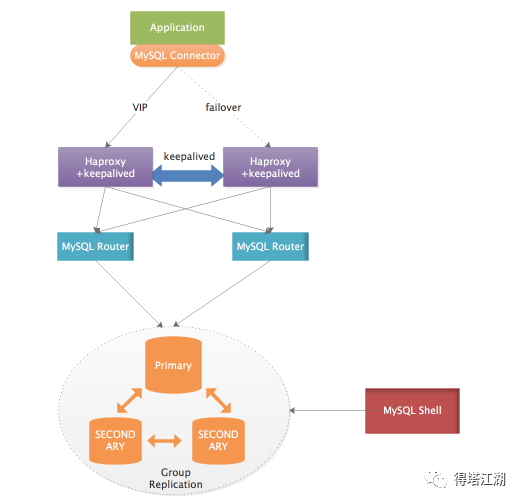
序言MGR增加mysqlrouter、mysqlshell来创建MIC集群模式,后续k有做router的高可用
| 组件 | IP | 主从关系 | host |
| mysql8 | 10.1.1.45 | 主 | db-1-45 |
| mysql8 | 10.1.1.46 | 从 | db-1-46 |
| mysql8 | 10.1.1.47 | 从 | db-1-47 |
| mysql-shell mysqlrouter | 10.1.1.111 | ||
| 10.1.1.112 |
一、创建管理用户
root@localhost:mysql_10120.sock [(none)]>create user 'cluster_admin'@'10.1.1.111' identified by 'xxxxxxxx';Query OK, 0 rows affected (0.01 sec)root@localhost:mysql_10120.sock [(none)]>create user 'cluster_admin'@'10.1.1.112' identified by 'xxxxxxxx';Query OK, 0 rows affected (0.00 sec)root@localhost:mysql_10120.sock [(none)]>GRANT ALL PRIVILEGES ON *.* TO 'cluster_admin'@'10.1.1.111' WITH GRANT OPTION;Query OK, 0 rows affected (0.01 sec)root@localhost:mysql_10120.sock [(none)]>GRANT ALL PRIVILEGES ON *.* TO 'cluster_admin'@'10.1.1.112' WITH GRANT OPTION;Query OK, 0 rows affected (0.01 sec)
配置router和mysqlshell的host,这里不配置host,在初始化集群时候,会提示识别不了mgr中的机器。
#TEST10.1.1.45 db-1-4510.1.1.46 db-1-4610.1.1.47 db-1-47
二、mysqlshell创建集群
mysql、mysqlrouter、mysqlshell尽量保持版本一致
root@vm-1-111:/usr/local/mysql-shell-8.0.26/bin# ./mysqlshMySQL Shell 8.0.26Copyright (c) 2016, 2021, Oracle and/or its affiliates.Oracle is a registered trademark of Oracle Corporation and/or its affiliates.Other names may be trademarks of their respective owners.Type '\help' or '\?' for help; '\quit' to exit.MySQL JS >shell.connect('cluster_admin@10.1.1.45:10120')Creating a session to 'cluster_admin@10.1.1.45:10120'Please provide the password for 'cluster_admin@10.1.1.45:10120': ***********Save password for 'cluster_admin@10.1.1.45:10120'? [Y]es/[N]o/Ne[v]er (default No): YFetching schema names for autocompletion... Press ^C to stop.Your MySQL connection id is 54Server version: 8.0.26 MySQL Community Server - GPLNo default schema selected; type \use <schema> to set one.<ClassicSession:cluster_admin@10.1.1.45:10120>MySQL 10.1.1.45:10120 JS >
如果没有创建集群,没有初始化实例,会出现以下错误
#没有创建集群MySQL 10.1.1.45:10120 JS > dba.getCluster()Dba.getCluster: This function is not available through a session to an instance belonging to an unmanaged replication group (RuntimeError)#修正,创建一个集群,创建集群不会影响原有的数据库表MySQL 10.1.1.45:10120 JS > dba.createCluster('cluster_name')A new InnoDB cluster will be created on instance '10.1.1.45:10120'.You are connected to an instance that belongs to an unmanaged replication group.Do you want to setup an InnoDB cluster based on this replication group? [Y/n]: YCreating InnoDB cluster 'cluster_name' on 'db-1-45:10120'...Adding Seed Instance...Adding Instance 'db-1-47:10120'...Adding Instance 'db-1-45:10120'...Adding Instance 'db-1-46:10120'...Resetting distributed recovery credentials across the cluster...Cluster successfully created based on existing replication group.<Cluster:cluster_name>MySQL 10.1.1.45:10120 JS >
查看集群
MySQL 10.1.1.45:10120 JS > var cluster = dba.getCluster()MySQL 10.1.1.45:10120 JS > cluster.status(){"clusterName": "cluster_name","defaultReplicaSet": {"name": "default","primary": "db-1-45:10120","ssl": "DISABLED","status": "OK","statusText": "Cluster is ONLINE and can tolerate up to ONE failure.","topology": {"db-1-45:10120": {"address": "db-1-45:10120","instanceErrors": ["NOTE: The required parallel-appliers settings are not enabled on the instance. Use dba.configureInstance() to fix it."],"memberRole": "PRIMARY","mode": "R/W","readReplicas": {},"replicationLag": null,"role": "HA","status": "ONLINE","version": "8.0.26"},"db-1-46:10120": {"address": "db-1-46:10120","instanceErrors": ["NOTE: The required parallel-appliers settings are not enabled on the instance. Use dba.configureInstance() to fix it."],"memberRole": "SECONDARY","mode": "R/O","readReplicas": {},"replicationLag": null,"role": "HA","status": "ONLINE","version": "8.0.26"},"db-1-47:10120": {"address": "db-1-47:10120","instanceErrors": ["NOTE: The required parallel-appliers settings are not enabled on the instance. Use dba.configureInstance() to fix it."],"memberRole": "SECONDARY","mode": "R/O","readReplicas": {},"replicationLag": null,"role": "HA","status": "ONLINE","version": "8.0.26"}},"topologyMode": "Single-Primary"},"groupInformationSourceMember": "db-1-45:10120"}MySQL 10.1.1.45:10120 JS >
可以看到,集群的状态都有一个问题:
"instanceErrors": ["NOTE: The required parallel-appliers settings are not enabled on the instance. Use dba.configureInstance() to fix it."
这个错误也提示了修复的方式,只要通过mysqlshell单独连上MGR中的每个实例,运行下即可修复:
例如连接db-1-45:10120
MySQL 10.1.1.45:10120 JS > dba.configureInstance()The instance 'db-1-45:10120' belongs to an InnoDB Cluster.Configuring MySQL instance at db-1-45:10120 for use in an InnoDB cluster...This instance reports its own address as db-1-45:10120Clients and other cluster members will communicate with it through this address by default. If this is not correct, the report_host MySQL system variable should be changed.applierWorkerThreads will be set to the default value of 4.NOTE: Some configuration options need to be fixed:+----------------------------------------+---------------+----------------+----------------------------+| Variable | Current Value | Required Value | Note |+----------------------------------------+---------------+----------------+----------------------------+| binlog_transaction_dependency_tracking | COMMIT_ORDER | WRITESET | Update the server variable |+----------------------------------------+---------------+----------------+----------------------------+Do you want to perform the required configuration changes? [y/n]: YConfiguring instance...WARNING: '@@slave_parallel_workers' is deprecated and will be removed in a future release. Please use replica_parallel_workers instead. (Code 1287).The instance 'db-1-45:10120' was configured to be used in an InnoDB cluster.
再根据提示,将mysql的参数修正下:
set persist binlog_transaction_dependency_tracking='WRITESET';
以上三台都需要单独执行。都执行完成后,查看:
MySQL 10.1.1.47:10120 JS > var cluster = dba.getCluster()MySQL 10.1.1.47:10120 JS > cluster.status(){"clusterName": "cluster_name","defaultReplicaSet": {"name": "default","primary": "db-1-45:10120","ssl": "DISABLED","status": "OK","statusText": "Cluster is ONLINE and can tolerate up to ONE failure.","topology": {"db-1-45:10120": {"address": "db-1-45:10120","memberRole": "PRIMARY","mode": "R/W","readReplicas": {},"replicationLag": null,"role": "HA","status": "ONLINE","version": "8.0.26"},"db-1-46:10120": {"address": "db-1-46:10120","memberRole": "SECONDARY","mode": "R/O","readReplicas": {},"replicationLag": null,"role": "HA","status": "ONLINE","version": "8.0.26"},"db-1-47:10120": {"address": "db-1-47:10120","memberRole": "SECONDARY","mode": "R/O","readReplicas": {},"replicationLag": null,"role": "HA","status": "ONLINE","version": "8.0.26"}},"topologyMode": "Single-Primary"},"groupInformationSourceMember": "db-1-45:10120"}
至此,innodb_cluster已经完成创建,查看数据库,会多一个数据库:mysql_innodb_cluster_metadata
三、配置mysqlrouter做proxy代理
3.1 初始化
命令:/usr/local/mysql-router-8.0.26/bin/mysqlrouter --bootstrap cluster_admin@10.1.1.45:10120 --user=root -d /data/service/mysqlrouter/20120 --conf-base-port 20120
其中--conf-base-port是配置router的管理端口,可以通过mysqlsh进入的
设置配置的路径和router的监听端口
root@vm-1-111:/data/service/mysqlrouter# /usr/local/mysql-router-8.0.26/bin/mysqlrouter --bootstrap cluster_admin@10.1.1.45:10120 --user=root -d /data/service/mysqlrouter/20120 --conf-base-port 20120Please enter MySQL password for cluster_admin:WARNING: The MySQL server does not have SSL configured and metadata used by the router may be transmitted unencrypted.# Bootstrapping MySQL Router instance at '/data/service/mysqlrouter/20120'...- Creating account(s) (only those that are needed, if any)- Verifying account (using it to run SQL queries that would be run by Router)- Storing account in keyring- Adjusting permissions of generated files- Creating configuration /data/service/mysqlrouter/20120/mysqlrouter.conf# MySQL Router configured for the InnoDB Cluster 'ad_yingshou'After this MySQL Router has been started with the generated configuration$ /usr/local/mysql-router-8.0.24/bin/mysqlrouter -c /data/service/mysqlrouter/20120/mysqlrouter.confthe cluster 'ad_yingshou' can be reached by connecting to:## MySQL Classic protocol- Read/Write Connections: localhost:20120- Read/Only Connections: localhost:20121## MySQL X protocol- Read/Write Connections: localhost:20122- Read/Only Connections: localhost:20123
进入刚刚初始化完成的目录:

进入目录,直接运行start.sh即可以启动:
启动后查看端口:
root@vm-1-111:/data/service/mysqlrouter/20120# netstat -lnpt | grep mysqltcp 0 0 0.0.0.0:20120 0.0.0.0:* LISTEN 13629/mysqlroutertcp 0 0 0.0.0.0:20121 0.0.0.0:* LISTEN 13629/mysqlroutertcp 0 0 0.0.0.0:20122 0.0.0.0:* LISTEN 13629/mysqlroutertcp 0 0 0.0.0.0:20123 0.0.0.0:* LISTEN 13629/mysqlroutertcp 0 0 0.0.0.0:8443 0.0.0.0:* LISTEN 13629/mysqlroute
3.2 myqlshe管理router
root@vm-1-111:/data/service/mysqlrouter/20120# /usr/local/mysql-shell-8.0.24/bin/mysqlsh --uri cluster_admin@10.20.20.111:20120Please provide the password for 'cluster_admin@10.1.1.111:20120': ***********Save password for 'cluster_admin@10.1.1.111:20120'? [Y]es/[N]o/Ne[v]er (default No): YMySQL Shell 8.0.24Copyright (c) 2016, 2021, Oracle and/or its affiliates.Oracle is a registered trademark of Oracle Corporation and/or its affiliates.Other names may be trademarks of their respective owners.Type '\help' or '\?' for help; '\quit' to exit.Creating a session to 'cluster_admin@10.1.1.111:20120'Fetching schema names for autocompletion... Press ^C to stop.Your MySQL connection id is 122Server version: 8.0.26 MySQL Community Server - GPLNo default schema selected; type \use <schema> to set one.
通过mysqlrouter连接数据库mysql
oot@vm-1-111:/data/service/mysqlrouter/20120# mysql -u cluster_admin -h 10.1.1.111 -P 20120 -pEnter password:Welcome to the MySQL monitor. Commands end with ; or \g.Your MySQL connection id is 174Server version: 8.0.26 MySQL Community Server - GPLCopyright (c) 2000, 2018, Oracle and/or its affiliates. All rights reserved.Oracle is a registered trademark of Oracle Corporation and/or itsaffiliates. Other names may be trademarks of their respectiveowners.Type 'help;' or '\h' for help. Type '\c' to clear the current input statement.mysql> show databases;+-------------------------------+| Database |+-------------------------------+| bdxiao |
至此 mysqlruoter完成配置,另外一台按照同样的方式操作一次就行了。然后再做高可用。
四、mysqlrouter高可用
4.1 keepalived(VIP)

4.2 Haproxy+keepalived(VIP)