



使用源码编译PostgreSQL 10.3全过程。

服务器环境
root@YaoYuan ~# cat etc/*releaseOracle Linux Server release 7.9NAME="Oracle Linux Server"VERSION="7.9"ID="ol"ID_LIKE="fedora"VARIANT="Server"VARIANT_ID="server"VERSION_ID="7.9"PRETTY_NAME="Oracle Linux Server 7.9"ANSI_COLOR="0;31"CPE_NAME="cpe:/o:oracle:linux:7:9:server"HOME_URL="https://linux.oracle.com/"BUG_REPORT_URL="https://bugzilla.oracle.com/"ORACLE_BUGZILLA_PRODUCT="Oracle Linux 7"ORACLE_BUGZILLA_PRODUCT_VERSION=7.9ORACLE_SUPPORT_PRODUCT="Oracle Linux"ORACLE_SUPPORT_PRODUCT_VERSION=7.9Red Hat Enterprise Linux Server release 7.9 (Maipo)Oracle Linux Server release 7.9root@YaoYuan ~# uname -aLinux dell.scutech 4.14.35-2047.505.4.3.el7uek.x86_64 #2 SMP Wed Jul 21 14:02:03 PDT 2021 x86_64 x86_64 x86_64 GNU/Linux
下面源码
wget --no-check-certificate https://ftp.postgresql.org/pub/source/v15.3/postgresql-15.3.tar.bz2tar xf postgresql-15.3.tar.bz2
这样在当前目录下展开了PostgreSQL的源程序
$ ll postgresql-15.3总用量 780-rw-r--r--. 1 oracle oinstall 397 5月 9 05:13 aclocal.m4drwxr-xr-x. 2 oracle oinstall 4096 5月 9 05:25 config-rwxr-xr-x. 1 oracle oinstall 601977 5月 9 05:13 configure-rw-r--r--. 1 oracle oinstall 89369 5月 9 05:13 configure.acdrwxr-xr-x. 61 oracle oinstall 4096 5月 9 05:24 contrib-rw-r--r--. 1 oracle oinstall 1192 5月 9 05:13 COPYRIGHTdrwxr-xr-x. 3 oracle oinstall 87 5月 9 05:25 doc-rw-r--r--. 1 oracle oinstall 4264 5月 9 05:13 GNUmakefile.in-rw-r--r--. 1 oracle oinstall 277 5月 9 05:13 HISTORY-rw-r--r--. 1 oracle oinstall 63842 5月 9 05:26 INSTALL-rw-r--r--. 1 oracle oinstall 1875 5月 9 05:13 Makefile-rw-r--r--. 1 oracle oinstall 1213 5月 9 05:13 READMEdrwxr-xr-x. 16 oracle oinstall 4096 5月 9 05:26 src
编译安装
./configuremake worldsudo make install-world...parallel group (2 tests): event_trigger oidjoinsevent_trigger ... ok 111 msoidjoins ... ok 200 mstest fast_default ... ok 130 ms============== shutting down postmaster ============================ removing temporary instance =====================================All 212 tests passed.=======================make[1]: 离开目录“/home/oracle/postgresql-15.3/src/test/regress”oracle@YaoYuan postgresql-15.3$ sudo make install-world
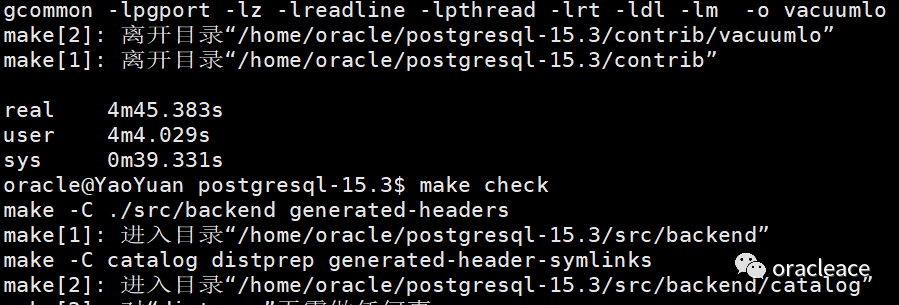
make world用时4分钟多。
在/etc/profile中增加如下内容,这样每个用户登录的时候都会执行
LD_LIBRARY_PATH=/usr/local/pgsql/libexport LD_LIBRARY_PATHMANPATH=/usr/local/pgsql/share/man:$MANPATHexport MANPATHPATH=/usr/local/pgsql/bin:$PATHexport PATHexport PGDATA=/usr/local/pgsql/data
创建用户
adduser postgres
初始化数据库
root@YaoYuan ~# mkdir -p usr/local/pgsql/dataroot@YaoYuan ~# chown postgres usr/local/pgsql/dataroot@YaoYuan ~# su - postgres上一次登录:四 7月 27 18:41:37 CST 2023pts/0 上-bash-4.2$ usr/local/pgsql/bin/initdb -D usr/local/pgsql/dataThe files belonging to this database system will be owned by user "postgres".This user must also own the server process.The database cluster will be initialized with locale "en_US.UTF-8".The default database encoding has accordingly been set to "UTF8".The default text search configuration will be set to "english".Data page checksums are disabled.fixing permissions on existing directory usr/local/pgsql/data ... okcreating subdirectories ... okselecting dynamic shared memory implementation ... posixselecting default max_connections ... 100selecting default shared_buffers ... 128MBselecting default time zone ... Asia/Shanghaicreating configuration files ... okrunning bootstrap script ... okperforming post-bootstrap initialization ... oksyncing data to disk ... okinitdb: warning: enabling "trust" authentication for local connectionsinitdb: hint: You can change this by editing pg_hba.conf or using the option -A, or --auth-local and --auth-host, the next time you run initdb.Success. You can now start the database server using:/usr/local/pgsql/bin/pg_ctl -D /usr/local/pgsql/data -l logfile start-bash-4.2$
启动数据库
-bash-4.2$ /usr/local/pgsql/bin/pg_ctl -D /usr/local/pgsql/data -l logfile startwaiting for server to start.... doneserver started-bash-4.2$ /usr/local/pgsql/bin/createdb test-bash-4.2$ /usr/local/pgsql/bin/psql testpsql (15.3)Type "help" for help.test=#
文章转载自oracleace,如果涉嫌侵权,请发送邮件至:contact@modb.pro进行举报,并提供相关证据,一经查实,墨天轮将立刻删除相关内容。
