



通常,我们为了避免频繁的查询访问数据库或者第三方接口,会把查询结果缓存到redis或者memcached之类的nosql数据库中,避免数据库或者网络开销过大导致程序效率太低或者雪崩效应,但是代码中频繁的操作缓存,会让代码过于冗长,这时候,可以通过自定义注解的方式封装缓存的操作。
先来看一段代码,相信我们在用缓存很多时候都会重复写这段代码
String browserLoginStatsStr = redisClient.get( PdvConst.DATAV_PREX_ + PdvConst.UserLoginLog.DATAV_KEYS_BROWSER_LOGIN_STATS );if (!StringUtils.isEmpty( browserLoginStatsStr )) {return R.ok().data(browserLoginStatsStr);}browserLoginStatsStr = datavService.selectContentByKey( PdvConst.UserLoginLog.DATAV_KEYS_BROWSER_LOGIN_STATS,PdvConst.ALL );redisClient.set( PdvConst.DATAV_PREX_ + PdvConst.UserLoginLog.DATAV_KEYS_BROWSER_LOGIN_STATS, browserLoginStatsStr);return R.ok().data( browserLoginStatsStr );
简单画一个流程图

为了防止代码冗余,我们封装一个注解来实现上面逻辑(话不多说,Coding)
1.缓存封装
@Configuration@EnableCachingpublic class RedisTemplateConfig extends CachingConfigurerSupport {@Autowiredprivate LettuceConnectionFactory lettuceConnectionFactory;/*** RedisTemplate配置*/@Beanpublic RedisTemplate<String, Object> redisTemplate(LettuceConnectionFactory lettuceConnectionFactory) {// 设置序列化Jackson2JsonRedisSerializer<Object> jackson2JsonRedisSerializer = new Jackson2JsonRedisSerializer<>(Object.class);ObjectMapper om = new ObjectMapper();om.setVisibility(PropertyAccessor.ALL, JsonAutoDetect.Visibility.ANY);om.activateDefaultTyping(LaissezFaireSubTypeValidator.instance,ObjectMapper.DefaultTyping.NON_FINAL, JsonTypeInfo.As.PROPERTY);jackson2JsonRedisSerializer.setObjectMapper(om);// 配置redisTemplateRedisTemplate<String, Object> redisTemplate = new RedisTemplate<>();redisTemplate.setConnectionFactory(lettuceConnectionFactory);RedisSerializer<?> stringSerializer = new StringRedisSerializer();redisTemplate.setKeySerializer(stringSerializer);// key序列化redisTemplate.setValueSerializer(jackson2JsonRedisSerializer);// value序列化redisTemplate.setHashKeySerializer(stringSerializer);// Hash key序列化redisTemplate.setHashValueSerializer(jackson2JsonRedisSerializer);// Hash value序列化redisTemplate.afterPropertiesSet();return redisTemplate;}@Bean@Overridepublic KeyGenerator keyGenerator() {return (target, method, objects) -> {StringBuilder sb = new StringBuilder();sb.append(target.getClass().getName());sb.append(method.getName());for (Object obj : objects) {sb.append(obj.toString());}return sb.toString();};}}
2.定义注解
@Documented@Retention(RetentionPolicy.RUNTIME)@Target({ElementType.METHOD,ElementType.TYPE})public @interface WxCache {/*** key前缀*/String keyPrefix();/*** key主体,spel表达式,例:#id(取形参中id的值)*/String keyField();/*** 过期时间,-1永久有效*/long expireTime() default Constant.PERMANENT;/*** 时间单位*/TimeUnit timeUnit() default TimeUnit.SECONDS;CacheOperation cacheOperation();/*** 缓存操作类型*/enum CacheOperation {QUERY, // 查询INSERT, // 新增UPDATE, // 修改DELETE; // 删除}}
3.切面处理类
@Slf4j@Aspectpublic class WxCacheAdvice {@Pointcut("@annotation(com.wangxiao.core.annotation.WxCache)")public void wxCacheServiceCut() {}@Autowiredprivate RedisTemplate redisTemplate;@Around(value = "wxCacheServiceCut()")public Object wxCacheService(ProceedingJoinPoint point) throws Throwable {try {Method method = getMethod(point);WxCache cacheAnnotation = method.getAnnotation(WxCache.class);Object[] args = point.getArgs();String fieldKey = parseKey(cacheAnnotation.keyField(), method, args);if (StringUtils.isBlank(fieldKey)) {return point.proceed();}String cacheKey = cacheAnnotation.keyPrefix() + fieldKey;log.info("{} enable cache service,cacheKey:{}", point.getSignature(), cacheKey);WxCache.CacheOperation cacheOperation = cacheAnnotation.cacheOperation();if (cacheOperation == WxCache.CacheOperation.QUERY) {return processQuery(point, cacheAnnotation, cacheKey);}if (cacheOperation == WxCache.CacheOperation.INSERT || cacheOperation == WxCache.CacheOperation.UPDATE || cacheOperation == WxCache.CacheOperation.DELETE) {return processInsertAndUpdateAndDelete(point, cacheKey);}} catch (Exception e) {log.error("wxCacheService error,JoinPoint:{}", point.getSignature(), e);}return point.proceed();}/*** 查询处理*/private Object processQuery(ProceedingJoinPoint point, WxCache wxCache, String cacheKey) throws Throwable {if (redisTemplate.hasKey(cacheKey)) {log.info("{} enable cache service,has cacheKey:{} , return", point.getSignature(), cacheKey);return redisTemplate.opsForValue().get(cacheKey);} else {Object result = null;try {return result = point.proceed();} finally {if(Constant.PERMANENT == wxCache.expireTime()){redisTemplate.opsForValue().set(cacheKey,result);}else {redisTemplate.opsForValue().set(cacheKey, result, wxCache.expireTime(), wxCache.timeUnit());}log.info("after {} proceed,save result to cache,redisKey:{},save content:{}", point.getSignature(), cacheKey, result);}}}/*** 增加、删除、修改处理*/private Object processInsertAndUpdateAndDelete(ProceedingJoinPoint point, String cacheKey) throws Throwable {//数据库IDU操作后删除原缓存数据try {return point.proceed();} finally {redisTemplate.delete(cacheKey);}}private Method getMethod(JoinPoint joinPoint) {MethodSignature signature = (MethodSignature) joinPoint.getSignature();Method method = signature.getMethod();return method;}/*** 解析redis的key*/private String parseKey(String fieldKey, Method method, Object[] args) {LocalVariableTableParameterNameDiscoverer tableParameter= new LocalVariableTableParameterNameDiscoverer();String[] parameterArr = tableParameter.getParameterNames(method);ExpressionParser parser = new SpelExpressionParser();StandardEvaluationContext context = new StandardEvaluationContext();for (int i = 0; i < parameterArr.length; i++) {context.setVariable(parameterArr[i], args[i]);}return parser.parseExpression(fieldKey).getValue(context, String.class);}}
4.Demo
@RestControllerpublic class CacheTestController {@PostMapping("/test/{id}")@WxCache(keyPrefix = "a:",keyField = "#id",expireTime = 120L,timeUnit = TimeUnit.MINUTES,cacheOperation = WxCache.CacheOperation.QUERY)public String showCache(@PathVariable("id") String id){String a = "test--"+id;System.out.println("执行数据库-----》如果第二次未打印,证明走了缓存!!!");return a;}@PostMapping("/del/{id}")@WxCache(keyPrefix = "a:",keyField = "#id",cacheOperation = WxCache.CacheOperation.DELETE)public void delCache(@PathVariable("id") String id){System.out.println(id);}}
5.测试
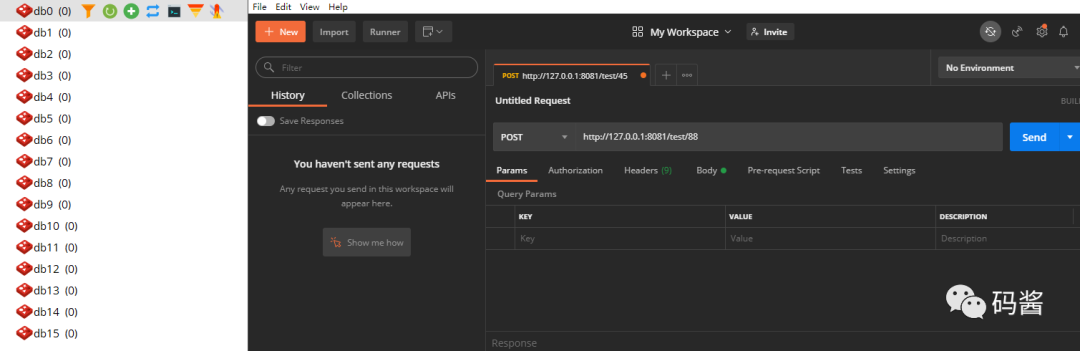
发送请求(左边redis能够看到目前无数据,右边postman发送请求)
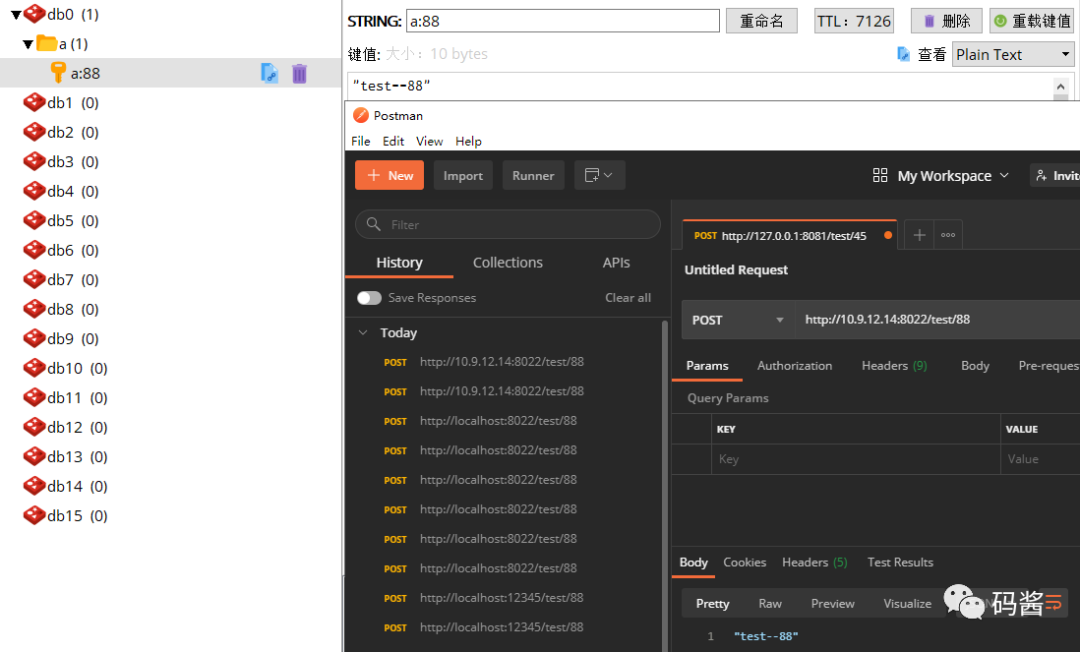
发送多次请求,可以看到控制台只有一次打印了

查看缓存,有数据
文章转载自码酱,如果涉嫌侵权,请发送邮件至:contact@modb.pro进行举报,并提供相关证据,一经查实,墨天轮将立刻删除相关内容。
