



“ June 28, 2023 ,Oracle发布了基于Arm架构的Oracle数据库版本,姚远老师实验了一下,在海思的鲲鹏CPU上安装成功!。”
关于号主,姚远:
Oracle ACE(Oracle和MySQL数据库方向)
华为云最有价值专家
《MySQL 8.0运维与优化》的作者
拥有 Oracle 10g、12c和19c OCM等数十项数据库认证
曾任IBM公司数据库部门经理
20+年DBA经验,服务2万+客户
精通C和Java,发明两项计算机专利
01
—
支持系统
ARM的Oracle数据库支持的操作系统版本。
Oracle Linux 8.6 with Unbreakable Enterprise Kernel 7: 5.15.0-6.80.3.1.el8uek.aarch64 or later
Note: Oracle recommends that you update Oracle Linux 8 to the latest available release level.
首先要安装Oracle Linux 8
下载地址https://yum.oracle.com/ISOS/OracleLinux/OL8/u8/aarch64/OracleLinux-R8-U8-aarch64-dvd.iso
02
—
在Oracle Linux上安装Oracle数据库软件
操作系统环境
[oracle@oel88 ~]$ uname -aLinux oel88 5.15.0-101.103.2.1.el8uek.aarch64 #2 SMP Mon May 1 19:47:28 PDT 2023 aarch64 aarch64 aarch64 GNU/Linux[oracle@oel88 ~]$ cat etc/*releaseOracle Linux Server release 8.8NAME="Oracle Linux Server"VERSION="8.8"ID="ol"ID_LIKE="fedora"VARIANT="Server"VARIANT_ID="server"VERSION_ID="8.8"PLATFORM_ID="platform:el8"PRETTY_NAME="Oracle Linux Server 8.8"ANSI_COLOR="0;31"CPE_NAME="cpe:/o:oracle:linux:8:8:server"HOME_URL="https://linux.oracle.com/"BUG_REPORT_URL="https://bugzilla.oracle.com/"ORACLE_BUGZILLA_PRODUCT="Oracle Linux 8"ORACLE_BUGZILLA_PRODUCT_VERSION=8.8ORACLE_SUPPORT_PRODUCT="Oracle Linux"ORACLE_SUPPORT_PRODUCT_VERSION=8.8Red Hat Enterprise Linux release 8.8 (Ootpa)Oracle Linux Server release 8.8
安装数据库软件
[oracle@oel88 ~]$ cd $ORACLE_HOME[oracle@oel88 db_1]$ unzip -q ~/LINUX.ARM64_1919000_db_home.zip[oracle@oel88 ~]$ $ORACLE_HOME/runInstaller -silent -responseFile tmp/db_19c2.rsp -ignoreInternalDriverErrorLaunching Oracle Database Setup Wizard...[WARNING] [INS-13001] Oracle Database is not supported on this operating system. Installer will not perform prerequisite checks on the system.CAUSE: This operating system may not have been in the certified list at the time of the release of this software.ACTION: Refer to My Oracle Support portal for the latest certification information for this operating system. Proceed with the installation if the operating system has been certified after the release of this software.[WARNING] [INS-30060] Check for group existence failed.CAUSE: Unexpected error occurred while trying to check for group existence.ACTION: Refer to the logs or contact Oracle Support Services. Note for advanced users: Launch the installer by passing the following flag '-ignoreInternalDriverError'.Enter password for 'root' user:The response file for this session can be found at:u01/app/oracle/product/19.19.0/db_1/install/response/db_2023-09-19_11-12-04AM.rspYou can find the log of this install session at:tmp/InstallActions2023-09-19_11-12-04AM/installActions2023-09-19_11-12-04AM.logSuccessfully Setup Software.Moved the install session logs to:u01/oracle/oraInventory/logs/InstallActions2023-09-19_11-12-04AM
03
—
创建Oracle数据库
[oracle@oel88 ~]$ dbca -silent -createDatabase -templateName General_Purpose.dbc -gdbname orcl -sid orcl -responseFile NO_VALUE -characterSet AL32UTF8 -memoryPercentage 50 -emConfiguration LOCAL -datafileDestination /u01/app/oracle/oradataEnter SYS user password:Enter SYSTEM user password:[WARNING] [DBT-06208] The 'SYS' password entered does not conform to the Oracle recommended standards.CAUSE:a. Oracle recommends that the password entered should be at least 8 characters in length, contain at least 1 uppercase character, 1 lower case character and1 digit [0-9].b.The password entered is a keyword that Oracle does not recommend to be used as passwordACTION: Specify a strong password. If required refer Oracle documentation for guidelines.[WARNING] [DBT-06208] The 'SYSTEM' password entered does not conform to the Oracle recommended standards.CAUSE:a. Oracle recommends that the password entered should be at least 8 characters in length, contain at least 1 uppercase character, 1 lower case character and1 digit [0-9].b.The password entered is a keyword that Oracle does not recommend to be used as passwordACTION: Specify a strong password. If required refer Oracle documentation for guidelines.Prepare for db operation10% completeCopying database files40% completeCreating and starting Oracle instance42% complete46% complete50% complete54% complete60% completeCompleting Database Creation66% complete69% complete70% completeExecuting Post Configuration Actions100% completeDatabase creation complete. For details check the logfiles at:/u01/app/oracle/cfgtoollogs/dbca/orcl.Database Information:Global Database Name:orclSystem Identifier(SID):orclLook at the log file "/u01/app/oracle/cfgtoollogs/dbca/orcl/orcl.log" for further details.[oracle@oel88 ~]$
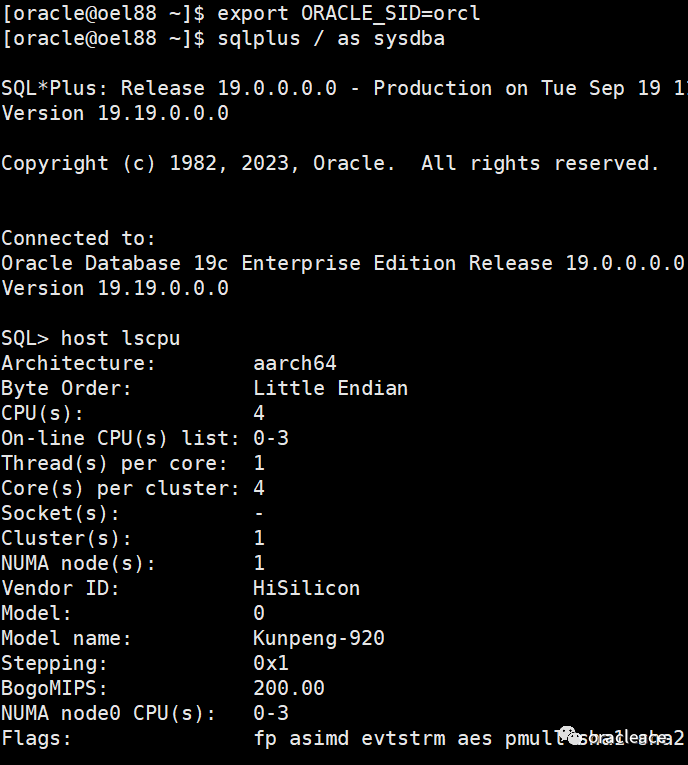
创建数据库成功!

推荐文章👇
托业890分的Oracle ACE为您翻译国际大佬的雄文(合集)
文章转载自oracleace,如果涉嫌侵权,请发送邮件至:contact@modb.pro进行举报,并提供相关证据,一经查实,墨天轮将立刻删除相关内容。
