



准备一台新主机: 关闭selinux,防火墙 为新主机创建用户 、组和目录,并授权 系统文件设置 yum安装 配置IP和hosts、hostname 配置grid和oracle用户环境变量 配置裸盘 安装cvuqdisk包:rpm -ivh cvuqdisk-1.0.7-1.rpm 配置grid,oracle互信
二
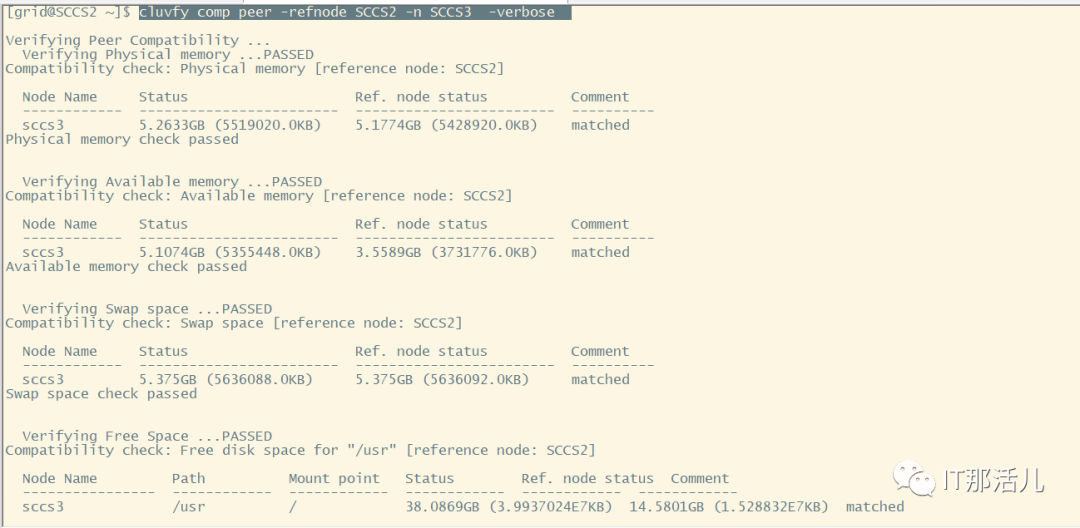
1. 在原有节点检查新建节点是否满足需求:
[grid@SCCS2 ~]$ cluvfy comp peer -refnode SCCS2 -n SCCS3 -verbose
[grid@SCCS2 ~]$ cluvfy stage -pre nodeadd -n SCCS3 -fixup -verbose

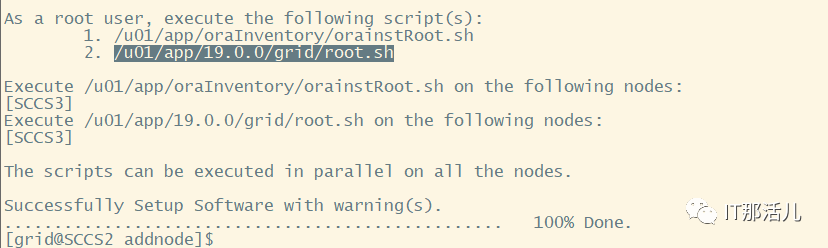
[grid@SCCS2 ~]$ cd $ORACLE_HOME/addnode[grid@SCCS2 addnode]$ ./addnode.sh -silent -ignoreSysPrereqs -ignorePrereqFailure "CLUSTER_NEW_NODES={SCCS3}" "CLUSTER_NEW_PRIVATE_NODE_NAMES={SCCS3-priv}" "CLUSTER_NEW_VIRTUAL_HOSTNAMES={SCCS3-vip}"


[oracle@SCCS2 ~]$ cd $ORACLE_HOME/addnode[oracle@SCCS2 addnode]$ ./addnode.sh -silent "CLUSTER_NEW_NODES={sccs3}"


[oracle@SCCS2 addnode]$ dbca -ignorePreReqs -ignorePrereqFailure -silent -addInstance -nodeName SCCS3 -gdbName SCCS -instanceName SCCS3 -sysDBAUserName sys -sysDBAPassword 123456

SQL>select inst_id,open_mode from gv$database;INST_ID OPEN_MODE---------- --------------------3 READ WRITE2 READ WRITE
三
[FATAL] [INS-32156] Installer has detected that there are non-readable files in oracle home.CAUSE: Following files are non-readable, due to insufficient permissionbin/log_file_client.log。
cd /u01/app/19.0.0/grid/binchown root:oinstall log_file_client.log
[FATAL] [INS-40912] Virtual host name: SCCS1-vip is assigned to another system on the network.CAUSE: One or more virtual host names appeared to be assigned to another system on the network.ACTION: Ensure that the virtual host names assigned to each of the nodes in the cluster are not currently in use, and the IP addresses are registered to the domain name you want to use as the virtual host name.
ifconfig enp0s8:3 192.168.100.141 netmask 255.255.255.0 down --在现有的正常节点执行准备:
准备一台新主机: 关闭selinux,防火墙 为新主机创建用户 、组和目录,并授权 系统文件设置 yum安装 配置IP和hosts、hostname 配置grid和oracle用户环境变量 配置裸盘 安装cvuqdisk包:rpm -ivh cvuqdisk-1.0.7-1.rpm 配置grid,oracle互信
二
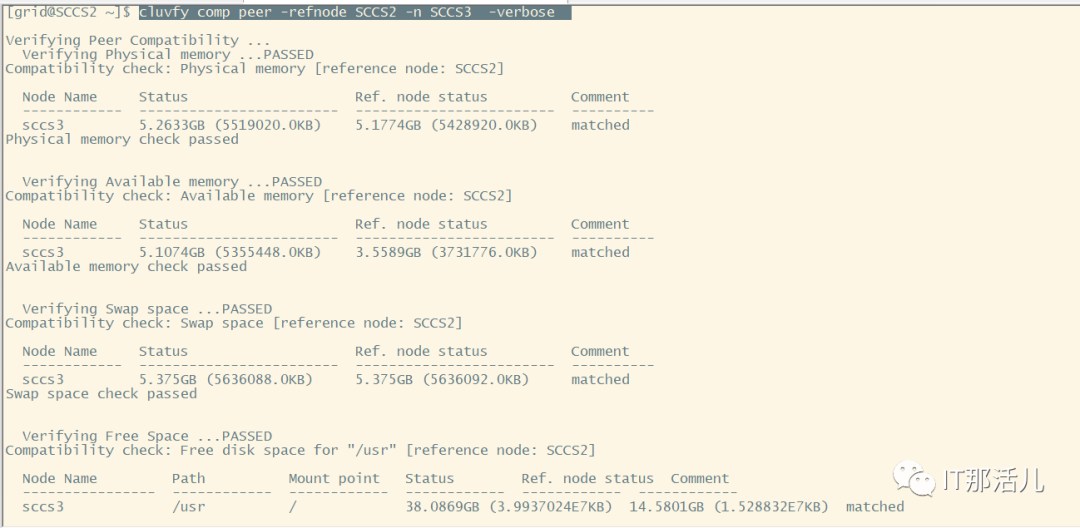
1. 在原有节点检查新建节点是否满足需求:
[grid@SCCS2 ~]$ cluvfy comp peer -refnode SCCS2 -n SCCS3 -verbose
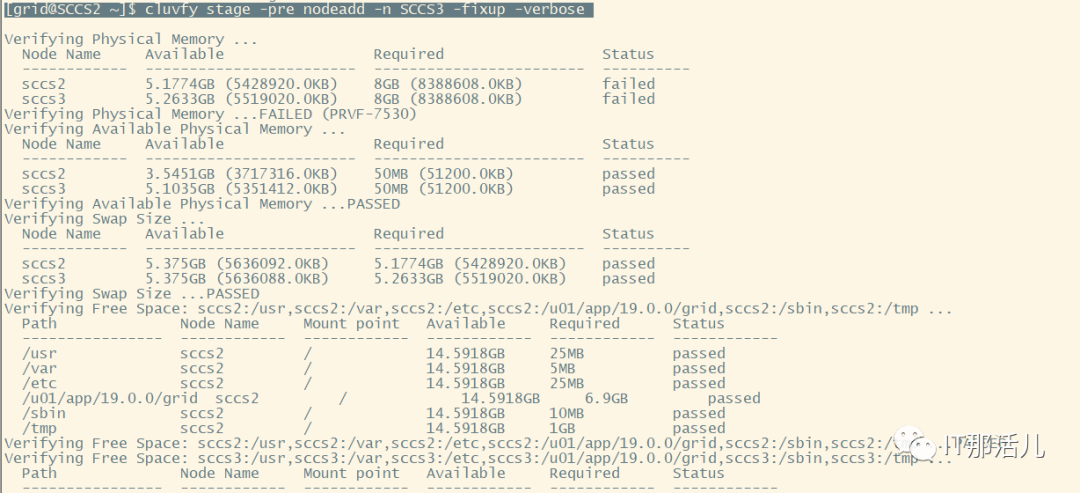
[grid@SCCS2 ~]$ cluvfy stage -pre nodeadd -n SCCS3 -fixup -verbose
[grid@SCCS2 ~]$ cd $ORACLE_HOME/addnode[grid@SCCS2 addnode]$ ./addnode.sh -silent -ignoreSysPrereqs -ignorePrereqFailure "CLUSTER_NEW_NODES={SCCS3}" "CLUSTER_NEW_PRIVATE_NODE_NAMES={SCCS3-priv}" "CLUSTER_NEW_VIRTUAL_HOSTNAMES={SCCS3-vip}"

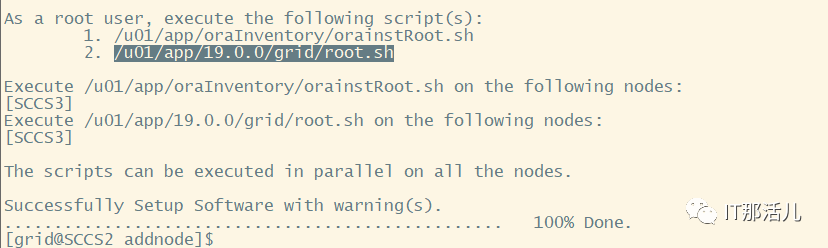

[oracle@SCCS2 ~]$ cd $ORACLE_HOME/addnode[oracle@SCCS2 addnode]$ ./addnode.sh -silent "CLUSTER_NEW_NODES={sccs3}"


[oracle@SCCS2 addnode]$ dbca -ignorePreReqs -ignorePrereqFailure -silent -addInstance -nodeName SCCS3 -gdbName SCCS -instanceName SCCS3 -sysDBAUserName sys -sysDBAPassword 123456

SQL>select inst_id,open_mode from gv$database;INST_ID OPEN_MODE---------- --------------------3 READ WRITE2 READ WRITE
三
[FATAL] [INS-32156] Installer has detected that there are non-readable files in oracle home.CAUSE: Following files are non-readable, due to insufficient permissionbin/log_file_client.log。
cd /u01/app/19.0.0/grid/binchown root:oinstall log_file_client.log
[FATAL] [INS-40912] Virtual host name: SCCS1-vip is assigned to another system on the network.CAUSE: One or more virtual host names appeared to be assigned to another system on the network.ACTION: Ensure that the virtual host names assigned to each of the nodes in the cluster are not currently in use, and the IP addresses are registered to the domain name you want to use as the virtual host name.
ifconfig enp0s8:3 192.168.100.141 netmask 255.255.255.0 down --在现有的正常节点执行「喜欢这篇文章,您的关注和赞赏是给作者最好的鼓励」
关注作者
【版权声明】本文为墨天轮用户原创内容,转载时必须标注文章的来源(墨天轮),文章链接,文章作者等基本信息,否则作者和墨天轮有权追究责任。如果您发现墨天轮中有涉嫌抄袭或者侵权的内容,欢迎发送邮件至:contact@modb.pro进行举报,并提供相关证据,一经查实,墨天轮将立刻删除相关内容。
