



原作者:tracy
MogDB 数据库支持设置以下策略,来确保数据库用户密码的安全。
数据库支持MD5和sha256加密方式进行用户密码加密
数据库password_encryption_type参数用于设置数据库中用户密码的加密方式,默认加密方式为sha256。
- 0表示采用md5方式对密码加密。
- 1表示采用sha256和md5两种方式分别对密码加密。
- 2表示采用sha256方式对密码加密。
解释postgres=# show password_encryption_type;
 password_encryption_type
--------------------------
 2
(1 row)

postgres=# create user test password 'abcd@1234';
CREATE ROLE
postgres=# select rolname,rolpassword from pg_authid where rolname='test';
 rolname |                                                                                                                     rolpassword

---------+---------------------------------------------------------------------------------------------------------------------------------------------------------------------------------------
---------------------------------------------------------------
 test    | sha2568ec7ac7ada43d12a226934c43c5f83f04985898fba7e77bbee948ae3454fe4fecb3fed3f1a84834685cc25cdecc67882c83e43c8a5629f1c17236e54cfe05d511374b5d5b6da2cd98cade9cdab91278c81f12dc0b3c74446
69ae001e9e6366a0md5bccdc05f6a9330c757e9b62f84d17dececdfecefade
(1 row)
postgres=# alter system set password_encryption_type =0;
ALTER SYSTEM SET
postgres=# create user test1 password 'abcd@1234';
NOTICE:  The encrypted password contains MD5 ciphertext, which is not secure.
CREATE ROLE
postgres=# select rolname,rolpassword from pg_authid where rolname in('test','test1');
 rolname |                                                                                                    rolpassword

---------+---------------------------------------------------------------------------------------------------------------------------------------------------------------------------------------
----------------------------
 test    | sha2568ec7ac7ada43d12a226934c43c5f83f04985898fba7e77bbee948ae3454fe4fecb3fed3f1a84834685cc25cdecc67882c83e43c8a5629f1c17236e54cfe05d511374b5d5b6da2cd98cade9cdab91278c81f12dc0b3c74446
69ae001e9e6366a0md5bccdc05f6a9330c757e9b62f84d17dececdfecefade
 test1   | md59efcd3fbdabe02575e16ed61e9c0b198
(2 rows)
数据库支持设置密码的复杂度策略
数据库password_policy参数用于设置数据库是否开启用户密码复杂度策略,默认开启。
- 0表示不采用任何密码复杂度策略。
- 1表示采用默认密码复杂度校验策略。
解释postgres=# show password_policy;
 password_policy
-----------------
 1
(1 row)
postgres=#  alter user test password 'abcd@12';
ERROR:  Password must contain at least 8 characters.
postgres=# alter system set password_policy =0;
ALTER SYSTEM SET
postgres=# alter user test password 'abcd@12';
ALTER ROLE
帐户密码的复杂度要求如下:
- 包含大写字母(A-Z)的最少个数(password_min_uppercase)
- 包含小写字母(a-z)的最少个数(password_min_lowercase)
- 包含数字(0-9)的最少个数(password_min_digital)
- 包含特殊字符的最少个数(password_min_special)
- 密码的最小长度(password_min_length)
- 密码的最大长度(password_max_length)
- 至少包含上述四类字符中的三类。
- 不能和用户名、用户名倒写相同,本要求为非大小写敏感。
- 不能和当前密码、当前密码的倒写相同。
- 不能是弱口令。
限制密码长度
数据库password_min_length参数用于设置数据库中用户密码的最小长度,默认值为8。
解释postgres=# show password_min_length;
 password_min_length
---------------------
 8
(1 row)
postgres=# alter system set password_policy =1;
ALTER SYSTEM SET
postgres=# alter user test password 'abcd@12';
ERROR:  Password must contain at least 8 characters.
数据库password_max_length参数用于设置数据库中用户密码的最大长度,默认值为32。
解释postgres=# show password_max_length;
 password_max_length
---------------------
 32
(1 row)

postgres=# alter system set password_policy =1;
ALTER SYSTEM SET
postgres=# alter user test password 'abcd@12345679012345678901234567890';
ERROR:  Password can't contain more than 32 characters.
postgres=#
限制密码必须包含多种字符
解释postgres=# alter system set password_policy =1;
ALTER SYSTEM SET
postgres=# alter user test password 'ABaaaaaa';
ERROR:  Password must contain at least three kinds of characters.
数据库password_min_uppercase参数用于设置数据库用户密码中必须包含的大写字母个数,默认值为0。
解释postgres=# show password_min_uppercase;
 password_min_uppercase
------------------------
 0
(1 row)
postgres=# alter system set password_policy =1;
ALTER SYSTEM SET
postgres=# alter system set password_min_uppercase=1;
ALTER SYSTEM SET
postgres=# alter user test password 'abcd@1232';
ERROR:  Password must contain at least 1 upper characters.
postgres=# alter user test password 'ABCd@789';
ALTER ROLE
数据库password_min_lowercase参数用于设置数据库用户密码中必须包含的小写字母个数,默认值为0。
解释postgres=# show password_min_lowercase;
 password_min_lowercase
------------------------
 0
(1 row)
postgres=# alter system set password_policy =1;
ALTER SYSTEM SET
postgres=# alter system set password_min_lowercase=1;
ALTER SYSTEM SET
postgres=# alter user test password 'ABCD@789';
ERROR:  Password must contain at least 1 lower characters.
postgres=# alter user test password 'abcd@123';
ALTER ROLE
数据库password_min_digital参数用于设置数据库用户密码中必须包含的数字个数,默认值为0。
解释postgres=# show password_min_digital;
 password_min_digital
----------------------
 0
(1 row)
postgres=# alter system set password_policy =1;
ALTER SYSTEM SET
postgres=# alter system set password_min_digital=1;
ALTER SYSTEM SET
postgres=# alter user test password 'ABCd@dsc';
ERROR:  Password must contain at least 1 digital characters.
postgres=#  alter user test password 'ABCd@321';
ALTER ROLE
数据库password_min_special参数用于设置数据库用户密码中必须包含的特殊字符个数,默认值为0。
解释postgres=# show password_min_special;
 password_min_special
----------------------
 0
(1 row)
postgres=# alter system set password_policy =1;
ALTER SYSTEM SET
postgres=# alter system set password_min_special=1;
ALTER SYSTEM SET
postgres=# alter user test password 'ABCd1dsc';
ERROR:  Password must contain at least 1 special characters.
postgres=# alter user test password 'ABCd@3214';
ALTER ROLE
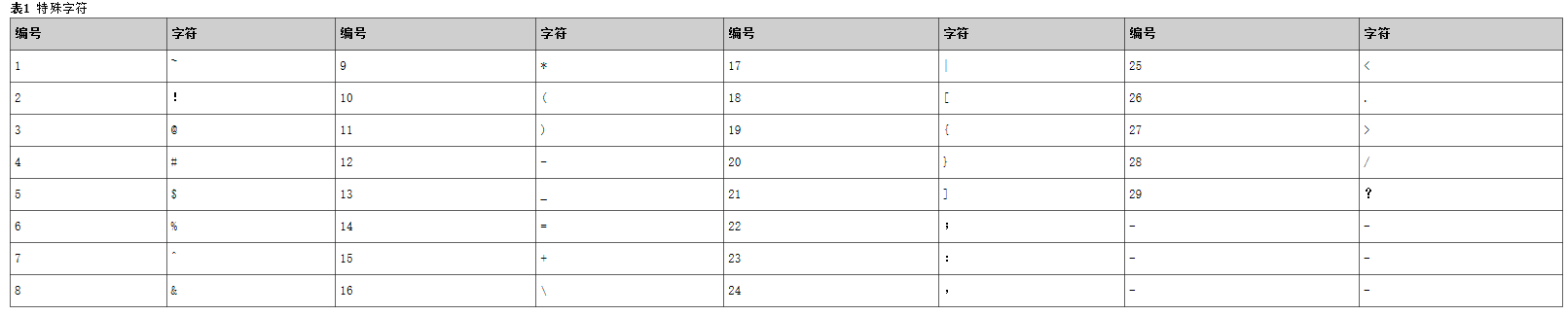
默认限制密码不能与用户名或用户名的反写相同(非大小写敏感)
解释postgres=# alter system set password_policy =1;
ALTER SYSTEM SET
postgres=#  alter system set password_min_lowercase=0;
ALTER SYSTEM SET
postgres=#  alter system set password_min_uppercase=0;
ALTER SYSTEM SET
postgres=# alter system set password_min_digital=0;
ALTER SYSTEM SET
postgres=# alter system set password_min_special=0;
ALTER SYSTEM SET
postgres=# create user test1234 password 'tesT1234';
ERROR:  Password should not equal to the rolname.
postgres=# create user test1234 password '4321Tset';
ERROR:  Password should not equal to the reverse of rolname.
不能和当前密码、当前密码的倒写相同
解释postgres=# alter system set password_policy =1;
ALTER SYSTEM SET
postgres=#  alter user test password 'ABCd@3214';
ERROR:  New password should not equal to the old ones.
postgres=#  alter user test password '4123@dCBA';
ERROR:  New password should not equal to the reverse of old ones.
postgres=#  alter user test password '4123@dCBa';
ALTER ROLE
可以设置弱口令字典,禁止使用被设置为弱口令的字符串做密码
使用CREATE WEAK PASSWORD DICTIONARY命令可以向弱口令字典中添加弱口令,默认未设置任何弱口令。
解释#向数据库弱口令字典中,添加弱口令
postgres=# CREATE WEAK PASSWORD DICTIONARY ('abcd@1234');
CREATE WEAK PASSWORD DICTIONARY
postgres=# alter system set password_policy =1;
ALTER SYSTEM SET
postgres=# create user test2 password 'abcd@1234';
ERROR:  Password should not be weak password.
postgres=# CREATE WEAK PASSWORD DICTIONARY ('abcd@123');
CREATE WEAK PASSWORD DICTIONARY
#查看数据库弱口令字典中,弱口令设置
postgres=# SELECT * FROM gs_global_config WHERE NAME LIKE 'weak_password';
     name      |   value
---------------+-----------
 weak_password | abcd@1234
 weak_password | abcd@123
(2 rows)
#删除数据库弱口令字典中,记录的所有弱口令,不支持只删除指定的弱口令。
postgres=# DROP WEAK PASSWORD DICTIONARY;
DROP WEAK PASSWORD DICTIONARY
postgres=# SELECT * FROM gs_global_config WHERE NAME LIKE 'weak_password';
 name | value
------+-------
(0 rows)
限制密码的不可重用天数和次数
数据库password_reuse_time参数用于限制数据库中用户密码的不可重用天数,默认值为60。
解释postgres=# show password_reuse_time;
 password_reuse_time
---------------------
 60
(1 row)
postgres=# show password_reuse_max;
 password_reuse_max
--------------------
 0
(1 row)
postgres=# alter system set password_policy =0;
ALTER SYSTEM SET
postgres=# alter user test password '4123@dCBa';
ERROR:  The password cannot be reused.
数据库password_reuse_max参数用于设置数据库中用户密码的不可重用次数,默认值为0。
解释postgres=# show password_reuse_max;
 password_reuse_max
--------------------
 0
(1 row)
postgres=# alter system set password_policy =0;
ALTER SYSTEM SET
postgres=# alter system set password_reuse_time =0;
ALTER SYSTEM SET
postgres=# alter system set password_reuse_max =1;
ALTER SYSTEM SET
postgres=# alter user test password '4123@dCBa';
ALTER ROLE
postgres=# alter user test password '4123@dCBa';
ERROR:  The password cannot be reused.
改密码时会检查配置参数password_reuse_time和password_reuse_max。
•当password_reuse_time和password_reuse_max都为正数时,只要满足其中任一个,即可认为密码可以重用。
•当password_reuse_time为0时,表示不限制密码重用天数,仅限制密码重用次数。
•当password_reuse_max为0时,表示不限制密码重用次数,仅限制密码重用天数。
•当password_reuse_time和password_reuse_max都为0时,表示不对密码重用进行限制。
数据库支持连续输入密码错误多次,锁定用户
数据库failed_login_attempts参数用于设置数据库用户密码连续输入几次后自动锁定,默认值为10次。
解释postgres=# show failed_login_attempts;
 failed_login_attempts
-----------------------
 10
(1 row)
$ gsql -U test
Password for user test:
gsql: FATAL:  Invalid username/password,login denied.
$ gsql -U test
Password for user test:
gsql: FATAL:  Invalid username/password,login denied.
$ gsql -U test
Password for user test:
gsql: FATAL:  Invalid username/password,login denied.
$ gsql -U test
Password for user test:
gsql: FATAL:  Invalid username/password,login denied.
$ gsql -U test
Password for user test:
gsql: FATAL:  Invalid username/password,login denied.
$ gsql -U test
Password for user test:
gsql: FATAL:  Invalid username/password,login denied.
$ gsql -U test
Password for user test:
gsql: FATAL:  Invalid username/password,login denied.
$ gsql -U test
Password for user test:
gsql: FATAL:  Invalid username/password,login denied.
$ gsql -U test
Password for user test:
gsql: FATAL:  Invalid username/password,login denied.
$ gsql -U test
Password for user test:
gsql: FATAL:  Invalid username/password,login denied.
$ gsql -U test
Password for user test:(输入正确的密码或错误的密码都会报错,因为账户已经锁定)
gsql: FATAL:  The account has been locked.
$ date
Fri Dec 31 15:01:01 CST 2021
密码输入错误多次自动锁定账号之后,还支持自动解锁
数据库paasword_lock_time参数用于设置自动锁定用户多长时间后自动解锁用户,默认1天。
解释postgres=# show password_lock_time;
 password_lock_time
--------------------
 1d
(1 row)
数据库支持设置密码有效期
数据库password_effect_time参数用于设置数据库中用户密码的有效期,默认值为90天。
数据库password_notify_time参数用于设置数据库中用户密码到期前提醒的天数,默认值为7天。
解释postgres=# show password_effect_time;
 password_effect_time
----------------------
 90
(1 row)
postgres=# show password_notify_time;
 password_notify_time
----------------------
 7
(1 row)
postgres=# alter system set password_effect_time =6;
ALTER SYSTEM SET
postgres=# \q
$ gsql -r -U test1
Password for user test1:
gsql ((MogDB 2.0.1 build f892ccb7) compiled at 2021-07-09 16:12:59 commit 0 last mr  )
NOTICE : 6 days left before password expired, please change the password.
Non-SSL connection (SSL connection is recommended when requiring high-security)
Type "help" for help.
postgres=>
注意区分密码有效期和账号有效期的设置方法。
设置账号有效期:
解释postgres=# select sysdate;
       sysdate
---------------------
 2021-12-31 22:51:19
(1 row)

postgres=# CREATE USER test3 WITH PASSWORD 'test@123' VALID BEGIN '2021-12-31 08:00:00' VALID UNTIL '2021-12-31 23:00:00';
CREATE ROLE
postgres=# \du test3
                          List of roles
 Role name |               Attributes                | Member of
-----------+-----------------------------------------+-----------
 test3     | Role valid begin 2021-12-31 08:00:00+08+| {}
           | Role valid until 2021-12-31 23:00:00+08 |
postgres=# \c - test3
Password for user test3:
Non-SSL connection (SSL connection is recommended when requiring high-security)
You are now connected to database "postgres" as user "test3".
postgres=> \c - omm1
Non-SSL connection (SSL connection is recommended when requiring high-security)
You are now connected to database "postgres" as user "omm1".
postgres=#\q
$ date
Fri Dec 31 23:02:13 CST 2021
$ gsql -r -U test3
Password for user test3:
gsql: FATAL:  The account is not within the period of validity.
