



01
安装IvorySQL
1.1 设置PG_CONFIG环境变量
export PG_CONFIG=/usr/local/ivorysql/ivorysql-3/bin/pg_config
1.2 获取pg_vector源码
git clone --branch v0.6.2 https://github.com/pgvector/pgvector.git1.3 安装 pgvector
cd pgvector
sudo --preserve-env=PG_CONFIG make
sudo --preserve-env=PG_CONFIG make instal
1.4 psql连接创建扩展
psql -U ivorysql -d ivorysql
ivorysql=# create extension vector;
CREATE EXTENSION
02
向量相似的对比方法介绍
03
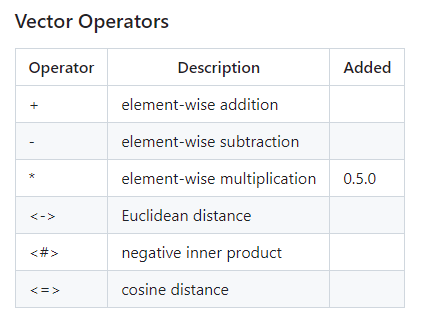
pgvector提供的方法
ivorysql=# CREATE TABLE items (id bigserial PRIMARY KEY, name varchar2(20), embedding vector(3));
CREATE TABLE
ivorysql=# select * from items;
 id |      name      | embedding
----+----------------+-----------
  1 | ora_demo       | [1,2,3]
  2 | ora_compatible | [4,5,6]
(2 rows)
3.1 欧式距离
ivorysql=# SELECT *, embedding <-> '[3,1,2]' result FROM items ORDER BY embedding <-> '[3,1,2]' LIMIT 5;
 id |      name      | embedding |      result
----+----------------+-----------+-------------------
  1 | ora_demo       | [1,2,3]   | 2.449489742783178
  2 | ora_compatible | [4,5,6]   | 5.744562646538029
(2 rows)
3.2 内积
ivorysql=# SELECT *, embedding <#> '[3,1,2]' result FROM items ORDER BY embedding <#> '[3,1,2]' LIMIT 5;
 id |      name      | embedding | result
----+----------------+-----------+--------
  2 | ora_compatible | [4,5,6]   |    -29
  1 | ora_demo       | [1,2,3]   |    -11
(2 rows)
3.3 余弦相似度
ivorysql=# SELECT *, embedding <=> '[3,1,2]' result FROM items ORDER BY embedding <=> '[3,1,2]' LIMIT 5;
 id |      name      | embedding |       result
----+----------------+-----------+---------------------
  2 | ora_compatible | [4,5,6]   | 0.11673988938389968
  1 | ora_demo       | [1,2,3]   |  0.2142857142857143
(2 rows)ivorysql=# SELECT * FROM items WHERE id != 1 ORDER BY embedding <-> (SELECT embedding FROM items WHERE id = 1) LIMIT 5;
id | name | embedding
----+----------------+-----------
2 | ora_compatible | [4,5,6]
(1 row)
04
pgvector提供的索引算法
4.1 HNSW
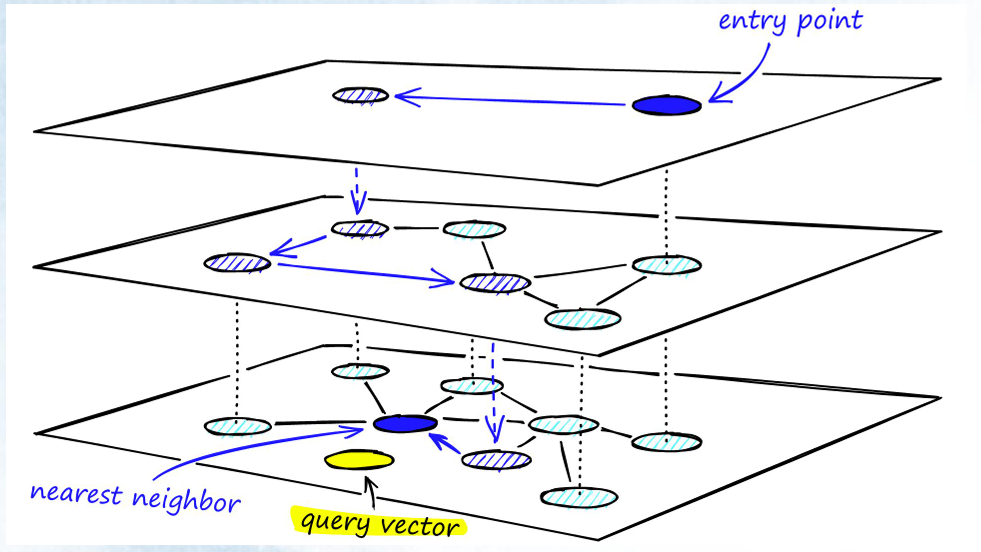
(1) L2 distance HNSW index
ivorysql=# CREATE INDEX ON items USING hnsw (embedding vector_l2_ops);
CREATE INDEX
(2)Inner product HNSW index
ivorysql=# CREATE INDEX ON items USING hnsw (embedding vector_ip_ops);
CREATE INDEX
(3) Cosine distance HNSW index
ivorysql=# CREATE INDEX ON items USING hnsw (embedding vector_cosine_ops);
CREATE INDEX
4.2 ivfflat
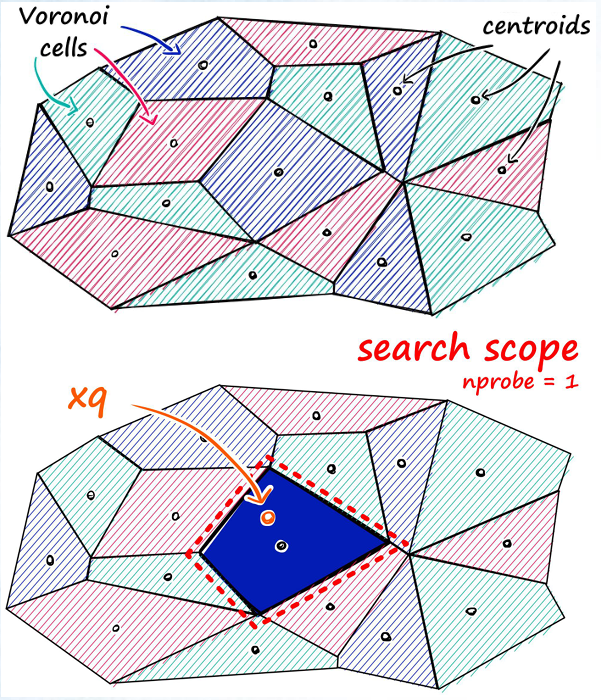
(1)L2 distance ivfflat index
ivorysql=# CREATE INDEX ON items USING ivfflat (embedding vector_l2_ops);
CREATE INDEX
(2) Inner product ivfflat index
ivorysql=# CREATE INDEX ON items USING ivfflat (embedding vector_ip_ops);
CREATE INDEX
(3) Cosine distance ivfflat index
ivorysql=# CREATE INDEX ON items USING ivfflat (embedding vector_cosine_ops);
CREATE INDEX
05
其他类型
5.1 Binary Vectors
Use thebit type to store binary vectors
ivorysql=# CREATE TABLE items5 (id bigserial PRIMARY KEY, name varchar2(20), num number(20), embedding bit(3));
CREATE TABLE
ivorysql=# INSERT INTO items5 (name, num, embedding) VALUES ('1st oracle data',0, '000'), ('2nd oracle data', 111, '111');
INSERT 0 2
ivorysql=# SELECT * FROM items5 ORDER BY bit_count(embedding # '101') LIMIT 5;
 id |      name       | num | embedding
----+-----------------+-----+-----------
  2 | 2nd oracle data | 111 | 111
  1 | 1st oracle data | 0   | 000
(2 rows)
06
Oracle兼容特性与pgvector适配
6.1 匿名块
ivorysql=# declare
i vector(3) := '[1,2,3]';
begin
raise notice '%', i;
end;
ivorysql-# /
NOTICE:  [1,2,3]
DO
6.2 存储过程
ivorysql=# CREATE OR REPLACE PROCEDURE ora_procedure()
AS
p vector(3) := '[4,5,6]';
begin
raise notice '%', p;
end;
/
CREATE PROCEDURE
ivorysql=# call ora_procedure();
NOTICE:  [4,5,6]
CALL
6.3 函数
ivorysql=# CREATE OR REPLACE FUNCTION AddVector(a vector(3), b vector(3))
RETURN vector(3)
IS
BEGIN
RETURN a + b;
END;
/
CREATE FUNCTION
ivorysql=# SELECT AddVector('[1,2,3]','[4,5,6]') FROM DUAL;
 addvector
----------------
 [5,7,9]
(1 row)
「喜欢这篇文章,您的关注和赞赏是给作者最好的鼓励」
关注作者
【版权声明】本文为墨天轮用户原创内容,转载时必须标注文章的来源(墨天轮),文章链接,文章作者等基本信息,否则作者和墨天轮有权追究责任。如果您发现墨天轮中有涉嫌抄袭或者侵权的内容,欢迎发送邮件至:contact@modb.pro进行举报,并提供相关证据,一经查实,墨天轮将立刻删除相关内容。
