



前言
上篇文章 总结了Spark SQL Rollback, Hudi CLI 也能实现 Rollback,本文总结下 Hudi CLI 安装配置以及遇到的问题。
官方文档
https://hudi.apache.org/cn/docs/cli/
版本
Hudi 0.13.0
Spark 3.2.3
打包
mvn clean package -DskipTests -Drat.skip=true -Dscala-2.12 -Dspark3.2 -Pflink-bundle-shade-hive3 -Dflink1.15
创建hudi-cli文件夹
mkdir hudi-cli
上传
将打包好的 conf
hudi-cli-bundle_2.12-0.13.0.jar
hudi-cli-with-bundle.sh
上传到 hudi-cli

修改文件权限和格式
chmod -R 777 hudi-cli-with-bundle.sh
dos2unix ./hudi-cli-with-bundle.sh
dos2unix conf/hudi-env.sh
环境变量
conf/hudi-env.sh
export HADOOP_CONF_DIR=${HADOOP_CONF_DIR:-"/etc/hadoop/conf"}
export SPARK_CONF_DIR=${SPARK_CONF_DIR:-"/etc/spark2/conf"}
#export CLIENT_JAR=${CLIENT_JAR}
export CLI_BUNDLE_JAR=/opt/hudi-cli/hudi-cli-bundle_2.12-0.13.0.jar
export SPARK_BUNDLE_JAR=/usr/hdp/3.1.0.0-78/spark/jars/hudi-spark3.2-bundle_2.12-0.13.0.jar
export SPARK_HOME=/usr/hdp/3.1.0.0-78/spark
使用
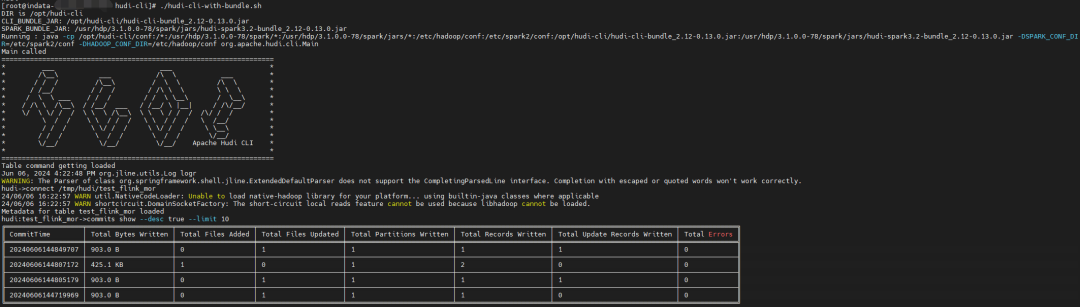
到现在就可以使用了
./hudi-cli-with-bundle.sh
connect /tmp/hudi/test_flink_mor
commits show --desc true --limit 10

警告和异常解决
修改脚本
修改后的脚本如下:
#!/usr/bin/env bash

#  Licensed to the Apache Software Foundation (ASF) under one
#  or more contributor license agreements.  See the NOTICE file
#  distributed with this work for additional information
#  regarding copyright ownership.  The ASF licenses this file
#  to you under the Apache License, Version 2.0 (the
#  "License"); you may not use this file except in compliance
#  with the License.  You may obtain a copy of the License at
#
#      http://www.apache.org/licenses/LICENSE-2.0
#
#  Unless required by applicable law or agreed to in writing, software
#  distributed under the License is distributed on an "AS IS" BASIS,
#  WITHOUT WARRANTIES OR CONDITIONS OF ANY KIND, either express or implied.
#  See the License for the specific language governing permissions and
# limitations under the License.

JAKARTA_EL_VERSION=3.0.3
DIR="$( cd "$( dirname "${BASH_SOURCE[0]}" )" && pwd )"
echo "DIR is ${DIR}"
. "${DIR}"/conf/hudi-env.sh
if [ -z "$CLI_BUNDLE_JAR" ]; then
  echo "Inferring CLI_BUNDLE_JAR path assuming this script is under Hudi repo"
  CLI_BUNDLE_JAR=`ls $DIR/target/hudi-cli-bundle*.jar | grep -v source | grep -v javadoc`
fi

if [ -z "$SPARK_BUNDLE_JAR" ]; then
  echo "Inferring SPARK_BUNDLE_JAR path assuming this script is under Hudi repo"
  SPARK_BUNDLE_JAR=`ls $DIR/../hudi-spark-bundle/target/hudi-spark*-bundle*.jar | grep -v source | grep -v javadoc`
fi

echo "CLI_BUNDLE_JAR: $CLI_BUNDLE_JAR"
echo "SPARK_BUNDLE_JAR: $SPARK_BUNDLE_JAR"

HUDI_CONF_DIR="${DIR}"/conf
# hudi aux lib contains jakarta.el jars, which need to be put directly on class path
#HUDI_AUX_LIB="${DIR}"/auxlib

if [ ! -d $HUDI_AUX_LIB ]; then
  echo "Downloading necessary auxiliary jars for Hudi CLI"
  wget https://repo1.maven.org/maven2/org/glassfish/jakarta.el/$JAKARTA_EL_VERSION/jakarta.el-$JAKARTA_EL_VERSION.jar -P auxlib
  wget https://repo1.maven.org/maven2/jakarta/el/jakarta.el-api/$JAKARTA_EL_VERSION/jakarta.el-api-$JAKARTA_EL_VERSION.jar -P auxlib
fi


if [ -z "$CLI_BUNDLE_JAR" ] || [ -z "$SPARK_BUNDLE_JAR" ]; then
  echo "Make sure to generate both the hudi-cli-bundle.jar and hudi-spark-bundle.jar before running this script."
  exit
fi

if [ -z "$SPARK_HOME" ]; then
  echo "SPARK_HOME not set, setting to /usr/local/spark"
  export SPARK_HOME="/usr/local/spark"
fi

echo "Running : java -cp ${HUDI_CONF_DIR}:${HUDI_AUX_LIB}/*:${SPARK_HOME}/*:${SPARK_HOME}/jars/*:${HADOOP_CONF_DIR}:${SPARK_CONF_DIR}:${CLI_BUNDLE_JAR}:${SPARK_BUNDLE_JAR} -DSPARK_CONF_DIR=${SPARK_CONF_DIR} -DHADOOP_CONF_DIR=${HADOOP_CONF_DIR} org.apache.hudi.cli.Main $@"
java -cp ${HUDI_CONF_DIR}:${HUDI_AUX_LIB}/*:${SPARK_HOME}/*:${SPARK_HOME}/jars/*:${HADOOP_CONF_DIR}:${SPARK_CONF_DIR}:${CLI_BUNDLE_JAR}:${SPARK_BUNDLE_JAR} -DSPARK_CONF_DIR=${SPARK_CONF_DIR} -DHADOOP_CONF_DIR=${HADOOP_CONF_DIR} org.apache.hudi.cli.Main $@
下载 HUDI_AUX_LIB
由于公司内网连不上maven仓库,可以选择手动下载,并上传到对应目录,这样就不用每次都下载了
mkdir auxlib

日志配置文件解析错误
错误日志
ERROR StatusLogger Unrecognized format specifier [d]
ERROR StatusLogger Unrecognized conversion specifier [d] starting at position 16 in conversion pattern.
ERROR StatusLogger Unrecognized format specifier [thread]
ERROR StatusLogger Unrecognized conversion specifier [thread] starting at position 25 in conversion pattern.
ERROR StatusLogger Unrecognized format specifier [level]
ERROR StatusLogger Unrecognized conversion specifier [level] starting at position 35 in conversion pattern.
ERROR StatusLogger Unrecognized format specifier [logger]
ERROR StatusLogger Unrecognized conversion specifier [logger] starting at position 47 in conversion pattern.
ERROR StatusLogger Unrecognized format specifier [msg]
ERROR StatusLogger Unrecognized conversion specifier [msg] starting at position 54 in conversion pattern.
ERROR StatusLogger Unrecognized format specifier [n]
ERROR StatusLogger Unrecognized conversion specifier [n] starting at position 56 in conversion pattern.
ERROR StatusLogger Unrecognized format specifier [d]
ERROR StatusLogger Unrecognized conversion specifier [d] starting at position 16 in conversion pattern.
ERROR StatusLogger Unrecognized format specifier [thread]
ERROR StatusLogger Unrecognized conversion specifier [thread] starting at position 25 in conversion pattern.
ERROR StatusLogger Unrecognized format specifier [level]
ERROR StatusLogger Unrecognized conversion specifier [level] starting at position 35 in conversion pattern.
ERROR StatusLogger Unrecognized format specifier [logger]
ERROR StatusLogger Unrecognized conversion specifier [logger] starting at position 47 in conversion pattern.
ERROR StatusLogger Unrecognized format specifier [msg]
ERROR StatusLogger Unrecognized conversion specifier [msg] starting at position 54 in conversion pattern.
ERROR StatusLogger Unrecognized format specifier [n]
ERROR StatusLogger Unrecognized conversion specifier [n] starting at position 56 in conversion pattern.
解决方法
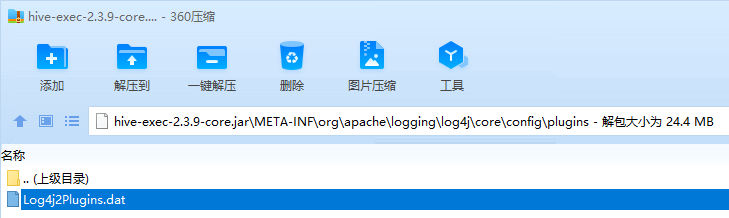
解决方法:删除 spark jars 下面的 hive-exec-2.3.9-core.jar 中的 Log4j2Plugins.dat 文件
问题原因:Log4j2Plugins.dat 文件冲突
参考文章:https://www.cnblogs.com/yeyang/p/10485790.html
查找冲突文件思路
根据 CLI 启动日志:
java -cp /opt/hudi-cli/conf:/opt/hudi-cli/auxlib/*:/usr/hdp/3.1.0.0-78/spark/*:/usr/hdp/3.1.0.0-78/spark/jars/*:/etc/hadoop/conf:/etc/spark2/conf:/opt/hudi-cli/hudi-cli-bundle_2.12-0.13.0.jar:/usr/hdp/3.1.0.0-78/spark/jars/hudi-spark3.2-bundle_2.12-0.14.1.jar -DSPARK_CONF_DIR=/etc/spark2/conf -DHADOOP_CONF_DIR=/etc/hadoop/conf org.apache.hudi.cli.Main
挨个查找其中每个路径下的文件中是否有包含 Log4j2Plugins.dat 。最终发现在 spark jars 下面的 hive-exec-2.3.9-core.jar 中包含 Log4j2Plugins.dat 。删除其中的 Log4j2Plugins.dat ,问题解决。
 grep -rl Log4j2Plugins.dat /usr/hdp/3.1.0.0-78/spark/jars/*
/usr/hdp/3.1.0.0-78/spark/jars/hive-exec-2.3.9-core.jar

最终效果
Rollback
用法
hudi->help
AVAILABLE COMMANDS

Archived Commits Command
       trigger archival: trigger archival
       show archived commits: Read commits from archived files and show details
       show archived commit stats: Read commits from archived files and show details

Bootstrap Command
       bootstrap run: Run a bootstrap action for current Hudi table
       bootstrap index showmapping: Show bootstrap index mapping
       bootstrap index showpartitions: Show bootstrap indexed partitions

Built-In Commands
       help: Display help about available commands
       stacktrace: Display the full stacktrace of the last error.
       clear: Clear the shell screen.
       quit, exit: Exit the shell.
       history: Display or save the history of previously run commands
       version: Show version info
       script: Read and execute commands from a file.

Cleans Command
       cleans show: Show the cleans
       clean showpartitions: Show partition level details of a clean
       cleans run: run clean

Clustering Command
       clustering run: Run Clustering
       clustering scheduleAndExecute: Run Clustering. Make a cluster plan first and execute that plan immediately
       clustering schedule: Schedule Clustering

Commits Command
       commits compare: Compare commits with another Hoodie table
       commits sync: Sync commits with another Hoodie table
       commit showpartitions: Show partition level details of a commit
       commits show: Show the commits
       commits showarchived: Show the archived commits
       commit showfiles: Show file level details of a commit
       commit show_write_stats: Show write stats of a commit

Compaction Command
       compaction run: Run Compaction for given instant time
       compaction scheduleAndExecute: Schedule compaction plan and execute this plan
       compaction showarchived: Shows compaction details for a specific compaction instant
       compaction repair: Renames the files to make them consistent with the timeline as dictated by Hoodie metadata. Use when compaction unschedule fails partially.
       compaction schedule: Schedule Compaction
       compaction show: Shows compaction details for a specific compaction instant
       compaction unscheduleFileId: UnSchedule Compaction for a fileId
       compaction validate: Validate Compaction
       compaction unschedule: Unschedule Compaction
       compactions show all: Shows all compactions that are in active timeline
       compactions showarchived: Shows compaction details for specified time window

Diff Command
       diff partition: Check how file differs across range of commits. It is meant to be used only for partitioned tables.
       diff file: Check how file differs across range of commits

Export Command
       export instants: Export Instants and their metadata from the Timeline

File System View Command
       show fsview all: Show entire file-system view
       show fsview latest: Show latest file-system view

HDFS Parquet Import Command
       hdfsparquetimport: Imports Parquet table to a hoodie table

Hoodie Log File Command
       show logfile records: Read records from log files
       show logfile metadata: Read commit metadata from log files

Hoodie Sync Validate Command
       sync validate: Validate the sync by counting the number of records

Kerberos Authentication Command
       kerberos kdestroy: Destroy Kerberos authentication
       kerberos kinit: Perform Kerberos authentication

Markers Command
       marker delete: Delete the marker

Metadata Command
       metadata stats: Print stats about the metadata
       metadata list-files: Print a list of all files in a partition from the metadata
       metadata list-partitions: List all partitions from metadata
       metadata validate-files: Validate all files in all partitions from the metadata
       metadata delete: Remove the Metadata Table
       metadata create: Create the Metadata Table if it does not exist
       metadata init: Update the metadata table from commits since the creation
       metadata set: Set options for Metadata Table

Repairs Command
       repair deduplicate: De-duplicate a partition path contains duplicates & produce repaired files to replace with
       rename partition: Rename partition. Usage: rename partition --oldPartition <oldPartition> --newPartition <newPartition>
       repair overwrite-hoodie-props: Overwrite hoodie.properties with provided file. Risky operation. Proceed with caution!
       repair migrate-partition-meta: Migrate all partition meta file currently stored in text format to be stored in base file format. See HoodieTableConfig#PARTITION_METAFILE_USE_DATA_FORMAT.
       repair addpartitionmeta: Add partition metadata to a table, if not present
       repair deprecated partition: Repair deprecated partition ("default"). Re-writes data from the deprecated partition into __HIVE_DEFAULT_PARTITION__
       repair show empty commit metadata: show failed commits
       repair corrupted clean files: repair corrupted clean files

Rollbacks Command
       show rollback: Show details of a rollback instant
       commit rollback: Rollback a commit
       show rollbacks: List all rollback instants

Savepoints Command
       savepoint rollback: Savepoint a commit
       savepoints show: Show the savepoints
       savepoint create: Savepoint a commit
       savepoint delete: Delete the savepoint

Spark Env Command
       set: Set spark launcher env to cli
       show env: Show spark launcher env by key
       show envs all: Show spark launcher envs

Stats Command
       stats filesizes: File Sizes. Display summary stats on sizes of files
       stats wa: Write Amplification. Ratio of how many records were upserted to how many records were actually written

Table Command
       table update-configs: Update the table configs with configs with provided file.
       table recover-configs: Recover table configs, from update/delete that failed midway.
       refresh, metadata refresh, commits refresh, cleans refresh, savepoints refresh: Refresh table metadata
       create: Create a hoodie table if not present
       table delete-configs: Delete the supplied table configs from the table.
       fetch table schema: Fetches latest table schema
       connect: Connect to a hoodie table
       desc: Describe Hoodie Table properties

Temp View Command
       temp_query, temp query: query against created temp view
       temps_show, temps show: Show all views name
       temp_delete, temp delete: Delete view name

Timeline Command
       metadata timeline show incomplete: List all incomplete instants in active timeline of metadata table
       metadata timeline show active: List all instants in active timeline of metadata table
       timeline show incomplete: List all incomplete instants in active timeline
       timeline show active: List all instants in active timeline

Upgrade Or Downgrade Command
       downgrade table: Downgrades a table
       upgrade table: Upgrades a table

Utils Command
       utils loadClass: Load a class
hudi->help commit rollback
NAME
       commit rollback - Rollback a commit

SYNOPSIS
       commit rollback [--commit String] --sparkProperties String --sparkMaster String --sparkMemory String --rollbackUsingMarkers String

OPTIONS
       --commit String
       Commit to rollback
       [Mandatory]

       --sparkProperties String
       Spark Properties File Path
       [Optional]

       --sparkMaster String
       Spark Master
       [Optional]

       --sparkMemory String
       Spark executor memory
       [Optional, default = 4G]

       --rollbackUsingMarkers String
       Enabling marker based rollback
       [Optional, default = false]
示例
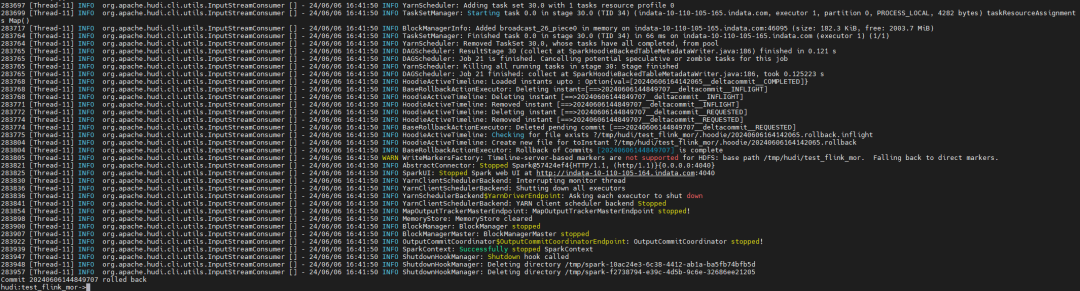
connect /tmp/hudi/test_flink_mor
commit rollback --commit 20240606144849707

问题
问题一
只有第一次Rollback成功,第二次以及后续的Rollback失败:
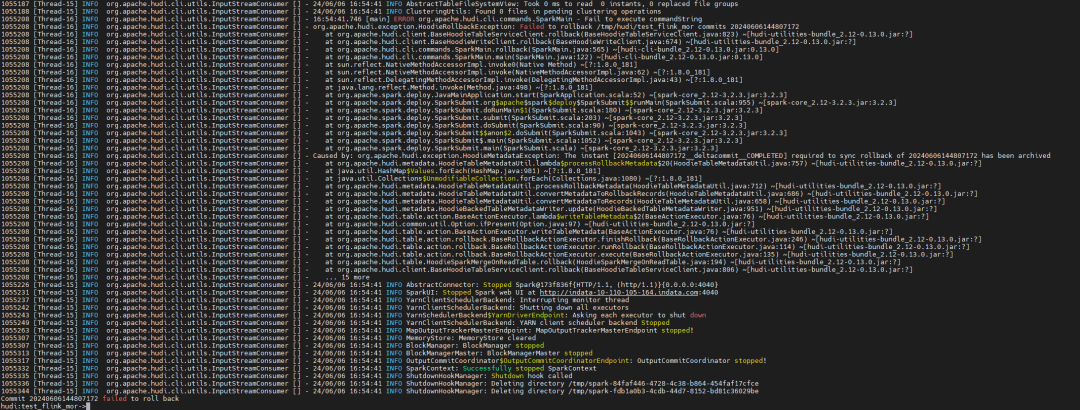
也不能Rollback失败的 commit:

问题原因和上篇文章一样,但是升级 Hudi 版本到 0.14.1,并没有解决问题,说明Hudi CLI 相关的代码逻辑并没有修复。
问题二
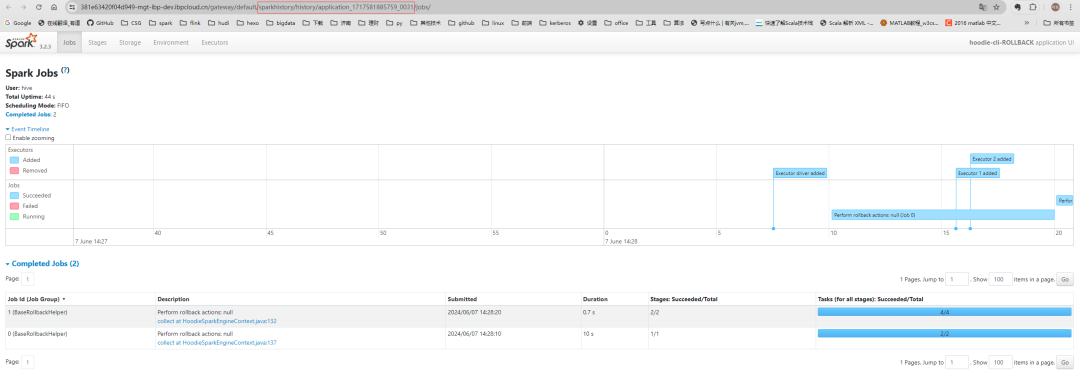
没有 history 日志,history UI 无法查看,报 404 错误。
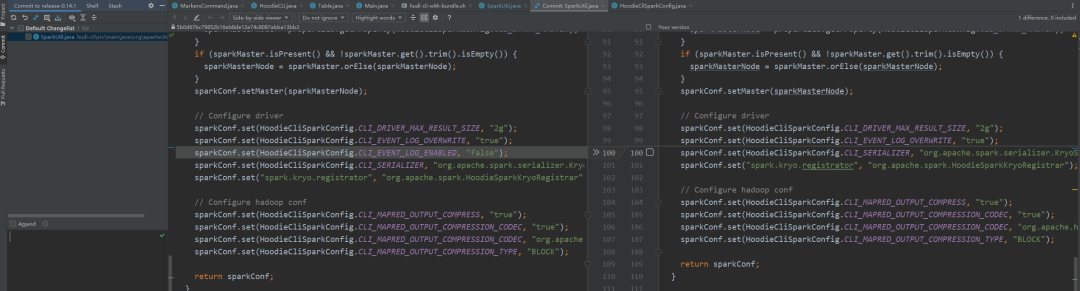
原因为源码中配置了 spark.eventLog.enabled=false , 这样虽然 spark-default.conf 中配置了 spark.eventLog.enabled=true , 但是代码优先级高,所以导致没有history 日志。
解决方法:修改源码,删除源码中spark.eventLog.enabled的默认设置,使照环境中 spark-default.conf 的配置生效,重新打包。
源码位置: SparkUtil
.getDefaultConf

安装包
链接:https://pan.baidu.com/s/1dbO8bh20R_9wFgf7_m9zhQ?pwd=4alo
提取码:4alo
🧐 分享、点赞、在看,给个3连击呗!👇
