



一、操作系统版本
[root@db01:/soft]# cat /etc/os-release
NAME="Oracle Linux Server"
VERSION="8.10"
ID="ol"
ID_LIKE="fedora"
VARIANT="Server"
VARIANT_ID="server"
VERSION_ID="8.10"
PLATFORM_ID="platform:el8"
PRETTY_NAME="Oracle Linux Server 8.10"
ANSI_COLOR="0;31"
CPE_NAME="cpe:/o:oracle:linux:8:10:server"
HOME_URL="https://linux.oracle.com/"
BUG_REPORT_URL="https://github.com/oracle/oracle-linux"

ORACLE_BUGZILLA_PRODUCT="Oracle Linux 8"
ORACLE_BUGZILLA_PRODUCT_VERSION=8.10
ORACLE_SUPPORT_PRODUCT="Oracle Linux"
ORACLE_SUPPORT_PRODUCT_VERSION=8.10
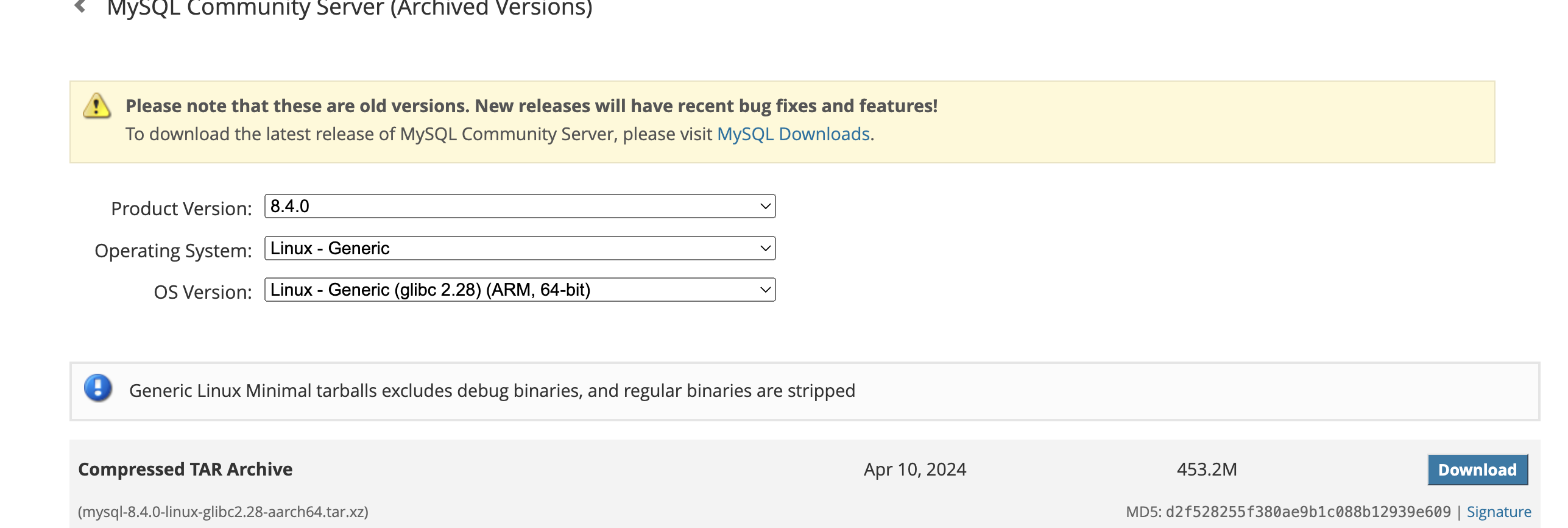
二、下载arm架构的mysql
官方下载地址:https://downloads.mysql.com/archives/community/
三、基础设置
3.1、解压安装包
[root@db01:/soft]# tar -xvf mysql-8.4.0-linux-glibc2.28-aarch64.tar.xz3.2、移动目录
[root@db01:/soft]# mv mysql-8.4.0-linux-glibc2.28-aarch64/ /usr/local/
[root@db01:/soft]# mv /usr/local/mysql-8.4.0-linux-glibc2.28-aarch64/ /usr/local/mysql
3.3、创建mysql用户
[root@db01:/soft]# useradd mysql
[root@db01:/soft]# passwd mysql
更改用户 mysql 的密码 。
新的 密码:mysql
无效的密码: 密码少于 8 个字符
重新输入新的 密码:mysql
3.4、创建目录
[root@db01:/soft]# mkdir -p /home/mysql/data
[root@db01:/soft]# mkdir -p /home/mysql/logs
[root@db01:/soft]# chown -R mysql:mysql /home/mysql/
3.5、生成配置文件
vim /etc/my.cnf
[mysqld]
bind-address=0.0.0.0
port=3306
user=mysql
basedir=/usr/local/mysql
datadir=/home/mysql/data
socket=/tmp/mysql.sock
log-error=/home/mysql/logs/mysql.err
pid-file=/home/mysql/mysql.pid
#character config
character_set_server=utf8mb4
symbolic-links=0
四、安装
4.1、初始化mysql
[root@db01:/usr/local/mysql/bin]# ./mysqld --defaults-file=/etc/my.cnf --basedir=/usr/locl/mysql --datadir=/home/mysql/data --user=mysql  --initialize

[root@db01:/usr/local/mysql/bin]# more /home/mysql/logs/mysql.err
2024-07-01T05:56:07.645165Z 0 [System] [MY-015017] [Server] MySQL Server Initialization - start.
2024-07-01T05:56:07.646471Z 0 [Warning] [MY-011070] [Server] 'Disabling symbolic links using --skip-symbolic-links (or equivalent) is the default. Consider not using t
his option as it' is deprecated and will be removed in a future release.
2024-07-01T05:56:07.646574Z 0 [System] [MY-013169] [Server] /usr/local/mysql/bin/mysqld (mysqld 8.4.0) initializing of server in progress as process 3765
2024-07-01T05:56:07.646611Z 0 [ERROR] [MY-010338] [Server] Can't find error-message file '/usr/locl/mysql/share/english/errmsg.sys'. Check error-message file location
and 'lc-messages-dir' configuration directive.
2024-07-01T05:56:07.655425Z 1 [System] [MY-013576] [InnoDB] InnoDB initialization has started.
2024-07-01T05:56:07.719327Z 1 [System] [MY-013577] [InnoDB] InnoDB initialization has ended.
2024-07-01T05:56:07.944014Z 0 [Warning] [MY-013829] [Server] Missing data directory for ICU regular expressions: /usr/locl/mysql/lib/private/.
2024-07-01T05:56:08.620178Z 6 [Note] [MY-010454] [Server] A temporary password is generated for root@localhost: *vilqS*f+43;
2024-07-01T05:56:10.327051Z 0 [System] [MY-015018] [Server] MySQL Server Initialization - end.

加入服务:
cp /usr/local/mysql/support-files/mysql.server /etc/init.d/mysql

[root@db01:/usr/local/mysql/bin]# ln -s /usr/local/mysql/ /usr/bin

启动mysql:
[root@db01:/usr/local/mysql/bin]# service mysql start
Starting MySQL. SUCCESS!
[mysql@db01 ~]$ service mysql status
 SUCCESS! MySQL running (4074)

password
 *vilqS*f+43;

修改password:
[mysql@db01 bin]$ ./mysql -uroot -p
Enter password:
Welcome to the MySQL monitor.  Commands end with ; or \g.
Your MySQL connection id is 18
Server version: 8.4.0

Copyright (c) 2000, 2024, Oracle and/or its affiliates.

Oracle is a registered trademark of Oracle Corporation and/or its
affiliates. Other names may be trademarks of their respective
owners.

Type 'help;' or '\h' for help. Type '\c' to clear the current input statement.

mysql> alter user 'root'@'localhost' identified by 'welcome1';
Query OK, 0 rows affected (0.01 sec)

mysql> flush privileges;
Query OK, 0 rows affected (0.00 sec)

# 修改远程访问 可选(如果远程连不上,看下配置文件里的bind-address是不是0.0.0.0)
use mysql;
update user set host='%' where user='root';
flush privileges;
五、环境变量修改
[mysql@db01 ~]$ vi .bash_profile
export PATH=/usr/local/mysql/bin:$PATH
[mysql@db01 ~]$ source .bash_profile
[mysql@db01 ~]$ mysql -u root -p
Enter password:
Welcome to the MySQL monitor.  Commands end with ; or \g.
Your MySQL connection id is 21
Server version: 8.4.0 MySQL Community Server - GPL

Copyright (c) 2000, 2024, Oracle and/or its affiliates.

Oracle is a registered trademark of Oracle Corporation and/or its
affiliates. Other names may be trademarks of their respective
owners.

Type 'help;' or '\h' for help. Type '\c' to clear the current input statement.

mysql>「喜欢这篇文章,您的关注和赞赏是给作者最好的鼓励」
关注作者
【版权声明】本文为墨天轮用户原创内容,转载时必须标注文章的来源(墨天轮),文章链接,文章作者等基本信息,否则作者和墨天轮有权追究责任。如果您发现墨天轮中有涉嫌抄袭或者侵权的内容,欢迎发送邮件至:contact@modb.pro进行举报,并提供相关证据,一经查实,墨天轮将立刻删除相关内容。
