



数据库管理237期 2024-09-02
数据库管理-第237期 OpenTenBase:简单的订单系统(20240902)
作者:胖头鱼的鱼缸(尹海文)
Oracle ACE Pro: Database(Oracle与MySQL)
PostgreSQL ACE Partner
10年数据库行业经验,现主要从事数据库服务工作
拥有OCM 11g/12c/19c、MySQL 8.0 OCP、Exadata、CDP等认证
墨天轮MVP、年度墨力之星,ITPUB认证专家、专家百人团成员,OCM讲师,PolarDB开源社区技术顾问,HaloDB外聘技术顾问,OceanBase观察团成员,青学会MOP技术社区(青年数据库学习互助会)技术顾问
圈内拥有“总监”、“保安”、“国产数据库最大敌人”等称号,非著名社恐(社交恐怖分子)
公众号:胖头鱼的鱼缸;CSDN:胖头鱼的鱼缸(尹海文);墨天轮:胖头鱼的鱼缸;ITPUB:yhw1809。
除授权转载并标明出处外,均为“非法”抄袭

OpenTenBase是一个典型的share-nothing分布式数据库架构,那么如果将一个原来使用集中式数据库系统迁移至OpenTenBase,则需要进行底层表逻辑设计的改造,本期在OpenTenBase上构建一个简单的的订单系统,具体内容大概背景可参照我之前的文章《数据库管理-第七十七期 再探分布式(20230523)》:
墨天轮:https://www.modb.pro/db/632306
CSDN:https://blog.csdn.net/yhw1809/article/details/130821955
1 逻辑结构
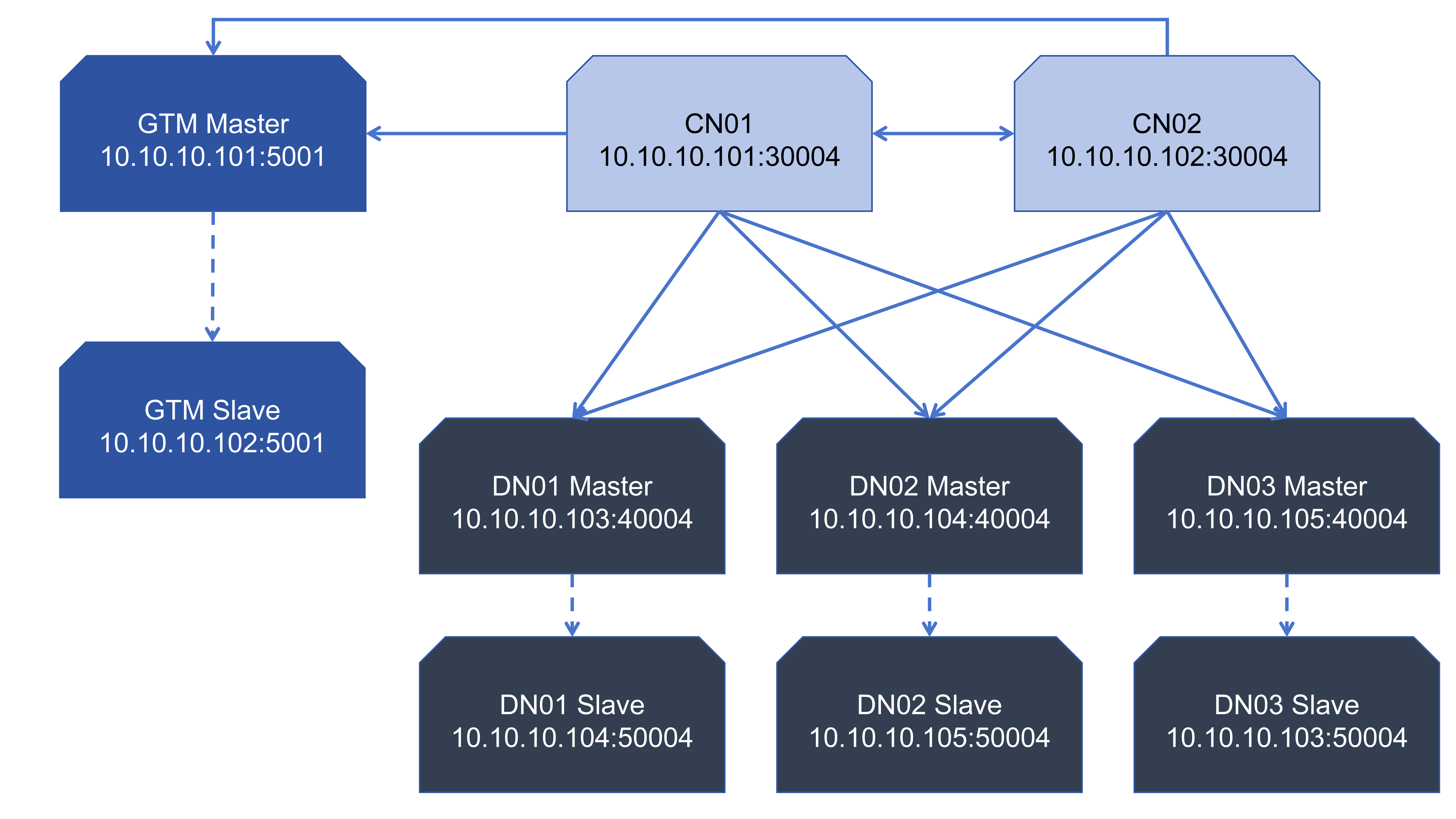
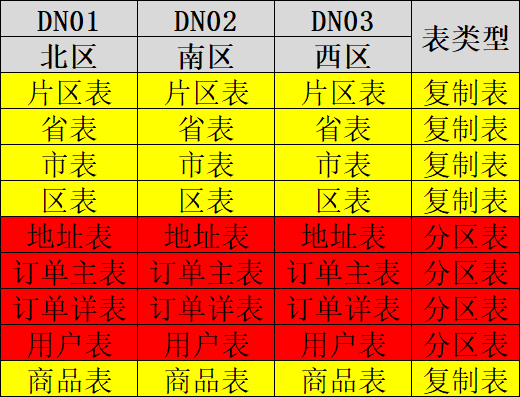
这里根据之前搭建的2GTM+2CN+(3+3)DN的集群进行配置:
2 建表语句
2.1 创建数据库与用户
create database orders;
create user orders with password 'orders';
alter database orders owner to orders;
2.2 创建group
create default node group default_group  with (dn01,dn02,dn03);
create sharding group to group default_group;
2.3 创建复制表
在分布式数据库中复制表的创建是比较简单的,这里需要在建表中指定distribute by replication子句
\c orders orders

-- 片区表
create table region
(
region_id int not null,
region_name varchar(60) not null,
primary key(region_id)
)
distribute by replication;

-- 省表
create table province
(
province_id int not null,
province_name varchar(60) not null,
regin_id int not null,
primary key(province_id)
)
distribute by replication;

-- 市表
create table city
(
city_id int not null,
city_name varchar(60) not null,
province_id int not null,
primary key(city_id)
)
distribute by replication;

-- 区表
create table district
(
district_id int not null,
district_name varchar(60) not null,
city_id int not null,
primary key(city_id)
)
distribute by replication;

-- 商品表
create table product
(
product_id int not null,
product_name varchar(60) not null,
product_price int not null,
primary key(product_id)
)
distribute by replication;
这里需要说明的一点是:在复制表上添加外键是不允许的,所以不能通过主外键来约束表之间的数据

插入数据:
insert into region values(1,'北');
insert into region values(2,'南');
insert into region values(3,'西');

insert into province values(1,'河北',1);
insert into province values(2,'广东',2);
insert into province values(3,'四川',3);

insert into city values(1,'石家庄',1);
insert into city values(2,'广州',2);
insert into city values(3,'成都',3);

insert into district values(1,'长安区',1);
insert into district values(2,'天河区',2);
insert into district values(3,'金牛区',3);

insert into product values(98765,'Laptop mode A',2000);
insert into product values(87654,'CD A',40);
insert into product values(76543,'Pork',15);
insert into product values(65432,'Oracle 23ai Document',100);

commit;
2.4 创建分片表
-- 地址表
create table address
(
address_id int not null,
region_id int not null,
province_id int not null,
city int not null,
district int not null,
primary key(address_id)
)
distribute by shard(address_id);

-- 订单主表
create table order
(
order_id int not null,
order_time timestamp,
customer_id int not null,
address_id int not null,
primary key(order_id)
)
distribute by shard(order_id);

-- 订单详表
create table order_detail
(
sub_id int not null,
order_id int not null,
product_id int not null,
primary key(sub_id),
foreign key (order_id) REFERENCES order(order_id)
)
distribute by shard(sub_id);

-- 用户表
create table customers
(
customer_id int not null,
customer_name varchar(200) not null,
address_id int not null,
primary key(customer_id),
foreign key (address_id) REFERENCES address(address_id)
)
distribute by shard(customer_id);
这里需要说明的是:
- 唯一索引对应的列必须包含在分片键之中

- 从目前了解到的情况来看,OpenTenBase只支持hash分片(待进一步确定),不支持通过指定分片键的值来进行分片,因此使用我规划的方式创建表是不能实现的
- 从测试来看(创建完地址表再创建用户表)在分片表上外键尝试将关联数据关联到同一节点的方式也是不能实现的,暂未发现其他方式

- 目前根据官方的建议需要使用单表来将数据分配到指定的节点上
总结
因为OpenTenBase分片表限制的原因,暂时未按照规划进行分布式改造向下一步前进,后面将根据进一步的了解调整方案。
同时吐槽一下,目前OpenTenBase的官方文档非常不完善,对于数据库的使用还是有很大的阻力的。
老规矩,知道写了些啥。
