




前言
PostgreSQL 全球开发小组今天宣布发布 PostgreSQL 17 ,这是世界上最先进的开源数据库的最新版本。
PostgreSQL 17 建立在数十年的开源开发基础上,提高了其性能和可扩展性,同时适应新兴的数据访问和存储模式。此版本的 PostgreSQL 显着提高了整体性能,包括彻底修改真空内存管理实现、存储访问优化和高并发工作负载改进、批量加载和导出加速以及索引查询执行改进。 PostgreSQL 17 的功能有利于全新的工作负载和关键系统,例如使用 SQL/JSON JSON_TABLE 命令增强开发人员体验,以及逻辑复制的增强功能,从而简化高可用性工作负载和主要版本升级的管理。
PostgreSQL 全球开发组计划每年发布一个包含新功能的主要版本(major version)。同时,对于每个主要版本,至少每 3 个月会发布一个次要版本[minor release],用于修复问题和安全漏洞。
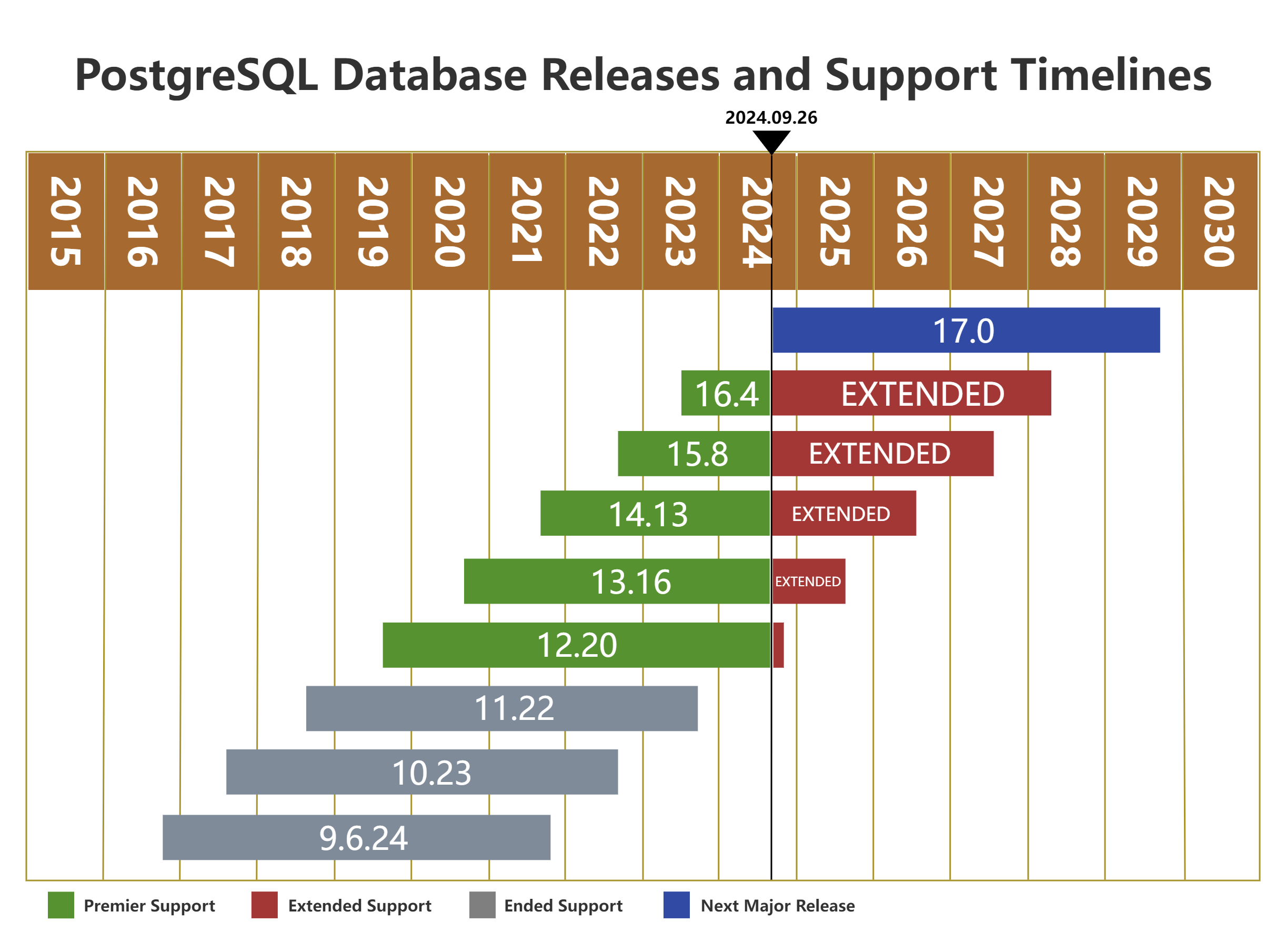
当前最新的版本是PostgreSQL 17 ,已经与今天2024 年 9 月26日发布。当前最新的次要版本是 PostgreSQL 16.4,预计每年二月、五月、八月、十一月第二周的周四都会发布一个的次要版本。另外,如果发布团队认为一个关键 Bug 或者安全更新非常重要,无法等待预定的发布计划,可能会提前发布一个次要版本。
对于主要版本,PostgreSQL 全球开发组将会提供 5 年的更新支持,然后在发布一个最终次要版本之后停止提供支持。
版本历史
| 大版本 | 当前本版 | 支持 | 发行时间 | 结束时间 |
|---|---|---|---|---|
| 17 | 17.0 | 是 | 2024年9月26日 | |
| 16 | 16.4 | 是 | 2023年9月14日 | 2028年11月9日 |
| 15 | 15.8 | 是 | 2022年10月13日 | 2027年11月11日 |
| 14 | 14.13 | 是 | 2021年9月30日 | 2026年11月12日 |
| 13 | 13.16 | 是 | 2020年9月24日 | 2025年11月13日 |
| 12 | 12.20 | 是 | 2019年10月3日 | 2024年11月14日 |
| 11 | 11.22 | 否 | 2018年10月18日 | 2023年11月9日 |
| 10 | 10.23 | 否 | 2017年10月5日 | 2022年11月10日 |
| 9.6 | 9.6.24 | 否 | 2016年9月29日 | 2021年11月11日 |
最新版本概述
PostgreSQL 17 包含许多新功能和增强功能,包括:
-
VACUUM 的新内存管理系统可减少内存消耗并提高整体清理性能。
-
新的 SQL/JSON 功能,包括构造函数、标识函数和 JSON_TABLE() 函数,该函数将 JSON 数据转换为表表示形式。
-
各种查询性能改进,包括使用流 I/O 的顺序读取、高并发下的写入吞吐量以及搜索 btree 索引中的多个值。
-
逻辑复制增强功能,包括:
- 故障转移控制
- pg_createsubscriber,一个从物理备用创建逻辑副本的实用程序
- pg_upgrade 现在在发布者和订阅者上保留复制槽
- 新的客户端连接选项 sslnegotiation=direct,执行直接 TLS 握手以避免往返协商。
- pg_basebackup 现在支持增量备份。
- COPY 添加了一个新选项 ON_ERROR ignore,允许复制操作在发生错误时继续。
源码安装体验
环境信息
本文的安装环境信息如下:
| 主机名 | 内存 | 磁盘空间 | IP地址 | 操作系统版本 | PostgreSQL版本 |
|---|---|---|---|---|---|
| pg17 | 4G | 100G | 192.168.17.17 | CentOS 7.9 | PostgreSQL17 |
安装包下载
最新的安装包可以到PostgreSQL官网下载,这次我们选用源码编译安装postgresql-17.0.tar.gz,下载并上传到服务器上
检查系统信息
## 查看系统版本信息
[root@pg17 ~]# cat /etc/os-release
NAME="CentOS Linux"
VERSION="7 (Core)"
ID="centos"
ID_LIKE="rhel fedora"
VERSION_ID="7"
PRETTY_NAME="CentOS Linux 7 (Core)"
ANSI_COLOR="0;31"
CPE_NAME="cpe:/o:centos:centos:7"
HOME_URL="https://www.centos.org/"
BUG_REPORT_URL="https://bugs.centos.org/"

CENTOS_MANTISBT_PROJECT="CentOS-7"
CENTOS_MANTISBT_PROJECT_VERSION="7"
REDHAT_SUPPORT_PRODUCT="centos"
REDHAT_SUPPORT_PRODUCT_VERSION="7"

[root@pg17 ~]#
关闭防火墙
[root@pg17 ~]# systemctl stop firewalld.service
[root@pg17 ~]# systemctl disable firewalld.service
[root@pg17 ~]#
关闭 SELINUX
[root@pg17 ~]# setenforce 0
setenforce: SELinux is disabled
[root@pg17 ~]# sed -ri 's/SELINUX=enforcing/SELINUX=disabled/' /etc/selinux/config
[root@pg17 ~]#
创建安装用户
[root@pg17 ~]# groupadd postgres
[root@pg17 ~]# useradd -g postgres postgres
[root@pg17 ~]# echo "postgres"|passwd --stdin postgres
Changing password for user postgres.
passwd: all authentication tokens updated successfully.
[root@pg17 ~]#
安装编译所需要的包
[root@pg17 ~]# yum install -y zlib zlib-devel libaio cmake make gcc gcc-c++ readline readline-devel perl \
> bison flex libyaml  net-tools expect  openssh-clients tcl openssl  openssl-devel libicu libicu-devel \
> ncurses-devel  python python-devel openldap pam systemtap-sdt-devel perl-ExtUtils-Embed
Loaded plugins: fastestmirror, langpacks
Loading mirror speeds from cached hostfile
Package zlib-1.2.7-21.el7_9.x86_64 already installed and latest version
Package zlib-devel-1.2.7-21.el7_9.x86_64 already installed and latest version
Package libaio-0.3.109-13.el7.x86_64 already installed and latest version
Package cmake-2.8.12.2-2.el7.x86_64 already installed and latest version
Package 1:make-3.82-24.el7.x86_64 already installed and latest version
Package gcc-4.8.5-44.el7.x86_64 already installed and latest version
Package gcc-c++-4.8.5-44.el7.x86_64 already installed and latest version
Package readline-6.2-11.el7.x86_64 already installed and latest version
Package readline-devel-6.2-11.el7.x86_64 already installed and latest version
Package 4:perl-5.16.3-299.el7_9.x86_64 already installed and latest version
Package bison-3.0.4-2.el7.x86_64 already installed and latest version
Package flex-2.5.37-6.el7.x86_64 already installed and latest version
Package libyaml-0.1.4-11.el7_0.x86_64 already installed and latest version
Package net-tools-2.0-0.25.20131004git.el7.x86_64 already installed and latest version
Package expect-5.45-14.el7_1.x86_64 already installed and latest version
Package openssh-clients-7.4p1-23.el7_9.x86_64 already installed and latest version
Package 1:tcl-8.5.13-8.el7.x86_64 already installed and latest version
Package 1:openssl-1.0.2k-26.el7_9.x86_64 already installed and latest version
Package 1:openssl-devel-1.0.2k-26.el7_9.x86_64 already installed and latest version
Package libicu-50.2-4.el7_7.x86_64 already installed and latest version
Package libicu-devel-50.2-4.el7_7.x86_64 already installed and latest version
Package python-2.7.5-94.el7_9.x86_64 already installed and latest version
Package python-devel-2.7.5-94.el7_9.x86_64 already installed and latest version
Package openldap-2.4.44-25.el7_9.x86_64 already installed and latest version
Package pam-1.1.8-23.el7.x86_64 already installed and latest version
Package systemtap-sdt-devel-4.0-13.el7.x86_64 already installed and latest version
Package perl-ExtUtils-Embed-1.30-299.el7_9.noarch already installed and latest version
Nothing to do
[root@pg17 ~]#
配置系统参数文件
[root@pg17 ~]# cat >> /etc/sysctl.conf << "EOF"
>
> #postgresql set
> fs.file-max = 76724200
> kernel.sem = 10000 10240000 10000 1024
> kernel.shmmni = 4096
> kernel.shmall = 253702
> kernel.shmmax = 1039163392
> net.ipv4.ip_local_port_range = 9000 65500
> net.core.rmem_default = 262144
> net.core.wmem_default = 262144
> net.core.rmem_max = 4194304
> net.core.wmem_max = 1048576
> fs.aio-max-nr = 40960000
> vm.dirty_ratio=20
> vm.dirty_background_ratio=3
> vm.dirty_writeback_centisecs=100
> vm.dirty_expire_centisecs=500
> vm.min_free_kbytes=524288
> vm.swappiness=0
> vm.overcommit_memory=2
> vm.overcommit_ratio=75
>
> EOF
[root@pg17 ~]# /sbin/sysctl -p
fs.file-max = 76724200
kernel.sem = 10000 10240000 10000 1024
kernel.shmmni = 4096
kernel.shmall = 253702
kernel.shmmax = 1039163392
net.ipv4.ip_local_port_range = 9000 65500
net.core.rmem_default = 262144
net.core.wmem_default = 262144
net.core.rmem_max = 4194304
net.core.wmem_max = 1048576
fs.aio-max-nr = 40960000
vm.dirty_ratio = 20
vm.dirty_background_ratio = 3
vm.dirty_writeback_centisecs = 100
vm.dirty_expire_centisecs = 500
vm.min_free_kbytes = 524288
vm.swappiness = 0
vm.overcommit_memory = 2
vm.overcommit_ratio = 75
[root@pg17 ~]# cat >> /etc/security/limits.conf << "EOF"
>
> #postgresql set
> postgres soft nofile 1048576
> postgres hard nofile 1048576
> postgres soft nproc 131072
> postgres hard nproc 131072
> postgres soft stack 10240
> postgres hard stack 32768
> postgres soft core 6291456
> postgres hard core 6291456
>
> EOF
[root@pg17 ~]#
创建安装目录
[root@pg17 ~]# mkdir -p /opt/pg/{pg17,data,archive}
[root@pg17 ~]# chown -R postgres:postgres /opt/pg
[root@pg17 ~]# chmod 0755 /opt/pg/pg17
[root@pg17 ~]# chmod 0700 /opt/pg/data /opt/pg/archive
[root@pg17 ~]#
源码编译
[root@pg17 postgres]# su - postgres
[postgres@pg17 ~]$ tar zxf postgresql-17.0.tar.gz
[postgres@pg17 ~]$ cd postgresql-17.0/
[postgres@pg17 postgresql-17.0]$ ./configure --prefix=/opt/pg/pg17 --with-pgport=5432 --with-openssl
checking build system type... x86_64-pc-linux-gnu
checking host system type... x86_64-pc-linux-gnu
checking which template to use... linux
checking whether NLS is wanted... no
checking for default port number... 5432
checking for block size... 8kB
checking for segment size... 1GB
checking for WAL block size... 8kB
checking for gcc... gcc
checking whether the C compiler works... yes
checking for C compiler default output file name... a.out
checking for suffix of executables...
checking whether we are cross compiling... no
checking for suffix of object files... o
checking whether we are using the GNU C compiler... yes
checking whether gcc accepts -g... yes
checking for gcc option to accept ISO C89... none needed
checking for gcc option to accept ISO C99... -std=gnu99
checking for g++... g++
checking whether we are using the GNU C++ compiler... yes
。。。省略
config.status: linking src/backend/port/tas/dummy.s to src/backend/port/tas.s
config.status: linking src/backend/port/posix_sema.c to src/backend/port/pg_sema.c
config.status: linking src/backend/port/sysv_shmem.c to src/backend/port/pg_shmem.c
config.status: linking src/include/port/linux.h to src/include/pg_config_os.h
config.status: linking src/makefiles/Makefile.linux to src/Makefile.port
## 耐心等待十来分钟编译安装
[postgres@pg17 postgresql-17.0]$ gmake world -j2
。。。省略

[postgres@pg17 postgresql-17.0]$ gmake install-world -j2
。。。省略
设置环境变量
[postgres@pg17 postgresql-17.0]$ cat >> /home/postgres/.bash_profile << "EOF"
>
> #PostgreSQL settings
> export PGPORT=5432
> export PGUSER=postgres
> export PGHOME=/opt/pg/pg17
> export PGDATA=/opt/pg/data
> export LD_LIBRARY_PATH=$PGHOME/lib
> export MANPATH=$PGHOME/share/man
> export PATH=$PGHOME/bin:$PATH
> export LANG="en_US.UTF-8"
>
> EOF
[postgres@pg17 postgresql-17.0]$ source ~/.bash_profile
[postgres@pg17 postgresql-17.0]$ postgres --version
postgres (PostgreSQL) 17.0
[postgres@pg17 postgresql-17.0]$
初始化数据库实例
[postgres@pg17 postgresql-17.0]initdb -D /opt/pg/data -k -E UTF8 -U postgres -W
The files belonging to this database system will be owned by user "postgres".
This user must also own the server process.

The database cluster will be initialized with locale "en_US.UTF-8".
The default text search configuration will be set to "english".

Data page checksums are enabled.

Enter new superuser password:
Enter it again:

fixing permissions on existing directory /opt/pg/data ... ok
creating subdirectories ... ok
selecting dynamic shared memory implementation ... posix
selecting default "max_connections" ... 100
selecting default "shared_buffers" ... 128MB
selecting default time zone ... Asia/Shanghai
creating configuration files ... ok
running bootstrap script ... ok
performing post-bootstrap initialization ... ok
syncing data to disk ... ok

initdb: warning: enabling "trust" authentication for local connections
initdb: hint: You can change this by editing pg_hba.conf or using the option -A, or --auth-local and --auth-host, the next time you run initdb.

Success. You can now start the database server using:

    pg_ctl -D /opt/pg/data -l logfile start

[postgres@pg17 postgresql-17.0]$
修改posgresql.conf文件
[postgres@pg17 postgresql-17.0]$ cat >> /opt/pg/data/postgresql.conf << "EOF"
>
> #add line
> listen_addresses = '*'
> port = 5432
> shared_buffers = 1GB
> work_mem = 30MB
> maintenance_work_mem = 256MB
> temp_buffers = 256MB
> max_connections = 500
> checkpoint_completion_target = 0.9
> wal_buffers = 16MB
> min_wal_size = 4GB
> max_wal_size = 64GB
> wal_log_hints = on
> wal_keep_size = 1000
> default_statistics_target = 100
> random_page_cost = 1.1
> effective_io_concurrency = 200
> wal_level = replica
> logging_collector = on
> log_directory = 'log'
> log_filename = 'postgresql-%Y-%m-%d_%H%M%S.log'
> log_file_mode = 0600
> log_rotation_age = 1d
> log_rotation_size = 0
> log_truncate_on_rotation = off
> archive_mode = on
> archive_command = 'test ! -f /opt/pg/archive/%f && cp %p /opt/pg/archive/%f'
>
> EOF
[postgres@pg17 postgresql-17.0]$
设置开机自启
##切换到root账号设置
[postgres@pg17 postgresql-17.0]$ exit
logout
[root@pg17 postgres]# cat > /usr/lib/systemd/system/postgres.service << "EOF"
> [Unit]
> Description=PostgreSQL database server
> After=network.target
> [Service]
> Type=forking
> User=postgres
> Group=postgres
> Environment=PGPORT=5432
> Environment=PGDATA=/opt/pg/data
> OOMScoreAdjust=-1000
> ExecStart=/opt/pg/pg17/bin/pg_ctl start -D $PGDATA
> ExecStop=/opt/pg/pg17/pg_ctl stop -D $PGDATA -s -m fast
> ExecReload=/opt/pg/pg17/bin/pg_ctl reload -D $PGDATA -s
> TimeoutSec=300
> [Install]
> WantedBy=multi-user.target
> EOF
[root@pg17 postgres]# chmod +x /usr/lib/systemd/system/postgres.service
[root@pg17 postgres]# systemctl daemon-reload
[root@pg17 postgres]# systemctl enable --now postgres.service
Created symlink from /etc/systemd/system/multi-user.target.wants/postgres.service to /usr/lib/systemd/system/postgres.service.
[root@pg17 postgres]# systemctl status postgres.service
?postgres.service - PostgreSQL database server
Loaded: loaded (/usr/lib/systemd/system/postgres.service; enabled; vendor preset: disabled)
Active: active (running) since Thu 2024-09-26 23:39:59 CST; 19s ago
Process: 65948 ExecStart=/opt/pg/pg17/bin/pg_ctl start -D $PGDATA (code=exited, status=0/SUCCESS)
Main PID: 65950 (postgres)
CGroup: /system.slice/postgres.service
?65950 /opt/pg/pg17/bin/postgres -D /opt/pg/data
?65951 postgres: logger
?65956 postgres: checkpointer
?65957 postgres: background writer
?65959 postgres: walwriter
?65960 postgres: autovacuum launcher
?65961 postgres: archiver
?65962 postgres: logical replication launcher
Sep 26 23:39:59 pg17 systemd[1]: Starting PostgreSQL database server...
Sep 26 23:39:59 pg17 pg_ctl[65948]: waiting for server to start....2024-09-26 23:39:59.509 CST [65950] LOG: redirecting log output to logging collector process
Sep 26 23:39:59 pg17 pg_ctl[65948]: 2024-09-26 23:39:59.509 CST [65950] HINT: Future log output will appear in directory "log".
Sep 26 23:39:59 pg17 systemd[1]: Started PostgreSQL database server.
[root@pg17 postgres]#
用psql登录测试
[postgres@pg17 ~]$ psql
psql (17.0)
Type "help" for help.

postgres=# select version();
                                                 version
---------------------------------------------------------------------------------------------------------
 PostgreSQL 17.0 on x86_64-pc-linux-gnu, compiled by gcc (GCC) 4.8.5 20150623 (Red Hat 4.8.5-44), 64-bit
(1 row)

## 这里我们来测试一下17的新特性JSON_TABLE
## JSON_TABLE 运算符将 JSON 格式的数据临时转换为关系表。这允许您在临时表上使用结构化查询语言,例如聚合、窗口函数或 CTE。
postgres=# create table t1 (json_col jsonb);
CREATE TABLE
postgres=# insert into t1 values (
postgres(# '{ "people": [
postgres'# { "name":"sunying", "address":"shanghai"},
postgres'# { "name":"wanghongmei", "address":"beijing"},
postgres'# { "name":"sunjiajun", "address":"shengzhen"}
postgres'# ] }'
postgres(# );
INSERT 0 1
postgres=# select people.* from t1,json_table(json_col, '$.people[*]' columns (
postgres(# name varchar(40) path '$.name',
postgres(# address varchar(100) path '$.address')
postgres(# ) people;
    name     |  address
-------------+-----------
 sunying     | shanghai
 wanghongmei | beijing
 sunjiajun   | shengzhen
(3 rows)

postgres=#
总结
本文介绍了PostgreSQL 17正式版本的新特性,以及版本历史的时间线,分享给各位小伙伴最新17正式版本的源码安装体验。😄
