



现代企业每天都在处理大量数据,分散在不同格式的文档、视频、邮件、聊天记录和电子表格中。然而,真正的挑战不仅是存储这些信息,而是要让它们易于访问并转化为可用的知识。传统搜索方案存在几大痛点:
只能精确匹配关键字,无法应对复杂查询需求。
缺乏语义理解,难以深入挖掘信息。
难以兼容多种文件格式,信息检索不全面。
无法从用户交互中学习,自我优化能力不足。
企业亟需一个能够打破格式限制、理解上下文并持续智能化的解决方案,以满足不断变化的业务需求。
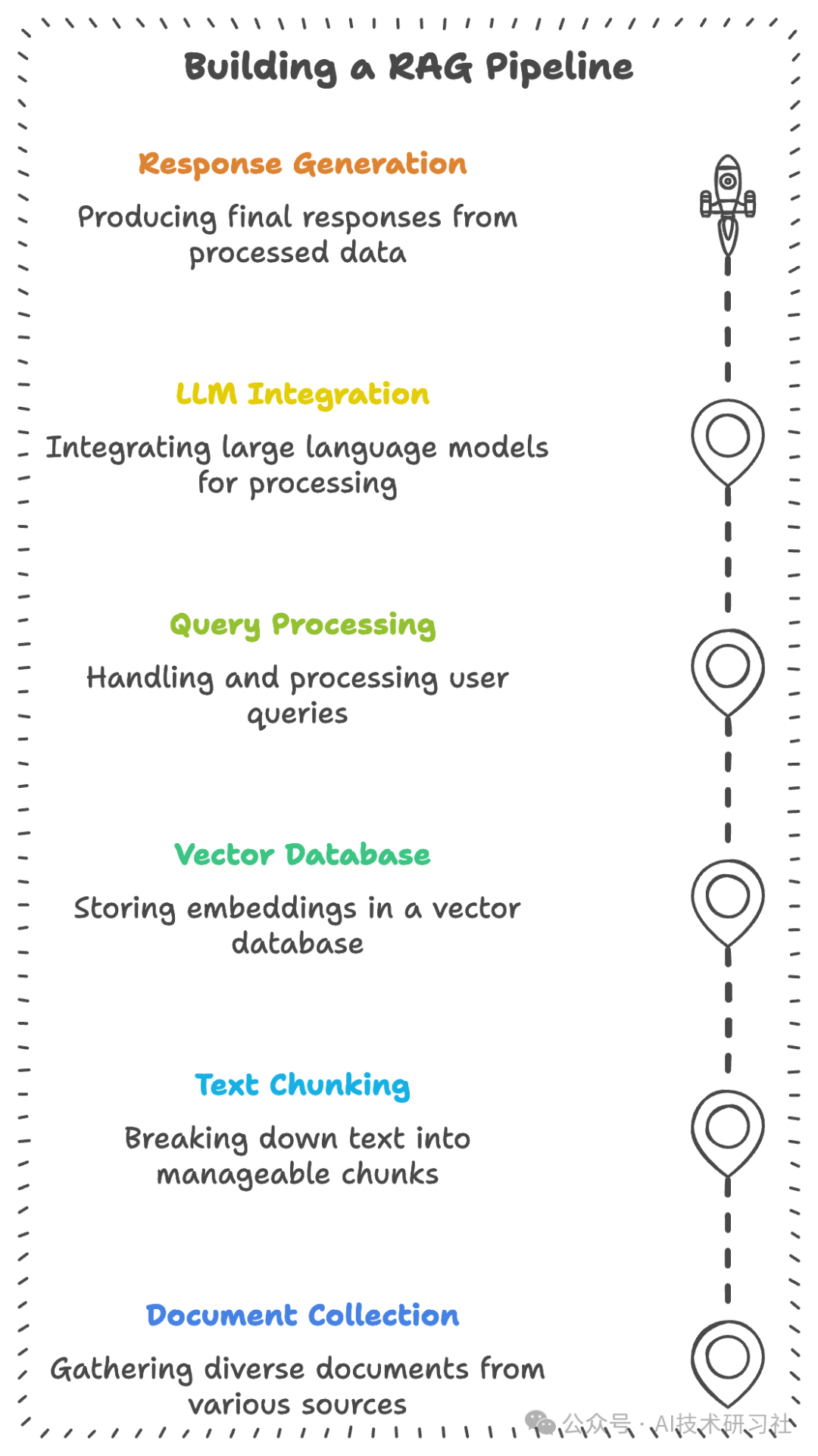
检索增强生成 (RAG) 正在彻底改变企业知识库的管理方式。作为组织的“智能内存”,RAG 提供了以下关键优势:
理解上下文:RAG 不仅限于简单的关键字匹配,还能理解问题背后的真实含义,提升了问答的准确性。
处理多种格式:RAG 能够处理各种类型的数据,无论是 PDF、视频,还是电子邮件,都能进行智能解析。
保持最新:与传统 AI 模型不同,RAG 能够随时引用最新数据,确保信息的实时性和相关性。
保持准确性:通过直接引用实际文档中的内容,RAG 能够避免虚构内容,提供更可信的答案。
这些能力使 RAG 成为企业应对数据复杂性、实现智能化知识管理的理想解决方案。
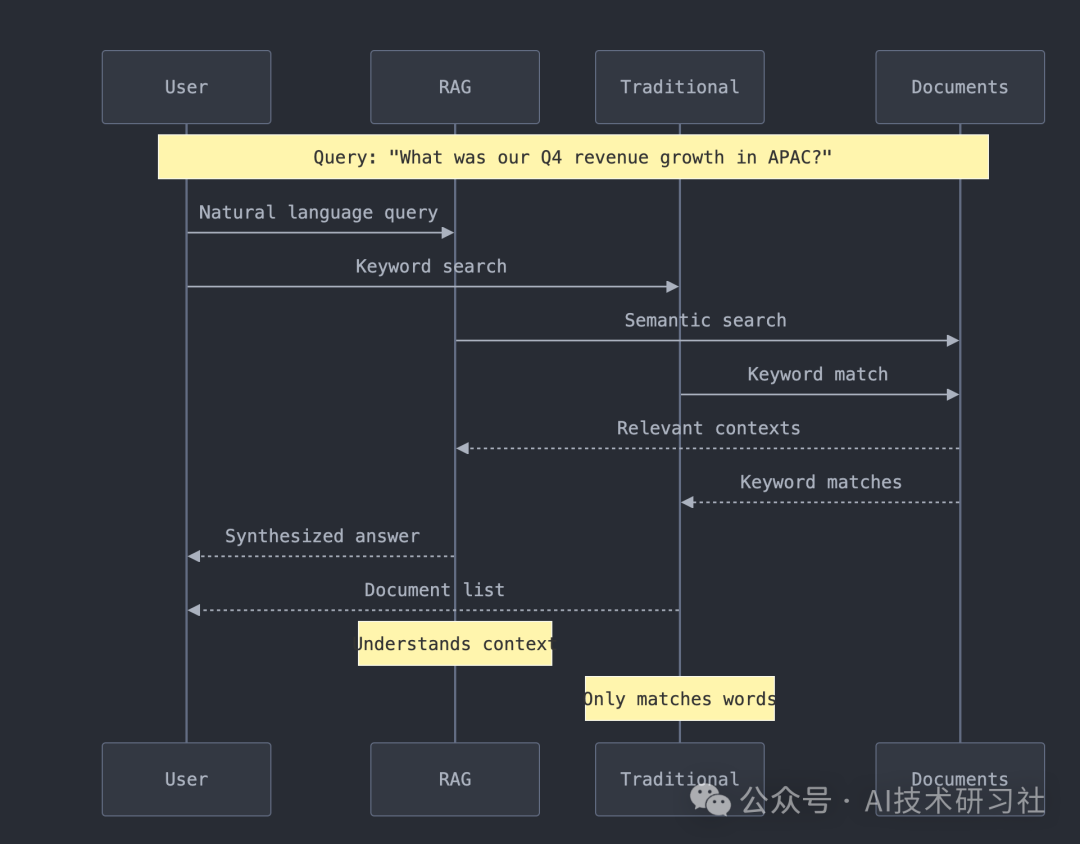
接下来,创建一个全面的 RAG 管道。管道提供多种功能:
# Example usage of our RAG pipelinefrom rag_pipeline import RAGPipeline, FileConfig# Initialize with smart defaultspipeline = RAGPipeline(persist_directory="./chroma_db",collection_name="enterprise_docs",config=FileConfig(chunk_size=1000,chunk_overlap=200,whisper_model_size="base"))# Process entire directories of mixed contentresult = pipeline.process_directory("./company_data")
多种文件格式支持
管道可处理文件格式广泛,包括文档(如.pdf
,.docx
),媒体文件(如.mp3
,.mp4
),和通信格式(如.eml
,.html
)等。supported_types = [# Documents'.pdf', '.docx', '.pptx', '.xlsx', '.txt',# Media'.mp3', '.wav', '.mp4', '.avi',# Communications'.eml', '.html', '.md']智能处理
智能分块:优化上下文理解
自动元数据提取
音频/视频文件转录
向量嵌入生成:支持高效内容检索
高效存储和检索
提供结构化的存储和快速的内容检索,以确保数据的高效利用和易访问性。
# Example queryresults = pipeline.db_manager.query(collection_name="enterprise_docs",query_texts=["What were our key achievements in Q4?"],n_results=3)
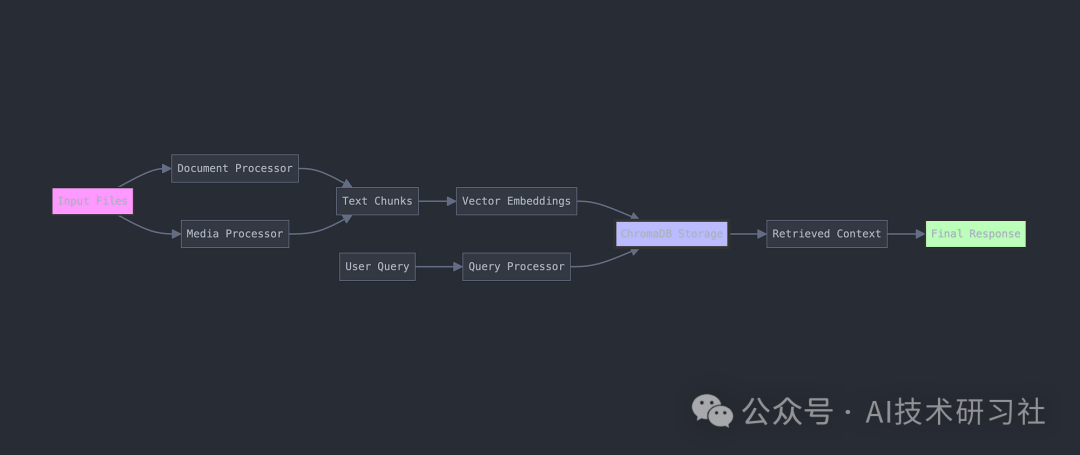
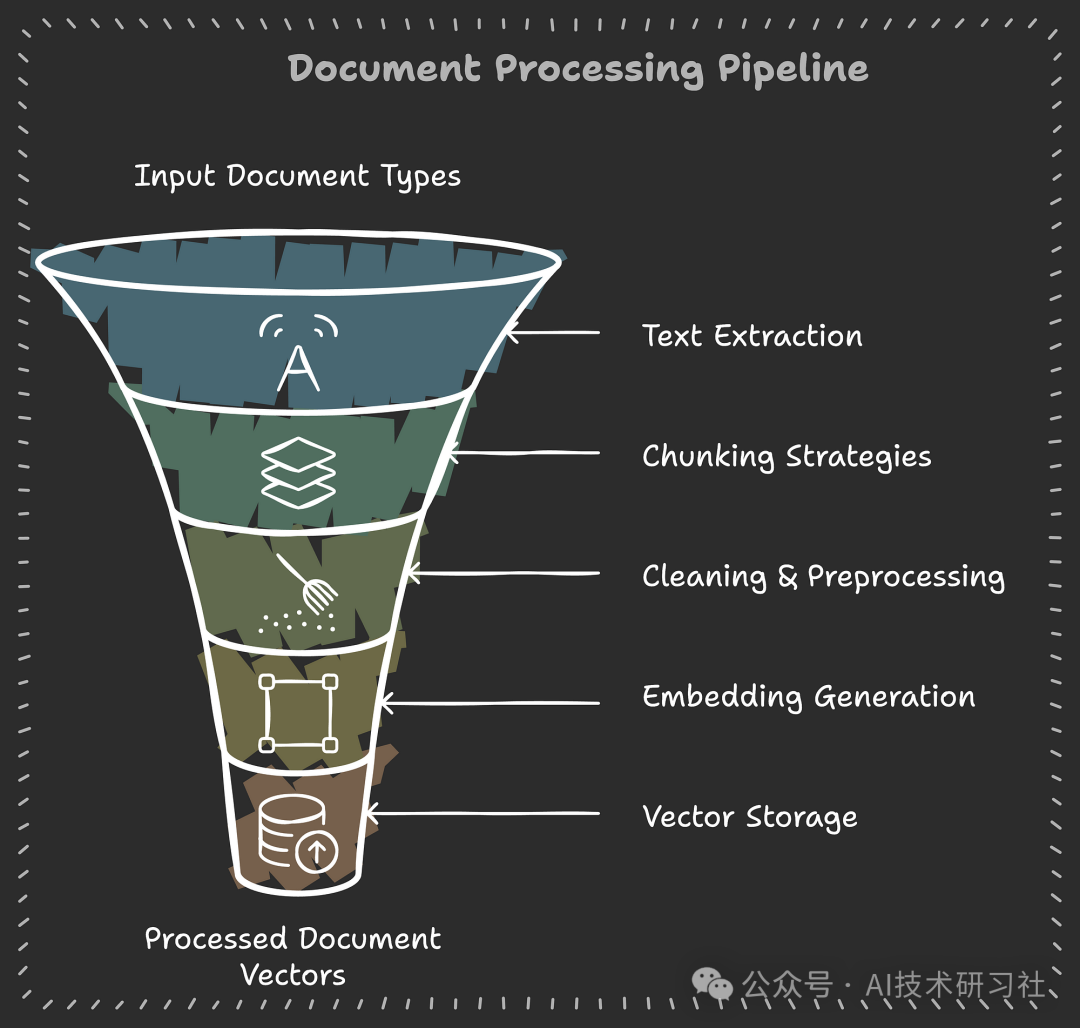
接下来,技术要求和先决条件,环境准备:
1. Python Environment 1.Python环境
Python 3.11+ installed 已安装 Python 3.11+
Virtual environment recommended
2.核心依赖
pip install -r requirements.txt
# Core dependencieschromadb>=0.4.0langchain>=0.1.0pandas>=1.5.0numpy>=1.24.0sentence-transformers>=2.2.0# Document processingpypdf>=3.0.0python-docx>=0.8.11openpyxl>=3.1.0python-pptx>=0.6.21beautifulsoup4>=4.12.0markdown>=3.4.0lxml>=4.9.0# Media processingopenai-whisper>=20231117moviepy>=1.0.3pydub>=0.25.1torch>=2.0.0# Optional but recommendedtqdm>=4.65.0python-magic>=0.4.27pyyaml>=6.0.0
所有代码均已完整记录并遵循最佳实践:
def process_file(self, file_path: str) -> List[Document]:"""Process a single file and return chunks with metadata.Args:file_path (str): Path to the file to processReturns:List[Document]: List of processed document chunksRaises:ValueError: If file type is not supported"""
了解 RAG 架构:现代文档智能的构建块
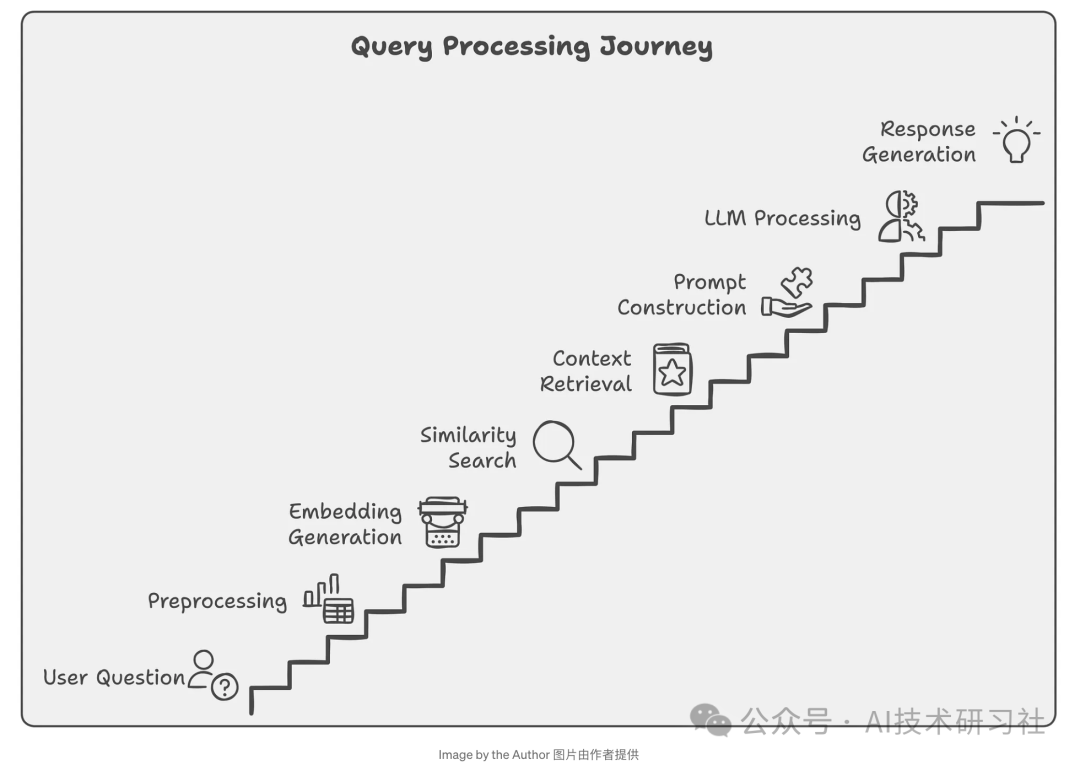
RAG 系统的组件
1. 文档处理流程
class DocumentProcessor:def __init__(self, config: FileConfig):self.config = configself.text_splitter = RecursiveCharacterTextSplitter(chunk_size=config.chunk_size,chunk_overlap=config.chunk_overlap)def process_file(self, file_path: str) -> List[LangchainDocument]:"""Process a single file into searchable chunks"""# Extract text based on file typetext = self._extract_text(file_path)# Split into manageable chunkschunks = self.text_splitter.split_text(text)# Add metadata for better retrievalreturn [LangchainDocument(page_content=chunk,metadata={"source": file_path,"chunk_index": i,"processed_date": datetime.now().isoformat()})for i, chunk in enumerate(chunks)]
2.向量存储
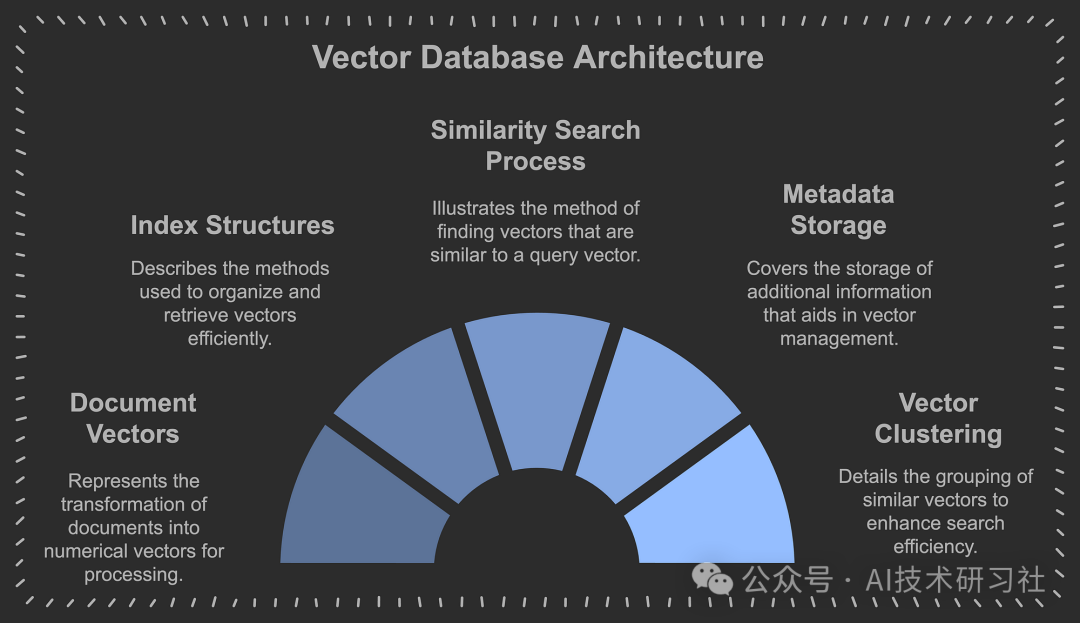
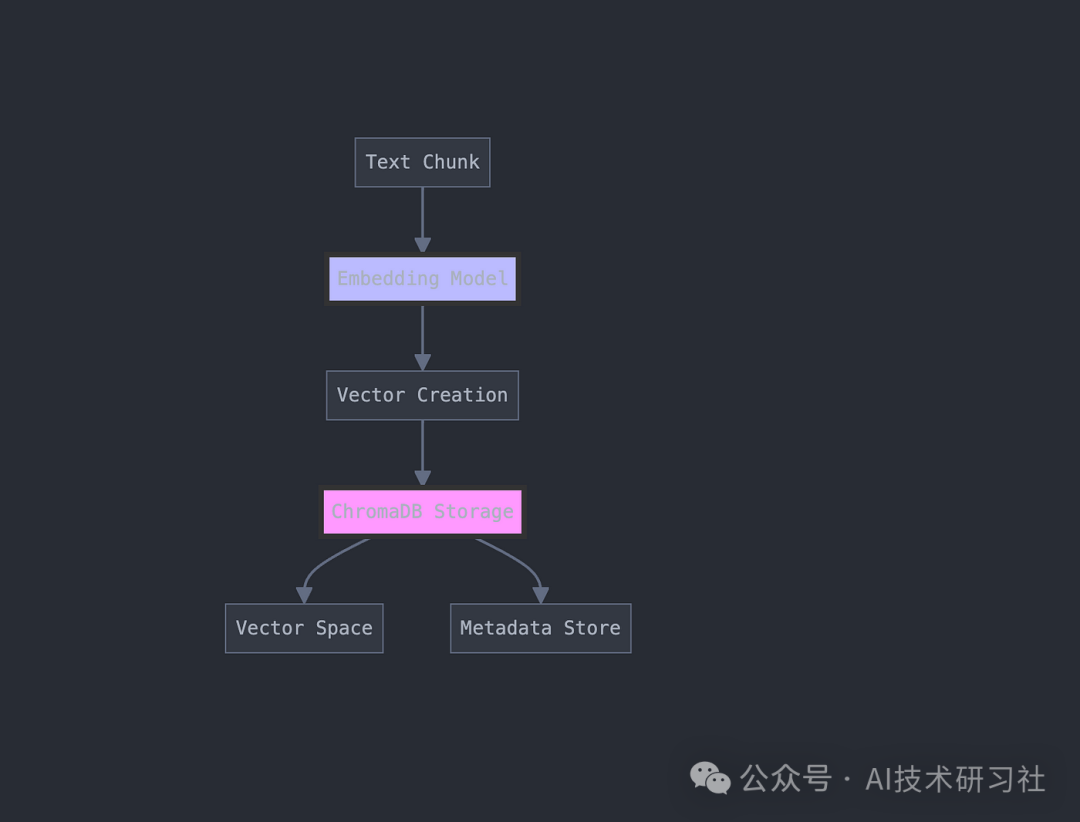
以下是使用 ChromaDB 实现这一点:
class ChromaDBManager:def __init__(self, persist_directory: str):self.client = chromadb.PersistentClient(path=persist_directory)self.embedding_function = embedding_functions.DefaultEmbeddingFunction()def add_documents(self, collection_name: str, documents: List[LangchainDocument]):"""Store documents with their vector embeddings"""collection = self.get_or_create_collection(collection_name)# Prepare documents for storagedocs = [doc.page_content for doc in documents]metadatas = [doc.metadata for doc in documents]ids = [f"{doc.metadata['file_hash']}_{doc.metadata['chunk_index']}"for doc in documents]# Store in ChromaDBcollection.add(documents=docs,metadatas=metadatas,ids=ids)
3. 检索机制
将问题转换到相同的向量空间,检索相关文档块。
def query_database(self, query: str, n_results: int = 3) -> Dict:"""Execute a semantic search query"""try:results = self.collection.query(query_texts=[query],n_results=n_results)return resultsexcept Exception as e:self.logger.error(f"Error querying database: {str(e)}")return None
4. 查询处理
这是将用户问题转化为可操作搜索的地方:
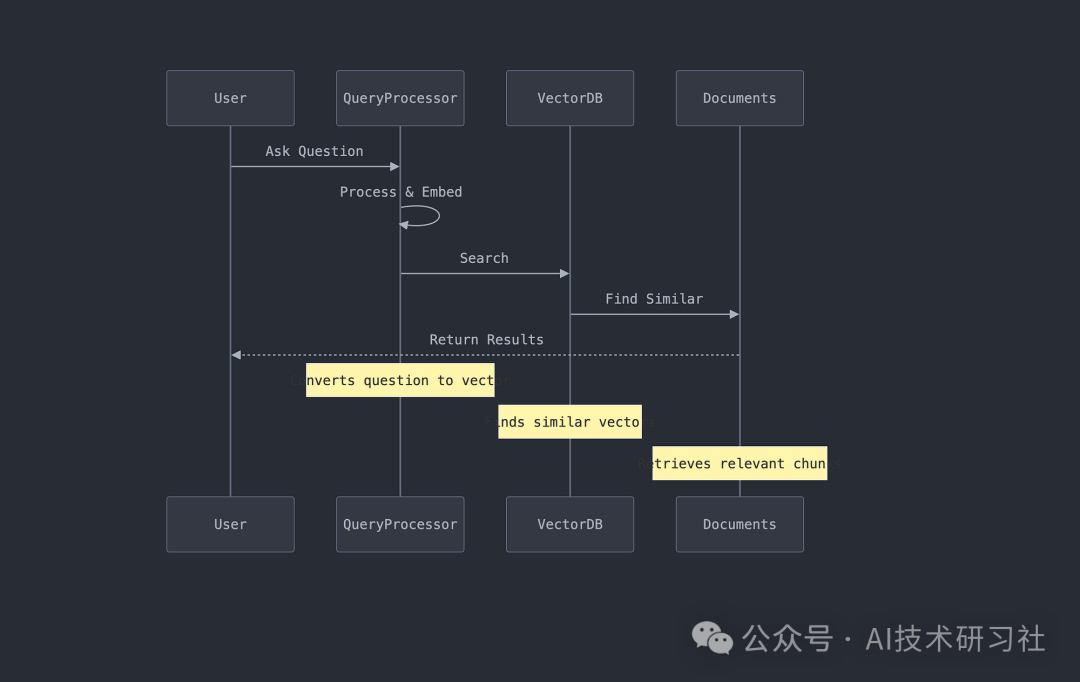
# Traditional Searchresults = database.find({"$text": {"$search": "revenue growth 2023"}})# RAG Searchresults = rag_pipeline.query("How did our revenue grow in 2023 compared to previous years?")
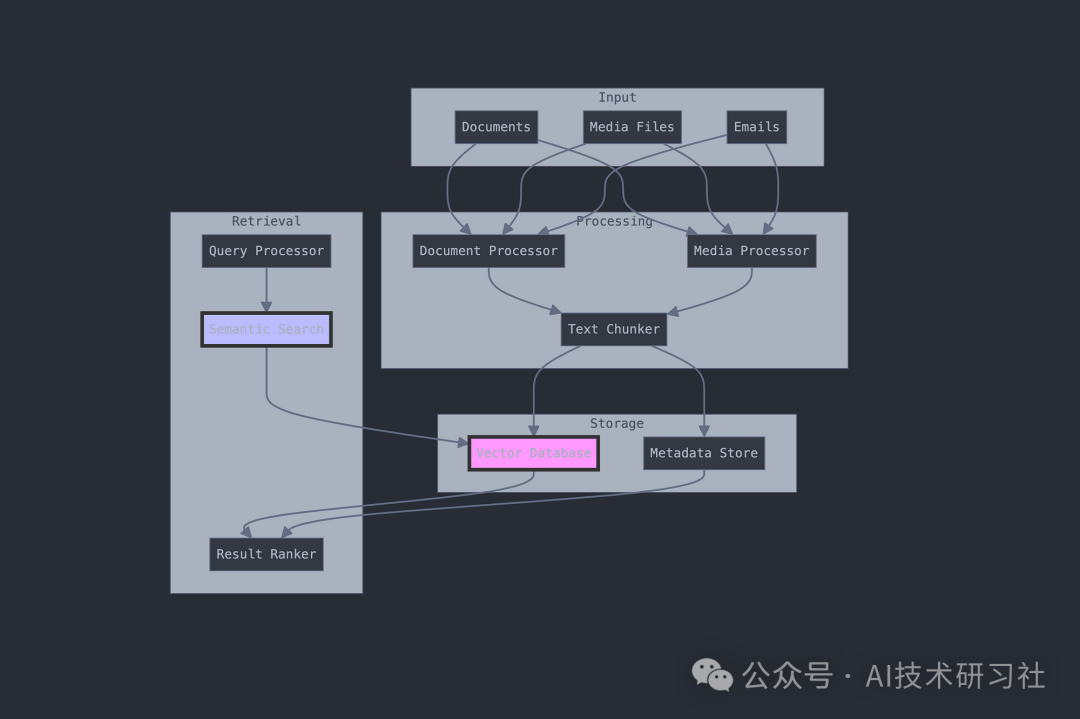
数据流处理,媒体处理:
class MediaProcessor:def __init__(self, config: FileConfig):self.whisper_model = whisper.load_model(config.whisper_model_size,device=config.device)def process_media(self, file_path: str) -> str:"""Process audio and video files"""file_ext = Path(file_path).suffix.lower()# Handle video filesif file_ext in ['.mp4', '.avi', '.mov']:audio_path = self.extract_audio(file_path)return self.transcribe_audio(audio_path)# Handle audio fileselif file_ext in ['.mp3', '.wav', '.m4a']:return self.transcribe_audio(file_path)
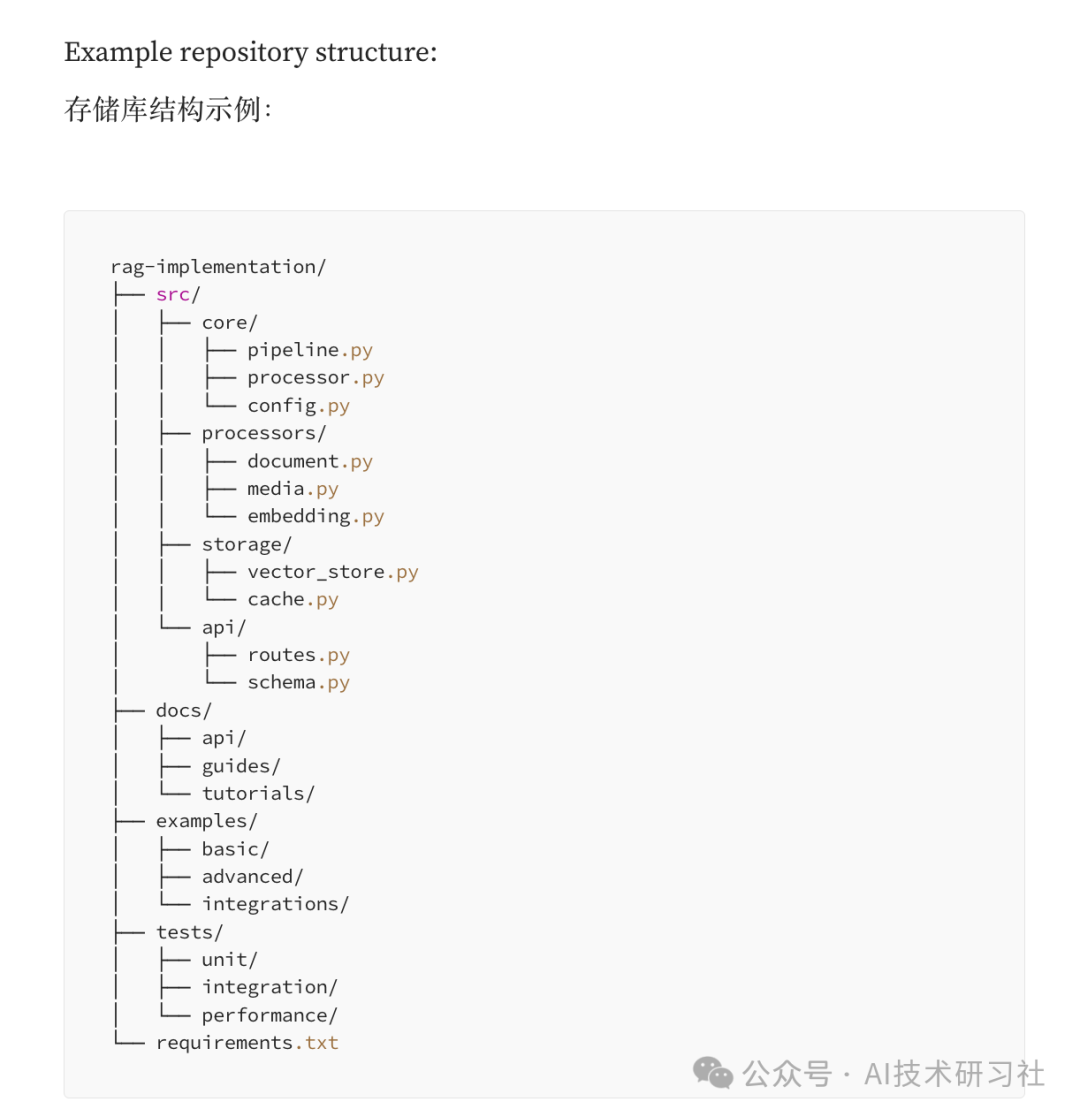
内容比较多,未完,上面是部分代码,整个代码结构如下:
结论:构建企业级 RAG 管道就像构建一个智能图书馆,它不仅可以存储文档,还可以智能地理解和检索它们。通过本文,我们介绍了如何构建一个系统。
完整代码参考资料:https://levelup.gitconnected.com/the-ultimate-rag-pipeline-building-scalable-document-intelligence-systems-5c8d835df6c4
