
一.Oracle 坏块类型说明二.Oracle 物理坏块分类三.Oracle 物理坏块模拟四.Oracle 坏块查询方法汇总五.Oracle 坏块解决

一.Oracle 坏块类型说明
下面内容整理自 Doc ID 1545366.1 和 Doc ID 840978.1 部分内容:
Physical Corrupted Blocks consisting of all Zeroes indicate a problem with OS, HW or Storage (Doc ID 1545366.1)
Oracle检测、防止并尝试修复不同类型的块损坏。
损坏块是指已被更改的块,与Oracle数据库期望找到的块不同。本说明涵盖了三种数据块损坏类型:
1.在物理块损坏(也称为媒体损坏)中,数据库根本无法识别该块:校验和无效,块包含全零,块的页眉和页脚不匹配,或者关键数据块数据结构之一不正确,如数据块地址(DBA)。
In a physical block corruption, which is also called a media corruption, the database does not recognize the block at all: the checksum is invalid, the block contains all zeros, the header and footer of the block do not match or one of the key data block data structure is incorrect such as the data block address (DBA).
2.在逻辑块损坏中,块的内容在物理上是健全的,并且通过了物理块检查;然而,该块在逻辑上可能不一致。逻辑损坏的示例包括行或索引条目的损坏。
In a logical block corruption, the contents of the block are physically sound and pass the physical block checks; however the block can be logically inconsistent. Examples of logical corruption include corruption of a row piece or index entry.
3.由杂散写入、丢失写入或错误定向写入引起的块损坏也会对数据库可用性造成严重破坏。数据块在物理或逻辑上可能是正确的,但在这种情况下,块的内容较旧、过时或位置错误。
Block corruptions caused by stray writes, lost writes or misdirected writes can also cause havoc to your database availability. The data block may be physically or logically correct but in this case the block’s content is older or stale or in the wrong location.
块损坏也可分为块间(interblock)损坏和块内(intrablock)损坏:
Block corruptions can also be divided into interblock corruption and intrablock corruption:
在块内损坏中,损坏发生在块本身,可以是物理损坏或逻辑损坏。
In intrablock corruption, the corruption occurs in the block itself and can be either a physical or a logical corruption.
在块间损坏中,损坏发生在块之间,并且只能是逻辑损坏。
In an interblock corruption, the corruption occurs between blocks and can only be a logical corruption.
Physical and Logical Block Corruptions. All you wanted to know about it. (Doc ID 840978.1)
物理坏块:
Physical Block CorruptionsThis kind of block corruptions are normally reported by Oracle with error ORA-1578 and the detailed corruption description is printed in the alert log.
这种块损坏通常由Oracle报告,错误为ORA-1578,详细的损坏描述打印在警报日志中。
物理坏块有哪些类型:
Corruption Examples are:1.Bad headerthe beginning of the block (cache header) is corrupt with invalid values块的开头(cache header)被无效值损坏2.The block is Fractured/Incompleteheader and footer of the block do not match块的header和footer不匹配3.The block checksum is invalid块校验和无效4.The block is misplaced块放错地方了5.Zeroed out blocks清零块
逻辑坏块:
Logical Block Corruptions
这是当块包含有效的校验和并且块开头以下的结构已损坏时(块内容已损坏)。
This is when block contains a valid checksum and the structure below the beginning of the block is corrupt (Block content is corrupt).
它可能会导致不同的ORA-600错误。
It may cause different ORA-600 errors.
逻辑损坏的详细损坏描述通常不会打印在alert.log中。
The detailed corruption description for Logical Corruptions are not normally printed in the alert.log.
DBVerify将报告块中逻辑损坏的内容。
DBVerify will report what is logically corrupted in the block.
Corruption Examples are:
1.被不存在的事务锁定了行 - ORA-600 [4512] 等;1.row locked by non-existent transaction - ORA-600 [4512], etc2.使用的空间量不等于块大小avsp bad2.the amount of space used is not equal to block size avsp bad3.etc.
启用 db_block_checking 时,可能会产生内部错误 ORA-600 [kddummy_blkchk] 或 ORA-600 [kdBlkCheckError]。
When db_block_checking is enabled, it may produce the internal errors ORA-600 [kddummy_blkchk] or ORA-600 [kdBlkCheckError].
如果启用了 db_block_checking,并且该块在磁盘上已经发生逻辑损坏,则下一次块更新将该块标记为软损坏,并且将来读取该块将产生错误 ORA-1578。
If db_block_checking is enabled and the block is already logically corrupt on disk, the next block update will mark the block as Soft Corrupt and future reads of this block will produce the error ORA-1578.
在这种情况下,DBVerify会报告此损坏,并显示错误"DBV-200: Block, dba <rdba>, already marked corrupted"。参考:1496934.1

二.Oracle 物理坏块分类
1.Fractured Block
断块意味着块体不完整。
块头中的信息与块尾不匹配。
A Fractured block means that the block is incomplete.Information from the block header does not match the block tail.
示例如下:
Corrupt block relative dba: 0x0380e573 (file 14, block 58739)Fractured block found during buffer readData in bad block -type: 6 format: 2 rdba: 0x0380e573last change scn: 0x0288.8e5a2f78 seq: 0x1 flg: 0x04consistency value in tail: 0x00780601check value in block header: 0x8739, computed block checksum: 0x2f00spare1: 0x0, spare2: 0x0, spare3: 0x0***Reread of rdba: 0x0380e573 (file 14, block 58739) found same corrupted data
2.Bad Checksum
块校验和用于识别块是否被Oracle外部的东西更改,以及在Oracle上次写入块之后。
Block Checksums are used to identify if the block was changed by something external to Oracle and after the block was last written by Oracle.
校验和是在将块写入磁盘之前由DBWR或direct loader计算的,并存储在块头中。
Checksum is calculated by DBWR or direct loader before writing the block to disk and stored in the block header.
每次读取块时,如果 db_block_checksum 不同于false,Oracle都会计算一个校验和,并将其与块标头中存储的校验和进行比较。
Every time that the block is read and if db_block_checksum is different than false, Oracle calculates a checksum and compares it to the one stored in the block header.
示例如下:
Example of a corrupt block due to invalid checksum:Corrupt block relative dba: 0x0380a58f (file 14, block 42383)Bad check value found during buffer readData in bad block -type: 6 format: 2 rdba: 0x0380a58flast change scn: 0x0288.7784c5ee seq: 0x1 flg: 0x06consistency value in tail: 0xc5ee0601check value in block header: 0x68a7, computed block checksum: 0x2f00spare1: 0x0, spare2: 0x0, spare3: 0x0***Reread of rdba: 0x0380a58f (file 14, block 42383) found same corrupted data
“计算块校验和”中的值不同于零(0x0)表示校验和不同,并打印此比较的结果。
A value different than zero (0x0) in "computed block checksum" means that the checksum differs and the result of this comparison is printed.
Init.ora Parameter "DB_BLOCK_CHECKSUM" Reference Note (Doc ID 30706.1)
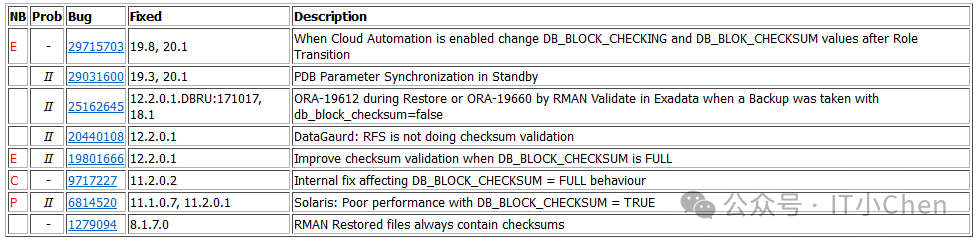
3.Block Misplaced
此时,Oracle检测到正在读取的块的内容属于另一个块,并且校验和有效:
This is when Oracle detected that the content of the block being read belongs to a different block and the checksum is valid:
示例如下:
Corrupt block relative dba: 0x0d805a89 (file 54, block 23177)Bad header found during buffer readData in bad block -type: 6 format: 2 rdba: 0x0d805b08 ----> Block is different than expected 0x0d805a89last change scn: 0x0692.86dc08e3 seq: 0x1 flg: 0x04consistency value in tail: 0x08e30601check value in block header: 0x2a6e, computed block checksum: 0x0spare1: 0x0, spare2: 0x0, spare3: 0x0***
4.Zeroed out blocks
Physical Corrupted Blocks consisting of all Zeroes indicate a problem with OS, HW or Storage (Doc ID 1545366.1)
本说明重点介绍物理块损坏,特别是包含全零的损坏块。
This note focuses on physical block corruptions specifically a corrupted block containing all zeros.
Oracle的设计不是写全零的块。
Oracle by design does not write blocks of all zeroes.
这样做是为了轻松识别底层操作系统、硬件或存储中的问题。
This is done to easily identify problems in the underlying operating system, hardware or storage.
这是由默认情况下在写入任何数据或redo重做块之前启用的Oracle检查强制执行的。
This is enforced by Oracle checks that are enabled by default before writing any data or redo block.
启用这些检查不需要特殊的参数,也没有人可以禁用它们。
No special parameters are needed to enable these checks nor can anyone disable them.
将更改写入磁盘的每个Oracle进程都遵守这些规则。
Every Oracle process that writes changes to the disk abides by these rules.
Oracle发现了硬件、操作系统、固件和存储中的错误,这些错误会导致零输出块。
Oracle has seen bugs in hardware, operating system, firmware and storage that result in zero out blocks.
Oracle故意避免写入完整的零块,因此很容易检测到外部力量何时导致这些数据块损坏。
Oracle deliberately avoids writing complete zero blocks so it easily detects when external forces caused these data block corruptions.
每个Oracle数据块、控制文件、redo和tempblocks都印有最低限度的元数据集。
Every Oracle data block, controlfile, redo and tempblocks are stamped with minimally set of meta data.
对于数据块,每个块的格式都包括数据文件中的块偏移地址(rdba)、块格式、flag标志、tail尾部和checksum校验和。
For data blocks, each block is formatted to include the block offset address (rdba), block format, a flag, tail and checksum within the datafile.
当创建新的数据文件时,Oracle会用这些字段标记每个块。
When a new datafile is created, Oracle stamps every block with these fields.
重做日志在数据库中使用之前也会进行类似的预格式化或初始化。
Redo logs are similarly pre-formatted or initialized before being used in the database.
在Oracle向操作系统发出write()调用之前,也会在数据库的最低级别检查确保Oracle从不写入清零块。
Ensuring Oracle never writes zeroed out blocks is also checked at the lowest levels of the database, right before Oracle issues the write() call to the Operating System.
如果Oracle RDBMS在向操作系统发出写入时检测到全零块,则会产生错误ORA-600,或者在警报日志中报告该块已损坏;
If the Oracle RDBMS detects an all-zero block at the point of the write is issued to the operating system, an error ORA-600 is produced or the block is reported as corrupt in the alert log;
则该块不会写入磁盘。
the block then is not written to disk.
存储供应商已经实施了基于Oracle不写零设计的检查。
Storage vendors have implemented checks based on the Oracle design of not writing zeros.
一些存储供应商现在会检查此Oracle属性(不写入零块),以避免操作系统或存储造成的一些损坏。
This Oracle property (not writing zero blocks) is now checked by some storage vendors to avoid some of these corruptions caused by operating system or storage.
EMC双校验和检查Oracle块中的非零DBA字段。根据定义,全零块无法通过检查。
EMC Double Checksum checks for a non-zero DBA field in Oracle blocks. An all-zero block by definition fails checks.
Hitachi数据库验证器执行相同的检查。
Hitachi Database Validator performs the same check.
Oracle Exadata执行这些以及其他更全面的(HARD)检查。
Oracle Exadata performs these, and additional, more comprehensive (HARD) checks.
如果Oracle编写了所有零块,它就永远不会允许这些检查被实现到第三方硬件中。
If Oracle wrote all-zero blocks, it would never have allowed these checks to be implemented into third-party hardware.
结论
Conclusion
如果数据库损坏 zero-out blocks,那么Oracle下面的操作系统或存储子系统肯定有问题。
您可以通知Oracle支持部门,但要与您的操作系统或存储供应商合作以确定问题。
If the database is corrupt with zero-out blocks, then there is definitely some issue with the OS or storage subsystem below Oracle.You may notify Oracle Support but work with your OS or storage vendor to identify the issue.
要修复损坏,请使用RMAN块介质恢复,如144911.1所述,或者如果备份不可用,请参考1578.1中的"Database in NOARCHIVELOG mode or there is not a valid backup".
To repair the corruption use RMAN block media recovery as described in Note 144911.1 or if a backup is not available reference section "Database in NOARCHIVELOG mode or there is not a valid backup" in Note 1578.1

三:Oracle 物理坏块的模拟
先备份全库
RMAN> backup database format '/back/rman/cjc_%d_%T_%U.bak';
1.OS Block Header
the beginning of the block(cache header) is corrupt with invalid values
Oracle数据库,块头为20字节,定义如下:
struct kcbh{ub1 type_kcbh; * block type */ub2 frmt_kcbh;ub1 spare1_kcbh;ub1 spare2_kcbh;krdba rdba_kcbh; * relative DBA */ub4 bas_kcbh; * base of SCN */ub2 wrp_kcbh; * wrap of SCN */ub1 seq_kcbh; * sequence # of changes at the same scn */ub1 flg_kcbh;ub2 chkval_kcbh;};
在块头中, seq_kcbh (占用1字节,块头偏移14)有着特殊的含义,如果该值为0xff,则表示该块被标记为corruption。
oracle@cjc-db-01:/home/oracle$sqlplus as sysdbaconn cjc/******create table cjc.t1(id int,name varchar(20));insert into cjc.t1 values(1,'cjc');insert into cjc.t1 values(2,'chen');commit;
select dbms_rowid.rowid_relative_fno(rowid) file#,dbms_rowid.rowid_block_number(rowid) block#,id,name from cjc.t1;FILE# BLOCK# ID NAME---------- ---------- ---------- --------------------5 132 1 cjc5 132 2 chen
select header_file,header_block from dba_segments where segment_name='T1' and owner='CJC';HEADER_FILE HEADER_BLOCK----------- ------------5 130alter system flush buffer_cache;
oracle@cjc-db-01:/home/oracle$bbedBBED: Release 2.0.0.0.0 - Limited Production on Tue Oct 29 16:14:06 2024Copyright (c) 1982, 2011, Oracle and/or its affiliates. All rights reserved.************* !!! For Oracle Internal Use only !!! ***************BBED> infoFile# Name Size(blks)----- ---- ----------1 db/oradata/cjc/system01.dbf 1510402 db/oradata/cjc/sysaux01.dbf 1446403 db/oradata/cjc/undotbs01.dbf 89604 db/oradata/cjc/users01.dbf 6405 db/oradata/cjc/cjc01.dbf 12806 db/oradata/cjc/control01.ctl 1190BBED> set file 5 block 132BBED> dump vBBED> p kcbhstruct kcbh, 20 bytes @0ub1 type_kcbh @0 0x06ub1 frmt_kcbh @1 0xa2ub1 spare1_kcbh @2 0x00ub1 spare2_kcbh @3 0x00ub4 rdba_kcbh @4 0x01400084ub4 bas_kcbh @8 0x00963dd1ub2 wrp_kcbh @12 0x0000ub1 seq_kcbh @14 0x01ub1 flg_kcbh @15 0x06 (KCBHFDLC, KCBHFCKV)ub2 chkval_kcbh @16 0x85adub2 spare3_kcbh @18 0x0000BBED> modify x ff offset 14BBED> sum applyCheck value for File 5, Block 132:current = 0x8553, required = 0x8553
查询表cjc.t1
SQL> select * from cjc.t1;select * from cjc.t1*ERROR at line 1:ORA-01578: ORACLE data block corrupted (file # 5, block # 132)ORA-01110: data file 5: '/db/oradata/cjc/cjc01.dbf
告警日志如下:
Corrupt block relative dba: 0x01400084 (file 5, block 132)Fractured block found during multiblock buffer read......check value in block header: 0x8553
详细日志如下:
Tue Oct 29 16:18:10 2024Hex dump of (file 5, block 132) in trace file db/oracle/app/oracle/diag/rdbms/cjc/cjc/trace/cjc_ora_10870.trcCorrupt block relative dba: 0x01400084 (file 5, block 132)Fractured block found during multiblock buffer readData in bad block:type: 6 format: 2 rdba: 0x01400084last change scn: 0x0000.00963dd1 seq: 0xff flg: 0x06spare1: 0x0 spare2: 0x0 spare3: 0x0consistency value in tail: 0x3dd10601check value in block header: 0x8553computed block checksum: 0x0Reading datafile '/db/oradata/cjc/cjc01.dbf' for corruption at rdba: 0x01400084 (file 5, block 132)Reread (file 5, block 132) found same corrupt data (no logical check)Tue Oct 29 16:18:10 2024Corrupt Block FoundTSN = 6, TSNAME = CJCRFN = 5, BLK = 132, RDBA = 20971652OBJN = 91201, OBJD = 91201, OBJECT = T1, SUBOBJECT =SEGMENT OWNER = CJC, SEGMENT TYPE = Table SegmentCorrupt Block FoundTSN = 6, TSNAME = CJCRFN = 5, BLK = 132, RDBA = 20971652OBJN = 91201, OBJD = 91201, OBJECT = T1, SUBOBJECT =SEGMENT OWNER = CJC, SEGMENT TYPE = Table SegmentErrors in file db/oracle/app/oracle/diag/rdbms/cjc/cjc/trace/cjc_ora_10870.trc (incident=91612):ORA-01578: ORACLE data block corrupted (file # 5, block # 132)ORA-01110: data file 5: '/db/oradata/cjc/cjc01.dbf'Incident details in: db/oracle/app/oracle/diag/rdbms/cjc/cjc/incident/incdir_91612/cjc_ora_10870_i91612.trcErrors in file db/oracle/app/oracle/diag/rdbms/cjc/cjc/trace/cjc_ora_10870.trc (incident=91613):ORA-01578: ORACLE data block corrupted (file # 5, block # 132)ORA-01110: data file 5: '/db/oradata/cjc/cjc01.dbf'Incident details in: db/oracle/app/oracle/diag/rdbms/cjc/cjc/incident/incdir_91613/cjc_ora_10870_i91613.trcTue Oct 29 16:18:11 2024Sweep [inc][91612]: completedHex dump of (file 5, block 132) in trace file db/oracle/app/oracle/diag/rdbms/cjc/cjc/incident/incdir_91612/cjc_m000_10876_i91612_a.trcCorrupt block relative dba: 0x01400084 (file 5, block 132)Fractured block found during validationData in bad block:type: 6 format: 2 rdba: 0x01400084last change scn: 0x0000.00963dd1 seq: 0xff flg: 0x06spare1: 0x0 spare2: 0x0 spare3: 0x0consistency value in tail: 0x3dd10601check value in block header: 0x8553computed block checksum: 0x0Reread of blocknum=132, file=/db/oradata/cjc/cjc01.dbf. found same corrupt dataReread of blocknum=132, file=/db/oradata/cjc/cjc01.dbf. found same corrupt dataReread of blocknum=132, file=/db/oradata/cjc/cjc01.dbf. found same corrupt dataReread of blocknum=132, file=/db/oradata/cjc/cjc01.dbf. found same corrupt dataReread of blocknum=132, file=/db/oradata/cjc/cjc01.dbf. found same corrupt dataTue Oct 29 16:18:11 2024Dumping diagnostic data in directory=[cdmp_20241029161811], requested by (instance=1, osid=10870), summary=[incident=91612].Checker run found 1 new persistent data failures
2.The block is Fractured/Incomplete
header and footer of the block do not matchA Fractured block means that the block is incomplete.Information from the block header does not match the block tail.
oracle@cjc-db-01:/home/oracle$sqlplus as sysdbaconn cjc/******create table cjc.t2(id int,name varchar(20));insert into cjc.t2 values(1,'cjc');insert into cjc.t2 values(2,'chen');commit;
select dbms_rowid.rowid_relative_fno(rowid) file#,dbms_rowid.rowid_block_number(rowid) block#,id,name from cjc.t2;FILE# BLOCK# ID NAME---------- ---------- ---------- --------------------5 151 1 cjc5 151 2 chenselect header_file,header_block from dba_segments where segment_name='T2' and owner='CJC';HEADER_FILE HEADER_BLOCK----------- ------------5 146
oracle@cjc-db-01:/home/oracle$bbedBBED: Release 2.0.0.0.0 - Limited Production on Tue Oct 29 16:14:06 2024Copyright (c) 1982, 2011, Oracle and/or its affiliates. All rights reserved.************* !!! For Oracle Internal Use only !!! ***************BBED> infoFile# Name Size(blks)----- ---- ----------1 db/oradata/cjc/system01.dbf 1510402 db/oradata/cjc/sysaux01.dbf 1446403 db/oradata/cjc/undotbs01.dbf 89604 db/oradata/cjc/users01.dbf 6405 db/oradata/cjc/cjc01.dbf 12806 db/oradata/cjc/control01.ctl 1190BBED> set file 5 block 151BBED> map v......ub4 tailchk @8188BBED> dump v offset 8188File: db/oradata/cjc/cjc01.dbf (5)Block: 151 Offsets: 8188 to 8191 Dba:0x01400097-------------------------------------------------------0106c5c6 l ....
BBED> modify x 0106c5c5 offset 8188BBED> sum apply
SQL> alter system flush buffer_cache;SQL> select * from cjc.t2;select * from cjc.t2*ERROR at line 1:ORA-01578: ORACLE data block corrupted (file # 5, block # 151)ORA-01110: data file 5: '/db/oradata/cjc/cjc01.dbf'
告警日志:
Corrupt block relative dba: 0x01400097 (file 5, block 151)Fractured block found during multiblock buffer read
详细日志如下:
oracle@cjc-db-01:/db/oracle/app/oracle/diag/rdbms/cjc/cjc/trace$tail -100f alert_cjc.log......Wed Oct 30 12:33:21 2024ALTER SYSTEM: Flushing buffer cacheHex dump of (file 5, block 151) in trace file db/oracle/app/oracle/diag/rdbms/cjc/cjc/trace/cjc_ora_29224.trcCorrupt block relative dba: 0x01400097 (file 5, block 151)Fractured block found during multiblock buffer readData in bad block:type: 6 format: 2 rdba: 0x01400097last change scn: 0x0000.0096c6c5 seq: 0x1 flg: 0x06spare1: 0x0 spare2: 0x0 spare3: 0x0consistency value in tail: 0xc5c50601check value in block header: 0xd040computed block checksum: 0x0Reading datafile '/db/oradata/cjc/cjc01.dbf' for corruption at rdba: 0x01400097 (file 5, block 151)Reread (file 5, block 151) found same corrupt data (no logical check)Wed Oct 30 12:33:26 2024Corrupt Block FoundTSN = 6, TSNAME = CJCRFN = 5, BLK = 151, RDBA = 20971671OBJN = 91214, OBJD = 91214, OBJECT = T2, SUBOBJECT =SEGMENT OWNER = CJC, SEGMENT TYPE = Table SegmentCorrupt Block FoundTSN = 6, TSNAME = CJCRFN = 5, BLK = 151, RDBA = 20971671OBJN = 91214, OBJD = 91214, OBJECT = T2, SUBOBJECT =SEGMENT OWNER = CJC, SEGMENT TYPE = Table SegmentErrors in file db/oracle/app/oracle/diag/rdbms/cjc/cjc/trace/cjc_ora_29224.trc (incident=91637):ORA-01578: ORACLE data block corrupted (file # 5, block # 151)ORA-01110: data file 5: '/db/oradata/cjc/cjc01.dbf'Incident details in: db/oracle/app/oracle/diag/rdbms/cjc/cjc/incident/incdir_91637/cjc_ora_29224_i91637.trcWed Oct 30 12:33:27 2024Sweep [inc][91637]: completedSweep [inc2][91637]: completedSweep [inc2][91636]: completedWed Oct 30 12:33:27 2024Dumping diagnostic data in directory=[cdmp_20241030123327], requested by (instance=1, osid=29224), summary=[incident=91637].
3.The block checksum is invalid
Bad Checksum
oracle@cjc-db-01:/home/oracle$sqlplus as sysdbaconn cjc/******create table cjc.t3(id int,name varchar(20));insert into cjc.t3 values(1,'cjc');insert into cjc.t3 values(2,'chen');commit;
select dbms_rowid.rowid_relative_fno(rowid) file#,dbms_rowid.rowid_block_number(rowid) block#,id,name from cjc.t3;FILE# BLOCK# ID NAME---------- ---------- ---------- --------------------5 143 1 cjc5 143 2 chenSQL> alter system flush buffer_cache;
BBED> set file 5 block 143BBED> p chkval_kcbhub2 chkval_kcbh @16 0xd84fBBED>Check value for File 5, Block 143:current = 0xd84f, required = 0xd84f
dump数据块
可以看到 0xd84f 反序 4fd8
BBED> dump v count 8192File: /oracle/app/oracle/oradata/cjc/cjc01.dbf (5)Block: 143 Offsets: 16 to 8191 Dba:0x0140008f-------------------------------------------------------4fd80000 01000000 42550100 21c70e00 l O.......BU..!...00000000 02003200 88004001 07000c00 l ......2...@.....94020000 e200c000 65000d00 02200000 l ........e.... ..23c70e00 00000000 00000000 00000000 l #...............00000000 00000000 00000000 00000000 l ................00000000 00010200 ffff1600 831f6d1f l ..............m.6d1f0000 02008e1f 831f0000 00000000 l m...............00000000 00000000 00000000 00000000 l ......................00000000 00000000 00000000 00000000 l ................00000000 00000000 00000000 00000000 l ................00000000 0000002c 010202c1 03046368 l .......,......ch656e2c01 0202c102 03636a63 010623c7 l en,......cjc..#.<16 bytes per line>
---4632
select spid from v$process where addr in (select paddr from v$session where sid = (select sid from v$mystat where rownum=1));alter system dump datafile 5 block 143;SQL> show parameter user_dump_destNAME TYPE VALUE------------------------------------ ----------- ------------------------------user_dump_dest string oracle/app/oracle/diag/rdbms/cjc/cjc/trace[oracle@cjc-db-01 trace]$ cp cjc_ora_4632.trc home/oracle/tmp/[oracle@cjc-db-01 trace]$ vi home/oracle/tmp/cjc_ora_4632.trc......Start dump data blocks tsn: 6 file#:5 minblk 143 maxblk 143Block dump from cache:Dump of buffer cache at level 4 for tsn=6 rdba=20971663BH (0x71bdf600) file#: 5 rdba: 0x0140008f (5/143) class: 1 ba: 0x718f8000set: 3 pool: 3 bsz: 8192 bsi: 0 sflg: 2 pwc: 0,28dbwrid: 0 obj: 87362 objn: 87362 tsn: 6 afn: 5 hint: fhash: [0x73fdb758,0x80209960] lru: [0x71ff6d18,0x73fdb790]lru-flags: on_auxiliary_listckptq: [NULL] fileq: [NULL] objq: [NULL] objaq: [NULL]st: FREE md: NULL fpin: 'ktspbwh2: ktspfmdb' tch: 0 lfb: 33flags:Block dump from disk:buffer tsn: 6 rdba: 0x0140008f (5/143)scn: 0x0000.000ec723 seq: 0x01 flg: 0x06 tail: 0xc7230601frmt: 0x02 chkval: 0xd84f type: 0x06=trans dataHex dump of block: st=0, typ_found=1Dump of memory from 0x00007FFFF4C18200 to 0x00007FFFF4C1A2007FFFF4C18200 0000A206 0140008F 000EC723 06010000 [......@.#.......]7FFFF4C18210 0000D84F 00000001 00015542 000EC721 [O.......BU..!...]7FFFF4C18220 00000000 00320002 01400088 000C0007 [......2...@.....]7FFFF4C18230 00000294 00C000E2 000D0065 00002002 [........e.... ..]......7FFFF4C1A1E0 00000000 2C000000 C1020201 68630403 [.......,......ch]7FFFF4C1A1F0 012C6E65 02C10202 636A6303 C7230601 [en,......cjc..#.]Block header dump: 0x0140008f......block_row_dump:tab 0, row 0, @0x1f8etl: 10 fb: --H-FL-- lb: 0x1 cc: 2col 0: [ 2] c1 02col 1: [ 3] 63 6a 63tab 0, row 1, @0x1f83tl: 11 fb: --H-FL-- lb: 0x1 cc: 2col 0: [ 2] c1 03col 1: [ 4] 63 68 65 6eend_of_block_dumpEnd dump data blocks tsn: 6 file#: 5 minblk 143 maxblk 143
SQL> select dump(1,16) from dual;DUMP(1,16)-----------------Typ=2 Len=2: c1,2SQL> select dump(2,16) from dual;DUMP(2,16)-----------------Typ=2 Len=2: c1,3SQL> select dump('cjc',16) from dual;DUMP('CJC',16)----------------------Typ=96 Len=3: 63,6a,63SQL> select dump('chen',16) from dual;DUMP('CHEN',16)-------------------------Typ=96 Len=4: 63,68,65,6e
SQL> shutdown immediate[oracle@cjc-db-01 cjc]$ dd if=/oracle/app/oracle/oradata/cjc/cjc01.dbf of=/home/oracle/tmp/1102_cjc01.dbf count=1 skip=143 bs=81921+0 records in1+0 records out8192 bytes (8.2 kB) copied, 0.000160868 s, 50.9 MB/s
需要edit文本编辑工具打开,将 cjc 修改为 chc
[oracle@cjc-db-01 1102]$ ls -lrthtotal 8.0K-rw-r--r-- 1 oracle oinstall 8.0K Nov 2 15:57 1102_cjc01.dbf
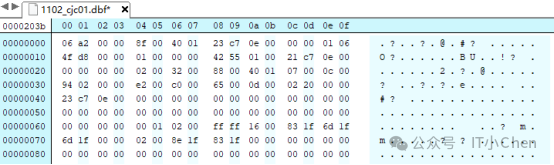
......

将 6a 改成 68,也就是将数据cjc改成chc。

保存,上传回服务器
[oracle@cjc-db-01 1102]$ dd if=/home/oracle/tmp/1102/1102_cjc01.dbf of=/oracle/app/oracle/oradata/cjc/cjc01.dbf bs=8192 seek=143 count=1 conv=notrunc1+0 records in1+0 records out8192 bytes (8.2 kB) copied, 0.000253211 s, 32.4 MB/s
启动数据库
SQL> startup
查询表
SQL> select * from cjc.t3;select * from cjc.t3*ERROR at line 1:ORA-01578: ORACLE data block corrupted (file # 5, block # 143)ORA-01110: data file 5: '/oracle/app/oracle/oradata/cjc/cjc01.dbf'
告警日志如下:
Sat Nov 02 16:01:39 2024Hex dump of (file 5, block 143) in trace file oracle/app/oracle/diag/rdbms/cjc/cjc/trace/cjc_ora_8982.trcCorrupt block relative dba: 0x0140008f (file 5, block 143)Bad check value found during multiblock buffer readData in bad block:type: 6 format: 2 rdba: 0x0140008flast change scn: 0x0000.000ec723 seq: 0x1 flg: 0x06spare1: 0x0 spare2: 0x0 spare3: 0x0consistency value in tail: 0xc7230601check value in block header: 0xd84fcomputed block checksum: 0x2Reading datafile '/oracle/app/oracle/oradata/cjc/cjc01.dbf' for corruption at rdba: 0x0140008f (file 5, block 143)Reread (file 5, block 143) found same corrupt data (no logical check)Errors in file oracle/app/oracle/diag/rdbms/cjc/cjc/trace/cjc_ora_8982.trc (incident=171800):ORA-01578: ORACLE data block corrupted (file # 5, block # 143)ORA-01110: data file 5: '/oracle/app/oracle/oradata/cjc/cjc01.dbf'Incident details in: oracle/app/oracle/diag/rdbms/cjc/cjc/incident/incdir_171800/cjc_ora_8982_i171800.trcSat Nov 02 16:01:41 2024Corrupt Block FoundTSN = 6, TSNAME = CJCRFN = 5, BLK = 143, RDBA = 20971663OBJN = 87362, OBJD = 87362, OBJECT = T3, SUBOBJECT =SEGMENT OWNER = CJC, SEGMENT TYPE = Table SegmentCorrupt Block FoundTSN = 6, TSNAME = CJCRFN = 5, BLK = 143, RDBA = 20971663OBJN = 87362, OBJD = 87362, OBJECT = T3, SUBOBJECT =SEGMENT OWNER = CJC, SEGMENT TYPE = Table SegmentSat Nov 02 16:01:46 2024Dumping diagnostic data in directory=[cdmp_20241102160146], requested by (instance=1, osid=8982), summary=[incident=171800].Errors in file oracle/app/oracle/diag/rdbms/cjc/cjc/trace/cjc_ora_8982.trc (incident=171801):ORA-01578: ORACLE data block corrupted (file # 5, block # 143)ORA-01110: data file 5: '/oracle/app/oracle/oradata/cjc/cjc01.dbf'Incident details in: oracle/app/oracle/diag/rdbms/cjc/cjc/incident/incdir_171801/cjc_ora_8982_i171801.trcSat Nov 02 16:01:47 2024Sweep [inc][171800]: completedHex dump of (file 5, block 143) in trace file oracle/app/oracle/diag/rdbms/cjc/cjc/incident/incdir_171800/cjc_m000_9003_i171800_a.trcCorrupt block relative dba: 0x0140008f (file 5, block 143)Bad check value found during validationData in bad block:type: 6 format: 2 rdba: 0x0140008flast change scn: 0x0000.000ec723 seq: 0x1 flg: 0x06spare1: 0x0 spare2: 0x0 spare3: 0x0consistency value in tail: 0xc7230601check value in block header: 0xd84fcomputed block checksum: 0x2Reread of blocknum=143, file=/oracle/app/oracle/oradata/cjc/cjc01.dbf. found same corrupt dataReread of blocknum=143, file=/oracle/app/oracle/oradata/cjc/cjc01.dbf. found same corrupt dataReread of blocknum=143, file=/oracle/app/oracle/oradata/cjc/cjc01.dbf. found same corrupt dataReread of blocknum=143, file=/oracle/app/oracle/oradata/cjc/cjc01.dbf. found same corrupt dataReread of blocknum=143, file=/oracle/app/oracle/oradata/cjc/cjc01.dbf. found same corrupt dataDumping diagnostic data in directory=[cdmp_20241102160147], requested by (instance=1, osid=8982), summary=[incident=171801].Checker run found 1 new persistent data failures
4.The block is misplaced
行锁错位的模拟
BBED> set file 5 block 143BBED> p *kdbrrowdata[11]-----------ub1 rowdata[11] @8178 0x2c
BBED> x/ rncccrowdata[11] @8178-----------flag@8178: 0x2c (KDRHFL, KDRHFF, KDRHFH)lock@8179: 0x01cols@8180: 2col 0[2] @8181: 1col 1[3] @8184: chcBBED> modify x 00 offset 8179File: /oracle/app/oracle/oradata/cjc/cjc01.dbf (5)Block: 143 Offsets: 8179 to 8191 Dba:0x0140008f------------------------------------------------------------------------000202c1 02036368 63010623 c7BBED> sum applyCheck value for File 5, Block 143:current = 0xd94d, required = 0xd94d
BBED> verifyDBVERIFY - Verification startingFILE = /oracle/app/oracle/oradata/cjc/cjc01.dbfBLOCK = 143Block Checking: DBA = 20971663, Block Type = KTB-managed data blockdata header at 0x7ffff7e43264kdbchk: xaction header lock count mismatchtrans=1 ilk=2 nlo=1Block 143 failed with check code 6108DBVERIFY - Verification completeTotal Blocks Examined : 1Total Blocks Processed (Data) : 1Total Blocks Failing (Data) : 1Total Blocks Processed (Index): 0Total Blocks Failing (Index): 0Total Blocks Empty : 0Total Blocks Marked Corrupt : 0Total Blocks Influx : 0Message 531 not found; product=RDBMS; facility=BBED
5.Zeroed out blocks
conn cjc/******create table cjc.t5(id int,name varchar(100));beginfor i in 1 .. 10000 loopinsert into cjc.t5 values(i,'cjc');commit;end loop;end;/
set pagesize 100col name for a20select dbms_rowid.rowid_relative_fno(rowid) file#,dbms_rowid.rowid_block_number(rowid) block#,id,name from cjc.t5;select distinct dbms_rowid.rowid_relative_fno(rowid) file#,dbms_rowid.rowid_block_number(rowid) block# from cjc.t5 order by 2;FILE# BLOCK#---------- ----------5 1555 1565 1575 1585 1595 1605 1615 1625 1635 1645 1655 1665 1675 1695 1715 1725 1745 17518 rows selected.SQL> select dbms_rowid.rowid_relative_fno(rowid) file#,dbms_rowid.rowid_block_number(rowid) block#,id,name from cjc.t5 where dbms_rowid.rowid_block_number(rowid)=160;FILE# BLOCK# ID NAME---------- ---------- ---------- --------------------5 160 5598 cjc5 160 5599 cjc5 160 5600 cjc......5 160 6153 cjc5 160 6154 cjc5 160 6155 cjc5 160 6156 cjc559 rows selected.
SQL> shutdown immediate[oracle@cjc-db-01 ~]$ dd if=/dev/zero of=/oracle/app/oracle/oradata/cjc/cjc01.dbf bs=8192 seek=160 count=1 conv=notrunc1+0 records in1+0 records out8192 bytes (8.2 kB) copied, 0.000180524 s, 45.4 MB/s
SQL> startupSQL> select * from cjc.t5;......ERROR:ORA-01578: ORACLE data block corrupted (file # 5, block # 160)ORA-01110: data file 5: '/oracle/app/oracle/oradata/cjc/cjc01.dbf'2790 rows selected.SQL> select * from cjc.t5 where id=1;ERROR:ORA-01578: ORACLE data block corrupted (file # 5, block # 160)ORA-01110: data file 5: '/oracle/app/oracle/oradata/cjc/cjc01.dbf'no rows selected
告警日志如下:
Corrupt block relative dba: 0x014000a0 (file 5, block 160)Completely zero block found during multiblock buffer read
详细日志如下:
Sat Nov 02 16:30:25 2024Hex dump of (file 5, block 160) in trace file oracle/app/oracle/diag/rdbms/cjc/cjc/trace/cjc_ora_10748.trcCorrupt block relative dba: 0x014000a0 (file 5, block 160)Completely zero block found during multiblock buffer readReading datafile '/oracle/app/oracle/oradata/cjc/cjc01.dbf' for corruption at rdba: 0x014000a0 (file 5, block 160)Reread (file 5, block 160) found same corrupt data (no logical check)Errors in file oracle/app/oracle/diag/rdbms/cjc/cjc/trace/cjc_ora_10748.trc (incident=173002):ORA-01578: ORACLE data block corrupted (file # 5, block # 160)ORA-01110: data file 5: '/oracle/app/oracle/oradata/cjc/cjc01.dbf'Incident details in: oracle/app/oracle/diag/rdbms/cjc/cjc/incident/incdir_173002/cjc_ora_10748_i173002.trcSat Nov 02 16:30:26 2024Corrupt Block FoundTSN = 6, TSNAME = CJCRFN = 5, BLK = 160, RDBA = 20971680OBJN = 87367, OBJD = 87367, OBJECT = T5, SUBOBJECT =SEGMENT OWNER = CJC, SEGMENT TYPE = Table SegmentCorrupt Block FoundTSN = 6, TSNAME = CJCRFN = 5, BLK = 160, RDBA = 20971680OBJN = 87367, OBJD = 87367, OBJECT = T5, SUBOBJECT =SEGMENT OWNER = CJC, SEGMENT TYPE = Table SegmentSat Nov 02 16:30:31 2024Dumping diagnostic data in directory=[cdmp_20241102163031], requested by (instance=1, osid=10748), summary=[incident=173002].Errors in file oracle/app/oracle/diag/rdbms/cjc/cjc/trace/cjc_ora_10748.trc (incident=173003):ORA-01578: ORACLE data block corrupted (file # 5, block # 160)ORA-01110: data file 5: '/oracle/app/oracle/oradata/cjc/cjc01.dbf'Incident details in: oracle/app/oracle/diag/rdbms/cjc/cjc/incident/incdir_173003/cjc_ora_10748_i173003.trcDumping diagnostic data in directory=[cdmp_20241102163033], requested by (instance=1, osid=10748), summary=[incident=173003].Sat Nov 02 16:30:33 2024Sweep [inc][173002]: completedHex dump of (file 5, block 160) in trace file oracle/app/oracle/diag/rdbms/cjc/cjc/incident/incdir_173002/cjc_m000_10831_i173002_a.trcCorrupt block relative dba: 0x014000a0 (file 5, block 160)Completely zero block found during validationReread of blocknum=160, file=/oracle/app/oracle/oradata/cjc/cjc01.dbf. found same corrupt dataReread of blocknum=160, file=/oracle/app/oracle/oradata/cjc/cjc01.dbf. found same corrupt dataReread of blocknum=160, file=/oracle/app/oracle/oradata/cjc/cjc01.dbf. found same corrupt dataReread of blocknum=160, file=/oracle/app/oracle/oradata/cjc/cjc01.dbf. found same corrupt dataReread of blocknum=160, file=/oracle/app/oracle/oradata/cjc/cjc01.dbf. found same corrupt dataChecker run found 1 new persistent data failures

四.Oracle 坏块查询方法汇总
查看 坏块的几种方式:
1.DBV工具
oracle@cjc-db-01:/db/oradata/cjc$dbv file=cjc01.dbf blocksize=8192DBVERIFY: Release 11.2.0.4.0 - Production on Tue Oct 29 16:28:02 2024Copyright (c) 1982, 2011, Oracle and/or its affiliates. All rights reserved.DBVERIFY - Verification starting : FILE = /db/oradata/cjc/cjc01.dbfPage 132 is influx - most likely media corruptCorrupt block relative dba: 0x01400084 (file 5, block 132)Fractured block found during dbv:Data in bad block:type: 6 format: 2 rdba: 0x01400084last change scn: 0x0000.00963dd1 seq: 0xff flg: 0x06spare1: 0x0 spare2: 0x0 spare3: 0x0consistency value in tail: 0x3dd10601check value in block header: 0x8553computed block checksum: 0x0DBVERIFY - Verification completeTotal Pages Examined : 1280Total Pages Processed (Data) : 19Total Pages Failing (Data) : 0Total Pages Processed (Index): 2Total Pages Failing (Index): 0Total Pages Processed (Other): 145Total Pages Processed (Seg) : 0Total Pages Failing (Seg) : 0Total Pages Empty : 1113Total Pages Marked Corrupt : 1Total Pages Influx : 1Total Pages Encrypted : 0Highest block SCN : 9846222 (0.9846222)
2.RMAN 和 V$DATABASE_BLOCK_CORRUPTION
RMAN> backup check logical validate datafile 5;Starting backup at 2024-10-29 16:29:34using target database control file instead of recovery catalogallocated channel: ORA_DISK_1channel ORA_DISK_1: SID=223 device type=DISKchannel ORA_DISK_1: starting full datafile backup setchannel ORA_DISK_1: specifying datafile(s) in backup setinput datafile file number=00005 name=/db/oradata/cjc/cjc01.dbfchannel ORA_DISK_1: backup set complete, elapsed time: 00:00:01List of Datafiles=================File Status Marked Corrupt Empty Blocks Blocks Examined High SCN---- ------ -------------- ------------ --------------- ----------5 FAILED 0 1113 1280 9846222File Name: /db/oradata/cjc/cjc01.dbfBlock Type Blocks Failing Blocks Processed---------- -------------- ----------------Data 1 20Index 0 2Other 0 145validate found one or more corrupt blocksSee trace file /db/oracle/app/oracle/diag/rdbms/cjc/cjc/trace/cjc_ora_12467.trc for detailsFinished backup at 2024-10-29 16:29:36
查看
vi /db/oracle/app/oracle/diag/rdbms/cjc/cjc/trace/cjc_ora_12467.trc......Corrupt block relative dba: 0x01400084 (file 5, block 132)Fractured block found during validationData in bad block:type: 6 format: 2 rdba: 0x01400084last change scn: 0x0000.00963dd1 seq: 0xff flg: 0x06spare1: 0x0 spare2: 0x0 spare3: 0x0consistency value in tail: 0x3dd10601check value in block header: 0x8553computed block checksum: 0x0......
或者查看整个数据库
RMAN> backup validate check logical database;
查看:
SQL> SELECT * FROM V$DATABASE_BLOCK_CORRUPTION;FILE# BLOCK# BLOCKS CORRUPTION_CHANGE# CORRUPTIO---------- ---------- ---------- ------------------ ---------5 132 1 0 FRACTURED
后面换测试库了,结果如下:
SQL> SELECT * FROM V$DATABASE_BLOCK_CORRUPTION;FILE# BLOCK# BLOCKS CORRUPTION_CHANGE# CORRUPTIO---------- ---------- ---------- ------------------ ---------5 160 1 0 ALL ZERO5 143 1 968483 CORRUPT
3.dbms_repair
begindbms_repair.admin_tables (table_name => 'REPAIR_TABLE',table_type => dbms_repair.repair_table,action => dbms_repair.create_action,tablespace => 'CJC');end;/
set serveroutput ondeclarerpr_count int;beginrpr_count := 0;dbms_repair.check_object (schema_name => 'CJC',object_name => 'T1',repair_table_name => 'REPAIR_TABLE',corrupt_count => rpr_count);dbms_output.put_line('repair count: ' || to_char(rpr_count));end;/repair count: 1
SQL> desc repair_tableName Null? Type----------------------------------------- -------- ----------------------------OBJECT_ID NOT NULL NUMBERTABLESPACE_ID NOT NULL NUMBERRELATIVE_FILE_ID NOT NULL NUMBERBLOCK_ID NOT NULL NUMBERCORRUPT_TYPE NOT NULL NUMBERSCHEMA_NAME NOT NULL VARCHAR2(30)OBJECT_NAME NOT NULL VARCHAR2(30)BASEOBJECT_NAME VARCHAR2(30)PARTITION_NAME VARCHAR2(30)CORRUPT_DESCRIPTION VARCHAR2(2000)REPAIR_DESCRIPTION VARCHAR2(200)MARKED_CORRUPT NOT NULL VARCHAR2(10)CHECK_TIMESTAMP NOT NULL DATEFIX_TIMESTAMP DATEREFORMAT_TIMESTAMP DATE
SET LINE 300COL OBJECT_NAME FOR A10COL CORRUPT_DESCRIPTION FOR A10COL REPAIR_DESCRIPTION FOR A30SELECT OBJECT_NAME, BLOCK_ID, CORRUPT_TYPE, MARKED_CORRUPT,CORRUPT_DESCRIPTION,REPAIR_DESCRIPTION FROM REPAIR_TABLE;OBJECT_NAM BLOCK_ID CORRUPT_TYPE MARKED_COR CORRUPT_DE REPAIR_DESCRIPTION---------- ---------- ------------ ---------- ---------- ------------------------------T1 132 6148 TRUE mark block software corrupt
4.exp
oracle@cjc-db-01:/home/oracle/tmp$exp cjc/****** file=/home/oracle/tmp/t1.dmp log=/home/oracle/tmp/t1a.log tables=t1Export: Release 11.2.0.4.0 - Production on Tue Oct 29 16:55:17 2024Copyright (c) 1982, 2011, Oracle and/or its affiliates. All rights reserved.EXP-00056: ORACLE error 28002 encounteredORA-28002: the password will expire within 7 daysConnected to: Oracle Database 11g Enterprise Edition Release 11.2.0.4.0 - 64bit ProductionWith the Partitioning, OLAP, Data Mining and Real Application Testing optionsExport done in AL32UTF8 character set and AL16UTF16 NCHAR character setAbout to export specified tables via Conventional Path .... . exporting table T1EXP-00056: ORACLE error 1578 encounteredORA-01578: ORACLE data block corrupted (file # 5, block # 132)ORA-01110: data file 5: '/db/oradata/cjc/cjc01.dbf'Export terminated successfully with warnings.
5.bbed
BBED> set file 5 block 132FILE# 5BLOCK# 132BBED> verifyDBVERIFY - Verification startingFILE = /db/oradata/cjc/cjc01.dbfBLOCK = 132Block 132 is corruptCorrupt block relative dba: 0x01400084 (file 0, block 132)Fractured block found during verificationData in bad block:type: 6 format: 2 rdba: 0x01400084last change scn: 0x0000.00963dd1 seq: 0xff flg: 0x06spare1: 0x0 spare2: 0x0 spare3: 0x0consistency value in tail: 0x3dd10601check value in block header: 0x8553computed block checksum: 0x0DBVERIFY - Verification completeTotal Blocks Examined : 1Total Blocks Processed (Data) : 0Total Blocks Failing (Data) : 0Total Blocks Processed (Index): 0Total Blocks Failing (Index): 0Total Blocks Empty : 0Total Blocks Marked Corrupt : 1Total Blocks Influx : 2Message 531 not found; product=RDBMS; facility=BBED

五.Oracle 坏块解决
如果有rman备份,可以直接恢复
[oracle@cjc-db-01 rman]$ rman target /RMAN> backup validate check logical database;......List of Datafiles=================File Status Marked Corrupt Empty Blocks Blocks Examined High SCN---- ------ -------------- ------------ --------------- ----------5 FAILED 0 1105 1280 980923File Name: /oracle/app/oracle/oradata/cjc/cjc01.dbfBlock Type Blocks Failing Blocks Processed---------- -------------- ----------------Data 1 34Index 0 0Other 1 141validate found one or more corrupt blocksSee trace file /oracle/app/oracle/diag/rdbms/cjc/cjc/trace/cjc_ora_11440.trc for detailsFinished backup at 2024-11-02 16:40:37
查看:
SQL> SELECT * FROM V$DATABASE_BLOCK_CORRUPTION;FILE# BLOCK# BLOCKS CORRUPTION_CHANGE# CORRUPTIO---------- ---------- ---------- ------------------ ---------5 160 1 0 ALL ZERO5 143 1 968483 CORRUPT
检查坏块所属段类型
set line 300col segment_name for a15select tablespace_name, segment_type, owner, segment_namefrom dba_extentswhere file_id = 5and 160 between block_id and block_id + blocks - 1;TABLESPACE_NAME SEGMENT_TYPE OWNER SEGMENT_NAME------------------------------ ------------------ ------------------------------ ---------------CJC TABLE CJC T5select tablespace_name, segment_type, owner, segment_namefrom dba_extentswhere file_id = 5and 143 between block_id and block_id + blocks - 1;TABLESPACE_NAME SEGMENT_TYPE OWNER SEGMENT_NAME------------------------------ ------------------ ------------------------------ ---------------CJC TABLE CJC T3
修复坏块
RMAN> blockrecover datafile 5 block 143,160;Starting recover at 2024-11-02 16:45:10using channel ORA_DISK_1channel ORA_DISK_1: restoring block(s)channel ORA_DISK_1: specifying block(s) to restore from backup setrestoring blocks of datafile 00005channel ORA_DISK_1: reading from backup piece /back/rman/cjc_CJC_20241102_01394j99_1_1.bakchannel ORA_DISK_1: piece handle=/back/rman/cjc_CJC_20241102_01394j99_1_1.bak tag=TAG20241102T145849channel ORA_DISK_1: restored block(s) from backup piece 1channel ORA_DISK_1: block restore complete, elapsed time: 00:00:01starting media recoverymedia recovery complete, elapsed time: 00:00:03Finished recover at 2024-11-02 16:45:15
告警日志如下:
Sat Nov 02 16:45:11 2024alter database recover datafile list clearCompleted: alter database recover datafile list clearStarted Block Media RecoveryRecovery of Online Redo Log: Thread 1 Group 1 Seq 4 Reading mem 0Mem# 0: /oracle/app/oracle/oradata/cjc/redo01.logCompleted Block Media Recovery
再次查询,坏块已修复
SQL> SELECT * FROM V$DATABASE_BLOCK_CORRUPTION;no rows selectedSQL> select * from cjc.t4;ID NAME---------- --------------------1 cjc2 chenSQL> select * from cjc.t5 where id=5600;ID NAME---------- ------------------------------5600 cjc
参考:
Physical and Logical Block Corruptions. All you wanted to know about it. (Doc ID 840978.1)Physical Corrupted Blocks consisting of all Zeroes indicate a problem with OS, HW or Storage (Doc ID 1545366.1)Init.ora Parameter "DB_BLOCK_CHECKSUM" Reference Note (Doc ID 30706.1)Oracle数据库坏块--物理坏块-ORA01578/ORA-01110http://www.360doc.com/content/24/0516/22/2245786_1123505557.shtml
###chenjuchao 20241102###
欢迎关注我的公众号《IT小Chen》