



点击上方“IT那活儿”公众号--专注于企业全栈运维技术分享,不管IT什么活儿,干就完了!!!
nginx的配置文件详解
主配置文件:
/usr/local/nginx/conf/nginx.conf
nginx常见的配置文件及其作用:
|配置文件 |作用
|— |—
nginx.conf |nginx的基本配置文件;
mime.types |MIME类型关联的扩展文件;
fastcgi.conf |与fastcgi相关的配置;
proxy.conf |与proxy相关的配置;
sites.conf |配置nginx提供的网站 ,包括虚拟主机常见的配置文件及其作用。
nginx.conf配置详解
2.1 nginx.conf的内容分为几段
main配置段:全局配置段。其中main配置段中可能包含event配置段;
event {}:定义event模型工作特性;
http {}:定义http协议相关的配置。
要以分号结尾 ,语法格式如下:
derective value1 [value2 …] ;
2.3 支持使用变量
内置变量:模块会提供内建变量定义。
自定义变量:set var_name value。
用于调试、定位问题的配置参数
daemon {on |off}
//是否以守护进程方式运行nginx ,调试时应设置为off。
master_process {on |off}
//是否以master/worker模型来运行nginx ,调试时可以设置为off。
error_log 位置 级别
//配置错误日志。
error_log里的位置和级别能有以下可选项:
位置 | 级别 |
file stderr syslog:server=address[,parameter=value] memory:size | debug:若要使用debug级别 ,需要在编译nginx时 使用–with-debug选项 info notice warn error crit alert emerg |
正常运行必备配置参数
user USERNAME [GROUPNAME]
//指定运行worker进程的用户和组。
pid path/to/pid_file
//指定nginx守护进程的pid文件。
worker_rlimit_nofile number
//设置所有worker进程最大可以打开的文件数 ,默认为1024。
worker_rlimit_core size
//指明所有worker进程所能够使用的总体的最大核心文件大小 ,保持默认即可。
user USERNAME [GROUPNAME]
//指定运行worker进程的用户和组。
user USERNAME [GROUPNAME] ; //指定运行worker进程的用户和组
[ root@nginx ~]# ps -ef | grep nginx
root 37811             1    0  14:22  ? 00:00:00  nginx: master process
/us r/local/nginx/sbin/nginx
nginx 37812      37811    0  14:22  ? 00:00:00  nginx: worker process
root 37815      15614    0  14:23  pts/1        00:00:00  vim nginx .conf
root 37845      37821    0  14:23  pts/2       00:00:00  g rep --color=auto ngi
nx
修改指定运行worker进程的用户
[ root@nginx ~]# vim us r/local/nginx/conf/nginx .conf
user nobody;
worker_processes 1;
. . .省略部分
[ root@nginx conf]# systemctl restart nginx
[ root@nginx ~]# ps -ef | grep nginx
root 37858             1    0  14:26  ? 00:00:00  nginx: master process
/us r/local/nginx/sbin/nginx
nobody 37859      37858    0  14:26  ? 00:00:00  nginx: worker process
root 37862      37821    0  14:27  pts/2       00:00:00  g rep --color=auto nginx
pid path/to/pid_file
//指定nginx守护进程的pid文件。
[ root@nginx ~]# find  -name nginx .pid
/us r/local/nginx/logs/nginx .pid
[ root@nginx ~]# vim us r/local/nginx/conf/nginx .conf
user nobody;
worker_processes 1;
#error_log logs/error .log;
#error_log logs/error .log notice;
#error_log logs/error .log info;

pid opt/nginx .pid;
. . .省略部分
[ root@nginx conf]# systemctl restart nginx
[ root@nginx ~]# find / -name nginx .pid
/opt/nginx .pid
worker_rlimit_nofile number
//设置所有worker进程最大可以打开的文件数 ,默认为1024。
[ root@nginx ~]# u limit -n
1024

[ root@nginx ~]# vim /us r/local/nginx/conf/nginx .conf
user nobody;
worker_processes 1;
worker_ r limit_nofile 65535;


[ root@nginx ~]# vim /etc/security/limits .conf
* soft nofile 65535
* hard nofile 65535
[ root@nginx ~]# systemctl restart nginx
[ root@nginx ~]# u limit

//重新打开一个终端,后生效
[ root@nginx ~]# u limit -n
65535
. . .省略部分
优化性能的配置参数
worker_processes n //启动n个worker进程 ,这里的n为了避免上下文切换 ,通常设置为cpu 总核心数-1或等于总核心数。 worker_cpu_affinity cpumask … //将进程绑定到某cpu中 ,避免频繁刷新缓存。 //cpumask 使用8位二进制表示cpu核心 ,如: 0000 0001 //第一颗cpu核心; 0000 0010 //第二颗cpu核心; 0000 0100 //第三颗cpu核心; 0000 1000 //第四颗cpu核心; 0001 0000 //第五颗cpu核心; 0010 0000 //第六颗cpu核心; 0100 0000 //第七颗cpu核心; 1000 0000 //第八颗cpu核心。 timer_resolution interval //计时器解析度。降低此值 ,可减少gettimeofday()系统调用的次数。 worker_priority number //指明worker进程的nice值。
top - 14:58:02  up 9  min , 3  users , load average: 0 .16 , 0 .10 , 0 .03
Tasks: 171  total , 1  running , 170  sleeping , 0  stopped , 0  zombie
%Cpu (s ) : 0 .0  us , 0 .1  sy , 0 .0  ni , 99 .9  id , 0 .0  wa , 0 .0  hi , 0 .0  si ,
0 .0  st
MiB Mem : 3709 .6  total , 3260 .0  free , 219 .1  used , 230 .5  buff/cac
he
MiB Swap: 2048 .0  total , 2048 .0  free , 0 .0  used. 3264 .8  avail Me
m

PID USER PR NI VIRT RES SHR S %CPU %MEM TIME+ CO
MMAND P
1649  nobody 20       0    114308      6232       4652  S 0 .0       0 .2      0:00 .00  ng
inx 1
1650  root 20      0              0            0            0  I 0 .0      0 .0      0:00 .06  kw
orke+ 3
1651  root 20      0              0            0            0  I 0 .0      0 .0      0:00 .00  kw
orke+ 3
1653  root 20      0      65428      4436      3772  R 0 .0      0 .1      0:00 .07  to
p 3
1654  root 20      0              0            0            0  I 0 .0      0 .0      0:00 .00  kw
orke+ 0
[ root@nginx ~]# vim /us r/local/nginx/conf/nginx .conf
user nobody;
worker_processes 2;
worker_cpu_affinity 01  10;
. . .省略部分
[ root@nginx ~]# systemctl restart nginx
top - 14:56:02  up 7  min , 3  users , load average: 0 .03 , 0 .03 , 0 .00
Tasks: 169  total , 1  running , 168  sleeping , 0  stopped , 0  zombie
%Cpu (s ) : 0 .1  us , 0 .1  sy , 0 .0  ni , 99 .8  id , 0 .0  wa , 0 .0  hi , 0 .0  si ,
0 .0  st
MiB Mem : 3709 .6  total , 3259 .6  free , 219 .5  used , 230 .5  buff/cac
he
MiB Swap: 2048 .0  total , 2048 .0  free , 0 .0  used. 3264 .3  avail Me
m
PID USER PR NI VIRT RES SHR S %CPU %MEM TIME+ CO
MMAND P
1634  nobody 20       0    114228      5840       4516  S 0 .0      0 .2       0:00 .00  ng
inx 0
1635  nobody 20       0    114228      5840       4516  S 0 .0      0 .2       0:00 .00  ng
inx 1
1636  root 20      0              0            0            0  I 0 .0      0 .0      0:00 .01  kw
orke+ 0
1638  root 20      0      65428      4496      3832  R 0 .0      0 .1      0:00 .11  to
p 3

//worker_priority number; //指明worker进程的nice值
[ root@nginx ~]# ps -elf | grep nginx
1  S root 1648              1    0    80      0  - 20407  - 14:56  ? 00:
00:00  nginx: master process /us r/local/nginx/sbin/nginx
5  S nobody 1649        1648    0     80      0  - 28577  do_epo 14:56  ? 00:
00:00  nginx: worker process
0  S root 1656        1563    0    80      0  - 11757  core_s 15:00  pts/0        00:
00:00  vim /us r/local/nginx/conf/nginx .conf
0  S root 1677        1591    0    80      0  - 3034  - 15:01  pts/1        00:
00:00  g rep --color=auto nginx
[ root@nginx ~]# vim /us r/local/nginx/conf/nginx .conf
user nobody;
worker_ r limit_nofile 65535;
worker_priority -10;
[ root@nginx ~]# systemctl restart nginx
[ root@nginx ~]# ps -elf | grep nginx
1  S root 1695              1    0    80      0  - 20407  - 15:04  ? 00:
00:00  nginx: master process /us r/local/nginx/sbin/nginx
5  S nobody 1696         1695    0    70  -10  - 28555  do_epo 15:04  ? 00:
00:00  nginx: worker process
0  S root 1698        1591    0    80      0  - 3034  - 15:04  pts/1        00:
00:00  g rep --color=auto nginx
事件相关的配置
event{}段中的配置参数:
accept_mutex {off|on}
//master调度用户请求至各worker进程时使用的负载均衡锁;on表示能让多个worker轮流地、序列化地去响应新请求。
lock_file file
//accept_mutex用到的互斥锁锁文件路径。
use [epoll | rtsig | select | poll]
//指明使用的事件模型 ,建议让nginx自行选择。
worker_connections #
//每个进程能够接受的最大连接数。
网络连接相关的配置参数
keepalive_timeout number
//长连接的超时时长 ,默认为65s。
keepalive_requests number
//在一个长连接上所能够允许请求的最大资源数。
keepalive_disable [msie6|safari|none]
//为指定类型的UserAgent禁用长连接。
tcp_nodelay on|off
//是否对长连接使用TCP_NODELAY选项 ,为了提升用户体验 ,通常设为on。
client_header_timeout number
//读取http请求报文首部的超时时长。
client_body_timeout number
//读取http请求报文body部分的超时时长。
send_timeout number
//发送响应报文的超时时长。
fastcgi的相关配置参数
LNMP php要启用fpm模型。
location ~ .php

fastcgi_script_name;


{

root html;

fastcgi_pass 127.0.0.1:9000; //定义反向代理

fastcgi_index index.php;

fastcgi_param SCRIPT_FILENAME /scripts

include fastcgi_params;
}
常需要进行调整的参数:
worker_processes
worker_connections
worker_cpu_affinity
worker_priority
http{}段的配置参数
http{ …}
配置http相关 , 由ngx_http_core_module模块引入。
nginx的HTTP配置主要包括四个区块 ,结构如下:
http {//协议级别
include mime.types;

default_type application/octet-stream;
keepalive_timeout 65;
gzip on;
upstream {//负载均衡配置
…
}
server {//服务器级别 ,每个server类似于httpd中的一个
listen 80;
server_name localhost;
location / {//请求级别 ,类似于httpd中的 ,用于定义URL与本地文件系统的映射关系 root html;
index index.html index.htm;
}
}
}
http{}段配置指令:
server {}:定义一个虚拟主机 ,示例如下:
server {

listen 80;

server_name www.idfsoft.com;

root “/vhosts/web” ;

}
listen:指定监听的地址和端口。
listen address[:port] ;

listen port;
实例:
[ root@nginx conf]# mkdir /opt/test
[ root@nginx conf]# echo 'test-test-test ' > index .html
[ root@nginx ~]# vim /us r/local/nginx/conf/nginx .conf
server {
listen 8081;
server_name yxt.example .com;
root /opt/test ;
}
[ root@nginx conf]# systemctl restart nginx
[ root@nginx conf]# ss -anlt
State Recv-Q Send-Q Local Address:Port Peer Address:Port Pr
ocess
LISTEN 0                 128                           0 .0 .0 .0:80                       0 .0 .0 .0:*
LISTEN 0                 128                           0 .0 .0 .0:8081                   0 .0 .0 .0:*

LISTEN 0                 128                           0 .0 .0 .0:22                       0 .0 .0 .0:*

LISTEN 0                 128                                     [ ::] :22                                 [ ::] :*
[ root@nginx ~]# curl 192 .168 .160 .132:8081 test-test-test
server_name NAME [ …]
后面可跟多个主机 ,名称可使用正则表达式或通配符。
当有多个server时 ,匹配顺序如下:
1.先做精确匹配检查
2.左侧通配符匹配检查 ,如*.idfsoft.com
3.右侧通配符匹配检查 ,如mail.*
4.正则表达式匹配检查 ,如~ ^.*.idfsoft.com$
5.default_server
root path
设置资源路径映射 ,用于指明请求的URL所对应的资源所在的文件系统上的起始路径。
alias path
用于location配置段 ,定义路径别名。
index file
默认主页面。
index index.php index.html;
[ root@host ~]# vim /us r/local/nginx/html/index .html
hello world

[ root@host ~]# vim /us r/local/nginx/conf/nginx .conf
server {
listen 80;
server_name localhost ;

#charset koi8- r;

#access_log logs/host.access .log main;

location / {
root html ;
index index .html index .htm;
}
[ root@host ~]# curl 192 .168 .160 .132
hello world

[ root@host ~]# vim /opt/yxt/index .html
[ root@host ~]# vim /us r/local/nginx/conf/nginx .conf
server {
listen 80;
server_name localhost ;

#charset koi8- r;

#access_log logs/host.access .log main;

location /yxt {
alias  /opt/yxt ;
index index .html index .htm;
}

location / {
root html ;
index index .html index .htm;
}

[ root@host ~]# systemctl restart nginx
[ root@host ~]# curl 192 .168 .160 .132/yxt/
error_page code [ …] [=code] URI | @name
根据http响应状态码来指明特用的错误页面 ,例如 error_page 404 /404_customed.html
[=code]: 以指定的响应码进行响应 ,而不是默认的原来的响应 ,默认表示以新资源的响应码为其响 应码 ,例如 error_page 404 =200 /404_customed.html
log_format 定义日志格式:
log_forma main '$ remote_addr - $ remote_user [$time_local] "$ request " ' '$status $body_bytes_sent "$http_ referer " '
'"$http_user_agent " "$http x forwarded_for " ' ;
logs/access .log main;

//注意:此处可用变量为nginx各模块内建变量


[ root@host ~]# vim /us r/local/nginx/conf/nginx .conf
server {
listen 80;
server_name localhost ;

#charset koi8- r;

#access_log logs/host.access .log main;

location /gy {
root html ;
index index .html index .htm;
}

[ root@host ~]# cd /us r/local/nginx/html/
[ root@host html]# mkdi r gy
[ root@host html]# cd gy/
[ root@host gy]# curl -o index .html http://cncharity .com .cn/
% Total % Received % Xfe rd Average Speed Time Time Time C
ur rent
D load Upload Total Spent Left S
peed
100  38258    100  38258       0           0    76363          0  -- :-- :--  -- :-- :--  -- :-- :--
76211

//当显示错误页面报错404时,调转为自定义的公益界面
[ root@host ~]# vim /us r/local/nginx/conf/nginx .conf
server {
listen 80;
server_name localhost ;

#charset koi8- r;

#access_log logs/host.access .log main;

location /gy {
root html ;
index index .html index .htm;
}
error_page 404                              /404 .html ;

[ root@host ~]# cd /us r/local/nginx/html/
[ root@host html]# mv gy/ 404 .html

location区段 ,通过指定模式来与客户端请求的URI相匹配:
//功能:允许根据用户请求的URI来匹配定义的各location ,匹配到时,此请求将被相应的locat ion配置块中的配置所处理,例如做访问控制等功能
//语法:location [ 修饰符 ] pattern { . . . . . .}
常用修饰符说明:
修 饰 符 | 功能 |
= | 精确匹配 |
~ | 正则表达式模式匹配 , 区分大小写 |
* ~ | 正则表达式模式匹配 ,不区分大小写 |
^~ | 前缀匹配 ,类似于无修饰符的行为 ,也是以指定模块开始 ,不同的是 ,如果模式匹配 ,那么就停止搜索其他模式了 ,不支持正则表达式 |
@ | 定义命名location区段 ,这些区段客户端不能访问 ,只可以由内部产生的请求来访问 ,如 try_files或error_page等 |
[ root@host ~]# vim /us r/local/nginx/conf/nginx .conf
server {
listen 80;
server_name localhost ;

#charset koi8- r;

#access_log logs/host.access .log main;

location = / {
echo " [ configuration A] " ;
}
location / {
echo " [ configuration B] " ;
}
location = /documents {
echo " [ configuration C] " ;
}
location = ^~ /images/  {
echo " [ configuration D] " ;
}
location = ~* \ . (gif|jpg |jpeg)$ {
echo " [ configuration E] " ;
}

[ root@host conf]# curl [ configuration A] 192.168.160.132
[ root@host conf]# curl [ configuration B] 192.168.160.132/asdlnasjkd asklwqeq
[ root@host conf]# curl [ configuration C] 192.168.160.132/documents
[ root@host conf]# curl jkdnlqwd 192.168.160.132//documents/asiodaskjdaskldnaskdbas
[ configuration C]
[ root@host conf]# curl [ configuration D] 192.168.160.132/images/1.gif
[ root@host conf]# curl [ configuration E] 192.168.160.132//documents/1.jpg
1)没有修饰符表示必须以指定模式开始
如:
server {
server_name www .idfsoft.com;
location /abc {
. . . . . .
}
}


[ root@host ~]#vim /us r/local/nginx/conf/nginx .conf
server {
listen 80;
server_name ocalhost ;
#charset koi8- r;

#access_log logs/host.access .log main;

location /abc {
echo "hello world " ;
}
[ root@host ~]# systemctl restart nginx
那么如下内容就可正确匹配:
[ root@host ~]# curl 192 .168 .160 .132/abc/
hello world
[ root@host ~]# curl 192 .168 .160 .132/abc?salkjsnskdns93jskdndsfs hello world
[ root@host ~]# curl 192 .168 .160 .132/abchello world
2)=
表示必须与指定的模式精确匹配 ,如:
server {
server_name www .idfsoft.com;
location = /abc {
. . . . . .
}}
[ root@host ~]# vim /us r/local/nginx/conf/nginx .conf
server {
listen
server_name

#charset koi8- r;

#access_log logs/host.access .log main;
location /abc {
echo "hello world " ;
}
location / {
echo "he he ";
}
[ root@host ~]# curl 192.168 .160 .132/abc
hello world
[ root@host ~]# curl 192.168 .160 .132/abc
he he
[ root@host ~]# curl 192.168 .160 .132/abcdasdasdasdwqqw  he he
3)~
表示指定的正则表达式要区分大小写 ,如:
server {
server_name www .idfsoft.com;
location ~ ^/abc$ {
. . . . . .
}}
[ root@host vim /us r/local/nginx/conf/nginx .conf
server {
listen 80;
server_name localhost ;

#charset koi8- r;

#access_log logs/host.access .log main;

location /abc {
echo  "hello world " ;
}
location ~ ^/abc$ {
echo  "xix ixi " ;
}
location / {
echo  "he he " ;
}

[ root@host ~]# curl 192 .168 .160 .132/abc
xix ixi
[ root@host ~]# curl 192 .168 .160 .132/abcde
hello world
[ root@host ~]# curl 192 .168 .160 .132/ABC  he he
4)~*
表示指定的正则表达式不区分大小写 ,如:
server {
server_name www .idfsoft.com;
location ~* ^/abc$ {
. . . . . .
}}
[ root@host ~]#vim /us r/local/nginx/conf/nginx .conf
server {
listen 80;server_name local host ;
[ root@host ~]#vim /us r/local/nginx/conf/nginx .conf
server {
listen 80;
server_name localhost ;
#charset koi8- r;

#access_log logs/host.access .log main;

location /abc {
echo  "hello world " ;
}
location ~* ^/abc$ {
echo  "xix ixi " ;
}
location / {
echo  "he he " ;
}


[ root@host ~]# curl xix ixi
[ root@host ~]# curl xix ixi
5)^~
类似于无修饰符的行为,也是以指定模式开始 ,不同的是 ,如果模式匹配 ,则停止搜索其他模式。
查找顺序和优先级:由高到底依次为
1)带有= 的精确匹配优先;
2)正则表达式按照他们在配置文件中定义的顺序;
3)带有^~修饰符的,开头匹配;
4)带有~或~*修饰符的,如果正则表达式与URI匹配;
5)没有修饰符的精确匹配。
优先级次序如下:
( location = 路径 ) --> ( location ^~ 路径 ) --> ( location ~ 正则 ) --> ( location ~* 正则 ) --> ( location 路径 )
访问控制
用于location段。
allow:设定允许哪台或哪些主机访问,多个参数间用空格隔开;
deny:设定禁止哪台或哪些主机访问,多个参数间用空格隔开。
示例:
[ root@nginx ~]# vim /us r/local/nginx/conf/nginx .conf
server {
listen
server_name
location / {
deny 192 .168 .160 .132/32;
echo "he he he " ;
}
[ root@nginx ~]# systemctl restart nginx
[ root@nginx ~]# curl 192 .168 .160 .132
<html>
<head><title>403 Forbidden</title></head>
<body>
<center><h1>403 Forbidden</h1></center>
<hr><center>nginx/1 .22 .0</center>
</body>
</html>

[ root@nginx ~]# vim /us r/local/nginx/conf/nginx .conf
server {
listen
server_name

location /abc {
deny all;
echo "he he he " ;
}

location ~* ^/abc$ {
allow 192 .168 .160 .132/32;
echo "la lala " ;
}
[ root@nginx ~]# curl 192 .168 .160 .132/abc   la lala
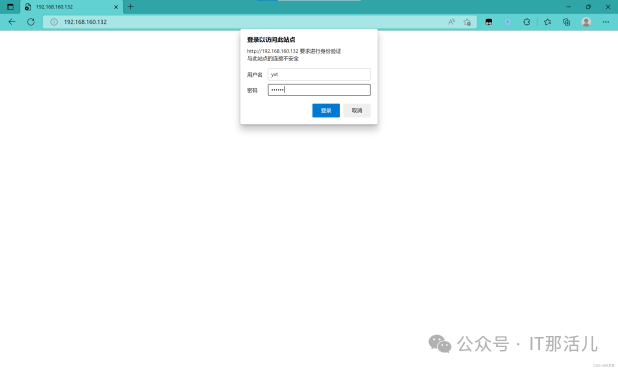
基于用户认证
auth_basic  "欢迎信息" ;

auth_basic_user_file  "/path/to/user_auth_file "
user_auth_file内容格式为:
username:password
这里的密码为加密后的密码串 ,建议用htpasswd来创建此文件:
htpasswd  -c -m /path/to/ .user_auth_file USERNAME
[ root@nginx  ~]# yum -y install httpd-tools
[ root@nginx  ~]# htpasswd -c -m /us r/local/nginx/conf/ .htpasswd yxt New password :
Re-type new password :
Adding password for user yxt
[ root@nginx  ~]# cat /us r/local/nginx/conf/ .htpasswd
yxt :$apr1$widaKKMg$KkKj4hXFizBF2/ Fb89fP .0
[ root@nginx  ~]# vim /us r/local/nginx/conf/nginx .conf
server {
listen
server_name

location / {
auth_basic  "yexiaotian " ;
auth_basic_user_file  "/us r/local/nginx/conf/ .htpasswd " ; echo  "he he he " ;}

https配置
生成私钥 ,生成证书签署请求并获得证书:
//CA生成一对密钥
[ root@nginx ~]# mkdir -p /etc/pki/CA
[ root@nginx ~]# cd /etc/pki/CA/
[ root@nginx CA]# mkdir private
[ root@nginx CA]# ls
private
[ root@nginx CA]# (umask 077;openssl gen rsa -out private/cakey .pem 2048)
Generating RSA private key , 2048  bit long modulus (2  primes)
   +++++

+++++
e is  65537  (0x010001)
[ root@nginx CA]# ls private/
cakey .pem
[ root@nginx CA]# mkdir certs newcerts c rl
[ root@nginx CA]# touch index .txt && echo 01 > serial
//CA生成自签署证书
[ root@nginx CA]# openssl req -new -x509 -key private/cakey .pem -out cacer t.pem -days 365
You are about to be asked to enter information that will be incorporated into your certificate request.
What you are about to enter is  what is  called a Distinguished Name or  a D N .
There are quite a few fields but you can leave some blank
For some fields there will be a default  value ,
If you enter ' . ' , the field will be left blank.
-----
Country Name (2  letter code ) [XX] :CN
State or  Province Name (full name) [] :HB
Locality Name (eg , city ) [Default City] :WH
Organization Name (eg , company) [Default Company Ltd] :www .yxt.com Organizational Unit Name (eg , section) [] :www .yxt.com
Common Name (eg , your name or  your server 's hostname) [] :www .yxt.com Email Address [] :123@123 .com
[ root@nginx CA]# ls
cacert.pem private
[ root@nginx CA]# mkdir certs newcerts c rl
[ root@nginx CA]# touch index .txt && echo 01 > serial

//客户端生成密钥
[ root@nginx ~]# cd /us r/local/nginx/
[ root@nginx nginx]# mkdir ssl
[ root@nginx nginx]# cd ssl
[ root@nginx ssl]# (umask 077;openssl gen rsa -out nginx .key 2048)
Generating RSA private key , 2048 bit long modulus (2 primes)
   +++++
   +++++
e is 65537 (0x010001)
[ root@nginx ssl]# ls
nginx .key


//客户端生成证书签署请求
[ root@nginx ssl]# openssl req -new -key nginx .key -days 365 -out nginx .cs
r
Ignoring -days; not generating a certificate
You are about to be asked to enter information that will be incorporated into your certificate request.
What you are about to enter is what is called a Distinguished Name or a D N .
There are quite a few fields but you can leave some blank
For some fields there will be a default value ,
If you enter ' . ' , the field will be left blank.
-----
Country Name (2 letter code ) [XX] :CN
State or Province Name (full name) [] :HB
Locality Name (eg , city ) [Default City] :WH
Organization Name (eg , company) [Default Company Ltd] :www .yxt.com Organizational Unit Name (eg , section) [] :www .yxt.com
Common Name (eg , your name or your server 's hostname) [] :www .yxt.com Email Address [] :123@123 .com

Please enter the following 'extra '  attributes
to be sent with your certificate request
A challenge password [] :
An optional company name [] :
[ root@nginx ssl]# ls
nginx .csr nginx .key
//CA签署客户端提交上来的证书
[ root@nginx ssl]# openssl ca -in nginx .csr -out nginx .crt -days 365
Using configuration from  /etc/pki/tls/openssl.cnf
Check that the request matches the signature
Signature ok
Certificate Details:
Serial Number: 1  (0x1)
Validity
Not Before: Oct 13  07:37:16  2022  GMT
Not After : Oct 13  07:37:16  2023  GMT
Subject :
countryName
stateOrProvinceName
organizationName
organizational UnitName
commonName
emailAddress
X509v3 extensions:
X509v3 Basic Constraints:
CA:FALSE
Netscape Comment :
OpenSSL Generated Certificate
X509v3 Subject Key Identifier:
23:E2:E9:C3:74:34:F8:2E:10:9E:F2:FF:32:9A:0E:E4:A8:6C:45:
02
X509v3 Authority Key Identifier:
keyid :A3:97:92:68:D9:9C:70:86:E7:55:F7:E4:2C:68:B9:6A:3B:
FA:62:9E

Certificate is  to be certified until  Oct 13  07:37:16  2023  GMT (365  days) Sign the certificate? [y/n] :y


1  out of  1  certificate requests certified , commit? [y/n]y
Write out database with 1  new  entries
Data Base Updated
[ root@nginx ssl]# rm - rf nginx .csr
[ root@nginx ssl]# ls  nginx .crt nginx .key
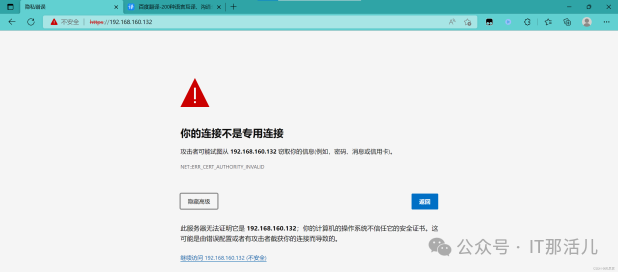
然后在nginx.conf中配置如下内容:
server  {
listen               443  ssl ;
server_name    www .yxt.com;
ssl_certificate  /us r/local/nginx/ssl/nginx .crt ;
ssl_certificate_key  /us r/local/nginx/ssl/nginx .key;
ssl_session_cache
ssl_session_timeout

ssl_ciphers    HIGH: !aNULL: !MD5;
ssl_prefer_server_ciphers    on;

location  / {
root      html ;
index    index .html  index .htm;
}
}
[ root@nginx conf]# systemctl    restart  nginx
[ root@nginx conf]# ss  -anlt
State       Recv-Q      Send-Q          Local  Address:Port         Peer  Address:Port    Pr
ocess
LISTEN      0                 128                           0 .0 .0 .0:80                       0 .0 .0 .0:*

LISTEN      0                 128                           0 .0 .0 .0:22                       0 .0 .0 .0:*

LISTEN      0                 128                           0 .0 .0 .0:443                     0 .0 .0 .0:*

LISTEN      0                 128                                     [ ::] :22                                 [ ::] :*
开启状态界面
开启status:
location  /status {
stub_status  {on   | off};
allow  172 .16 .0 .0/16;
deny  all;}
[root@nginx ~]# vim /usr/local/nginx/conf/nginx.conf
server {
listen
server_name

#charset koi8- r;

#access_log logs/host.access .log main;

location = /status{
stub_status;
}
[ root@nginx conf]# systemctl restart nginx
[ root@nginx ssl]# curl 192 .168 .160 .132/status
Active connections: 3
server accepts handled requests
3  3  3
Reading: 0  Writing: 1  Waiting: 2
状态页面信息详解:
状态码 | 表示的意义 |
Active connections 2 | 当前所有处于打开状态的连接数 |
accepts | 总共处理了多少个连接 |
handled | 成功创建多少握手 |
requests | 总共处理了多少个请求 |
Reading | nginx读取到客户端的Header信息数 ,表示正处于接收请求状态的连接数 |
Writing | nginx返回给客户端的Header信息数 ,表示请求已经接收完成 ,且正处于处理请 求或发送响应的过程中的连接数 |
Waiting | 开启keep-alive的情况下 ,这个值等于active - (reading + writing) ,意思就是Nginx 已处理完正在等候下一次请求指令的驻留连接 |
rewrite
语法 :
rewrite regex replacement flag; , 如:
rewrite ^/images/(.*.jpg)1 break;
演示:
//上传一张图片
[ root@nginx ~]# cd /us r/local/nginx/html/
[ root@nginx html]# mkdir images
[ root@nginx html]# cd images/
[ root@nginx images]# ls
1 .jpg
[ root@nginx ~]# vim /us r/local/nginx/conf/nginx .conf
location / {
root html ;
index index .html index .htm;
}
location /images {
root html ;
index index .html index .htm;}

//当我们改变路径,使用rewrite进行重定向,也能匹配到
[ root@nginx html]#mv images/ imgs
[ root@nginx ~]#vim /us r/local/nginx/conf/nginx .conf
location / {
root html ;
index index .html index .htm;
}
location /images {
rewrite ^/images/( .*\ .jpg)$ /imgs/$1  break ;}

此处的$1用于引用(.*.jpg)匹配到的内容 ,又如:
rewrite ^/bbs/(.*)$ http://www.idfsoft.com/index.html redirect;
[ root@nginx ~]#vim /us r/local/nginx/conf/nginx .conf
location / {
root html ;
index index .html index .htm;
}
location /images {
rewrite ^/images/( .*\ .jpg)$ https://scpic .chinaz .net/files/pi c/pic9/202009/apic27858 .jpg break ;
}
[ root@nginx ~]#systemctl restart nginx

flag | 作用 |
last | 基本上都用这个flag ,表示当前的匹配结束 ,继续下一个匹配 ,最多匹配10个到20 个一旦此rewrite规则重写完成后 ,就不再被后面其它的rewrite规则进行处理 而是由UserAgent重新对重写后的URL再一次发起请求 ,并从头开始执行类似的过 程 |
break | 中止Rewrite ,不再继续匹配 一旦此rewrite规则重写完成后 , 由UserAgent对新的URL重新发起请求, 且不再会被当前location内的任何rewrite规则所检查 |
redirect | 以临时重定向的HTTP状态302返回新的URL |
permanent |
rewrite模块的作用是用来执行URL重定向。这个机制有利于去掉恶意访问的url ,也有利于搜索引擎 优化(SEO)。
nginx使用的语法源于Perl兼容正则表达式(PCRE)库 ,基本语法如下:
标识符 | 意义 |
^ | 必须以^后的实体开头 必须 以前的实体结尾 |
. | 匹配任意字符 |
[] | 匹配指定字符集内的任意字符 |
| [^] | 匹配任何不包括在指定字符集内的任意字符串 |
| | | 匹配 |之前或之后的实 |
| () | 分组 ,组成一组用于匹配的实体 ,通常会有 |
^ (hello |sir )$ //字符串为“ hi  s ir”捕获的结果:$1=hi$2=sir
//这些被捕获的数据,在后面就可以当变量一样使用了
if
语法 :if (condition) { …}
应用场景:
server段
location段
常见的condition:
变量名(变量值为空串 ,或者以“0”开始 ,则为false ,其它的均为true)
以变量为操作数构成的比较表达式(可使用= , !=类似的比较操作符进行测试)
正则表达式的模式匹配操作
~:区分大小写的模式匹配检查;
~*:不区分大小写的模式匹配检查;
!~和 !~*:对上面两种测试取反;
测试指定路径为文件的可能性( -f , !-f)
测试指定路径为目录的可能性( -d , !-d)
测试文件的存在性( -e , !-e)
检查文件是否有执行权限( -x , !-x)
基于浏览器实现分离案例:
if  ($http_user_agent  ~ Firefox)  {
rewrite  ^ ( .*)$ /firefox/$1  break ;
}

if  ($http_user_agent  ~ MSIE)  {
rewrite  ^ ( .*)$ /msie/$1  break ;
}

if  ($http_user_agent  ~ Chrome)  {
rewrite  ^ ( .*)$ /chrome/$1  break ;}
防盗链案例:
location  ~* \ . (jpg |gif|jpeg |png)$ {
valid_ referers none  blocked  www .idfsoft.com;
if  ($invalid_ referer) {
rewrite  ^/  http://www .idfsoft.com/403 .html ;
}
}

本文作者:叶晓天(上海新炬中北团队)
本文来源:“IT那活儿”公众号

