



OPatchAuto supports two modes of patching a GI or RAC Home - Rolling and Non-rolling. When a patching session is started off (on the first node), the stack has to be up and running on this node. This applies to both rolling and non-rolling modes of patching.
Rolling Mode (Default Mode):
When performing patching in Rolling mode, the ORACLE_HOME processes on a particular node are shut down, the patch is applied, then the node is brought back up again. This process is repeated for each node in the GI or RAC environment until all nodes are patched. This is the most efficient mode of applying an interim patch to an Oracle RAC setup because this results in no downtime. Not all patches can be applied using Rolling mode. Whether or not a patch can be applied in this way is generally specified in the patch metadata. The patch README also specifies whether or not a patch can be applied in Rolling mode. The node (GI Home) from which the opatchauto command is executed is considered the LOCAL node and all other nodes are considered REMOTE nodes.
When you begin a rolling mode session, at least 1 remote node has to be up and running.
OPatchAuto applies patches in rolling mode by default.
Non-rolling Mode:
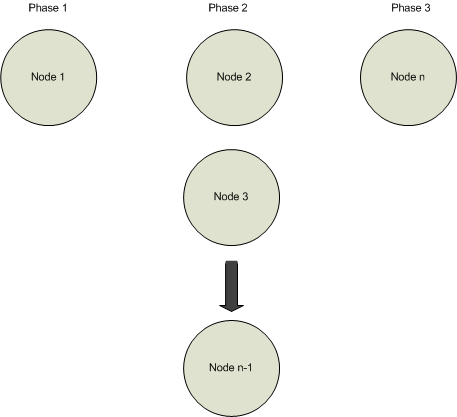
Prior to 12c, a non-rolling upgrade was defined as shutting down Oracle processes on all nodes. Beginning with 12c, non-rolling patching requires the GI stack to be up on local node. The patching operation on first and last node have special steps to perform hence the operation needs to be handled separately but not in parallel with other nodes. The non-rolling patching can ve described as three phases:
Beginning with 12c, non-rolling patching occurs in three phases:
Patch Node 1
Patch Node 2 through n-1
Patch Node n
When you start a non-rolling mode session none of the remote nodes can up and running: All nodes (including the local node) must be stopped.
As shown in the following figure, given n nodes, you begin the non-rolling patch session by patching a single node, then patch nodes two through n-1 in parallel, and finally patch node n to finish the patching session.
To run OPatchAuto in non-rolling mode, you must explicitly specify the -nonrolling option.
Patch Application Mode Conflict
As mentioned earlier, OPatchAuto applies patches in rolling mode by default. If the patch is applied in rolling mode but the patch content is not rollable (content does not support application in rolling mode), OPatchAuto will error out when attempting to run rootcrs.pl -prepatch.
https://docs.oracle.com/cd/E24628_01/doc.121/e39376/configuration_patching.htm#OPTCH149
