





在现代分布式系统中,日志记录与分析是确保系统稳定性和可观测性的关键组成部分。CnosDB 作为一款高性能的时序数据库,提供了强大的日志处理能力,能够帮助开发者和运维人员高效地管理和分析大量日志数据。
日志的重要性
日志是记录系统运行状态和事件的重要工具。通过分析日志,团队可以:
快速定位问题:当系统出现故障时,日志可以提供详细的上下文信息,帮助快速排查问题。
监控系统健康:定期分析日志可以发现潜在的性能瓶颈或异常行为,提前预警。
审计与合规:日志记录用户操作和系统变更,便于后续审计和合规检查。
CnosDB 的日志存储
CnosDB 支持高效的日志存储,能够处理来自各种来源的日志数据。常见的日志数据源包括:
应用日志:记录应用程序的运行状态和业务逻辑。
系统日志:记录操作系统的事件和状态。
容器日志:在容器化环境中,记录容器的运行状态和输出。
通过将这些日志数据存储在 CnosDB 中,用户可以利用其高性能的查询能力进行实时分析。
日志分析流程
使用 CnosDB 进行日志分析通常包括以下步骤:
日志收集:使用工具如 Vector、Promtail 或 Logstash 将日志数据收集并发送到 CnosDB。
数据存储:CnosDB 将日志数据以时序数据的形式存储,支持高效的写入和查询。
数据查询:用户可以使用 SQL 查询语言对日志数据进行检索,快速获取所需信息。
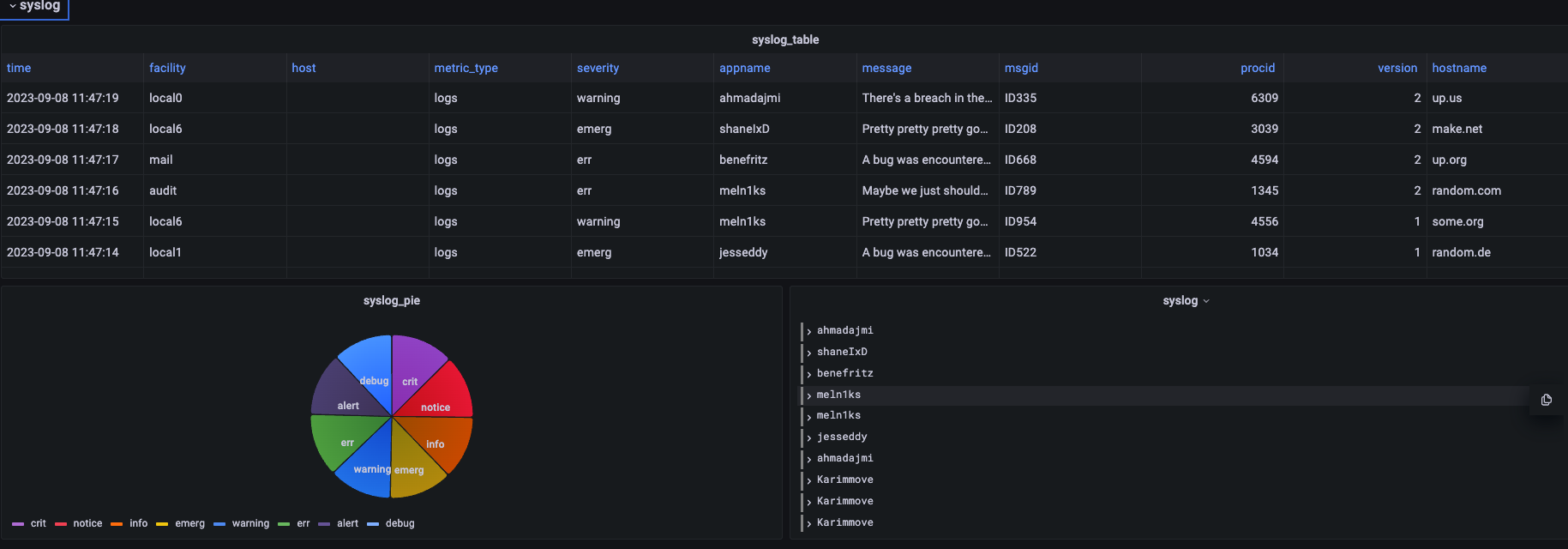
可视化展示:通过 Grafana 等可视化工具,将分析结果以图表或仪表盘的形式展示,便于监控和分析。
CnosDB 集成日志组件配置用例
Vector
# Change this to use a non-default directory for Vector data storage:
data_dir = "/var/lib/vector"

# Random Syslog-formatted logs
[sources.logs]
type = "file"
include = [ "/tmp/cnosdb/1001/log/tsdb.log.*" ]

# Parse Syslog logs
# See the Vector Remap Language reference for more info: https://vrl.dev
[transforms.parse_logs]
type = "remap"
inputs = ["logs"]
source = '''
. = parse_regex!(.message, r'^(?P<time>.+?)\s+(?P<level>\w+)\s+(?P<compont>.+?):\s+(?P<message>.+)$')
.timestamp = parse_timestamp!(.time, format: "%Y-%m-%dT%H:%M:%S%.f%:z")
del(.time)
._tenant = "cnosdb"
._database = "public"
._table = "cnosdb_log_test"
._user = "root"
._password = ""

'''
[sinks.cnosdb]
type = "vector"
inputs = ["parse_logs"]
address = "127.0.0.1:12006"
Promtail
server:
  http_listen_port: 9080
  grpc_listen_port: 0

positions:
  filename: /tmp/positions.yaml

clients:
  - url: http://localhost:8902/api/v1/es/_bulk?db=prometail&table=table4&log_type=loki
    basic_auth:
      username: root
      password:

scrape_configs:
- job_name: system
  static_configs:
  - targets:
      - localhost
    labels:
      job: varlogs
      __path__: /var/log/*log
      stream: stdout
Logstash
input {
  stdin {
  }
  file {
    path => "/var/log/system.log"
    start_position => "beginning"
  }
  beats {
    port => 5044
  }
}

output {
  elasticsearch {
    hosts => ["http://localhost:8902/api/v1/es/"]
    custom_headers => {
        Authorization => "Basic cm9vdDo="
    }
    parameters => {
      "db" => "logstash"
      "table" => "table1"
    }
  }

}
Filebeat
filebeat.inputs:
- type: filestream
  id: my-filestream-id
  enabled: true
  paths:
    - /var/log/*.log
output.elasticsearch:
  hosts: ["http://localhost:8902/api/v1/es/"]
  username: "root"
  password: ""
  parameters:
    table: "table1"
Fluent-bit
[SERVICE]
    Flush           5
    Daemon          off
    Log_Level       debug

[INPUT]
    Name         dummy
    Tag          cpu.local
    Interval_Sec 1

[OUTPUT]
    Name  http
    Match *
    Host  localhost
    Port  8902
    Format json_lines
    URI   /api/v1/es/_bulk?table=fluent&time_column=date&log_type=ndjson
    http_User root
    json_date_format iso8601
通过以上方式将数据写入到 CnosDB后,可以在 Grafana 或其他日志分析工具中进行查询。
结论
日志记录与分析是实现系统可观测性的关键环节。CnosDB 提供了高效的日志存储和分析能力,帮助开发者和运维人员快速定位问题、监控系统健康,并提升整体运维效率。通过结合日志分析与可视化工具,团队可以更深入地了解系统的运行状态,从而作出更明智的决策。
这种日志记录与分析的方式,不仅提升了系统的可靠性,也为企业提供了更好的用户体验。
结语
可观测性是现代软件开发和运维中不可或缺的一部分。它不仅帮助团队更好地理解系统的运行状态,还能通过数据驱动的方式提升业务价值。通过这些实践,用户可以有效整合自研组件与开源工具,形成一个灵活且高效的监控体系,从而提升运维效率,确保系统的稳定性和可靠性。
