



在数据库管理中,定期更新密码是确保系统安全的重要手段。然而,如何在不影响现有连接的情况下平滑地切换密码,避免系统停机,始终是一个挑战。MySQL 8.0 引入的“双密码”机制为这种需求提供了有效的解决方案,使得密码更新过程能够无缝进行。
1. MySQL8.0双密码特性
自 MySQL 8.0.14 版本起,MySQL 支持为每个用户账户设置两个密码:主密码(新密码)和辅助密码(旧密码)。这种双密码机制能够在一些复杂的系统中,特别是当涉及大量 MySQL 实例、复制、多个应用程序连接以及频繁的密码更新时,保持服务不中断,从而实现更流畅的密码更改流程。
常见使用场景:
系统有多个 MySQL 服务器,其中一些可能是主从复制。
不同的应用程序连接到不同的 MySQL 服务器。
系统需要定期更新连接凭据,且不希望中断现有服务。
如果不使用双密码机制,密码更改可能需要仔细协调更新过程,以避免在某些服务器或应用程序上造成停机或连接中断。而通过双密码机制,可以在不影响现有连接的情况下分阶段完成凭据更新,从而避免停机。
2. 双密码机制的工作流程
2.1. 为账户添加新密码并保留旧密码
在更改密码时,首先通过 RETAIN CURRENT PASSWORD 子句设置新的主密码,并保留当前密码作为辅助密码。此时,客户端可以继续使用旧密码(辅助密码)连接数据库,同时新密码(主密码)也已经生效,主要语法如下:
ALTER USER 'user'@'host'IDENTIFIED BY 'new_password'RETAIN CURRENT PASSWORD;该命令会将 new_password 设置为主密码,并将旧密码保留为辅助密码。此时,
无论是使用新密码还是旧密码的客户端,都能正常连接到数据库。
案例如下:
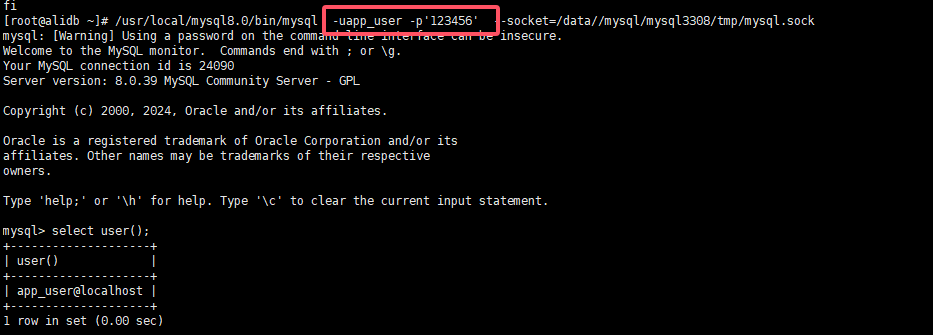
# 创建一个用户并设定密码mysql> create user 'app_user'@'localhost' identified by '123456';Query OK, 0 rows affected (0.03 sec)mysql> grant select on *.* to 'app_user'@'localhost';Query OK, 0 rows affected, 1 warning (0.01 sec)# 登录测试密码[root@alidb ~]# usr/local/mysql8.0/bin/mysql -uapp_user -p'123456' --socket=/data//mysql/mysql3308/tmp/mysql.sockmysql: [Warning] Using a password on the command line interface can be insecure.Welcome to the MySQL monitor. Commands end with ; or \g.Your MySQL connection id is 24090Server version: 8.0.39 MySQL Community Server - GPLCopyright (c) 2000, 2024, Oracle and/or its affiliates.Oracle is a registered trademark of Oracle Corporation and/or itsaffiliates. Other names may be trademarks of their respectiveowners.Type 'help;' or '\h' for help. Type '\c' to clear the current input statement.mysql> select user();+--------------------+| user() |+--------------------+| app_user@localhost |+--------------------+1 row in set (0.00 sec)
原密码可以正常登录。
再创建新密码进行验证
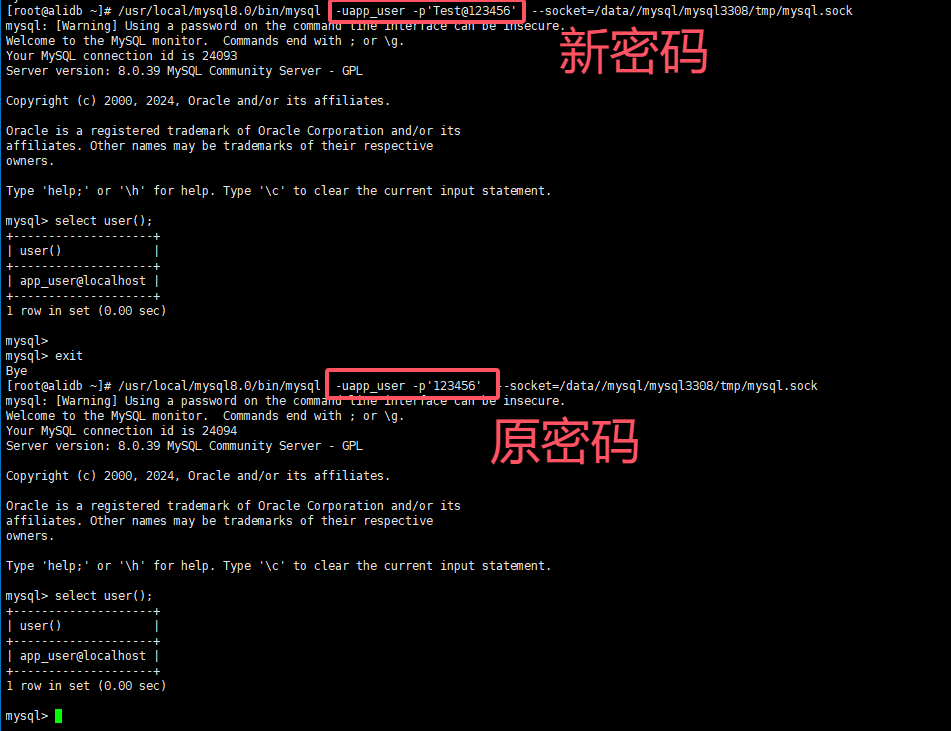
#创建新密码mysql> ALTER USER 'app_user'@'localhost' IDENTIFIED BY 'Test@123456' RETAIN CURRENT PASSWORD;Query OK, 0 rows affected (0.01 sec)# 使用新密码登录[root@alidb ~]# usr/local/mysql8.0/bin/mysql -uapp_user -p'Test@123456' --socket=/data//mysql/mysql3308/tmp/mysql.sockmysql: [Warning] Using a password on the command line interface can be insecure.Welcome to the MySQL monitor. Commands end with ; or \g.Your MySQL connection id is 24093Server version: 8.0.39 MySQL Community Server - GPLCopyright (c) 2000, 2024, Oracle and/or its affiliates.Oracle is a registered trademark of Oracle Corporation and/or itsaffiliates. Other names may be trademarks of their respectiveowners.Type 'help;' or '\h' for help. Type '\c' to clear the current input statement.mysql> select user();+--------------------+| user() |+--------------------+| app_user@localhost |+--------------------+1 row in set (0.00 sec)mysql>mysql> exitBye# 再次使用原密码登录[root@alidb ~]# usr/local/mysql8.0/bin/mysql -uapp_user -p'123456' --socket=/data//mysql/mysql3308/tmp/mysql.sockmysql: [Warning] Using a password on the command line interface can be insecure.Welcome to the MySQL monitor. Commands end with ; or \g.Your MySQL connection id is 24094Server version: 8.0.39 MySQL Community Server - GPLCopyright (c) 2000, 2024, Oracle and/or its affiliates.Oracle is a registered trademark of Oracle Corporation and/or itsaffiliates. Other names may be trademarks of their respectiveowners.Type 'help;' or '\h' for help. Type '\c' to clear the current input statement.mysql> select user();+--------------------+| user() |+--------------------+| app_user@localhost |+--------------------+1 row in set (0.00 sec)
可见,新密码及原密码均可以登录
文章转载自数据库干货铺,如果涉嫌侵权,请发送邮件至:contact@modb.pro进行举报,并提供相关证据,一经查实,墨天轮将立刻删除相关内容。
