




点击蓝字关注我们
本教程旨在指导您了解如何使用barman-cloud-backup将PostgreSQL实例的 Barman 备份设置到 Azure Blob 存储并将其存储在云中。
对于那些以前没有使用过它的人来说,Barman(备份和恢复管理器)是一个开源管理工具,用于在关键业务环境中对 PostgreSQL 服务器进行远程备份和灾难恢复。
为了演示如何设置 Barman 备份到 Azure Blob 存储,我们使用以下环境:
操作系统:RHEL 8
数据库:EPAS
数据库版本:14.5
一、安装 Barman
dnf -y install barman
示例输出如下:
[root@backuptest ~]# dnf -y install barman======================================================================================Package Architecture Version Repository Size======================================================================================Installing:barman noarch 3.2.0-1.el8 edb 57 kInstalling dependencies:libpq5 x86_64 15.1-42PGDG.rhel8 edb 216 kpython3-argcomplete noarch 1.9.3-6.el8 rhel-8-for-x86_64-appstream-eus-rhui-rpms 60 kpython3-barman noarch 3.2.0-1.el8 edb 461 kpython3-psycopg2 x86_64 2.8.6-1.rhel8 edb 178 kTransaction Summary========================================================================================Install 5 PackagesTotal download size: 972 kInstalled size: 3.9 MDownloading Packages:(1/5): barman-3.2.0-1.el8.noarch.rpm 636 kB/s | 57 kB 00:00(2/5): libpq5-15.1-42PGDG.rhel8.x86_64.rpm 2.1 MB/s | 216 kB 00:00(3/5): python3-barman-3.2.0-1.el8.noarch.rpm 4.0 MB/s | 461 kB 00:00(4/5): python3-psycopg2-2.8.6-1.rhel8.x86_64.rpm 5.0 MB/s | 178 kB 00:00(5/5): python3-argcomplete-1.9.3-6.el8.noarch.rpm 430 kB/s | 60 kB 00:00----------------------------------------------------------------------------------------Total 3.9 MB/s | 972 kB 00:00......
安装完成后,执行:
[root@backuptest ~]# barman --version3.2.0 Barman by EnterpriseDB (www.enterprisedb.com)[root@backuptest ~]#
二、安装 barman-cli-cloud
dnf install barman-cli-cloud
示例输出如下:
[root@backuptest ~]# dnf install barman-cli-cloud======================================================================================Package Architecture Version Repository Size======================================================================================Installing:barman-cli-cloud noarch 3.2.0-1.el8 edb 59 kTransaction Summary========================================================================================Install 1 PackageTotal download size: 59 kInstalled size: 73 kIs this ok [y/N]: yDownloading Packages:barman-cli-cloud-3.2.0-1.el8.noarch.rpm 362 kB/s | 59 kB 00:00----------------------------------------------------------------------------------------Total 3.9 MB/s | 972 kB 00:00Running transaction checkTransaction check succeeded.Running transaction testTransaction test succeeded.Running transactionPreparing : 1/1Installing : barman-cli-cloud-3.2.0-1.el8.noarch 1/1Running scriptlet: barman-cli-cloud-3.2.0-1.el8.noarch 1/1Verifying : barman-cli-cloud-3.2.0-1.el8.noarch 1/1Installed products updated.Installed:barman-cli-cloud-3.2.0-1.el8.noarchComplete![root@backuptest ~]#
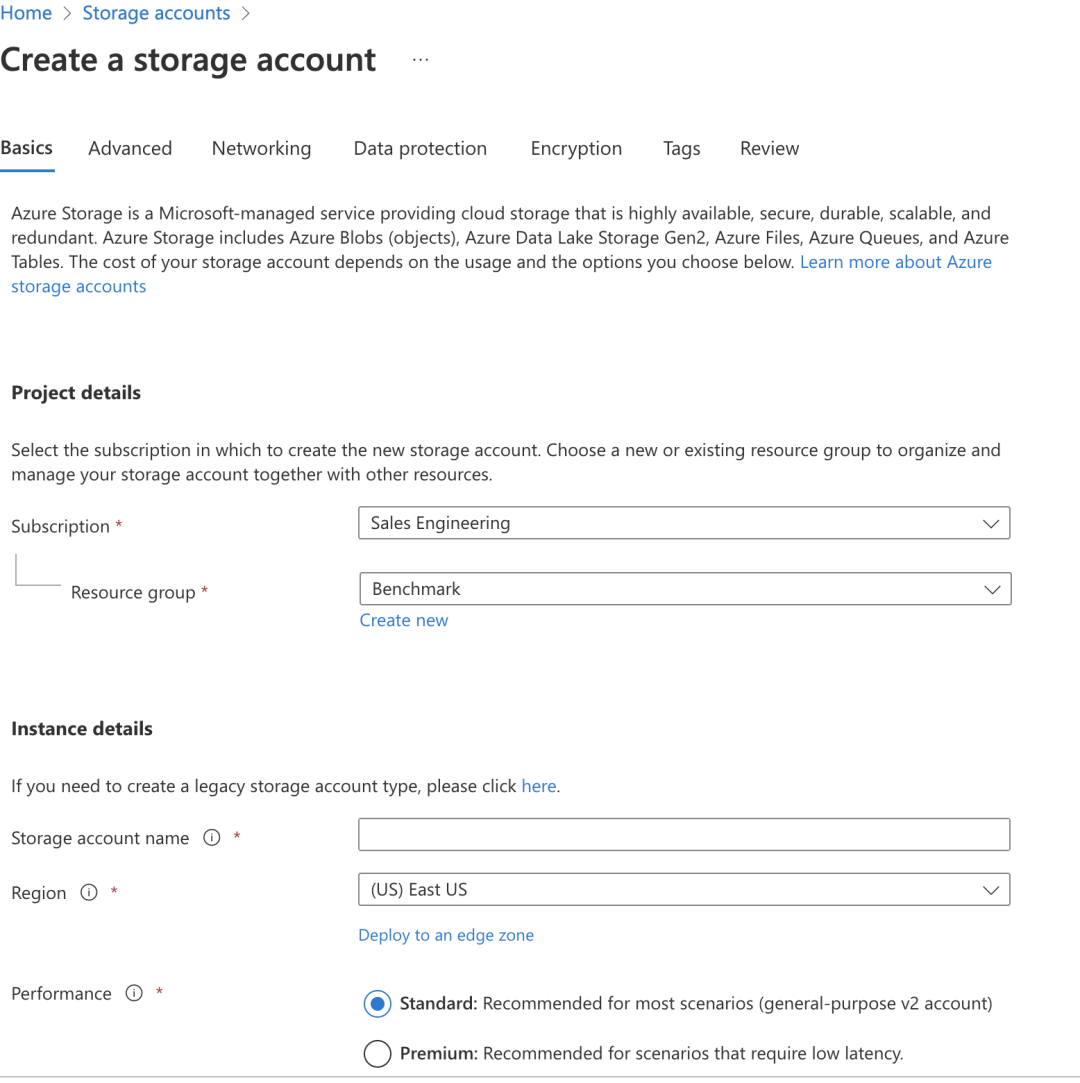
三、在 Azure 上创建存储帐号
填写所有必要详细信息以创建存储帐户
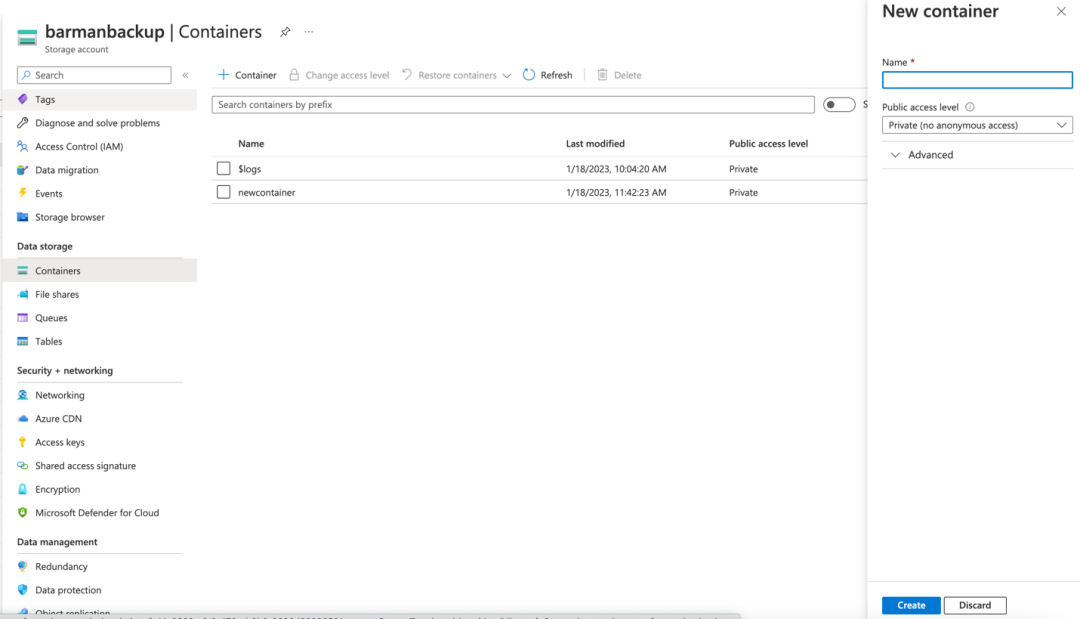
四、在 Azure 存储帐户中创建容器
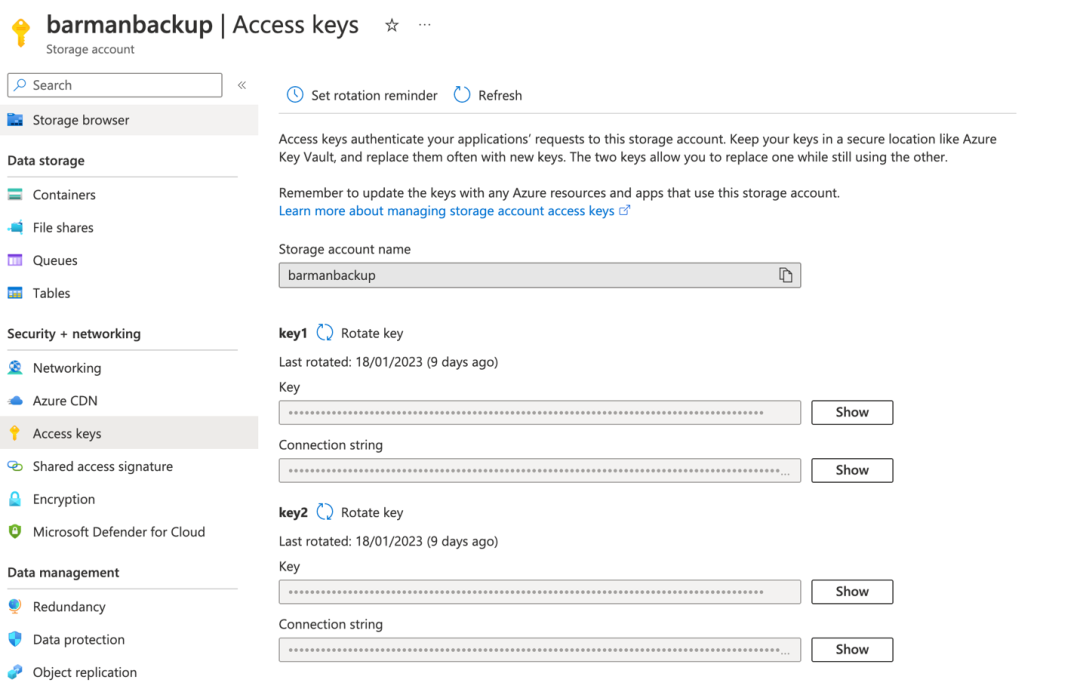
五、识别AZURE_STORAGE_CONNECTION_STRING和AZURE_STORAGE_KEY
我们可以在存储帐户页面的左侧面板的“安全 + 网络”>“访问密钥”下找到相同的内容。
AZURE_STORAGE_KEY=> keyAZURE_STORAGE_CONNECTION_STRING=>connection key
六、安装 azure-storage-blob
sudo pip3 install azure-storage-blob
示例输出如下:
[enterprisedb@backuptest ~]$ which pip3/usr/bin/pip3[enterprisedb@backuptest ~]$ which python3/usr/bin/python3[enterprisedb@backuptest ~]$[enterprisedb@backuptest ~]$ sudo pip3 install azure-storage-blob[sudo] password for enterprisedb:WARNING: Running pip install with root privileges is generally not a good idea. Try `pip3 install --user` instead.Collecting azure-storage-blobDownloading https://files.pythonhosted.org/packages/dd/fb/1501707ae8d921079ea826d16926e1b9b179d15264a2d239a08d7b374522/azure_storage_blob-12.13.1-py3-none-any.whl (377kB)100% |████████████████████████████████| 378kB 2.4MB/sCollecting msrest>=0.6.21 (from azure-storage-blob)Downloading https://files.pythonhosted.org/packages/15/cf/f2966a2638144491f8696c27320d5219f48a072715075d168b31d3237720/msrest-0.7.1-py3-none-any.whl (85kB)100% |████████████████████████████████| 92kB 9.7MB/sCollecting azure-core<2.0.0,>=1.23.1 (from azure-storage-blob)Downloading https://files.pythonhosted.org/packages/4f/43/18cac1c7c1c1c3ad9d0dc5f262bd5633f7b15a6b5f568dcb10a8ac8990aa/azure_core-1.24.2-py3-none-any.whl (178kB)100% |████████████████████████████████| 184kB 5.9MB/sRequirement already satisfied: cryptography>=2.1.4 in /usr/lib64/python3.6/site-packages (from azure-storage-blob)Collecting requests-oauthlib>=0.5.0 (from msrest>=0.6.21->azure-storage-blob)Downloading https://files.pythonhosted.org/packages/6f/bb/5deac77a9af870143c684ab46a7934038a53eb4aa975bc0687ed6ca2c610/requests_oauthlib-1.3.1-py2.py3-none-any.whlRequirement already satisfied: requests~=2.16 in /usr/lib/python3.6/site-packages (from msrest>=0.6.21->azure-storage-blob)Collecting certifi>=2017.4.17 (from msrest>=0.6.21->azure-storage-blob)Downloading https://files.pythonhosted.org/packages/71/4c/3db2b8021bd6f2f0ceb0e088d6b2d49147671f25832fb17970e9b583d742/certifi-2022.12.7-py3-none-any.whl (155kB)100% |████████████████████████████████| 163kB 6.5MB/sCollecting isodate>=0.6.0 (from msrest>=0.6.21->azure-storage-blob)Downloading https://files.pythonhosted.org/packages/b6/85/7882d311924cbcfc70b1890780763e36ff0b140c7e51c110fc59a532f087/isodate-0.6.1-py2.py3-none-any.whl (41kB)100% |████████████████████████████████| 51kB 10.4MB/sCollecting typing-extensions>=4.0.1 (from azure-core<2.0.0,>=1.23.1->azure-storage-blob)Downloading https://files.pythonhosted.org/packages/45/6b/44f7f8f1e110027cf88956b59f2fad776cca7e1704396d043f89effd3a0e/typing_extensions-4.1.1-py3-none-any.whlRequirement already satisfied: six>=1.11.0 in /usr/lib/python3.6/site-packages (from azure-core<2.0.0,>=1.23.1->azure-storage-blob)Requirement already satisfied: cffi!=1.11.3,>=1.8 in /usr/lib64/python3.6/site-packages (from cryptography>=2.1.4->azure-storage-blob)Collecting oauthlib>=3.0.0 (from requests-oauthlib>=0.5.0->msrest>=0.6.21->azure-storage-blob)Downloading https://files.pythonhosted.org/packages/7e/80/cab10959dc1faead58dc8384a781dfbf93cb4d33d50988f7a69f1b7c9bbe/oauthlib-3.2.2-py3-none-any.whl (151kB)100% |████████████████████████████████| 153kB 7.0MB/sRequirement already satisfied: chardet<3.1.0,>=3.0.2 in /usr/lib/python3.6/site-packages (from requests~=2.16->msrest>=0.6.21->azure-storage-blob)Requirement already satisfied: idna<2.8,>=2.5 in /usr/lib/python3.6/site-packages (from requests~=2.16->msrest>=0.6.21->azure-storage-blob)Requirement already satisfied: urllib3<1.25,>=1.21.1 in /usr/lib/python3.6/site-packages (from requests~=2.16->msrest>=0.6.21->azure-storage-blob)Requirement already satisfied: pycparser in /usr/lib/python3.6/site-packages (from cffi!=1.11.3,>=1.8->cryptography>=2.1.4->azure-storage-blob)Installing collected packages: oauthlib, requests-oauthlib, certifi, isodate, typing-extensions, azure-core, msrest, azure-storage-blobSuccessfully installed azure-core-1.24.2 azure-storage-blob-12.13.1 certifi-2022.12.7 isodate-0.6.1 msrest-0.7.1 oauthlib-3.2.2 requests-oauthlib-1.3.1 typing-extensions-4.1.1[enterprisedb@backuptest ~]$
七、export 环境变量
export前面获的环境变量值
export AZURE_STORAGE_CONNECTION_STRING=export AZURE_STORAGE_KEY=export AZURE_STORAGE_SAS_TOKEN=
八、执行备份
barman-cloud-backup --cloud-provider azure-blob-storage -J 4 https://barmanbackup.blob.core.windows.net/newcontainer prodbkp -v
可以使用 barman-cloud-backup --help 查看更多选项
示例输出:
On the backup completion:2024-03-27 11:17:48,491 [11656] INFO: Backup end at LSN: 0/3000138 (000000010000000000000003, 00000138)2024-03-27 11:17:48,491 [11656] INFO: Backup completed (start time: 2024-03-27 11:17:46.521570, elapsed time: 1 second)2024-03-27 11:17:48,491 [11661] INFO: Upload process stopped (worker 0)2024-03-27 11:17:48,491 [11662] INFO: Upload process stopped (worker 1)2024-03-27 11:17:48,494 [11664] INFO: Upload process stopped (worker 3)2024-03-27 11:17:48,494 [11663] INFO: Upload process stopped (worker 2)[enterprisedb@backuptest ~]$
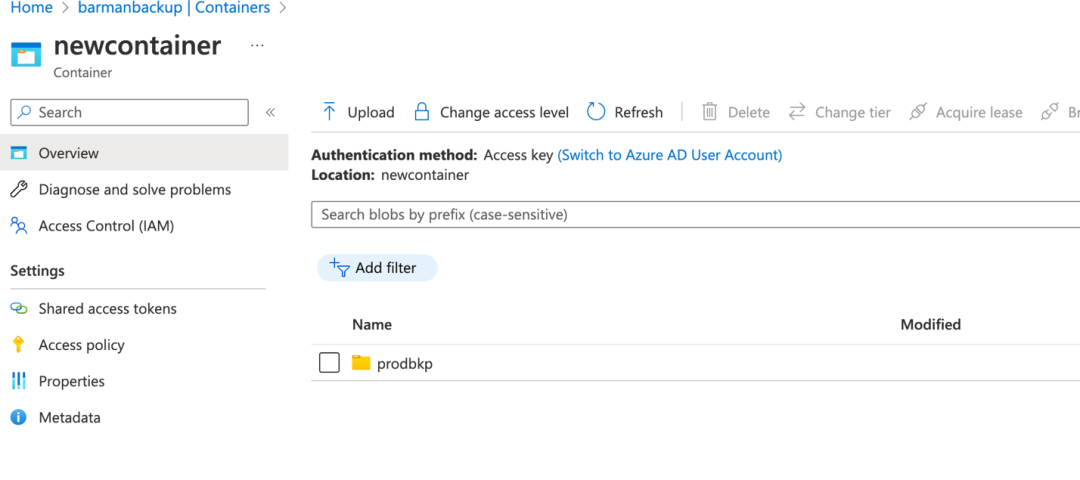
也可以在azure平台获得相同的内容
九、声明
此示例是在 POC 环境中准备和测试的,您可能需要根据您的环境更改它才能使用它。
在生产环境中使用它之前,始终建议在低配环境中进行测试。
备份和恢复功能对任何数据库环境來说都是必不可少的,特別是像PostgreSQL这样复杂且功能丰富的数据库环境。有了Barman,就可以始终防止数据丢失,并拥有适合自己独特需求的灵活备份策略。 Barman 备份到 Azure Blob Storage 只是保护您最基本资产的众多方法之一。
关于公司
感谢您关注新智锦绣科技(北京)有限公司!作为 Elastic 的 Elite 合作伙伴及 EnterpriseDB 在国内的唯一代理和服务合作伙伴,我们始终致力于技术创新和优质服务,帮助企业客户实现数据平台的高效构建与智能化管理。无论您是关注 Elastic 生态系统,还是需要 EnterpriseDB 的支持,我们都将为您提供专业的技术支持和量身定制的解决方案。
欢迎关注我们,获取更多技术资讯和数字化转型方案,共创美好未来!
 |  |
Elastic 微信群 | EDB 微信群 |
发现“分享”和“赞”了吗,戳我看看吧
