序言
环境
部署服务
部署TimescaleDB
部署promscale
Prometheus查询
序言
默认情况下,Prometheus收集到的指标数据是存储内置的TSDB时序数据库中的,这对于部署来说非常快捷便利。但也有不使用的场景,比如没有集群解决方案,聚合分析能力较弱,并且也不是解决大容量存储问题。
为了完善解决方案,Prometheus提供了远端存储功能。可以通过配置文件配置remote_write
和remote_read
来实现将指标存放在远端存储并读取。
Prometheus的远端存储方案有多种选择,比如InfluxDB、OpenTSDB、M3DB、PostgreSQL等。
环境
| IP | 部署服务 |
|---|---|
| 10.0.1.4 | Prometheus |
| 10.0.1.5 | Prometheus |
| 10.0.1.7 | PostgreSQL/TimescaleDB |
部署服务
PostgreSQL的安装这里就不介绍,不过需要注意的一点,使用源码编译安装时需要--with-openssl
参数。
Prometheus可以直接使用官方提供的二进制,部署过程也不赘述。
部署TimescaleDB
需要安装cmake,并且版本需要
部署TimesacleDB时,最好使用postgres用户(PostgreSQL服务使用用户),主要是为了方便读取环境变量。
$ wget https://github.com/timescale/timescaledb/archive/refs/tags/2.7.0.tar.gz
$ tar xf 2.7.0.tar.gz
$ cd  timescaledb-2.7.0
$ ./bootstrap
$ cd ./build && make
$ sudo make install
安装完成后,修改PostgreSQL主配置文件postgresql.conf
$ vim postgresql.conf
shared_preload_libraries = 'timescaledb'
$ pg_ctl restart
重启后,创建扩展
postgres=# create extension timescaledb;
2022-09-13 14:28:50.804 CST [64965] WARNING:
        WELCOME TO
         _____ _                               _     ____________
        |_   _(_)                             | |    |  _  \ ___ \
          | |  _ _ __ ___   ___  ___  ___ __ _| | ___| | | | |_/ /
          | | | |  _ ` _ \ / _ \/ __|/ __/ _` | |/ _ \ | | | ___ \
          | | | | | | | | |  __/\__ \ (_| (_| | |  __/ |/ /| |_/ /
          |_| |_|_| |_| |_|\___||___/\___\__,_|_|\___|___/ \____/
                       Running version 2.7.0
        For more information on TimescaleDB, please visit the following links:

         1. Getting started: https://docs.timescale.com/timescaledb/latest/getting-started
         2. API reference documentation: https://docs.timescale.com/api/latest
         3. How TimescaleDB is designed: https://docs.timescale.com/timescaledb/latest/overview/core-concepts

        Note: TimescaleDB collects anonymous reports to better understand and assist our users.
        For more information and how to disable, please see our docs https://docs.timescale.com/timescaledb/latest/how-to-guides/configuration/telemetry.

2022-09-13 14:28:50.804 CST [64965] CONTEXT:  PL/pgSQL function inline_code_block line 16 at RAISE
WARNING:
WELCOME TO
 _____ _                               _     ____________
|_   _(_)                             | |    |  _  \ ___ \
  | |  _ _ __ ___   ___  ___  ___ __ _| | ___| | | | |_/ /
  | | | |  _ ` _ \ / _ \/ __|/ __/ _` | |/ _ \ | | | ___ \
  | | | | | | | | |  __/\__ \ (_| (_| | |  __/ |/ /| |_/ /
  |_| |_|_| |_| |_|\___||___/\___\__,_|_|\___|___/ \____/
               Running version 2.7.0
For more information on TimescaleDB, please visit the following links:

 1. Getting started: https://docs.timescale.com/timescaledb/latest/getting-started
 2. API reference documentation: https://docs.timescale.com/api/latest
 3. How TimescaleDB is designed: https://docs.timescale.com/timescaledb/latest/overview/core-concepts

Note: TimescaleDB collects anonymous reports to better understand and assist our users.
For more information and how to disable, please see our docs https://docs.timescale.com/timescaledb/latest/how-to-guides/configuration/telemetry.

CREATE EXTENSION
2022-09-13 14:28:52.032 CST [64967] LOG:  the "timescaledb" extension is not up-to-date
2022-09-13 14:28:52.032 CST [64967] HINT:  The most up-to-date version is 2.8.0, the installed version is 2.7.0.
部署promscale
旧版本名字是pg_prometheus,并且需要安装prometheus-postgresql-adapter。这两个开发者已经归档,并新建项目,分别为promscale和promscale-extension。promscale-extension是PostgreSQL扩展。
安装clang依赖
# yum install centos-release-scl -y
# yum install llvm-toolset-7 -y
# scl enable llvm-toolset-7 bash
# clang --version
clang version 5.0.1 (tags/RELEASE_501/final)
Target: x86_64-unknown-linux-gnu
Thread model: posix
InstalledDir: /opt/rh/llvm-toolset-7/root/usr/bin
安装promscale-extension。也是使用postgres用户
$ curl --proto '=https' --tlsv1.2 -sSf https://sh.rustup.rs | sh
$ source $HOME/.cargo/env
$ wget https://github.com/timescale/promscale_extension/archive/refs/tags/0.6.0.tar.gz
$ tar xf 0.6.0.tar.gz
$ cd promscale_extension-0.6.0/
$ ./install-cargo-pgx.sh
$ cargo pgx init --pg14=/usr/local/pg-14.3/bin/pg_config
$ make package
$ sudo make install
$ cd
安装promscale
$ wget https://github.com/timescale/promscale/releases/download/0.14.0/promscale_0.14.0_Linux_x86_64
$ mv promscale_0.14.0_Linux_x86_64 promscale
$ chmod +x promscale
$ ./promscale --db.host 10.0.1.7 --db.port <port> --db.name postgres --db.password '<password>' --db.user postgres --db.ssl-mode allow --startup.install-extensions
服务启动后,有两个端口9201和9202,9202是提供给OLTP服务使用的,Prometheus远程读写使用9201端口。
Prometheus配置文件添加如下配置后重启promtheus即可。
remote_write:
  - url: "http://10.0.1.7:9201/write"
remote_read:
  - url: "http://10.0.1.7:9201/read"
    read_recent: true
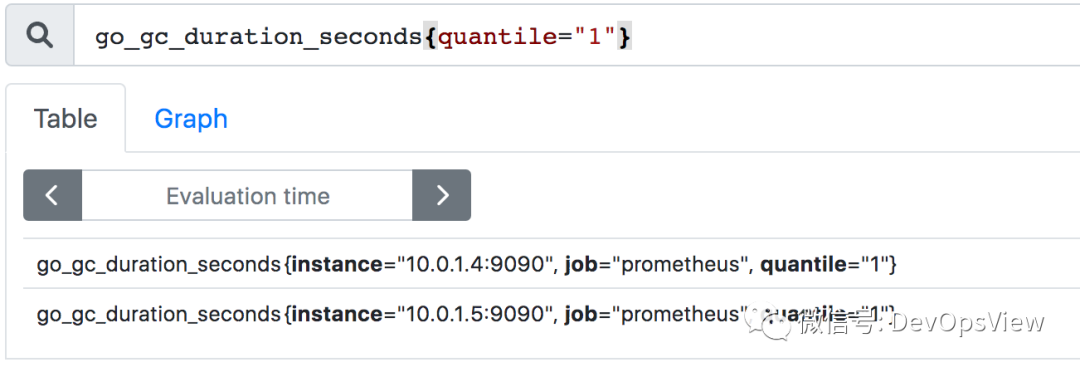
Prometheus查询
在任意一个Prometheus实例进行查询都可查询到两台。