



上篇文章我们已经知道了如何去编译修改Flink源码:
今天我们通过Flink源码自带的 Streaming API 下面的WordCount案例来学习Flink Streaming API 源码是如何运行的,先上WordCount代码
import org.apache.flink.api.common.functions.FlatMapFunction;import org.apache.flink.api.java.tuple.Tuple2;import org.apache.flink.streaming.api.datastream.DataStream;import org.apache.flink.streaming.api.environment.StreamExecutionEnvironment;import org.apache.flink.streaming.examples.wordcount.util.CLI;import org.apache.flink.streaming.examples.wordcount.util.WordCountData;import org.apache.flink.util.Collector;import java.time.Duration;public class WordCount {public static void main(String[] args) throws Exception {final CLI params = CLI.fromArgs(args);*创建执行环境。这是构建Flink应用程序的主要入口点。*/final StreamExecutionEnvironment env = StreamExecutionEnvironment.getExecutionEnvironment();*通过将运行时模式设置为AUTOMATIC,如果所有数据源都是有界的,Flink将选择BATCH,否则选择STREAMING*/env.setRuntimeMode(params.getExecutionMode());DataStream<String> text;*创建一个新的文件源,将从给定的一组目录中读取文件。每个文件将被处理为纯文本,并根据换行符进行分割。*/text = env.fromElements(WordCountData.WORDS).name("in-memory-input");DataStream<Tuple2<String, Integer>> counts =*从源读取的文本行将使用用户定义的函数拆分为单词。下面实现的分词器将输出每个单词作为包含(单词,1)的二元组。*/text.flatMap(new Tokenizer()).name("tokenizer")*keyBy根据字段 0位置,即单词,对元组进行分组。使用keyBy允许在按键执行聚合和其他有状态的数据转换。这类似于SQL查询中的GROUP BY子句。*/.keyBy(value -> value.f0)*对于每个键,我们对字段 "1",即计数,执行简单的求和操作。如果输入数据流是有界的,sum将为每个单词输出最终计数。如果它是无界的,它将在流中每次看到每个单词的新实例时连续输出更新。*/.sum(1).name("counter");counts.print().name("print-sink");*Apache Flink应用程序是懒惰执行的。调用execute会提交作业并开始处理*/env.execute("WordCount");}*实现字符串分词器,将句子拆分为单词,作为用户定义的FlatMapFunction。该函数接受一行(String),并将其拆分为多个形如 "(word,1)" 的二元组(Tuple2<String, Integer>)。*/public static final class Tokenizerimplements FlatMapFunction<String, Tuple2<String, Integer>> {@Overridepublic void flatMap(String value, Collector<Tuple2<String, Integer>> out) {normalize and split the lineString[] tokens = value.toLowerCase().split("\\W+");emit the pairsfor (String token : tokens) {if (token.length() > 0) {out.collect(new Tuple2<>(token, 1));}}}}}/*提供WordCount示例程序使用的默认数据集。如果未向程序提供参数,则使用默认数据集。*/public class WordCountData {public static final String[] WORDS =new String[] {"To be, or not to be,--that is the question:--","Whether 'tis nobler in the mind to suffer","The slings and arrows of outrageous fortune","Or to take arms against a sea of troubles,","And by opposing end them?--To die,--to sleep,--","No more; and by a sleep to say we end","The heartache, and the thousand natural shocks","That flesh is heir to,--'tis a consummation","Devoutly to be wish'd. To die,--to sleep;--","To sleep! perchance to dream:--ay, there's the rub;","For in that sleep of death what dreams may come,","When we have shuffled off this mortal coil,","Must give us pause: there's the respect","That makes calamity of so long life;","For who would bear the whips and scorns of time,","The oppressor's wrong, the proud man's contumely,","The pangs of despis'd love, the law's delay,","The insolence of office, and the spurns","That patient merit of the unworthy takes,","When he himself might his quietus make","With a bare bodkin? who would these fardels bear,","To grunt and sweat under a weary life,","But that the dread of something after death,--","The undiscover'd country, from whose bourn","No traveller returns,--puzzles the will,","And makes us rather bear those ills we have","Than fly to others that we know not of?","Thus conscience does make cowards of us all;","And thus the native hue of resolution","Is sicklied o'er with the pale cast of thought;","And enterprises of great pith and moment,","With this regard, their currents turn awry,","And lose the name of action.--Soft you now!","The fair Ophelia!--Nymph, in thy orisons","Be all my sins remember'd."};}
我们通过代码,一步步的进行解析
01
获取执行环境
/*创建执行环境。这是构建Flink应用程序的主要入口点。*/final StreamExecutionEnvironment env =StreamExecutionEnvironment.getExecutionEnvironment();
ctrl + 鼠标点击 getExecutionEnvironment()方法,将进入位于flink-streaming-java下面的org.apache.flink.streaming.api.environment包下面的StreamExecutionEnvironment类中
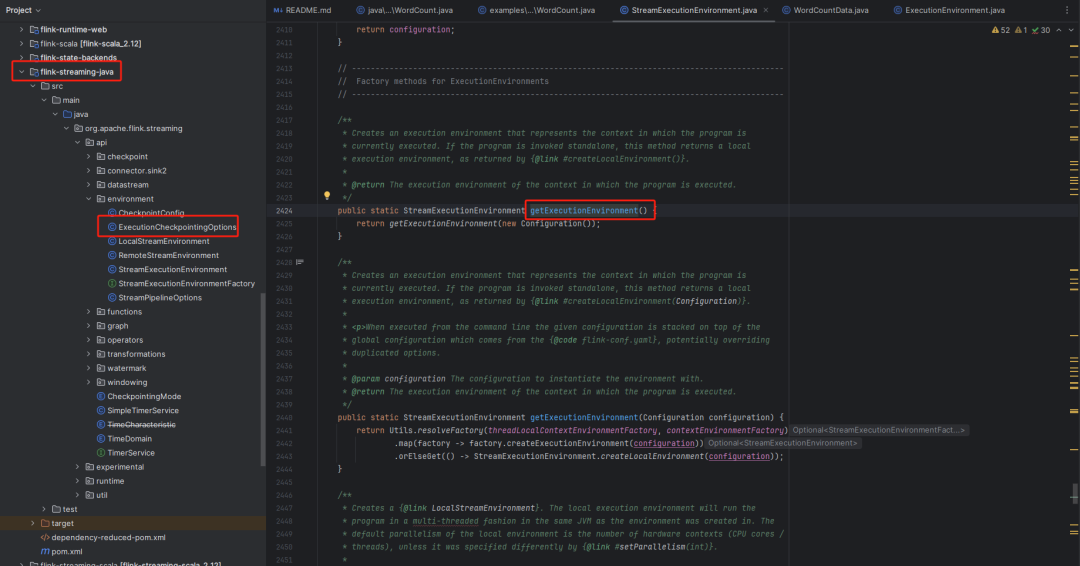
/*** 创建一个表示程序当前执行上下文的执行环境。如果程序是独立调用的,该方法将返回一个本地执行环境,* 就像{@link #createLocalEnvironment()}方法返回的那样。** @return 在程序执行的上下文中的执行环境。*/public static StreamExecutionEnvironment getExecutionEnvironment() {return getExecutionEnvironment(new Configuration());}
继续点击getExecutionEnvironment(new Configuration())方法。
/*** 创建一个表示程序当前执行上下文的执行环境。如果程序是独立调用的,该方法将返回一个本地执行环境,* 就像通过{@link #createLocalEnvironment(Configuration)}返回的那样。** 当从命令行执行时,给定的配置将堆叠在全局配置之上,全局配置来自于{@code flink-conf.yaml},可能覆盖重复的选项。** @param configuration 使用的实例化环境的配置。* @return 程序执行上下文中的执行环境。*/public static StreamExecutionEnvironment getExecutionEnvironment(Configuration configuration) {return Utils.resolveFactory(threadLocalContextEnvironmentFactory, contextEnvironmentFactory).map(factory -> factory.createExecutionEnvironment(configuration)).orElseGet(() -> StreamExecutionEnvironment.createLocalEnvironment(configuration));}
StreamExecutionEnvironment.createLocalEnvironment(configuration))
02
设置运行模式
/*通过将运行时模式设置为AUTOMATIC,如果所有数据源都是有界的,Flink将选择BATCH,否则选择STREAMING*/env.setRuntimeMode(params.getExecutionMode());
/*** 设置应用程序的运行时执行模式(参见{@link RuntimeExecutionMode})。这相当于在应用程序的配置文件中设置{@code execution.runtime-mode}。** 我们建议用户不要使用这个方法,而是在提交应用程序时使用命令行设置{@code execution.runtime-mode}。* 保持应用程序代码无需配置可以提供更大的灵活性,因为相同的应用程序可以在任何执行模式下执行。** @param executionMode 期望的执行模式。* @return 您的应用程序的执行环境。*/@PublicEvolvingpublic StreamExecutionEnvironment setRuntimeMode(final RuntimeExecutionMode executionMode) {checkNotNull(executionMode);configuration.set(ExecutionOptions.RUNTIME_MODE, executionMode);return this;}
点击 ExecutionOptions.RUNTIME_MODE 参数,可以看到 RuntimeExecutionMode 的 默认值是 STREAMING
public static final ConfigOption<RuntimeExecutionMode> RUNTIME_MODE =ConfigOptions.key("execution.runtime-mode").enumType(RuntimeExecutionMode.class).defaultValue(RuntimeExecutionMode.STREAMING).withDescription("Runtime execution mode of DataStream programs. Among other things, "+ "this controls task scheduling, network shuffle behavior, and time semantics.");
03
读取文件源
/*创建一个新的文件源,将从给定的一组目录中读取文件。每个文件将被处理为纯文本,并根据换行符进行分割。*/text = env.fromElements(WordCountData.WORDS).name("in-memory-input");
点击 fromElements(WordCountData.WORDS) 方法
/*** 创建一个包含给定元素的新数据流。这些元素必须是相同类型的,例如,都是{@link String}或{@link Integer}。** 框架将尝试从元素中确定确切的类型。对于通用元素,* 可能需要通过{@link #fromCollection(java.util.Collection, org.apache.flink.api.common.typeinfo.TypeInformation)}手动提供类型信息。** 请注意,此操作将导致非并行数据流源,即并行度为1的数据流源。** @param data 从中创建数据流的元素数组。* @param <OUT> 返回的数据流的类型。* @return 表示给定元素数组的数据流。*/@SafeVarargspublic final <OUT> DataStreamSource<OUT> fromElements(OUT... data) {if (data.length == 0) {throw new IllegalArgumentException("fromElements needs at least one element as argument");}TypeInformation<OUT> typeInfo;try {typeInfo = TypeExtractor.getForObject(data[0]);} catch (Exception e) {throw new RuntimeException("Could not create TypeInformation for type "+ data[0].getClass().getName()+ "; please specify the TypeInformation manually via "+ "StreamExecutionEnvironment#fromElements(Collection, TypeInformation)",e);}return fromCollection(Arrays.asList(data), typeInfo);}
/*** 从给定的非空集合创建数据流。* 请注意,此操作将导致非并行数据流源,即并行度为1的数据流源。** @param data 从中创建数据流的元素集合。* @param typeInfo 生成的数据流的TypeInformation。* @param <OUT> 返回的数据流的类型* @return 表示给定集合的数据流*/public <OUT> DataStreamSource<OUT> fromCollection(Collection<OUT> data, TypeInformation<OUT> typeInfo) {Preconditions.checkNotNull(data, "Collection must not be null");must not have null elements and mixed elementsFromElementsFunction.checkCollection(data, typeInfo.getTypeClass());SourceFunction<OUT> function = new FromElementsFunction<>(data);return addSource(function, "Collection Source", typeInfo, Boundedness.BOUNDED).setParallelism(1);}public FromElementsFunction(Iterable<T> elements) {this.serializer = null;this.elements = elements;this.numElements =elements instanceof Collection? ((Collection<T>) elements).size(): (int) IterableUtils.toStream(elements).count();checkIterable(elements, Object.class);}
04
编写数据处理逻辑
DataStream<Tuple2<String, Integer>> counts =/*从源读取的文本行将使用用户定义的函数拆分为单词。下面实现的分词器将输出每个单词作为包含(单词,1)的二元组。*/text.flatMap(new Tokenizer()).name("tokenizer")/*keyBy根据字段 0位置,即单词,对元组进行分组。使用keyBy允许在按键执行聚合和其他有状态的数据转换。这类似于SQL查询中的GROUP BY子句。*/.keyBy(value -> value.f0)/*对于每个键,我们对字段 "1",即计数,执行简单的求和操作。如果输入数据流是有界的,sum将为每个单词输出最终计数。如果它是无界的,它将在流中每次看到每个单词的新实例时连续输出更新。*/.sum(1).name("counter");counts.print().name("print-sink");
@Publicpublic class DataStream<T> {protected final StreamExecutionEnvironment environment;protected final Transformation<T> transformation;/*** Create a new {@link DataStream} in the given execution environment with partitioning set to* forward by default.** @param environment The StreamExecutionEnvironment*/public DataStream(StreamExecutionEnvironment environment, Transformation<T> transformation) {this.environment =Preconditions.checkNotNull(environment, "Execution Environment must not be null.");this.transformation =Preconditions.checkNotNull(transformation, "Stream Transformation must not be null.");}}
05
执行代码
/*Apache Flink应用程序是懒惰执行的。调用execute会提交作业并开始处理*/env.execute("WordCount");
/*** 触发程序执行。环境将执行所有导致"sink"操作的程序部分。"Sink"操作包括打印结果或将其转发到消息队列等操作。程序执行将被记录并显示出提供的名称。** @param jobName 作业的期望名称。* @return 作业执行的结果,包含经过的时间和累加器。* @throws Exception 在作业执行期间发生的。*/public JobExecutionResult execute(String jobName) throws Exception {final List<Transformation<?>> originalTransformations = new ArrayList<>(transformations);StreamGraph streamGraph = getStreamGraph();if (jobName != null) {streamGraph.setJobName(jobName);}try {return execute(streamGraph);} catch (Throwable t) {Optional<ClusterDatasetCorruptedException> clusterDatasetCorruptedException =ExceptionUtils.findThrowable(t, ClusterDatasetCorruptedException.class);if (!clusterDatasetCorruptedException.isPresent()) {throw t;}// Retry without cache if it is caused by corrupted cluster dataset.invalidateCacheTransformations(originalTransformations);streamGraph = getStreamGraph(originalTransformations);return execute(streamGraph);}}/*** 获取流式作业的{@link StreamGraph}的方法。此调用会清除先前注册的{@link Transformation 转换}。** @return 表示转换的流图。*/@Internalpublic StreamGraph getStreamGraph() {return getStreamGraph(true);}/*** 获取流式作业的{@link StreamGraph}的方法,可以选择清除先前注册的{@link Transformation 转换}。* 清除转换允许,在调用{@link #execute()}多次时,例如,不重新执行相同的操作。** @param clearTransformations 是否清除先前注册的转换。* @return 表示转换的流图。*/@Internalpublic StreamGraph getStreamGraph(boolean clearTransformations) {final StreamGraph streamGraph = getStreamGraph(transformations);if (clearTransformations) {transformations.clear();}return streamGraph;}private StreamGraph getStreamGraph(List<Transformation<?>> transformations) {synchronizeClusterDatasetStatus();return getStreamGraphGenerator(transformations).generate();}private StreamGraphGenerator getStreamGraphGenerator(List<Transformation<?>> transformations) {if (transformations.size() <= 0) {throw new IllegalStateException("No operators defined in streaming topology. Cannot execute.");}// We copy the transformation so that newly added transformations cannot intervene with the// stream graph generation.return new StreamGraphGenerator(new ArrayList<>(transformations), config, checkpointCfg, configuration).setStateBackend(defaultStateBackend).setChangelogStateBackendEnabled(changelogStateBackendEnabled).setSavepointDir(defaultSavepointDirectory).setChaining(isChainingEnabled).setChainingOfOperatorsWithDifferentMaxParallelism(isChainingOfOperatorsWithDifferentMaxParallelismEnabled).setUserArtifacts(cacheFile).setTimeCharacteristic(timeCharacteristic).setDefaultBufferTimeout(bufferTimeout).setSlotSharingGroupResource(slotSharingGroupResources);}
/*** 触发程序执行。环境将执行所有导致 "sink" 操作的程序部分。"Sink" 操作包括打印结果或将其转发到消息队列等** @param streamGraph 表示转换的流图。* @return 作业执行的结果,包括经过的时间和累加器* @throws Exception 在作业执行期间发生的。*/@Internalpublic JobExecutionResult execute(StreamGraph streamGraph) throws Exception {final JobClient jobClient = executeAsync(streamGraph);try {final JobExecutionResult jobExecutionResult;if (configuration.getBoolean(DeploymentOptions.ATTACHED)) {jobExecutionResult = jobClient.getJobExecutionResult().get();} else {jobExecutionResult = new DetachedJobExecutionResult(jobClient.getJobID());}jobListeners.forEach(jobListener -> jobListener.onJobExecuted(jobExecutionResult, null));return jobExecutionResult;} catch (Throwable t) {// get() on the JobExecutionResult Future will throw an ExecutionException. This// behaviour was largely not there in Flink versions before the PipelineExecutor// refactoring so we should strip that exception.Throwable strippedException = ExceptionUtils.stripExecutionException(t);jobListeners.forEach(jobListener -> {jobListener.onJobExecuted(null, strippedException);});ExceptionUtils.rethrowException(strippedException);// never reached, only make javac happyreturn null;}}
/*** 异步触发程序执行。环境将执行所有导致 "sink" 操作的程序部分。"Sink" 操作包括打印结果或将其转发到消息队列等。** @param streamGraph 表示转换的流图。* @return 一个可以用来与已提交的作业通信的{@link JobClient},在提交成功后完成* @throws Exception 在作业执行期间发生。*/@Internalpublic JobClient executeAsync(StreamGraph streamGraph) throws Exception {checkNotNull(streamGraph, "StreamGraph cannot be null.");final PipelineExecutor executor = getPipelineExecutor();CompletableFuture<JobClient> jobClientFuture =executor.execute(streamGraph, configuration, userClassloader);try {JobClient jobClient = jobClientFuture.get();jobListeners.forEach(jobListener -> jobListener.onJobSubmitted(jobClient, null));collectIterators.forEach(iterator -> iterator.setJobClient(jobClient));collectIterators.clear();return jobClient;} catch (ExecutionException executionException) {final Throwable strippedException =ExceptionUtils.stripExecutionException(executionException);jobListeners.forEach(jobListener -> jobListener.onJobSubmitted(null, strippedException));throw new FlinkException(String.format("Failed to execute job '%s'.", streamGraph.getJobName()),strippedException);}}@Internalpublic interface PipelineExecutor {/*** 执行基于提供的配置的{@link Pipeline},并返回一个{@link JobClient},该客户端允许与正在执行的作业进行交互,例如取消它或创建一个保存点。** 调用方负责管理返回的{@link JobClient}的生命周期。这意味着在调用方的代码中应当显式调用例如 {@code close()} 方法** @param pipeline 要执行的{@link Pipeline}。* @param configuration 具有所需执行参数的{@link Configuration}* @param userCodeClassloader 用于反序列化用户代码的{@link ClassLoader}* @return 一个{@link CompletableFuture},其中包含与流水线对应的{@link JobClient}。*/CompletableFuture<JobClient> execute(final Pipeline pipeline,final Configuration configuration,final ClassLoader userCodeClassloader)throws Exception;}
@Overridepublic CompletableFuture<JobClient> execute(Pipeline pipeline, Configuration configuration, ClassLoader userCodeClassloader)throws Exception {checkNotNull(pipeline);checkNotNull(configuration);Configuration effectiveConfig = new Configuration();effectiveConfig.addAll(this.configuration);effectiveConfig.addAll(configuration);// we only support attached execution with the local executor.checkState(configuration.getBoolean(DeploymentOptions.ATTACHED));final JobGraph jobGraph = getJobGraph(pipeline, effectiveConfig, userCodeClassloader);return PerJobMiniClusterFactory.createWithFactory(effectiveConfig, miniClusterFactory).submitJob(jobGraph, userCodeClassloader);}
public CompletableFuture<JobClient> submitJob(JobGraph jobGraph, ClassLoader userCodeClassloader) throws Exception {MiniClusterConfiguration miniClusterConfig =getMiniClusterConfig(jobGraph.getMaximumParallelism());MiniCluster miniCluster = miniClusterFactory.apply(miniClusterConfig);miniCluster.start();return miniCluster.submitJob(jobGraph).thenApplyAsync(FunctionUtils.uncheckedFunction(submissionResult -> {org.apache.flink.client.ClientUtils.waitUntilJobInitializationFinished(() ->miniCluster.getJobStatus(submissionResult.getJobID()).get(),() ->miniCluster.requestJobResult(submissionResult.getJobID()).get(),userCodeClassloader);return submissionResult;})).thenApply(result ->new MiniClusterJobClient(result.getJobID(),miniCluster,userCodeClassloader,MiniClusterJobClient.JobFinalizationBehavior.SHUTDOWN_CLUSTER)).whenComplete((ignored, throwable) -> {if (throwable != null) {// We failed to create the JobClient and must shutdown to ensure// cleanup.shutDownCluster(miniCluster);}}).thenApply(Function.identity());}
至此,整个wordcount任务运行的源码就解读完成了。
总结如下:
第一步:传参
第二步:获取执行环境
第三步:对环境设置额外参数
第四步:读取数据,转成DataStream类型
第五步:编写代码逻辑,封装进transformations
第六步:transformations转换成StreamGraph
第七步:StreamGraph转 Pipeline
第八步:excute Pipeline
第九步:Pipeline 转 JobGraph
第十步:submitJob 提交任务 返回结果
往期回顾:
文章转载自大数据技能圈,如果涉嫌侵权,请发送邮件至:contact@modb.pro进行举报,并提供相关证据,一经查实,墨天轮将立刻删除相关内容。
