




点击蓝字,关注我们
1
背景
注:以3.2.1版本为例。
2
Worker Task关系图
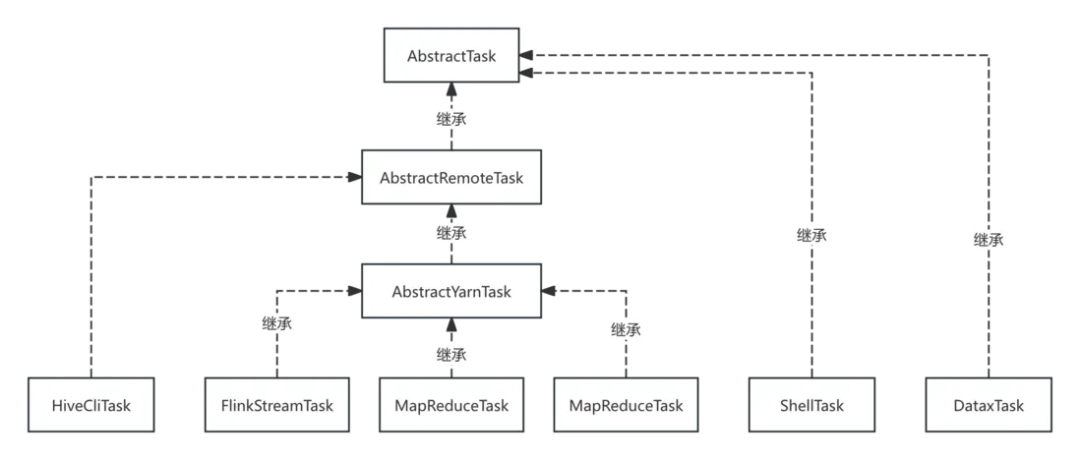
AbstractTask: 主要定义了Task的基本生命周期接口,比如说init、handle和cancel AbstractRemoteTask: 主要对handle方法做了实现,体现了模版方法设计模式,提取了 submitApplication
、trackApplicationStatus
以及cancelApplication
三个核心接口方法AbstractYarnTask: 比如说YARN任务,就抽象了 AbstractYarnTask
,其中submitApplication
、trackApplicationStatus
以及cancelApplication
可以直接是对YARN API的访问
3
AbstractYarnTask实现YARN状态跟踪
org.apache.dolphinscheduler.plugin.task.api.AbstractYarnTask,完整代码如下 :
public abstract class AbstractYarnTask extends AbstractRemoteTask {

    private static final int MAX_RETRY_ATTEMPTS = 3;

    private ShellCommandExecutor shellCommandExecutor;

    public AbstractYarnTask(TaskExecutionContext taskRequest) {
        super(taskRequest);
        this.shellCommandExecutor = new ShellCommandExecutor(this::logHandle, taskRequest);
    }

    @Override
    public void submitApplication() throws TaskException {
        try {
            IShellInterceptorBuilder shellActuatorBuilder =
                    ShellInterceptorBuilderFactory.newBuilder()
                            .properties(getProperties())
                             todo: do we need to move the replace to subclass?
                            .appendScript(getScript().replaceAll("\\r\\n", System.lineSeparator()));
             SHELL task exit code
            TaskResponse response = shellCommandExecutor.run(shellActuatorBuilder, null);
            setExitStatusCode(response.getExitStatusCode());
            setAppIds(String.join(TaskConstants.COMMA, getApplicationIds()));
            setProcessId(response.getProcessId());
        } catch (InterruptedException ex) {
            Thread.currentThread().interrupt();
            log.info("The current yarn task has been interrupted", ex);
            setExitStatusCode(TaskConstants.EXIT_CODE_FAILURE);
            throw new TaskException("The current yarn task has been interrupted", ex);
        } catch (Exception e) {
            log.error("yarn process failure", e);
            exitStatusCode = -1;
            throw new TaskException("Execute task failed", e);
        }
    }

    @Override
    public void trackApplicationStatus() throws TaskException {
        if (StringUtils.isEmpty(appIds)) {
            return;
        }


        List<String> appIdList = Arrays.asList(appIds.split(","));
        boolean continueTracking = true;

        while (continueTracking) {
            Map<String, YarnState> yarnStateMap = new HashMap<>();
            for (String appId : appIdList) {
                if (StringUtils.isEmpty(appId)) {
                    continue;
                }

                boolean hadoopSecurityAuthStartupState =
                        PropertyUtils.getBoolean(HADOOP_SECURITY_AUTHENTICATION_STARTUP_STATE, false);
                String yarnStateJson = fetchYarnStateJsonWithRetry(appId, hadoopSecurityAuthStartupState);
                if (StringUtils.isNotEmpty(yarnStateJson)) {
                    String appJson = JSONUtils.getNodeString(yarnStateJson, "app");
                    YarnTask yarnTask = JSONUtils.parseObject(appJson, YarnTask.class);
                    log.info("yarnTask : {}", yarnTask);
                    yarnStateMap.put(yarnTask.getId(), YarnState.of(yarnTask.getState()));
                }
            }

            YarnState yarnTaskOverallStatus = YarnTaskStatusChecker.getYarnTaskOverallStatus(yarnStateMap);
            if (yarnTaskOverallStatus.isFinalState()) {
                handleFinalState(yarnTaskOverallStatus);
                continueTracking = false;
            } else {
                try {
                    TimeUnit.MILLISECONDS.sleep(SLEEP_TIME_MILLIS * 10);
                } catch (InterruptedException e) {
                    Thread.currentThread().interrupt();
                    throw new RuntimeException(e);
                }
            }
        }
    }

    private String fetchYarnStateJsonWithRetry(String appId,
                                               boolean hadoopSecurityAuthStartupState) throws TaskException {
        int retryCount = 0;
        while (retryCount < MAX_RETRY_ATTEMPTS) {
            try {
                return fetchYarnStateJson(appId, hadoopSecurityAuthStartupState);
            } catch (Exception e) {
                retryCount++;
                log.error("Failed to fetch or parse Yarn state for appId: {}. Attempt: {}/{}",
                        appId, retryCount, MAX_RETRY_ATTEMPTS, e);

                if (retryCount >= MAX_RETRY_ATTEMPTS) {
                    throw new TaskException("Failed to fetch Yarn state after "
                            + MAX_RETRY_ATTEMPTS + " attempts for appId: " + appId, e);
                }

                try {
                    TimeUnit.MILLISECONDS.sleep(SLEEP_TIME_MILLIS);
                } catch (InterruptedException ie) {
                    Thread.currentThread().interrupt();
                    throw new RuntimeException(ie);
                }
            }
        }
        return null;
    }

    private void handleFinalState(YarnState yarnState) {
        switch (yarnState) {
            case FINISHED:
                setExitStatusCode(EXIT_CODE_SUCCESS);
                break;
            case KILLED:
                setExitStatusCode(EXIT_CODE_KILL);
                break;
            default:
                setExitStatusCode(EXIT_CODE_FAILURE);
                break;
        }
    }

    private String fetchYarnStateJson(String appId, boolean hadoopSecurityAuthStartupState) throws Exception {
        return hadoopSecurityAuthStartupState
                ? KerberosHttpClient.get(getApplicationUrl(appId))
                : HttpUtils.get(getApplicationUrl(appId));
    }


    static class YarnTaskStatusChecker {

        public static YarnState getYarnTaskOverallStatus(Map<String, YarnState> yarnTaskMap) {
             检查是否有任何任务处于 FAILED 或 KILLED 状态
            boolean hasKilled = yarnTaskMap.values().stream()
                    .anyMatch(state -> state == YarnState.KILLED);

            if (hasKilled) {
                return YarnState.KILLED;
            }

             检查是否有任何任务处于 FAILED 或 KILLED 状态
            boolean hasFailed = yarnTaskMap.values().stream()
                    .anyMatch(state -> state == YarnState.FAILED);

            if (hasFailed) {
                return YarnState.FAILED;
            }


             检查是否所有任务都处于 FINISHED 状态
            boolean allFINISHED = yarnTaskMap.values().stream()
                    .allMatch(state -> state == YarnState.FINISHED);

            if (allFINISHED) {
                return YarnState.FINISHED;
            }

             检查是否有任何任务处于 RUNNING 状态
            boolean hasRunning = yarnTaskMap.values().stream()
                    .anyMatch(state -> state == YarnState.RUNNING);

            if (hasRunning) {
                return YarnState.RUNNING;
            }

             检查是否有任何任务处于提交中状态
            boolean hasSubmitting = yarnTaskMap.values().stream()
                    .anyMatch(state -> state == YarnState.NEW || state == YarnState.NEW_SAVING
                            || state == YarnState.SUBMITTED || state == YarnState.ACCEPTED);

            if (hasSubmitting) {
                return YarnState.SUBMITTING;
            }

             如果都不匹配,返回未知状态
            return YarnState.UNKNOWN;
        }
    }


    **
     * cancel application
     *
     * @throws TaskException exception
     */
    @Override
    public void cancelApplication() throws TaskException {
         cancel process
        try {
            shellCommandExecutor.cancelApplication();
        } catch (Exception e) {
            throw new TaskException("cancel application error", e);
        }
    }

    **
     * get application ids
     *
     * @return
     * @throws TaskException
     */
    @Override
    public List<String> getApplicationIds() throws TaskException {
         TODO 这里看common.properties中是否配置 appId.collect了,如果配置了走aop,否则走log
        return LogUtils.getAppIds(
                taskRequest.getLogPath(),
                taskRequest.getAppInfoPath(),
                PropertyUtils.getString(APPID_COLLECT, DEFAULT_COLLECT_WAY));
    }

    ** Get the script used to bootstrap the task */
    protected abstract String getScript();

    ** Get the properties of the task used to replace the placeholders in the script. */
    protected abstract Map<String, String> getProperties();

    @Data
    static class YarnTask {
        private String id;
        private String state;
    }

    private String getApplicationUrl(String applicationId) throws BaseException {

        String yarnResourceRmIds = PropertyUtils.getString(YARN_RESOURCEMANAGER_HA_RM_IDS);
        String yarnAppStatusAddress = PropertyUtils.getString(YARN_APPLICATION_STATUS_ADDRESS);
        String hadoopResourceManagerHttpAddressPort =
                PropertyUtils.getString(HADOOP_RESOURCE_MANAGER_HTTPADDRESS_PORT);

        String appUrl = StringUtils.isEmpty(yarnResourceRmIds) ?
                yarnAppStatusAddress :
                getAppAddress(yarnAppStatusAddress, yarnResourceRmIds);

        if (StringUtils.isBlank(appUrl)) {
            throw new BaseException("yarn application url generation failed");
        }

        log.info("yarn application url:{}", String.format(appUrl, hadoopResourceManagerHttpAddressPort, applicationId));
        return String.format(appUrl, hadoopResourceManagerHttpAddressPort, applicationId);
    }

    private static String getAppAddress(String appAddress, String rmHa) {

        String[] appAddressArr = appAddress.split(Constants.DOUBLE_SLASH);

        if (appAddressArr.length != 2) {
            return null;
        }

        String protocol = appAddressArr[0] + Constants.DOUBLE_SLASH;
        String[] pathSegments = appAddressArr[1].split(Constants.COLON);

        if (pathSegments.length != 2) {
            return null;
        }

        String end = Constants.COLON + pathSegments[1];

         get active ResourceManager
        String activeRM = YarnHAAdminUtils.getActiveRMName(protocol, rmHa);

        if (StringUtils.isEmpty(activeRM)) {
            return null;
        }

        return protocol + activeRM + end;
    }

    ** yarn ha admin utils */
    private static final class YarnHAAdminUtils {

        **
         * get active resourcemanager node
         *
         * @param protocol http protocol
         * @param rmIds yarn ha ids
         * @return yarn active node
         */
        public static String getActiveRMName(String protocol, String rmIds) {

            String hadoopResourceManagerHttpAddressPort =
                    PropertyUtils.getString(HADOOP_RESOURCE_MANAGER_HTTPADDRESS_PORT);

            String[] rmIdArr = rmIds.split(Constants.COMMA);

            String yarnUrl = protocol
                    + "%s:"
                    + hadoopResourceManagerHttpAddressPort
                    + "/ws/v1/cluster/info";
            try {
                ** send http get request to rm */
                for (String rmId : rmIdArr) {
                    String state = getRMState(String.format(yarnUrl, rmId));
                    if (Constants.HADOOP_RM_STATE_ACTIVE.equals(state)) {
                        return rmId;
                    }
                }

            } catch (Exception e) {
                log.error("get yarn ha application url failed", e);
            }
            return null;
        }

        ** get ResourceManager state */
        public static String getRMState(String url) {
            boolean hadoopSecurityAuthStartupState =
                    PropertyUtils.getBoolean(HADOOP_SECURITY_AUTHENTICATION_STARTUP_STATE, false);
            String retStr = Boolean.TRUE.equals(hadoopSecurityAuthStartupState)
                    ? KerberosHttpClient.get(url)
                    : HttpUtils.get(url);

            if (StringUtils.isEmpty(retStr)) {
                return null;
            }
             to json
            ObjectNode jsonObject = JSONUtils.parseObject(retStr);

             get ResourceManager state
            if (!jsonObject.has("clusterInfo")) {
                return null;
            }
            return jsonObject.get("clusterInfo").path("haState").asText();
        }
    }

    public enum YarnState {
        NEW,
        NEW_SAVING,
        SUBMITTED,
        ACCEPTED,
        RUNNING,
        FINISHED,
        FAILED,
        KILLED,
        SUBMITTING,
        UNKNOWN,
        ;

         将字符串转换为枚举
        public static YarnState of(String state) {
            try {
                return YarnState.valueOf(state);
            } catch (IllegalArgumentException | NullPointerException e) {
                 如果字符串无效,则返回 null
                return null;
            }
        }

        **
         * 任务结束
         * @return
         */
        public boolean isFinalState() {
            return this == FINISHED || this == FAILED || this == KILLED;
        }
    }
}
submitApplication、
trackApplicationStatus两个核心接口,
cancelApplication这个其实原则上应该代理
YarnApplicationManager才好(当前没有整合,不过不影响)。
4
流式任务前端applicationId显示
dolphinscheduler-ui/src/views/projects/task/instance/use-stream-table.ts
5
后端封装applicationId为YARN URL
dolphinscheduler-api/src/main/java/org/apache/dolphinscheduler/api/service/impl/TaskInstanceServiceImpl.java 修改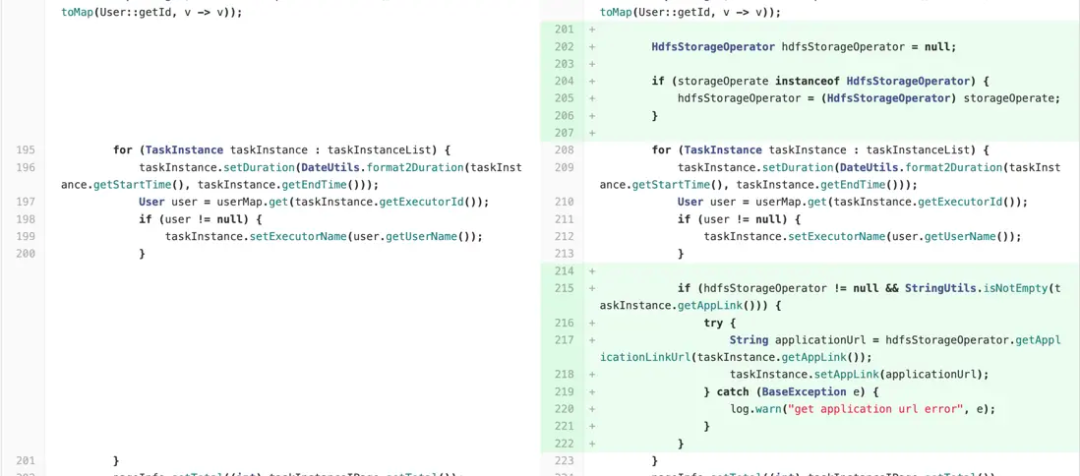
dolphinscheduler-common/src/main/java/org/apache/dolphinscheduler/common/constants/Constants.java 修改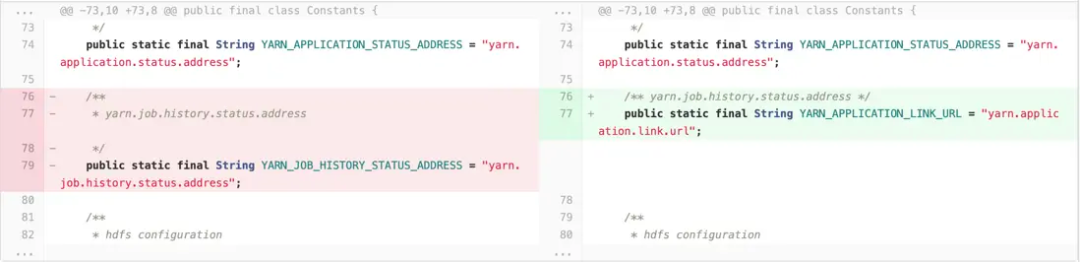
dolphinscheduler-common/src/main/resources/common.properties修改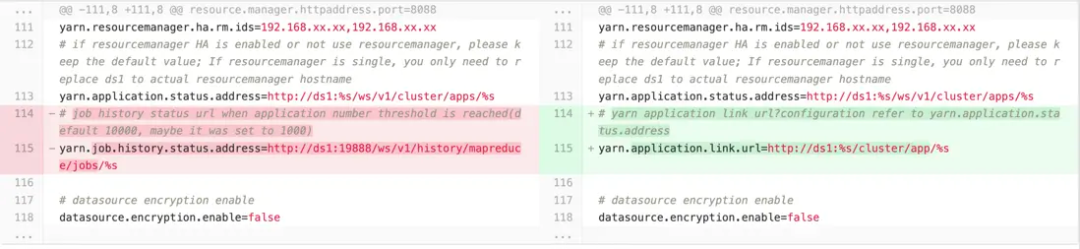
dolphinscheduler-storage-plugin/dolphinscheduler-storage-hdfs/src/main/java/org/apache/dolphinscheduler/plugin/storage/hdfs/HdfsStorageOperator.java修改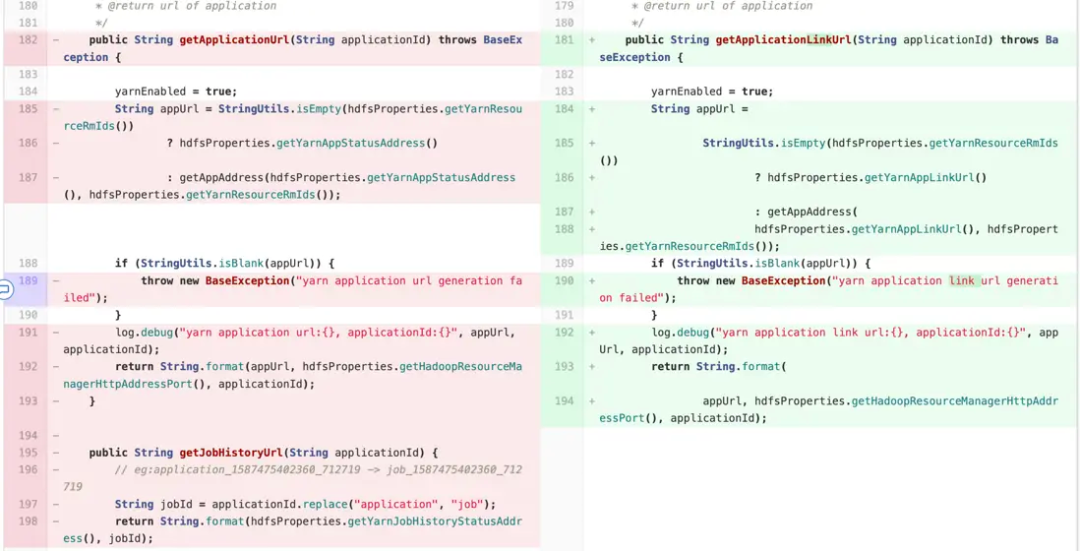
dolphinscheduler-storage-plugin/dolphinscheduler-storage-hdfs/src/main/java/org/apache/dolphinscheduler/plugin/storage/hdfs/HdfsStorageProperties.java修改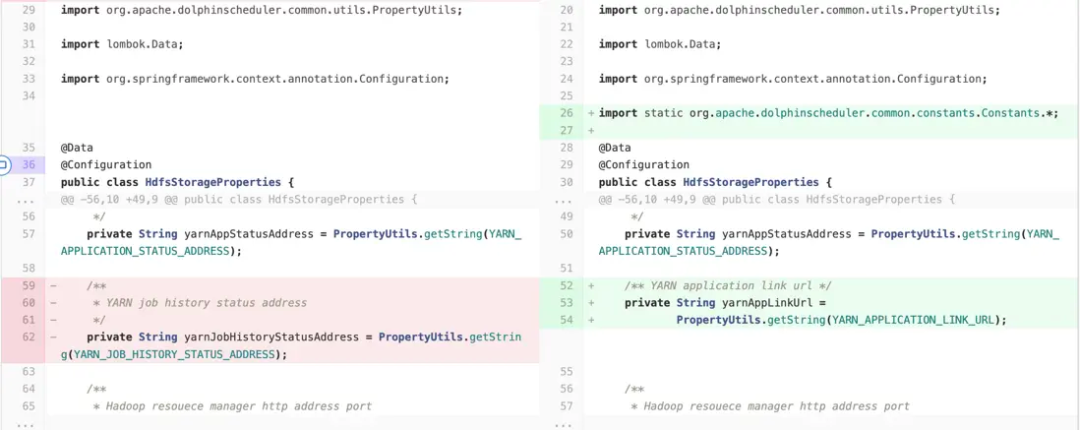
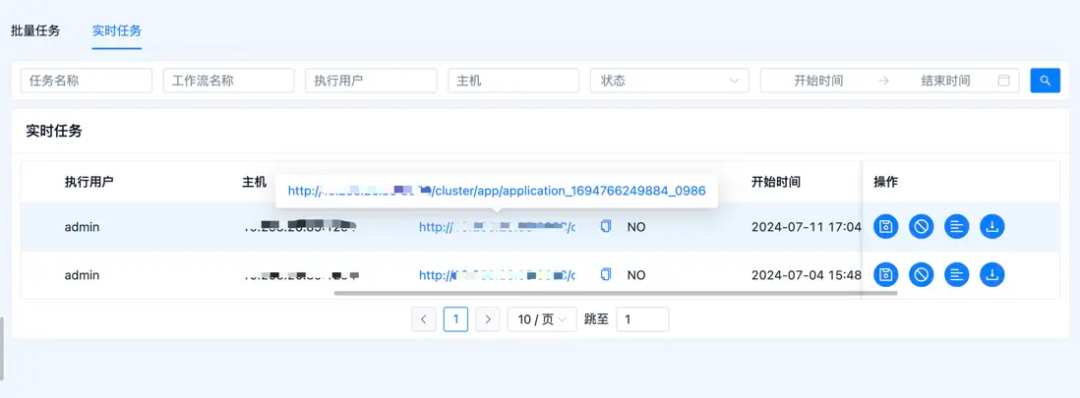
注意 : URL粘贴是需要自己写的,上面的代码不包含
6
问题追踪
org.apache.dolphinscheduler.plugin.task.api.AbstractYarnTask#handleFinalStateprivate void handleFinalState(YarnState yarnState) {
switch (yarnState) {
case FINISHED:
setExitStatusCode(EXIT_CODE_SUCCESS);
break;
case KILLED:
setExitStatusCode(EXIT_CODE_KILL);
break;
default:
setExitStatusCode(EXIT_CODE_FAILURE);
break;
}
}
7
使用HTTP对任务进行kill
curl -X PUT -d '{"state":"KILLED"}' \
>     -H "Content-Type: application/json" \
>     http://xx.xx.xx.xx:8088/ws/v1/cluster/apps/application_1694766249884_1098/state?user.name=hdfs
注意 :一定要指定 user.name
,否则不一定能kill掉。
参与Apache DolphinScheduler 社区有非常多的参与贡献的方式,包括:

文章转载自大数据技能圈,如果涉嫌侵权,请发送邮件至:contact@modb.pro进行举报,并提供相关证据,一经查实,墨天轮将立刻删除相关内容。
