在创建了docker swarm集群服务后,需要在3台服务器的节点上部署Ngnx。
一、查看集群节点状态
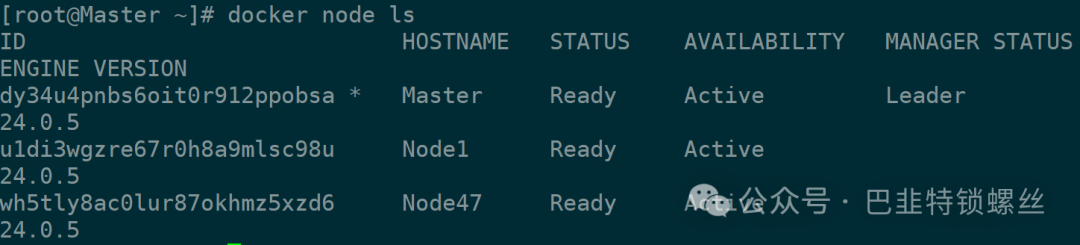
可以看出集群节点状态正常,可以创建服务。
分别有3台主机节点:
192.168.1.132(Master管理节点)
192.168.1.139(Worker节点1)
192.168.1.139(Worker节点2)
二、Nginx服务初始化
1、解除创建出错
[root@Master ~]# docker service create -p 8888:80 --name my-nginx nginxError response from daemon: rpc error: code = FailedPrecondition desc = service needs ingress network, but no ingress network is present[root@Master ~]# docker network create --ingress my-ingressError response from daemon: Ingress network can only be global scope network[root@Master ~]# docker network create --ingress --scope global my-ingressError response from daemon: Ingress network can only be global scope network

这个错误提示是因为创建ingress网络时,只能使用全局作用域(global scope)的网络。
解决:
docker network create --driver overlay --ingress --scope global my-ingress
再次创建nginx服务:
docker service create -p 8888:80 --name my-nginx nginx
[root@Master ~]# docker network create --driver overlay --ingress --scope global my-ingressv1b1eoklp2y9ois6a5grpslfe[root@Master ~]# docker service create -p 8888:80 --name my-nginx nginxy9y4iwq4u5k006lvvb2wd1r3uoverall progress: 1 out of 1 tasks1/1: runningverify: Service converged[root@Master ~]# docker psCONTAINER ID IMAGE COMMAND CREATED STATUS PORTS NAMESf454099b3357 nginx:latest "/docker-entrypoint.…" 44 seconds ago Up 43 seconds 80/tcp my-nginx.1.iqz84ijgerbeyp1rbd546c3i0
2、查看状态(Manage节点)
docker service ls
docker service ps my-nginx

3、服务扩缩容操作(Manage节点)
扩缩容:docker service update --replicas 3 my-nginx
或者:docker service scale my-nginx=3
[root@Master ~]# docker service update --replicas 3 my-nginxmy-nginxoverall progress: 3 out of 3 tasks1/3: running2/3: running3/3: runningverify: Service converged[root@Master ~]# docker service lsID NAME MODE REPLICAS IMAGE PORTSy9y4iwq4u5k0 my-nginx replicated 3/3 nginx:latest *:8888->80/tcp[root@Master ~]# docker service ps my-nginxID NAME IMAGE NODE DESIRED STATE CURRENT STATE ERROR PORTSiqz84ijgerbe my-nginx.1 nginx:latest Master Running Running 15 minutes ago5tliv89fqkma my-nginx.2 nginx:latest Node47 Running Running about a minute agovztfkup6908u my-nginx.3 nginx:latest Node1 Running Running 2 minutes ago
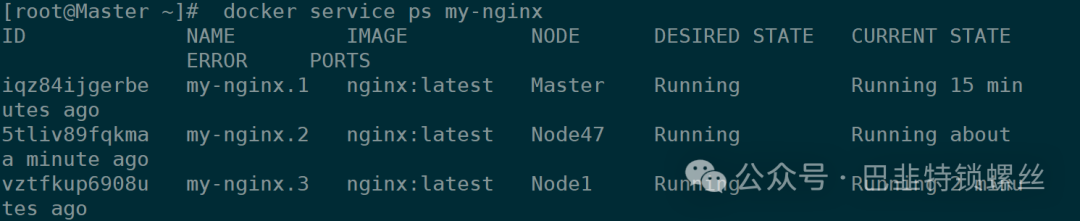
4、故障转移测试
停止其中节点的一个容器服务,可以发现很快在另一个服务器自动构建新的容器。Service并不会受主机的影响,会在集群中自动调度。
服务删除:docker service rm my-nginx
三、volume逻辑卷挂载(仅本地有效,无法集群同步)
1、查看逻辑卷
docker volume ls
docker volume inspect nginx-config
[root@Master ~]# docker volume lsDRIVER VOLUME NAMElocal ab088d81b38ece678f9d1e86a36e35cd198f04dc2329d536d2ad7e7538825143local aef036cf93666995932a429dcd5c880c3373113bf65faf17a76784cca31d0f85local d5b2246c7c5bd258924df21f3a266e26e4cc71769bc7f86b710adb480003c832local f4f6cf811e061507045463e9be57c7f071e355d414db073e39ca6606ee039179local nginx-configlocal portainer_data[root@Master ~]# docker volume inspect nginx-config[{"CreatedAt": "2023-09-26T17:17:45+08:00","Driver": "local","Labels": null,"Mountpoint": "/var/lib/docker/volumes/nginx-config/_data","Name": "nginx-config","Options": null,"Scope": "local"}]
2、挂载并创建Service
docker service create --replicas 3 --mount type=volume,src=my-nginx,dst=/my-nginx --name my-nginx nginx
分别在进入到3个服务器的容器内查看,可以看出已挂载上。

在挂载的数据卷目录中新增文件,观察:
[root@Master ~]# docker exec -it 737f5dc28307 bin/bashroot@737f5dc28307:/# lsbin docker-entrypoint.d home media opt run sys varboot docker-entrypoint.sh lib mnt proc sbin tmpdev etc lib64 my-nginx root srv usrroot@737f5dc28307:/# cd my-nginx/root@737f5dc28307:/my-nginx# lsroot@737f5dc28307:/my-nginx# echo "This is volume test from docker-1" > hello.txtroot@737f5dc28307:/my-nginx# lshello.txt[root@Master ~]# docker volume inspect my-nginx[{"CreatedAt": "2024-03-06T13:12:28+08:00","Driver": "local","Labels": null,"Mountpoint": "/var/lib/docker/volumes/my-nginx/_data","Name": "my-nginx","Options": null,"Scope": "local"}][root@Master ~]# cd var/lib/docker/volumes/my-nginx/_data[root@Master _data]# lshello.txt
可以看出在Manage节点创建的文件,在Work节点并没有同步,挂载的volume数据卷仅本地有效,涉及到修改调整无法在集群中同步。