



gs_dump工具介绍及使用
1. gs_dump工具介绍
gs_dump是openGauss用于导出数据库相关信息的工具,用户可以自定义导出一个数据库或其中的对象(模式、表、视图等)。支持导出的数据库可以是默认数据库postgres,也可以是自定义数据库。
a. 由操作系统用户omm执行。
b. gs_dump工具在进行数据导出时,其他用户可以访问openGauss数据库(读或写)。
c. gs_dump工具支持导出完整一致的数据。例如,T1时刻启动gs_dump导出A数据库,那么导出数据结果将会是T1时刻A数据库的数据状态,T1时刻之后对A数据库的修改不会被导出。
d. gs_dump支持将数据库信息导出至纯文本格式的SQL脚本文件或其他归档文件中
2. ds_dump参数解释
omm@modb:~$ gs_dump --help

  --lock-wait-timeout=TIMEOUT                 fail after waiting TIMEOUT for a table lock
  -?, --help                                  show this help, then exit

Options controlling the output content:
gs_dump dumps a database as a text file or to other formats.

Usage:
  gs_dump [OPTION]... [DBNAME]

General options:
  -f, --file=FILENAME                         output file or directory name
  -F, --format=c|d|t|p                        output file format (custom, directory, tar,
                                              plain text (default))
  -v, --verbose                               verbose mode
  -V, --version                               output version information, then exit
  -Z, --compress=0-9                          compression level for compressed formats
  -a, --data-only                             dump only the data, not the schema
  -b, --blobs                                 include large objects in dump
  -c, --clean                                 clean (drop) database objects before recreating
  -C, --create                                include commands to create database in dump
  -E, --encoding=ENCODING                     dump the data in encoding ENCODING
  -n, --schema=SCHEMA                         dump the named schema(s) only
  -N, --exclude-schema=SCHEMA                 do NOT dump the named schema(s)
  -o, --oids                                  include OIDs in dump
  -O, --no-owner                              skip restoration of object ownership in
                                              plain-text format
  -s, --schema-only                           dump only the schema, no data
  -S, --sysadmin=NAME                         system admin user name to use in plain-text format
  -t, --table=TABLE                           dump the named table(s) only
  -T, --exclude-table=TABLE                   do NOT dump the named table(s)
  --include-table-file=FileName               dump the named table(s) only
  --exclude-table-file=FileName               do NOT dump the named table(s)
  -x, --no-privileges/--no-acl                do not dump privileges (grant/revoke)
  --disable-triggers                          disable triggers during data-only restore
  --exclude-table-data=TABLE                  do NOT dump data for the named table(s)
  --inserts                                   dump data as INSERT commands, rather than COPY
  --no-security-labels                        do not dump security label assignments
  --column-inserts/--attribute-inserts        dump data as INSERT commands with column names
  --disable-dollar-quoting                    disable dollar quoting, use SQL standard quoting
  --no-tablespaces                            do not dump tablespace assignments
  --no-unlogged-table-data                    do not dump unlogged table data
  --include-alter-table                       dump the table delete column
  --quote-all-identifiers                     quote all identifiers, even if not key words
  --dont-overwrite-file                       do not overwrite the existing file in case of plain,
					      tar and custom format
  --use-set-session-authorization             use SET SESSION AUTHORIZATION commands instead of
                                              ALTER OWNER commands to set ownership
  --with-encryption=AES128                    dump data is encrypted using AES128
  --with-key=KEY                              AES128 encryption key, must be 16 bytes in length
  --with-salt=RANDVALUES                      used by gs_dumpall, pass rand value array
  --include-extensions                        include extensions in dump
  --binary-upgrade                            for use by upgrade utilities only
  --section=SECTION                           dump named section (pre-data, data, or post-data)
  --serializable-deferrable                   wait until the dump can run without anomalies

  --binary-upgrade-usermap="USER1=USER2"      to be used only by upgrade utility for mapping usernames
  --non-lock-table                            for use by OM tools utilities only
  --include-depend-objs                       dump the object which depends on the input object
  --exclude-self                              do not dump the input object

Connection options:
  -h, --host=HOSTNAME                         database server host or socket directory
  -p, --port=PORT                             database server port number
  -U, --username=NAME                         connect as specified database user
  -w, --no-password                           never prompt for password
  -W, --password=PASSWORD                     the password of specified database user
  --role=ROLENAME                             do SET ROLE before dump
  --rolepassword=ROLEPASSWORD                 the password for role

If no database name is supplied, then the PGDATABASE environment
variable value is used.
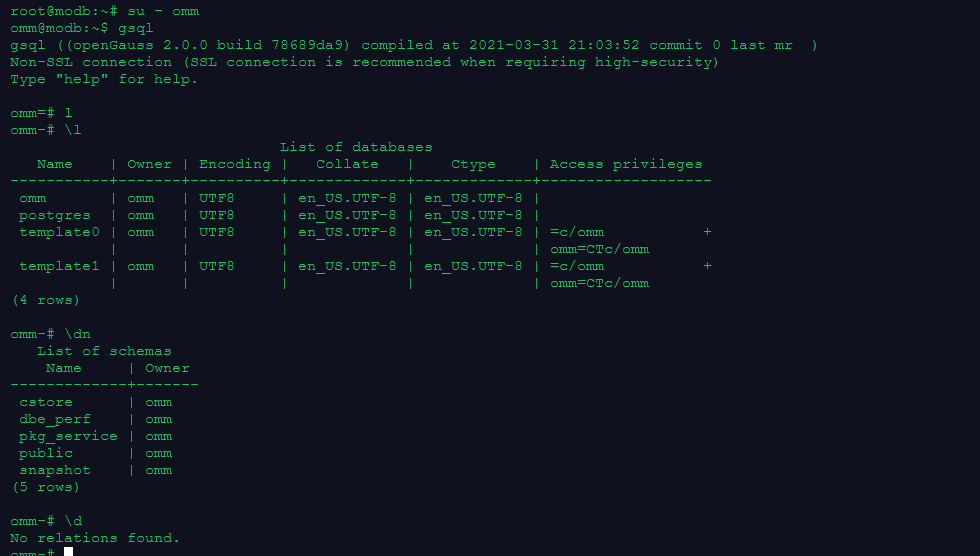
数据库连接及环境检查
切换用户至omm用户(gaussdb的所有者)
su - omm
gsql连接数据库,并检查当前会话连接信息:
gsql -r
\conninfo
查看当前数据库、模式及表
\l
\dn
\d
课后练习
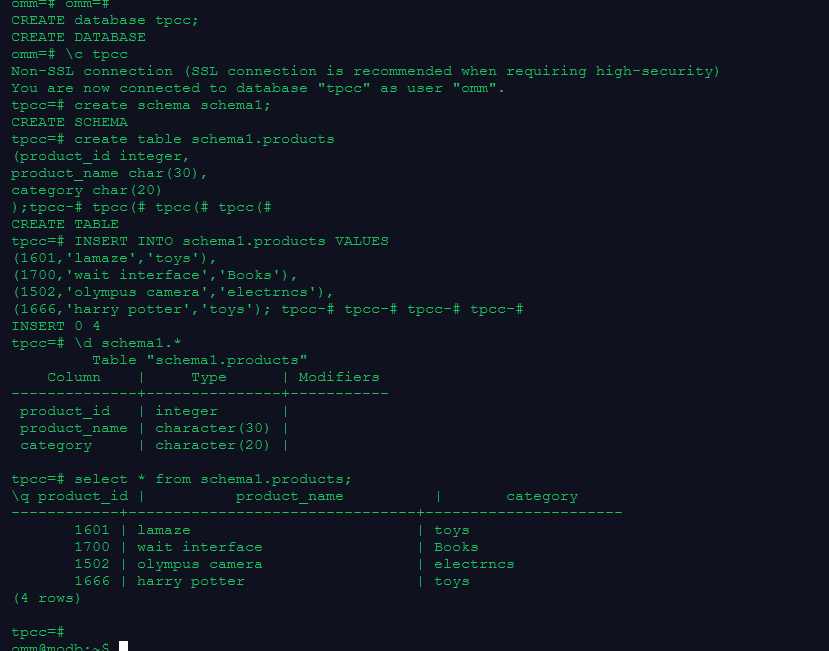
1.创建数据库tpcc,在数据库tpcc中创建模式schema1,在模式schema1中建表products
CREATE database tpcc;
\c tpcc
create schema schema1;

create table schema1.products
(product_id integer,
product_name char(30),
category char(20)
);


INSERT INTO schema1.products VALUES
(1601,'lamaze','toys'),
(1700,'wait interface','Books'),
(1502,'olympus camera','electrncs'),
(1666,'harry potter','toys');

\d schema1.*
2.使用gs_dump工具以文本格式导出数据库tpcc的全量数据
gs_dump -f /home/omm/tpcc_database_all.sql tpcc -F p

3.使用gs_dump工具以文本格式导出模式schema1的定义
gs_dump -f /home/omm/tpcc_schema1_define.sql tpcc -n schema1 -s -F p

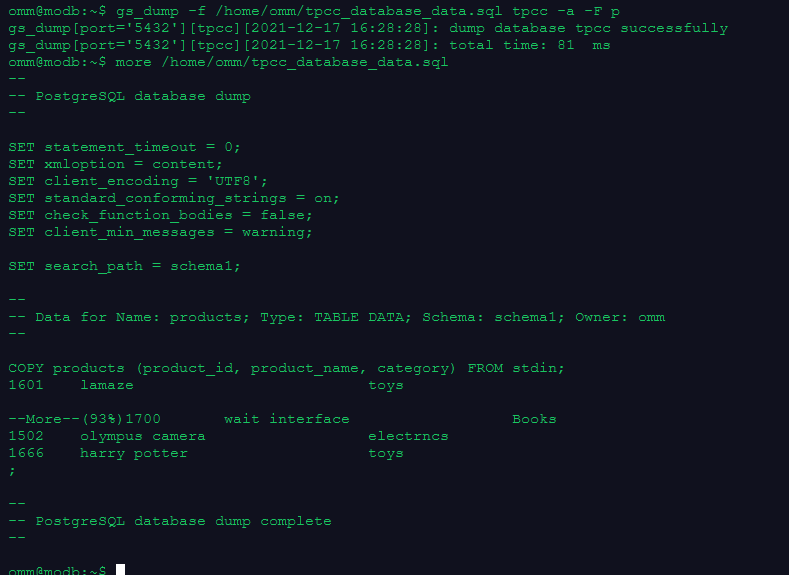
4.使用gs_dump工具以文本格式导出数据库tpcc的数据,不包含定义
gs_dump -f /home/omm/tpcc_database_data.sql tpcc -a -F p
5.删除表、模式和数据库
drop table schema1.products;
drop schema schema1;
drop database tpcc;

\l
\dn
附:备份恢复相关官网文档
「喜欢这篇文章,您的关注和赞赏是给作者最好的鼓励」
关注作者
【版权声明】本文为墨天轮用户原创内容,转载时必须标注文章的来源(墨天轮),文章链接,文章作者等基本信息,否则作者和墨天轮有权追究责任。如果您发现墨天轮中有涉嫌抄袭或者侵权的内容,欢迎发送邮件至:contact@modb.pro进行举报,并提供相关证据,一经查实,墨天轮将立刻删除相关内容。
