随机数生成器
numpy.random模块对Python内置的random进⾏了补充,增加了⽤于⾼效⽣成多种概率分布的样本值的函数。
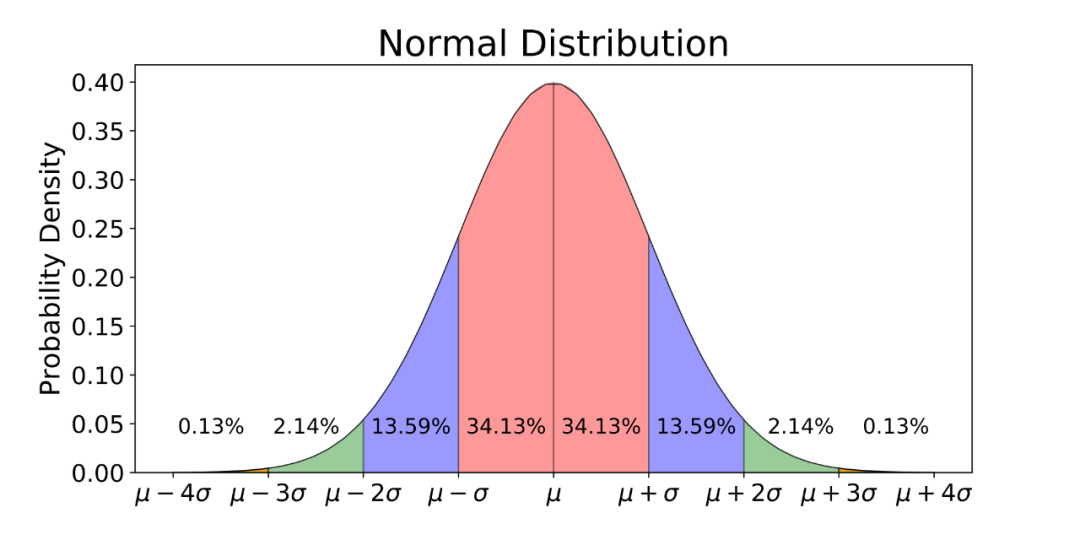
例如,我们可以⽤normal来得到⼀个标准正态分布的4×4样本数组:
In [1]: import numpy as np

In [2]: samples = np.random.normal(size=(4, 4))

In [3]: samples
Out[3]:
array([[-0.43234712,  0.71508302, -0.24922243, -0.14008809],
       [-0.07306857,  1.11902257,  1.67834241,  1.04380962],
       [ 1.57511993,  0.53217359, -0.93805353, -1.27407489],
       [-0.42945442, -0.932593  , -0.27341583, -1.84592276]])
Python内置的random模块⼀次⽣成⼀个样本值。如果需要产⽣⼤量样本值,numpy.random快了不⽌⼀个数量级。
这里说的随机数其实是伪随机数,因为它们都是算法基于随机数⽣成器种⼦,在确定性的条件下⽣成的。
可以⽤NumPy的np.random.seed更改随机数⽣成种⼦:
In [4]: np.random.seed(1314)

In [5]: np.random.normal(size=(4, 4))
Out[5]:
array([[ 0.82249116,  0.31716606,  0.07460255,  0.39114589],
       [ 1.02974183, -0.17169844,  0.01783485, -0.79592287],
       [ 0.69842939,  0.53006889, -0.02240247, -0.30659769],
       [ 0.70876805, -0.15339119,  0.06983401,  0.65920784]])

In [6]: np.random.normal(size=(4, 4))
Out[6]:
array([[-0.23700754, -0.12591096, -0.53713709,  0.83859018],
       [-0.92441333, -1.82950711,  1.07402425, -0.71082924],
       [-1.56931586,  1.25346696, -1.03149754, -0.48788514],
       [ 0.63616211,  0.60657245, -2.9265837 ,  0.37558252]])
❝固定随机数种子可以帮你在重新运行代码时得到和以前一样的结果,比如可以使得每次初始化神经网络时的参数不变。
❞
numpy.random的数据⽣成函数使⽤了全局随机数种⼦。要避免全局状态,可以使⽤numpy.random.RandomState创建⼀个与其它随机数⽣成器隔离的随机数⽣成器。
这里似乎有点难懂,配合一下英文原版:
The data generation functions in numpy.random use a global random seed. To avoid global state, you can use numpy.random.RandomState to create a random number generator isolated from others。
In [4]: np.random.seed(1314)

In [5]: np.random.normal(size=(4, 4))
Out[5]:
array([[ 0.82249116,  0.31716606,  0.07460255,  0.39114589],
       [ 1.02974183, -0.17169844,  0.01783485, -0.79592287],
       [ 0.69842939,  0.53006889, -0.02240247, -0.30659769],
       [ 0.70876805, -0.15339119,  0.06983401,  0.65920784]])

In [7]: rng = np.random.RandomState(521)

In [8]: rng.randn(10)
Out[8]:
array([ 0.58677824,  1.72618782, -2.09253487, -1.21094691, -0.54463643,
        0.33302445,  1.71423807, -0.67017194, -0.34323145, -0.05041905])
也就是说rng变量产生随机数的随机数种子是521(局部),其他的变量产生的随机数种子是np.random.seed(1314)(全局),‘隔离’就是这个意思。
np.random.shuffle可以打乱数据
In [9]: data = np.arange(10)

In [10]: data
Out[10]: array([0, 1, 2, 3, 4, 5, 6, 7, 8, 9])

In [11]: np.random.shuffle(data)

In [12]: data
Out[12]: array([1, 0, 5, 8, 3, 9, 7, 2, 6, 4])
np.random.rand:可以返回一个或一组取值范围0-1服从均匀分布的随机样本值。
In [13]: np.random.rand(10)
Out[13]:
array([0.9633685 , 0.14799736, 0.8877545 , 0.40978015, 0.56855213,
       0.5427673 , 0.2399583 , 0.86841299, 0.81771011, 0.23006818])
nump.random.randint会返回一组随机生成的整数,范围是[low, high)。
「格式」:
nump.random.randint(low, high=None, size=None, dtype='l')
low:随机生成整数的下限
high:随机生成整数的上限
size: 随机生成整数的数量
比如我们生成0到10之间10个整数:
In [14]: np.random.randint(0,10,10)
Out[14]: array([8, 6, 1, 1, 7, 5, 0, 6, 3, 3])
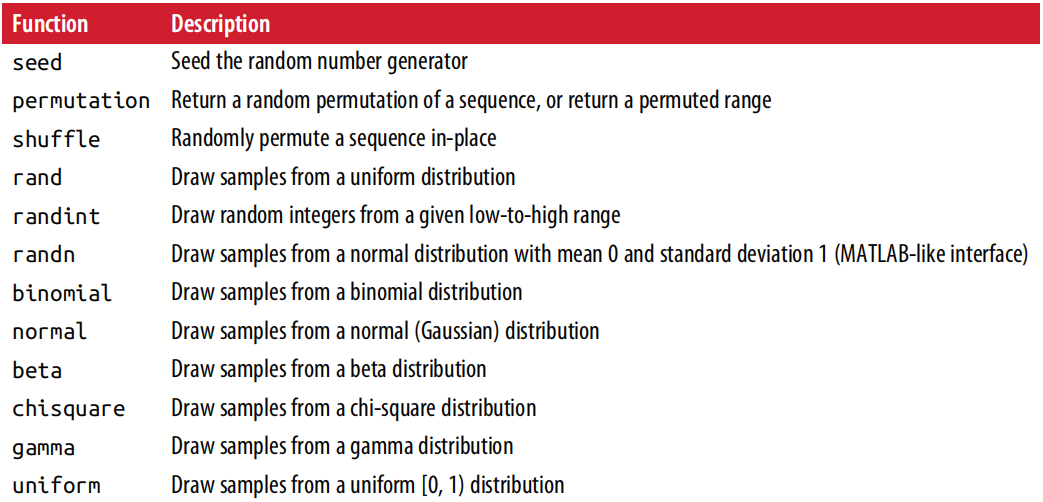
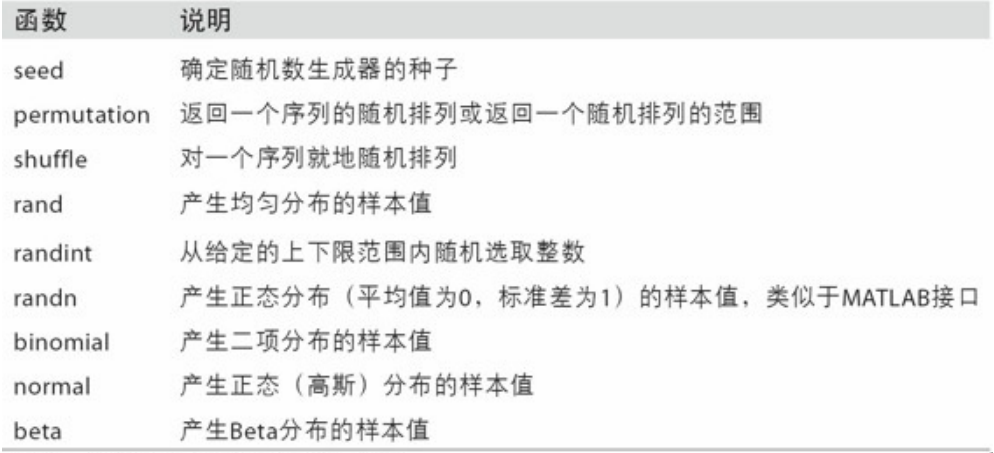
更多不同分布的随机数见下面表格:
英文版
中文版


往期回顾



Stay hungry, stay foolish
快来,点在看啦