



学习目标
学习openGauss存储模型-行存和列存
行存储是指将表按行存储到硬盘分区上,列存储是指将表按列存储到硬盘分区上。默认情况下,创建的表为行存储。
行、列存储模型各有优劣,通常用于TP场景的数据库,默认使用行存储,仅对执行复杂查询且数据量大的AP场景时,才使用列存储
课程学习
连接数据库

#第一次进入等待15秒
#数据库启动中...
su - omm
gsql -r
1.创建行存表
CREATE TABLE test_t1
(
col1 CHAR(2),
col2 VARCHAR2(40),
col3 NUMBER
);
–压缩属性为no

\d+ test_t1
insert into test_t1 select col1, col2, col3 from (select generate_series(1, 100000) as key, repeat(chr(int4(random() * 26) + 65), 2) as  col1, repeat(chr(int4(random() * 26) + 65), 30) as  col2, (random() * (10^4))::integer as col3);
2.创建列存表
CREATE TABLE test_t2
(
col1 CHAR(2),
col2 VARCHAR2(40),
col3 NUMBER
)
WITH (ORIENTATION = COLUMN);
–压缩属性为low

\d+ test_t2;
–插入和行存表相同的数据

insert into test_t2 select * from test_t1;
3.占用空间对比
\d+
4.对比读取一列的速度
analyze VERBOSE test_t1;
analyze VERBOSE test_t2;
–列存表时间少于行存表

explain analyze select distinct col1 from test_t1;
explain analyze select distinct col1 from test_t2;
5.对比插入一行的速度
–行存表时间少于列存表

explain analyze insert into test_t1 values('x', 'xxxx', '123');
explain analyze insert into test_t2 values('x', 'xxxx', '123');
6.清理数据
drop table test_t1;
drop table test_t2;
课程作业
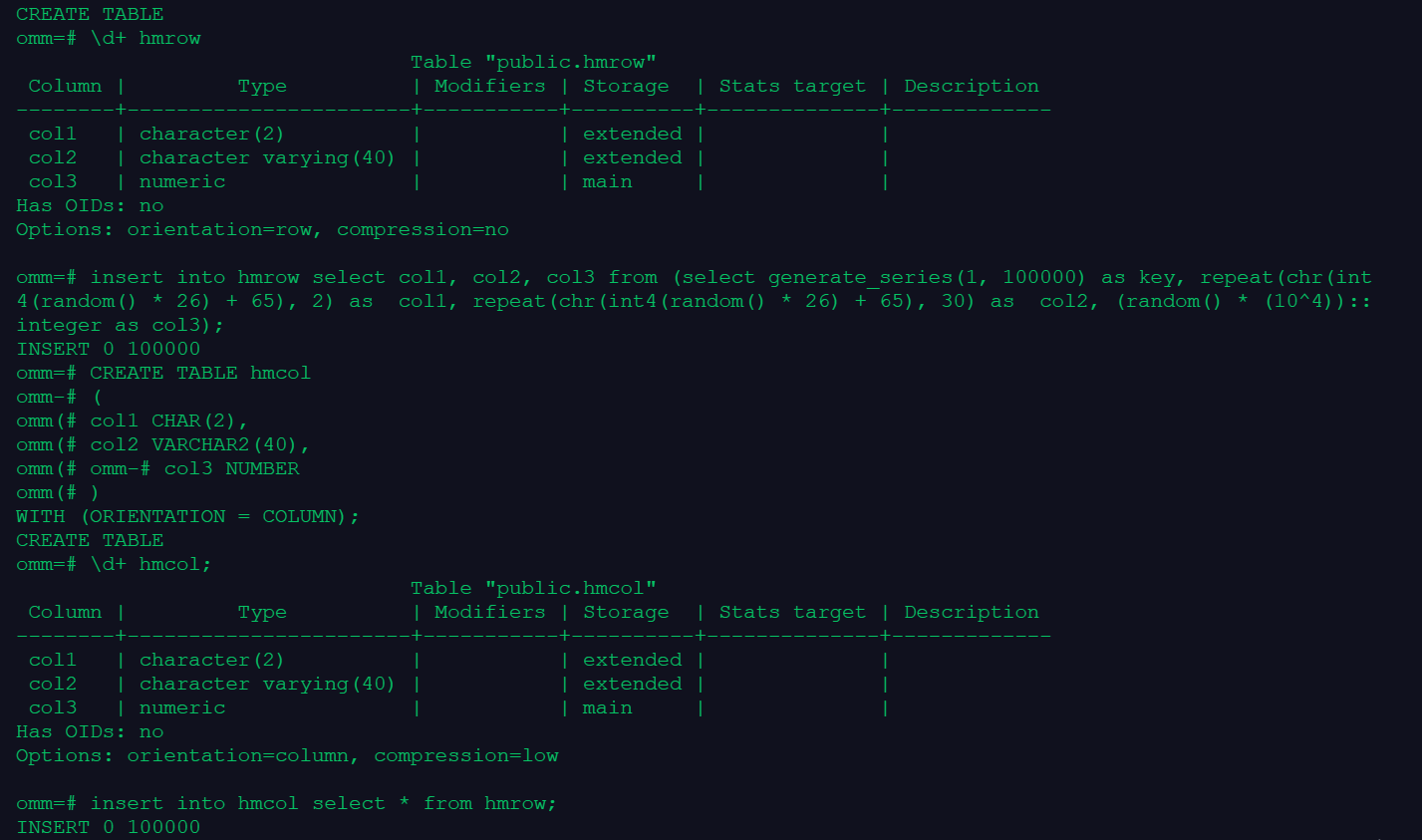
1.创建行存表和列存表,并批量插入10万条数据(行存表和列存表数据相同)
CREATE TABLE hmrow
(
col1 CHAR(2),
col2 VARCHAR2(40),
col3 NUMBER
);
–压缩属性为no

\d+ hmrow
insert into hmrow select col1, col2, col3 from (select generate_series(1, 100000) as key, repeat(chr(int4(random() * 26) + 65), 2) as  col1, repeat(chr(int4(random() * 26) + 65), 30) as  col2, (random() * (10^4))::integer as col3);
创建列存表
CREATE TABLE hmcol
(
col1 CHAR(2),
col2 VARCHAR2(40),
col3 NUMBER
)
WITH (ORIENTATION = COLUMN);
–压缩属性为low

\d+ hmcol;
–插入和行存表相同的数据
insert into hmcol select * from hmrow;
2.对比行存表和列存表空间大小

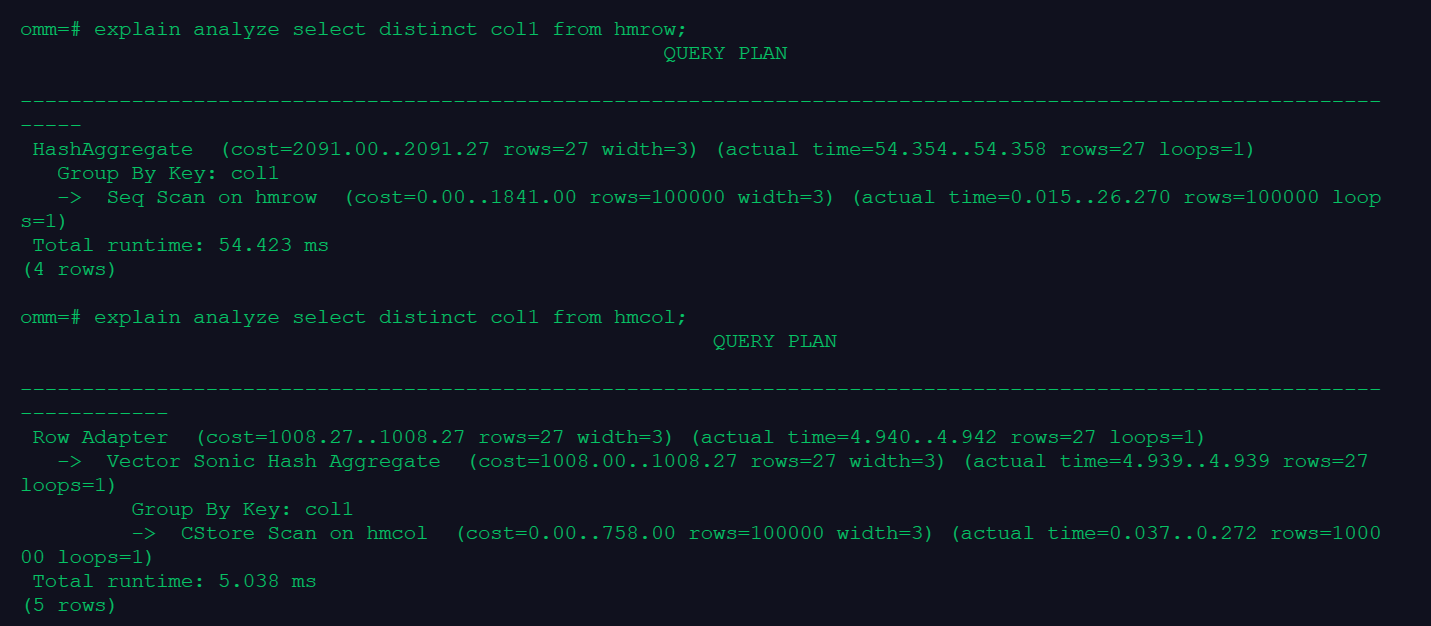
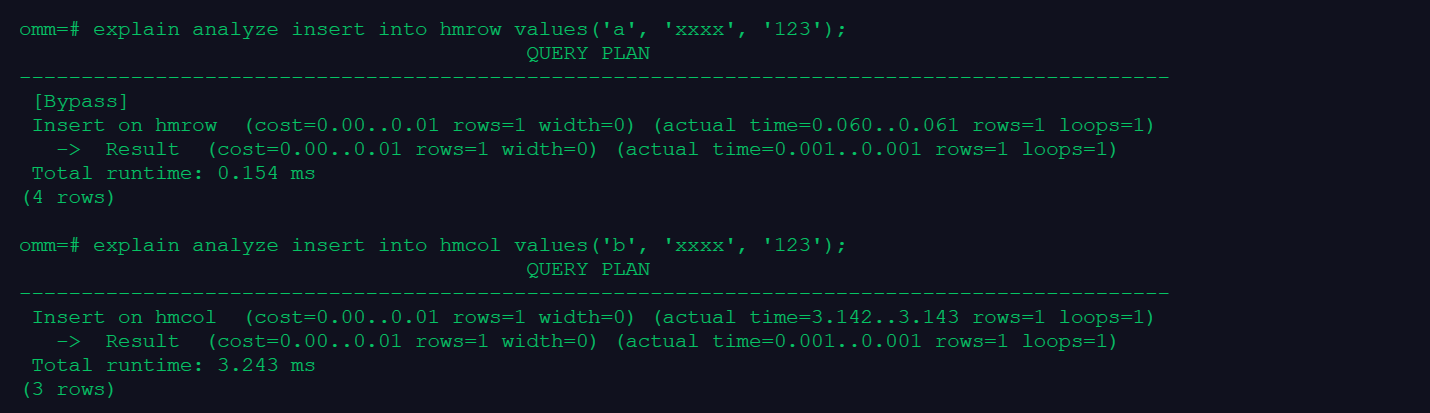
3.对比查询一列和插入一行的速度
analyze VERBOSE hmrow;
analyze VERBOSE hmcol;
–列存表时间少于行存表
explain analyze select distinct col1 from hmrow;
explain analyze select distinct col1 from hmcol;

–行存表时间少于列存表
explain analyze insert into hmrow values('a', 'xxxx', '123');
explain analyze insert into hmcol values('b', 'xxxx', '123');
4.清理数据
drop table hmrow;
drop table hmcol;

坚持:2021.12.21
「喜欢这篇文章,您的关注和赞赏是给作者最好的鼓励」
关注作者
【版权声明】本文为墨天轮用户原创内容,转载时必须标注文章的来源(墨天轮),文章链接,文章作者等基本信息,否则作者和墨天轮有权追究责任。如果您发现墨天轮中有涉嫌抄袭或者侵权的内容,欢迎发送邮件至:contact@modb.pro进行举报,并提供相关证据,一经查实,墨天轮将立刻删除相关内容。
