




screw (螺丝钉) 英:[skruː] ~ 简洁好用的数据库表结构文档生成工具、
特点
•简洁、轻量、设计良好•多数据库支持•多种格式文档•灵活扩展•支持自定义模板
数据库支持
•MySQL•MariaDB•TIDB•Oracle•SqlServer•PostgreSQL•Cache DB
文档生成支持
•html•word•markdwon
配置
1、pom文件
•引入screw核心包,HikariCP数据库连接池,HikariCP号称性能最出色的数据库连接池。
<!-- screw核心 --><dependency><groupId>cn.smallbun.screw</groupId><artifactId>screw-core</artifactId><version>1.0.3</version></dependency><!-- HikariCP --><dependency><groupId>com.zaxxer</groupId><artifactId>HikariCP</artifactId><version>3.4.5</version></dependency><!--mysql driver--><dependency><groupId>mysql</groupId><artifactId>mysql-connector-java</artifactId><version>8.0.20</version></dependency>
2、screw 核心配置
screw有两种执行方式,
第一种是pom文件配置
<build><plugins><plugin><groupId>org.springframework.boot</groupId><artifactId>spring-boot-maven-plugin</artifactId></plugin><plugin><groupId>cn.smallbun.screw</groupId><artifactId>screw-maven-plugin</artifactId><version>1.0.3</version><dependencies><!-- HikariCP --><dependency><groupId>com.zaxxer</groupId><artifactId>HikariCP</artifactId><version>3.4.5</version></dependency><!--mysql driver--><dependency><groupId>mysql</groupId><artifactId>mysql-connector-java</artifactId><version>8.0.20</version></dependency></dependencies><configuration><!--username--><username>root</username><!--password--><password>123456</password><!--driver--><driverClassName>com.mysql.cj.jdbc.Driver</driverClassName><!--jdbc url--><jdbcUrl>jdbc:mysql://41.92.6.5:3306/fire</jdbcUrl><!--生成文件类型--><fileType>MD</fileType><!--打开文件输出目录--><openOutputDir>false</openOutputDir><!--生成模板--><produceType>freemarker</produceType><!--文档名称 为空时:将采用[数据库名称-描述-版本号]作为文档名称--><!--<docName>测试文档名称</docName>--><!--描述--><description>数据库文档生成</description><!--版本--><version>${project.version}</version><!--标题--><title>fire数据库文档</title></configuration><executions><execution><phase>compile</phase><goals><goal>run</goal></goals></execution></executions></plugin></plugins></build>
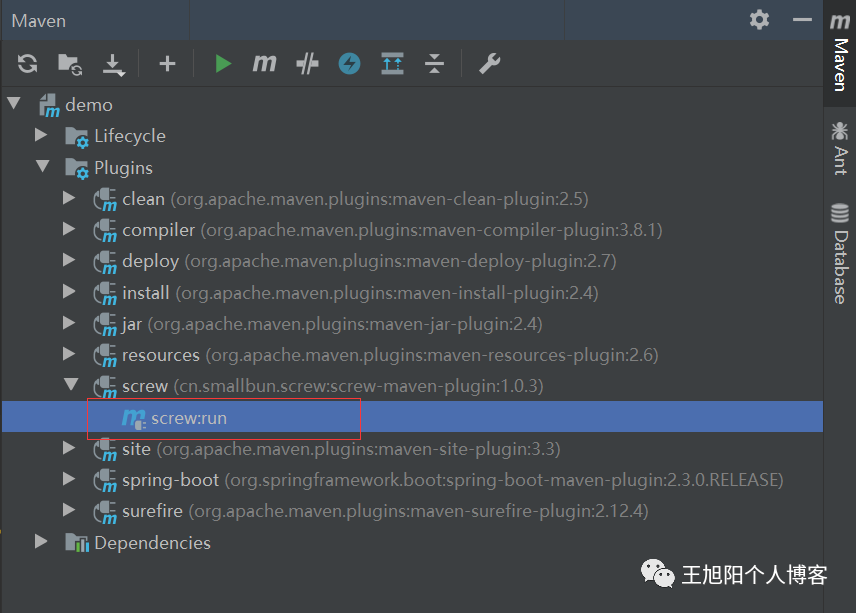
配置完以后在 maven project->screw 双击执行ok。
第二种是代码执行。
@SpringBootTestpublic class ScrewApplicationTests {@AutowiredApplicationContext applicationContext;@Testvoid contextLoads() {DataSource dataSourceMysql = applicationContext.getBean(DataSource.class);// 生成文件配置EngineConfig engineConfig = EngineConfig.builder()// 生成文件路径,自己本机本地的地址,这里需要自己更换下路径.fileOutputDir("D:/")// 打开目录.openOutputDir(false)// 文件类型.fileType(EngineFileType.HTML)// 生成模板实现.produceType(EngineTemplateType.freemarker).build();// 生成文档配置(包含以下自定义版本号、描述等配置连接)Configuration config = Configuration.builder().version("0.0.1").description("生成文档信息描述").dataSource(dataSourceMysql).engineConfig(engineConfig).produceConfig(getProcessConfig()).build();// 执行生成new DocumentationExecute(config).execute();}/*** 配置想要生成的表+ 配置想要忽略的表** @return 生成表配置*/public static ProcessConfig getProcessConfig() {// 忽略表名List<String> ignoreTableName = Arrays.asList("test", "test_group");// 忽略表前缀,如忽略a开头的数据库表List<String> ignorePrefix = Arrays.asList("a", "t");// 忽略表后缀List<String> ignoreSuffix = Arrays.asList("_test", "czb_");return ProcessConfig.builder()//根据名称指定表生成.designatedTableName(Arrays.asList("fire_user"))//根据表前缀生成.designatedTablePrefix(new ArrayList<>())//根据表后缀生成.designatedTableSuffix(new ArrayList<>())//忽略表名.ignoreTableName(ignoreTableName)//忽略表前缀.ignoreTablePrefix(ignorePrefix)//忽略表后缀.ignoreTableSuffix(ignoreSuffix).build();}}
生成文档格式在代码中的修改
.fileType(EngineFileType.MD)或者
pom
文件<fileType>MD</fileType>
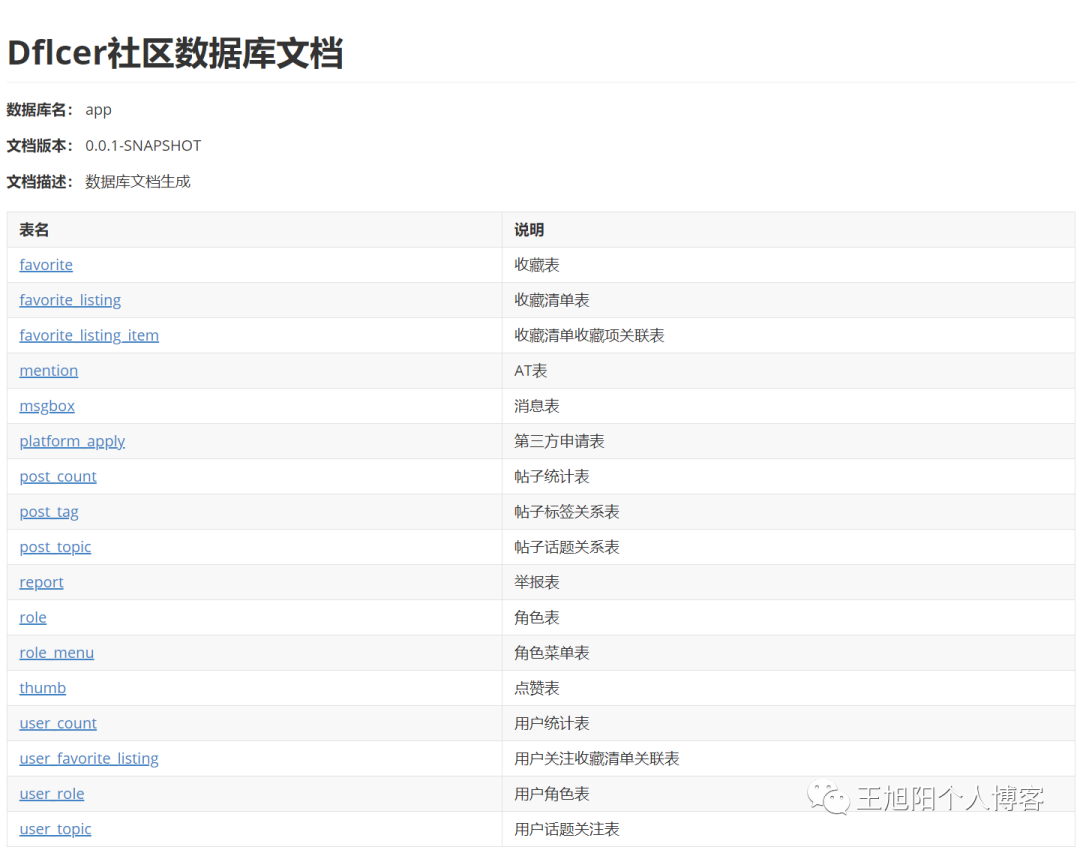
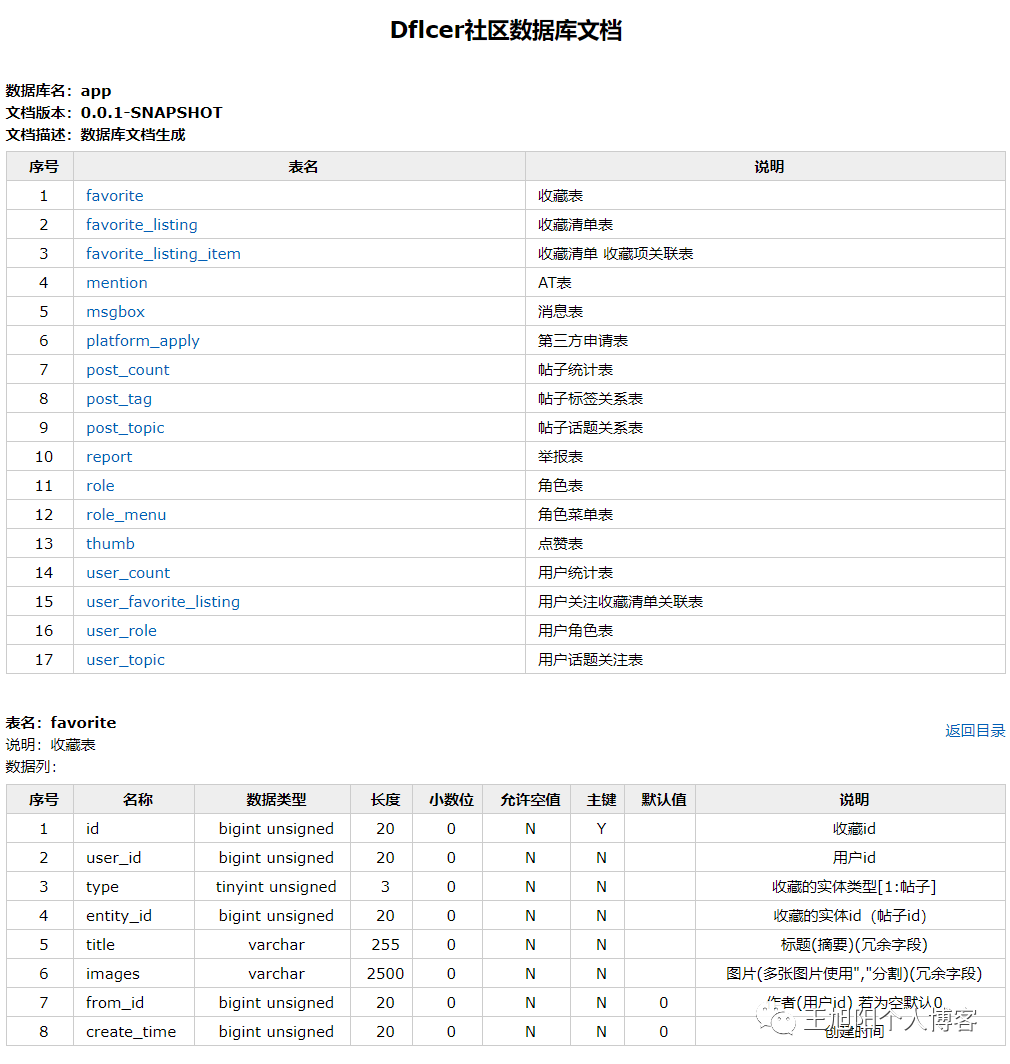
生成样式
MD样式
HTML样式
常见问题
•生成后文档乱码?MySQL:URL加入?characterEncoding=UTF-8
。•Caused by: java.lang.NoSuchFieldError: VERSION_2_3_30?检查项目freemarker
依赖,这是由于版本过低造成的,升级版本为2.3.30
即可。•java.lang.AbstractMethodError: oracle.jdbc.driver.T4CConnection.getSchema()Ljava/lang/String;这是因为oracle驱动版本过低造成的,删除或屏蔽目前驱动版本,驱动添加升级为以下版本:
<dependency><groupId>com.oracle.ojdbc</groupId><artifactId>ojdbc8</artifactId><version>19.3.0.0</version></dependency><dependency><groupId>cn.easyproject</groupId><artifactId>orai18n</artifactId><version>12.1.0.2.0</version></dependency>
•MySQL数据库表和列字段有说明、生成文档没有说明?URL链接加入useInformationSchema=true
即可。•java.lang.AbstractMethodError: com.mysql.jdbc.JDBC4Connection.getSchema()Ljava/lang/String;这是因为mysql驱动版本过低造成的,升级mysql驱动版本为最新即可。
项目地址
GITHUB[1]
GITEE[2]
References
[1]
GITHUB: https://github.com/pingfangushi/screw[2]
GITEE: https://gitee.com/leshalv/screw
