



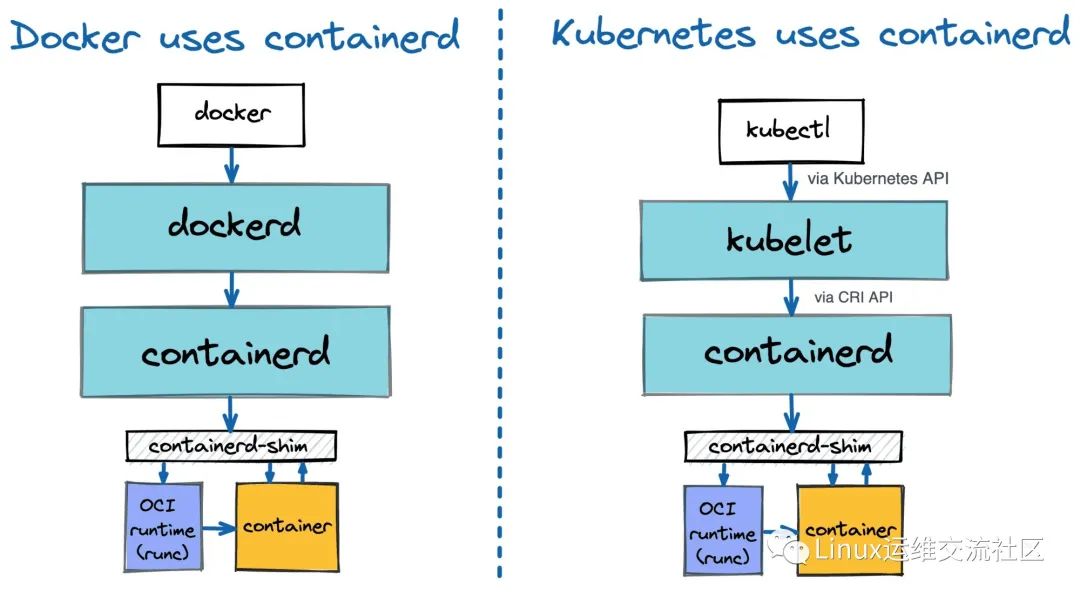
Containerd 被 Docker、Kubernetes CRI 和其他一些项目使用
Containerd 旨在轻松嵌入到更大的系统中。Docker 在后台使用 containerd来运行容器。Kubernetes 可以通过 CRI 使用 containerd来管理单个节点上的容器。
生成默认配置
root@hello:~# containerd config default > etc/containerd/config.tomlroot@hello:~# vim etc/containerd/config.tomlroot@hello:~# cat etc/containerd/config.tomlversion = 2root = "/var/lib/containerd"state = "/run/containerd"plugin_dir = ""disabled_plugins = []required_plugins = []oom_score = 0[grpc]address = "/run/containerd/containerd.sock"tcp_address = ""tcp_tls_cert = ""tcp_tls_key = ""uid = 0gid = 0max_recv_message_size = 16777216max_send_message_size = 16777216[ttrpc]address = ""uid = 0gid = 0[debug]address = ""uid = 0gid = 0level = ""[metrics]address = ""grpc_histogram = false[cgroup]path = ""[timeouts]"io.containerd.timeout.shim.cleanup" = "5s""io.containerd.timeout.shim.load" = "5s""io.containerd.timeout.shim.shutdown" = "3s""io.containerd.timeout.task.state" = "2s"[plugins][plugins."io.containerd.gc.v1.scheduler"]pause_threshold = 0.02deletion_threshold = 0mutation_threshold = 100schedule_delay = "0s"startup_delay = "100ms"[plugins."io.containerd.grpc.v1.cri"]disable_tcp_service = truestream_server_address = "127.0.0.1"stream_server_port = "0"stream_idle_timeout = "4h0m0s"enable_selinux = falseselinux_category_range = 1024sandbox_image = "k8s.gcr.io/pause:3.2"stats_collect_period = 10systemd_cgroup = falseenable_tls_streaming = falsemax_container_log_line_size = 16384disable_cgroup = falsedisable_apparmor = falserestrict_oom_score_adj = falsemax_concurrent_downloads = 3disable_proc_mount = falseunset_seccomp_profile = ""tolerate_missing_hugetlb_controller = truedisable_hugetlb_controller = trueignore_image_defined_volumes = false[plugins."io.containerd.grpc.v1.cri".containerd]snapshotter = "overlayfs"default_runtime_name = "runc"no_pivot = falsedisable_snapshot_annotations = truediscard_unpacked_layers = false[plugins."io.containerd.grpc.v1.cri".containerd.default_runtime]runtime_type = ""runtime_engine = ""runtime_root = ""privileged_without_host_devices = falsebase_runtime_spec = ""[plugins."io.containerd.grpc.v1.cri".containerd.untrusted_workload_runtime]runtime_type = ""runtime_engine = ""runtime_root = ""privileged_without_host_devices = falsebase_runtime_spec = ""[plugins."io.containerd.grpc.v1.cri".containerd.runtimes][plugins."io.containerd.grpc.v1.cri".containerd.runtimes.runc]runtime_type = "io.containerd.runc.v2"runtime_engine = ""runtime_root = ""privileged_without_host_devices = falsebase_runtime_spec = ""[plugins."io.containerd.grpc.v1.cri".containerd.runtimes.runc.options][plugins."io.containerd.grpc.v1.cri".cni]bin_dir = "/opt/cni/bin"conf_dir = "/etc/cni/net.d"max_conf_num = 1conf_template = ""[plugins."io.containerd.grpc.v1.cri".registry][plugins."io.containerd.grpc.v1.cri".registry.mirrors][plugins."io.containerd.grpc.v1.cri".registry.mirrors."docker.io"]endpoint = ["https://registry-1.docker.io"][plugins."io.containerd.grpc.v1.cri".image_decryption]key_model = ""[plugins."io.containerd.grpc.v1.cri".x509_key_pair_streaming]tls_cert_file = ""tls_key_file = ""[plugins."io.containerd.internal.v1.opt"]path = "/opt/containerd"[plugins."io.containerd.internal.v1.restart"]interval = "10s"[plugins."io.containerd.metadata.v1.bolt"]content_sharing_policy = "shared"[plugins."io.containerd.monitor.v1.cgroups"]no_prometheus = false[plugins."io.containerd.runtime.v1.linux"]shim = "containerd-shim"runtime = "runc"runtime_root = ""no_shim = falseshim_debug = false[plugins."io.containerd.runtime.v2.task"]platforms = ["linux/amd64"][plugins."io.containerd.service.v1.diff-service"]default = ["walking"][plugins."io.containerd.snapshotter.v1.devmapper"]root_path = ""pool_name = ""base_image_size = ""async_remove = falseroot@hello:~#
配置镜像加速器
[plugins."io.containerd.grpc.v1.cri".registry][plugins."io.containerd.grpc.v1.cri".registry.mirrors][plugins."io.containerd.grpc.v1.cri".registry.mirrors."docker.io"]endpoint = ["https://ted9wxpi.mirror.aliyuncs.com"]
ctr 相当于核心组件,通过加载插件的方式来支持各种操作。
使用 ctr plugins ls 来查看当前加载的插件和支持的操作。
[root@k8s-master01 ~]# ctr plugins lsTYPE ID PLATFORMS STATUSio.containerd.content.v1 content - okio.containerd.snapshotter.v1 aufs linux/amd64 errorio.containerd.snapshotter.v1 devmapper linux/amd64 errorio.containerd.snapshotter.v1 native linux/amd64 okio.containerd.snapshotter.v1 overlayfs linux/amd64 okio.containerd.snapshotter.v1 zfs linux/amd64 errorio.containerd.metadata.v1 bolt - okio.containerd.differ.v1 walking linux/amd64 okio.containerd.gc.v1 scheduler - okio.containerd.service.v1 introspection-service - okio.containerd.service.v1 containers-service - okio.containerd.service.v1 content-service - okio.containerd.service.v1 diff-service - okio.containerd.service.v1 images-service - okio.containerd.service.v1 leases-service - okio.containerd.service.v1 namespaces-service - okio.containerd.service.v1 snapshots-service - okio.containerd.runtime.v1 linux linux/amd64 okio.containerd.runtime.v2 task linux/amd64 okio.containerd.monitor.v1 cgroups linux/amd64 okio.containerd.service.v1 tasks-service - okio.containerd.internal.v1 restart - okio.containerd.grpc.v1 containers - okio.containerd.grpc.v1 content - okio.containerd.grpc.v1 diff - okio.containerd.grpc.v1 events - okio.containerd.grpc.v1 healthcheck - okio.containerd.grpc.v1 images - okio.containerd.grpc.v1 leases - okio.containerd.grpc.v1 namespaces - okio.containerd.internal.v1 opt - okio.containerd.grpc.v1 snapshots - okio.containerd.grpc.v1 tasks - okio.containerd.grpc.v1 version - okio.containerd.grpc.v1 cri linux/amd64 ok[root@k8s-master01 ~]#
ctr plugins ls 命令会展示三列 ,第二列 ID 就是对应的命令。
例如 plugins 的 id 为 content 可使用 ctr content --help 来查看帮助,以及其他命令来执行操作。
[root@k8s-master01 ~]# ctr content --helpNAME:ctr content - manage contentUSAGE:ctr content [global options] command [command options] [arguments...]VERSION:1.4.13COMMANDS:active display active transfersdelete, del, remove, rm permanently delete one or more blobsedit edit a blob and return a new digestfetch fetch all content for an image into containerdfetch-object retrieve objects from a remoteget get the data for an objectingest accept content into the storelist, ls list all blobs in the storepush-object push an object to a remotelabel add labels to contentGLOBAL OPTIONS:--help, -h show help[root@k8s-master01 ~]#
查看有哪些命名空间
[root@k8s-master01 ~]# ctr namespace lsNAME LABELSdefaultk8s.io[root@k8s-master01 ~]#
查看 k8s.io 空间下的镜像有哪些
[root@k8s-master01 ~]# ctr -n k8s.io images lsREF TYPE DIGEST SIZE PLATFORMS LABELSk8s.gcr.io/ingress-nginx/kube-webhook-certgen@sha256:64d8c73dca984af206adf9d6d7e46aa550362b1d7a01f3a0a91b20cc67868660 application/vnd.docker.distribution.manifest.list.v2+json sha256:64d8c73dca984af206adf9d6d7e46aa550362b1d7a01f3a0a91b20cc67868660 18.0 MiB linux/amd64,linux/arm/v7,linux/arm64,linux/s390x
接下来 从 容器的 生命周期流程 来说明 ctr 命令的使用。
ctr images ls 查看镜像
[root@k8s-master01 ~]# ctr images lsREF TYPE DIGEST SIZE PLATFORMS LABELSdocker.io/library/nginx:alpine application/vnd.docker.distribution.manifest.list.v2+json sha256:77cc350019d0188d3115084265483dcefdd8489ccf719ff4e4c956b48de8ff6a 9.7 MiB linux/386,linux/amd64,linux/arm/v6,linux/arm/v7,linux/arm64/v8,linux/ppc64le,linux/s390x -[root@k8s-master01 ~]#
ctr images pull 拉取镜像
[root@k8s-master01 ~]# ctr images pull docker.io/library/nginx:alpinedocker.io/library/nginx:alpine: resolved |++++++++++++++++++++++++++++++++++++++|index-sha256:77cc350019d0188d3115084265483dcefdd8489ccf719ff4e4c956b48de8ff6a: done |++++++++++++++++++++++++++++++++++++++|manifest-sha256:1e3458b8841319dec826a9a63b66f98c0bb260d50454dcdbdfe414eed362a3c4: done |++++++++++++++++++++++++++++++++++++++|layer-sha256:9a9d990f68b82fceea08b4b08a0549e3de8ba7840ac721e0b8cc4d2d27e33ccf: done |++++++++++++++++++++++++++++++++++++++|config-sha256:7d73f57a7cf733ff46e22c3d60cb237f7b29e8e7ec6753922f2daa7f5af5d186: done |++++++++++++++++++++++++++++++++++++++|layer-sha256:6c53e58c6af6338b6ea1ddeb46b638a719e4afdd2cffb5cf80362af3e61099d1: done |++++++++++++++++++++++++++++++++++++++|layer-sha256:bda3fba8f6c468c5b9f60cec056498ebdedf711410c8864f956f0b8d3408428c: done |++++++++++++++++++++++++++++++++++++++|layer-sha256:e07cc103cea6f44382a40ffe1f7d893781521aa2723765c069f23480e674dd0c: done |++++++++++++++++++++++++++++++++++++++|layer-sha256:3d243047344378e9b7136d552d48feb7ea8b6fe14ce0990e0cc011d5e369626a: done |++++++++++++++++++++++++++++++++++++++|layer-sha256:4ba4f346920eaf3fd54877cf123ac46a7bbea16f23d4b0bdc210988ebe7969f0: done |++++++++++++++++++++++++++++++++++++++|elapsed: 14.8s total: 9.7 Mi (671.0 KiB/s)unpacking linux/amd64 sha256:77cc350019d0188d3115084265483dcefdd8489ccf719ff4e4c956b48de8ff6a...done[root@k8s-master01 ~]#
只有通过 crictl 或者 Kubernetes 调用时 mirror 才会生效,通过 ctr 拉取是不会生效的。
ctr images rm 删除镜像
[root@k8s-master01 ~]# ctr images rm docker.io/library/nginx:alpinedocker.io/library/nginx:alpine[root@k8s-master01 ~]#[root@k8s-master01 ~]# ctr images lsREF TYPE DIGEST SIZE PLATFORMS LABELS[root@k8s-master01 ~]#
ctr images mount 挂载
[root@k8s-master01 ~]# ctr images lsREF TYPE DIGEST SIZE PLATFORMS LABELSdocker.io/library/nginx:alpine application/vnd.docker.distribution.manifest.list.v2+json sha256:77cc350019d0188d3115084265483dcefdd8489ccf719ff4e4c956b48de8ff6a 9.7 MiB linux/386,linux/amd64,linux/arm/v6,linux/arm/v7,linux/arm64/v8,linux/ppc64le,linux/s390x -[root@k8s-master01 ~]# ctr images mount docker.io/library/nginx:alpine cbysha256:7a7cbbee0f17b403a980a36ae708bbd9ee428511a7219da36c50ce7e33662d43/cby[root@k8s-master01 ~]#[root@k8s-master01 ~]# ls cby/bin docker-entrypoint.d etc lib mnt proc run srv tmp vardev docker-entrypoint.sh home media opt root sbin sys usr[root@k8s-master01 ~]#
ctr images unmount 卸载
[root@k8s-master01 ~]# ctr images unmount cby/cby[root@k8s-master01 ~]#
ctr images export 导出镜像
root@hello:~# ctr images export nginx.tar docker.io/library/nginx:alpineroot@hello:~#root@hello:~# ls nginx.tarnginx.tarroot@hello:~#
ctr images import 导入镜像
root@hello:~# ctr images import nginx.tarunpacking docker.io/library/nginx:alpine (sha256:77cc350019d0188d3115084265483dcefdd8489ccf719ff4e4c956b48de8ff6a)...doneroot@hello:~#
ctr中 containers 是镜像实例化的一个虚拟环境,提供一个磁盘,模拟空间,就好比你电脑处于关机状态一样。
ctr中 tasks 是将容器运行起来,电脑开机了 ,初始化进程等 ,task就是的这么个形式。
ctr containers ls 查看容器
root@hello:~# ctr containers lsCONTAINER IMAGE RUNTIMEnginx docker.io/library/nginx:alpine io.containerd.runc.v2root@hello:~#
ctr containers create 创建容器
root@hello:~# ctr containers create docker.io/library/nginx:alpine nginxroot@hello:~#
ctr containers rm 删除容器
root@hello:~# ctr containers rm nginxroot@hello:~# ctr containers lsCONTAINER IMAGE RUNTIMEroot@hello:~#
ctr containers info 查看详细信息
root@hello:~# ctr containers info nginx{"ID": "nginx","Labels": {"io.containerd.image.config.stop-signal": "SIGQUIT"},"Image": "docker.io/library/nginx:alpine","Runtime": {"Name": "io.containerd.runc.v2","Options": {"type_url": "containerd.runc.v1.Options"}},"SnapshotKey": "nginx","Snapshotter": "overlayfs","CreatedAt": "2022-03-21T08:51:45.127872097Z","UpdatedAt": "2022-03-21T08:51:45.127872097Z","Extensions": null,"Spec": {---略---
create 的命令创建了容器后,并没有处于运行状态,只是一个静态的容器。一个 container 对象只是包含了运行一个容器所需的资源及配置的数据结构,这意味着 namespaces、rootfs 和容器的配置都已经初始化成功了,只是用户进程(这里是 nginx)还没有启动。
ctr tasks start -d 在后台运行容器
root@hello:~# ctr tasks start -d nginxroot@hello:~# ctr tasks lsTASK PID STATUSnginx 118454 RUNNINGroot@hello:~#
ctr task exec 进入容器,id随便写就行,需要将其唯一
root@hello:~# ctr task exec --exec-id 1 -t nginx sh/ #
ctr task pause 暂停容器
root@hello:~# ctr task pause nginxroot@hello:~# ctr task lsTASK PID STATUSnginx 118454 PAUSEDroot@hello:~#
ctr task resume 恢复容器
root@hello:~# ctr task resume nginxroot@hello:~# ctr task lsTASK PID STATUSnginx 118454 RUNNINGroot@hello:~#
ctr task kill 杀死容器
root@hello:~# ctr task kill nginxroot@hello:~# ctr task lsTASK PID STATUSnginx 118454 STOPPEDroot@hello:~#
ctr task metrics获取容器信息
root@hello:~# ctr task metrics nginxID TIMESTAMPnginx 2022-03-21 09:05:49.949321537 +0000 UTCMETRIC VALUEmemory.usage_in_bytes 3821568memory.limit_in_bytes 9223372036854771712memory.stat.cache 135168cpuacct.usage 176641571cpuacct.usage_percpu [24856408 21740008 12150472 37947198 31775746 28169704 7366623 12635412]pids.current 0pids.limit 0root@hello:~#
ctr tasks rm 删除容器
root@hello:~# ctr tasks rm nginxroot@hello:~# ctr tasks lsTASK PID STATUSroot@hello:~#

https://www.oiox.cn/
https://www.chenby.cn/
https://cby-chen.github.io/
https://weibo.com/u/5982474121
https://blog.csdn.net/qq_33921750
https://my.oschina.net/u/3981543
https://www.zhihu.com/people/chen-bu-yun-2
https://segmentfault.com/u/hppyvyv6/articles
https://juejin.cn/user/3315782802482007
https://space.bilibili.com/352476552/article
https://cloud.tencent.com/developer/column/93230
https://www.jianshu.com/u/0f894314ae2c
https://www.toutiao.com/c/user/token/MS4wLjABAAAAeqOrhjsoRZSj7iBJbjLJyMwYT5D0mLOgCoo4pEmpr4A/
CSDN、GitHub、知乎、开源中国、思否、掘金、简书、腾讯云、哔哩哔哩、今日头条、新浪微博、个人博客、全网可搜《小陈运维》
