1-使用阿里云对象存储OSS部署Eon数据库
前言
在国内的公有云市场上,阿里云的使用量算是排在前面的,最近我们也有不少客户在阿里云上部署传统的企业模式Vertica集群及Eon集群,本系列文章即是简单介绍Vertica与阿里云集成的大概的介绍。
阿里云针对新用户有一个月的免费试用活动:
ECS共享型n4,1核2G内存1M带宽40GB存储。
共享存储OSS标准存储包100GB可以免费试用3个月。
虽然配置低,但做个简单的测试足够了。
环境准备
所有的计算节点、OSS对象存储建议选择在同一个地域,同一个地域可以用内部网络,不在同一个地域走的是公有网络,网络带宽相差很大。
ECS
配yum源,阿里云论坛上有关于配置yum源的介绍。在配置centOS 8的yum源时可能会碰到404错误,这个是因为阿里云改了源文件结构但是在repo配置文件中没有同步修改导致,可以参考这篇文章进行调整。
其他关于计算节点的配置和企业模型下相同。
OSS
创建bucket
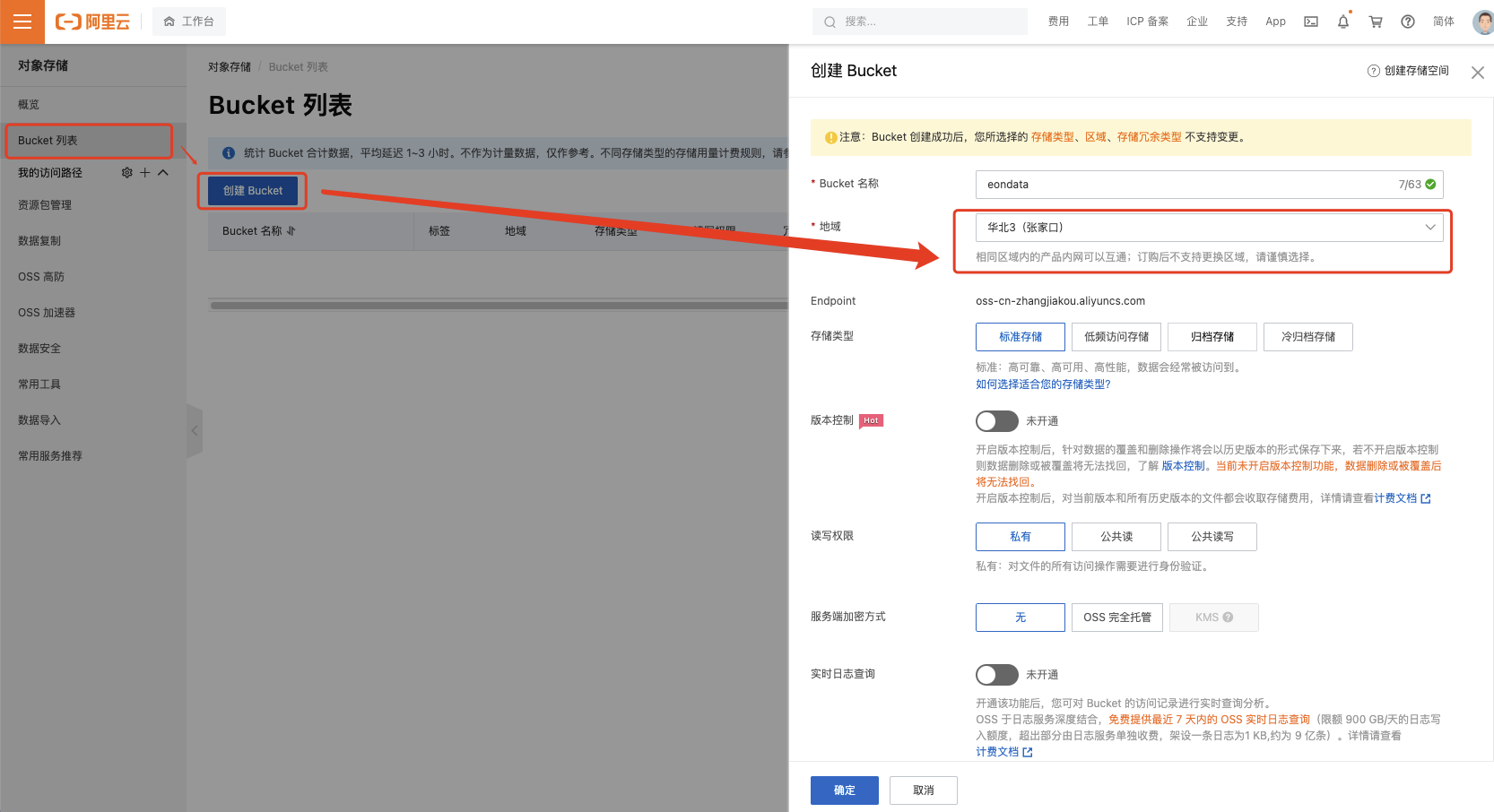
开通OSS服务后,进入管理界面创建bucket,创建时注意选择与计算节点相同的地域,其他的选项根据需要选择,一般默认即可。
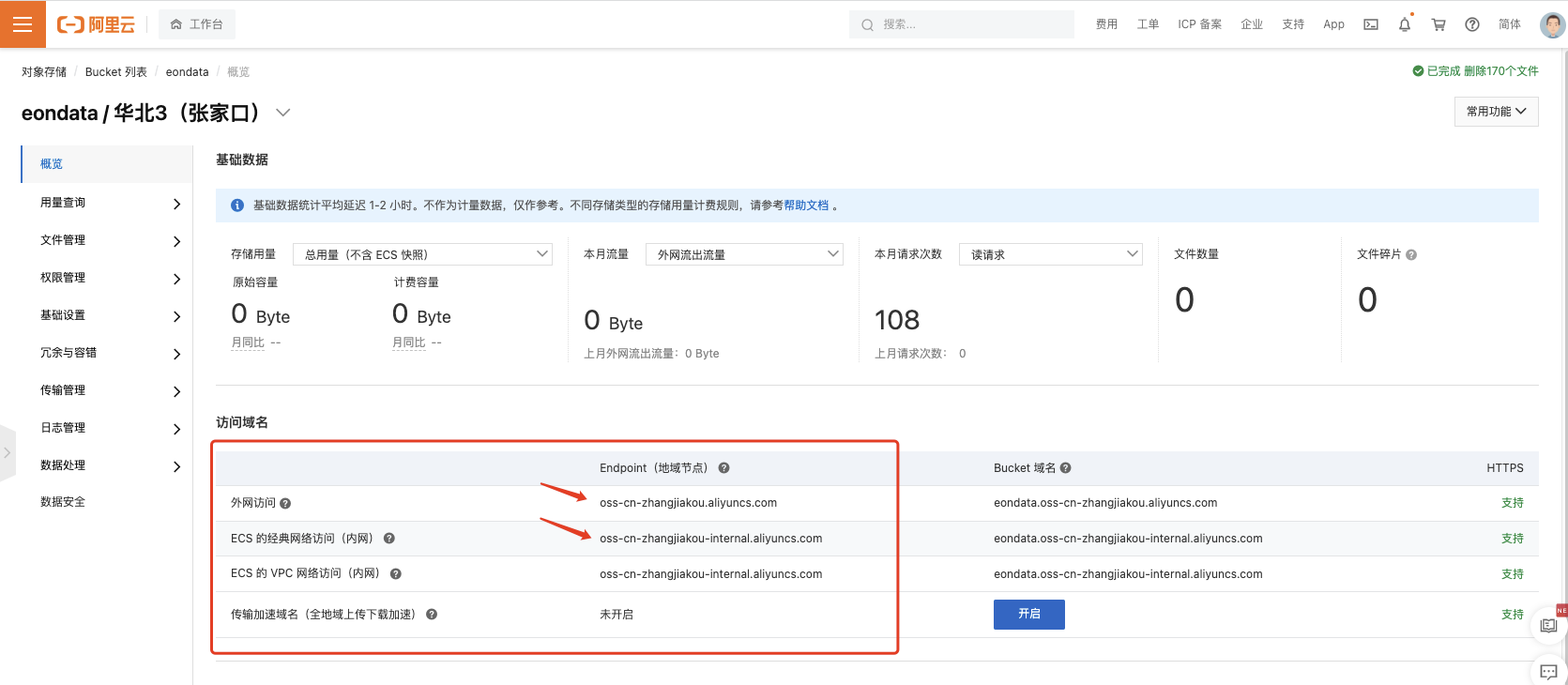
创建完bucket过后可以看到该bucket的访问域名,记下Endpoint。
如果计算节点和bucket不在同一地域,则只能通过“外网访问”的Endpoint地址访问OSS,通常只有1-200KB/s。
如果在同一地域,则可以使用“ECS 的经典网络访问(内网)”的Endpoint地址访问OSS,速度更快,一般有几十MB/s。
AccessKey
注册阿里云账号时,这个云账号会有一个AccessKey,这个云账号的AccessKey具有账户的完全权限,请您务必妥善保管!不要以任何方式公开 AccessKey 到外部渠道(例如 Github),避免被他人利用造成 安全威胁。强烈建议您遵循 阿里云安全最佳实践,使用 RAM 用户(而不是云账号)的 AccessKey 进行 API 调用。
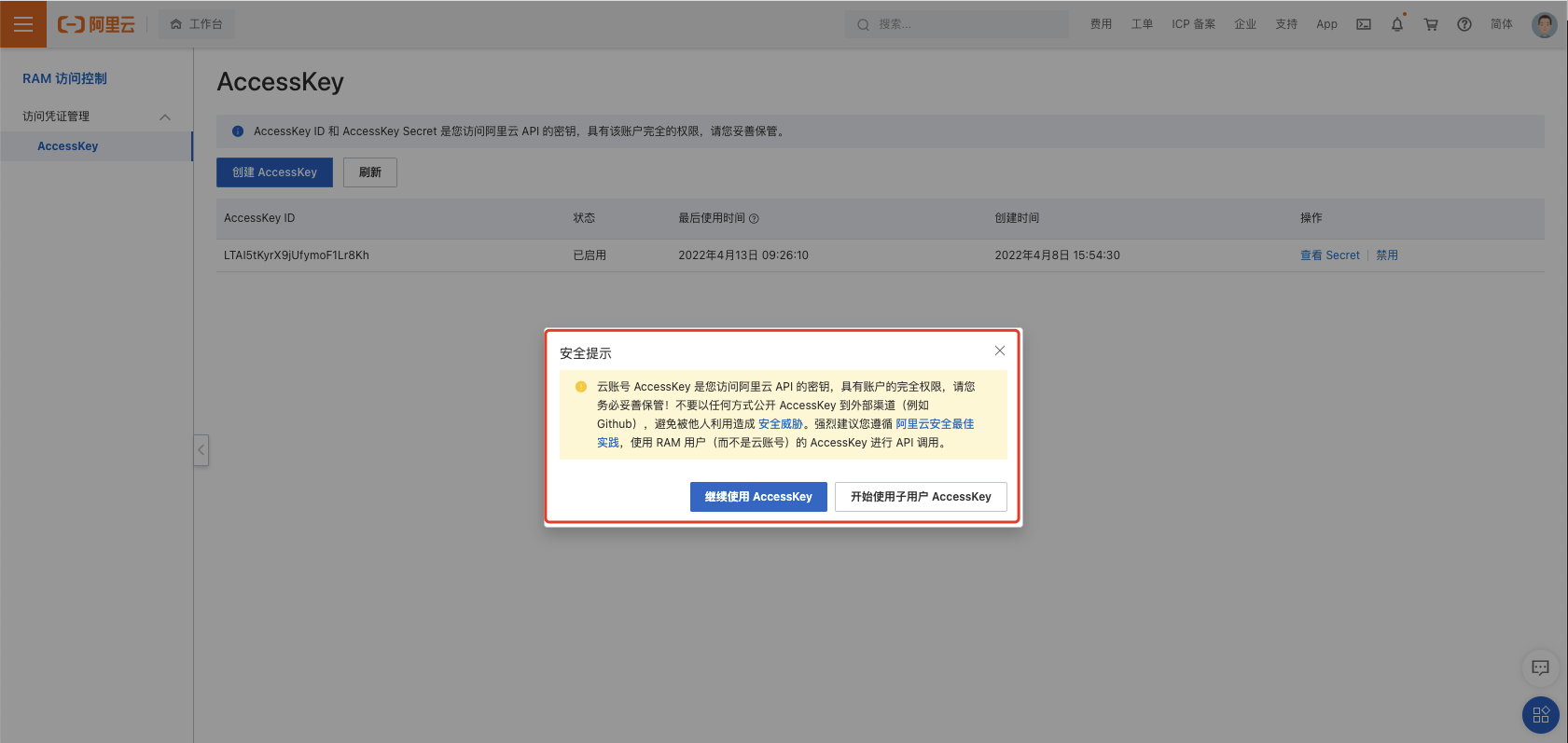
我这里就不创建子用户AccessKey了,生产环境建议遵循阿里云的建议,使用子用户AccessKey,再给子用户分配资产权限即可。
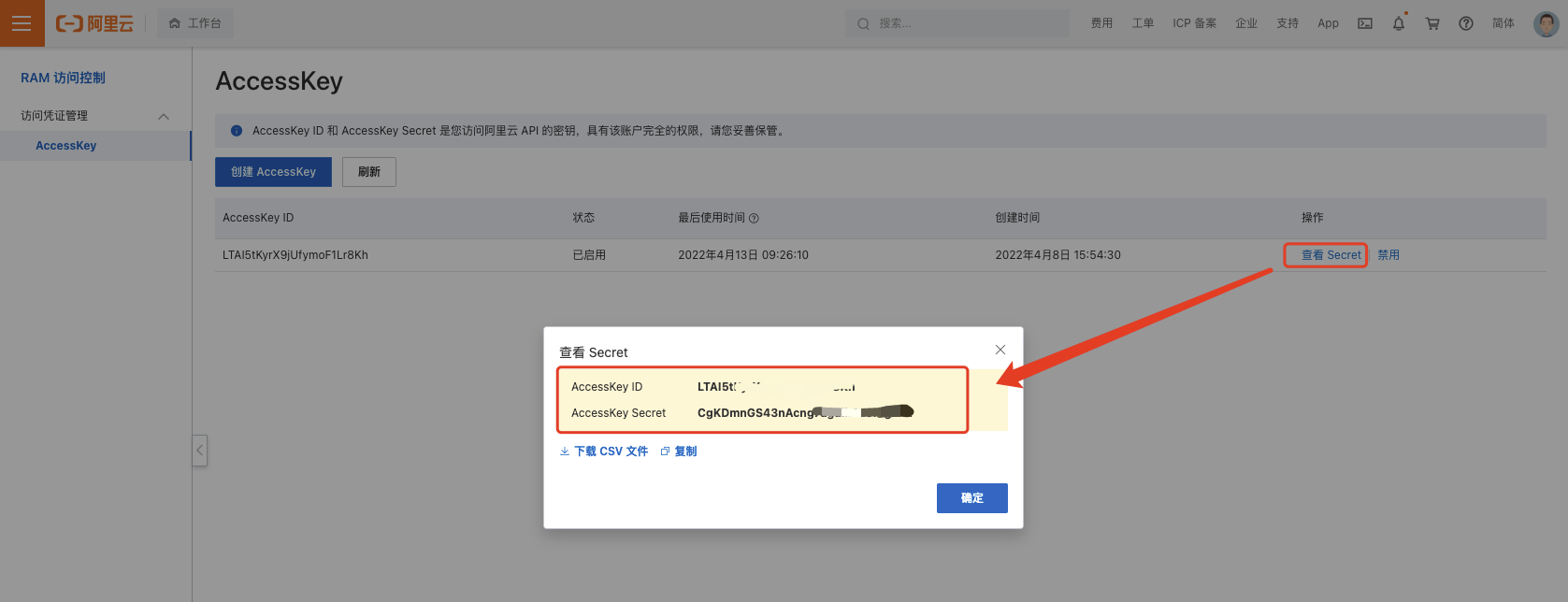
点击查看Secret,记住AccessKey ID及AccessKey Secret,用这个密匙对搭配不同bucket的Endpoint即可访问你创建的所有bucket(如果是子用户则需要经过授权才能访问bucket)。
OSS管理工具
OSS管理工具分为图形化管理工具及命令行管理工具。
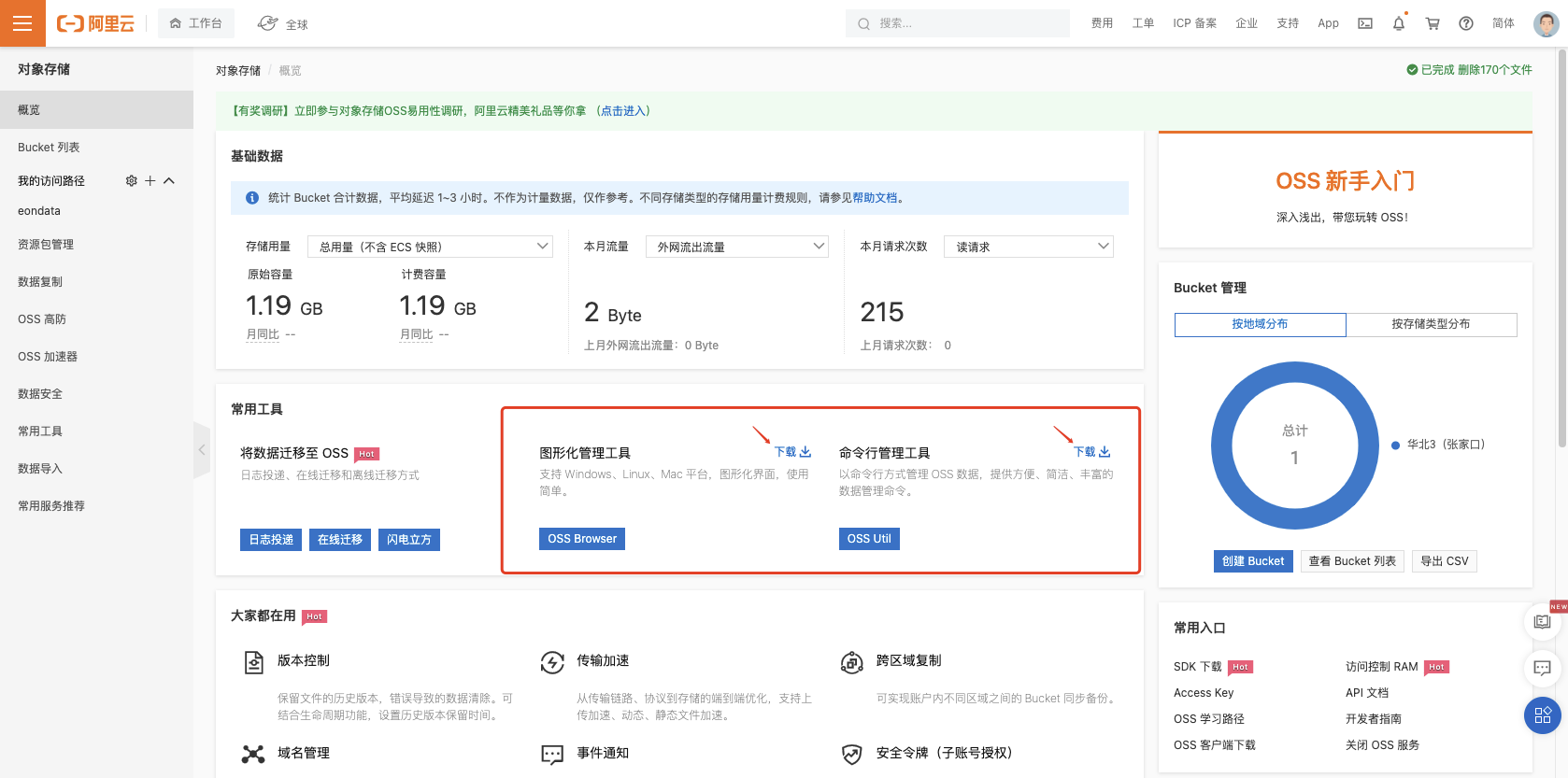
在对象存储工作台首页有提供下载、安装及使用方法介绍。
在Linux计算节点可以通过安装命令行工具ossutil64,验证计算节点与对象存储的访问是否通畅。
配置:
[root@iZ8vbiwk22jkju2dp91szcZ data]# ./ossutil64 config
The command creates a configuration file and stores credentials.

Please enter the config file name,the file name can include path(default /root/.ossutilconfig, carriage return will use the default file. If you specified this option to other file, you should specify --config-file option to the file when you use other commands):
No config file entered, will use the default config file /root/.ossutilconfig

For the following settings, carriage return means skip the configuration. Please try "help config" to see the meaning of the settings
Please enter accessKeyID:LTAI5tKyrX9jUfymoF1Lr8GH
Please enter accessKeySecret:CgKDmnGS43nAcng7aguikPL6I4gNFG
Please enter stsToken:
Please enter endpoint:oss-cn-zhangjiakou-internal.aliyuncs.com
[root@iZ8vbiwk22jkju2dp91szcZ data]#
验证:
[root@iZ8vbiwk22jkju2dp91szcZ data]# ./ossutil64 ls
CreationTime                                 Region    StorageClass    BucketName
2022-04-13 10:55:25 +0800 CST    oss-cn-zhangjiakou        Standard    oss://eondata
Bucket Number is: 1

0.125367(s) elapsed
[root@iZ8vbiwk22jkju2dp91szcZ data]#
数据库安装
安装软件
[root@iZ8vbiwk22jkju2dp91szcZ data]# rpm -ivh vertica-11.0.2-7.x86_64.RHEL6.rpm
warning: vertica-11.0.2-7.x86_64.RHEL6.rpm: Header V3 RSA/SHA256 Signature, key ID f54b82a0: NOKEY
Verifying...                          ################################# [100%]
Preparing...                          ################################# [100%]
Updating / installing...
   1:vertica-11.0.2-7                 ################################# [100%]

Vertica Analytic Database v11.0.2-7 successfully installed on host iZ8vbiwk22jkju2dp91szcZ

To complete your NEW installation and configure the cluster, run:
 /opt/vertica/sbin/install_vertica

To complete your Vertica UPGRADE, run:
 /opt/vertica/sbin/update_vertica

----------------------------------------------------------------------------------
Important
----------------------------------------------------------------------------------
Before upgrading Vertica, you must backup your database.  After you restart your
database after upgrading, you cannot revert to a previous Vertica software version.
----------------------------------------------------------------------------------

View the latest Vertica documentation at https://www.vertica.com/documentation/vertica/

[root@iZ8vbiwk22jkju2dp91szcZ data]#
安装集群
[root@iZ8vbiwk22jkju2dp91szcZ data]# /opt/vertica/sbin/install_vertica --hosts iZ8vbiwk22jkju2dp91szcZ --rpm /data/vertica-11.0.2-7.x86_64.RHEL6.rpm -T -d /data/ --failure-threshold=NONE
Vertica Analytic Database 11.0.2-7 Installation Tool


>> Validating options...


Mapping hostnames in --hosts (-s) to addresses...
        iZ8vbiwk22jkju2dp91szcZ        => 172.16.222.90

>> Starting installation tasks.
>> Getting system information for cluster (this may take a while)...

Default shell on nodes:
172.16.222.90 /bin/bash

>> Validating software versions (rpm or deb)...

warning: /data/vertica-11.0.2-7.x86_64.RHEL6.rpm: Header V3 RSA/SHA256 Signature, key ID f54b82a0: NOKEY

>> Beginning new cluster creation...

successfully backed up admintools.conf on 172.16.222.90

>> Creating or validating DB Admin user/group...

Successful on hosts (1): 172.16.222.90
    Provided DB Admin account details: user = dbadmin, group = verticadba, home = /home/dbadmin
    Creating group... Group already exists
    Validating group... Okay
    Creating user... User already exists
    Validating user... Okay


>> Validating node and cluster prerequisites...

Prerequisites not fully met during local (OS) configuration for
verify-172.16.222.90.xml:
    HINT (S0305): https://www.vertica.com/docs/11.0.x/HTML/index.htm#cshid=S0305
        HINT(eS0305): TZ is unset for dbadmin. Consider updating .profile or
        .bashrc
    HINT (S0040): https://www.vertica.com/docs/11.0.x/HTML/index.htm#cshid=S0040
        HINT(eS0040): Could not find the following tools normally provided by
        the pstack or gstack package: pstack/gstack
    FAIL (S0180): https://www.vertica.com/docs/11.0.x/HTML/index.htm#cshid=S0180
        FAIL(eS0180): Insufficient swap size. Need 2.00 GB, have 0.00 GB

System prerequisites passed.  Threshold = NONE


>> Establishing DB Admin SSH connectivity...

Installing/Repairing SSH keys for dbadmin


>> Setting up each node and modifying cluster...

Creating Vertica Data Directory...

Updating agent...
Creating node node0001 definition for host 172.16.222.90
... Done

>> Sending new cluster configuration to all nodes...

Starting or restarting agent...

>> Completing installation...

Running upgrade logic
Installation complete.

Please evaluate your hardware using Vertica's validation tools:
    https://www.vertica.com/docs/11.0.x/HTML/index.htm#cshid=VALSCRIPT

To create a database:
  1. Logout and login as dbadmin. (see note below)
  2. Run /opt/vertica/bin/adminTools as dbadmin
  3. Select Create Database from the Configuration Menu

  Note: Installation may have made configuration changes to dbadmin
  that do not take effect until the next session (logout and login).

To add or remove hosts, select Cluster Management from the Advanced Menu.
[root@iZ8vbiwk22jkju2dp91szcZ data]#
创建数据库
配置启动文件
[dbadmin@iZ8vbiwk22jkju2dp91szcZ ~]$ cat <<- EOF > ~/oss.conf
awsauth = LTAI5tKyrX9jUfymoF1Lr8GH:CgKDmnGS43nAcng7aguikPL6I4gNFG
awsendpoint = oss-cn-zhangjiakou-internal.aliyuncs.com
s3enablevirtualaddressing = 1
EOF
创建数据库
[dbadmin@iZ8vbiwk22jkju2dp91szcZ ~]$ admintools --debug -t create_db -x ~/oss.conf --communal-storage-location=s3://eondata/ -D /data/ -c /data/ --depot-path=/data/ --shard-count=3 -s 172.16.222.90 -d alieon --force-removal-at-creation --force-cleanup-on-failure
Info: no password specified, using none
Default depot size in use
Database with 1 or 2 nodes cannot be k-safe and it may lose data if it crashes
Distributing changes to cluster.
        Creating database alieon
        Starting bootstrap node v_alieon_node0001 (172.16.222.90)
        Starting nodes:
                v_alieon_node0001 (172.16.222.90)
        Starting Vertica on all nodes. Please wait, databases with a large catalog may take a while to initialize.
        Node Status: v_alieon_node0001: (DOWN)
        Node Status: v_alieon_node0001: (DOWN)
        Node Status: v_alieon_node0001: (UP)
Creating depot locations for 1 nodes
Communal storage detected: rebalancing shards

Waiting for rebalance shards. We will wait for at most 36000 seconds.
Installing AWS package
        Success: package AWS installed
Installing ComplexTypes package
        Success: package ComplexTypes installed
Installing DelimitedExport package
        Success: package DelimitedExport installed
Installing MachineLearning package
STATUS: vertica.engine.api.vsql_script.module is still running on 1 host: 172.16.222.90 as of 2022-04-13 15:00:39. See /opt/vertica/log/adminTools.log for full details.
        Success: package MachineLearning installed
Installing OrcExport package
        Success: package OrcExport installed
Installing ParquetExport package
        Success: package ParquetExport installed
Installing VFunctions package
        Success: package VFunctions installed
Installing approximate package
        Success: package approximate installed
Installing flextable package
        Success: package flextable installed
Installing kafka package
        Success: package kafka installed
Installing logsearch package
        Success: package logsearch installed
Installing place package
STATUS: vertica.engine.api.vsql_script.module is still running on 1 host: 172.16.222.90 as of 2022-04-13 15:01:18. See /opt/vertica/log/adminTools.log for full details.
STATUS: vertica.engine.api.vsql_script.module is still running on 1 host: 172.16.222.90 as of 2022-04-13 15:01:28. See /opt/vertica/log/adminTools.log for full details.
        Success: package place installed
Installing txtindex package
        Success: package txtindex installed
Installing voltagesecure package
        Success: package voltagesecure installed
Syncing catalog on alieon with 2000 attempts.
Database creation SQL tasks completed successfully.
Database alieon created successfully.
[dbadmin@iZ8vbiwk22jkju2dp91szcZ ~]$
创建表&数据加载
[dbadmin@iZ8vbiwk22jkju2dp91szcZ VMart_Schema]$ vsql -f /opt/vertica/examples/VMart_Schema/vmart_define_schema.sql
CREATE SCHEMA
CREATE SCHEMA
CREATE TABLE
CREATE TABLE
CREATE TABLE
CREATE TABLE
CREATE TABLE
CREATE TABLE
CREATE TABLE
CREATE TABLE
CREATE TABLE
ALTER TABLE
CREATE TABLE
CREATE TABLE
ALTER TABLE
CREATE TABLE
ALTER TABLE
CREATE TABLE
CREATE TABLE
CREATE TABLE
ALTER TABLE
[dbadmin@iZ8vbiwk22jkju2dp91szcZ VMart_Schema]$ ./vmart_gen
Using default parameters
datadirectory = ./
numfiles = 1
seed = 20177
null = ''
timefile = Time.txt
numfactsalesrows = 5000000
numfactorderrows = 300000
numprodkeys = 60000
numstorekeys = 250
numpromokeys = 1000
numvendkeys = 50
numcustkeys = 50000
numempkeys = 10000
numwarehousekeys = 100
numshippingkeys = 100
numonlinepagekeys = 1000
numcallcenterkeys = 200
numfactonlinesalesrows = 5000000
numinventoryfactrows = 300000
gen_load_script = false
years = 2003 to 2007
Data Generated successfully !
[dbadmin@iZ8vbiwk22jkju2dp91szcZ VMart_Schema]$ vsql -f /opt/vertica/examples/VMart_Schema/vmart_load_data.sql
 Rows Loaded
-------------
        1826
(1 row)

 Rows Loaded
-------------
       60000
(1 row)

 Rows Loaded
-------------
         250
(1 row)

 Rows Loaded
-------------
        1000
(1 row)

 Rows Loaded
-------------
          50
(1 row)

 Rows Loaded
-------------
       50000
(1 row)

 Rows Loaded
-------------
       10000
(1 row)

 Rows Loaded
-------------
         100
(1 row)

 Rows Loaded
-------------
         100
(1 row)

 Rows Loaded
-------------
        1000
(1 row)

 Rows Loaded
-------------
         200
(1 row)

 Rows Loaded
-------------
     5000000
(1 row)

 Rows Loaded
-------------
      300000
(1 row)

 Rows Loaded
-------------
     5000000
(1 row)

 Rows Loaded
-------------
      300000
(1 row)

[dbadmin@iZ8vbiwk22jkju2dp91szcZ VMart_Schema]$
dbadmin=> \dt
                          List of tables
    Schema    |         Name          | Kind  |  Owner  | Comment
--------------+-----------------------+-------+---------+---------
 online_sales | call_center_dimension | table | dbadmin |
 online_sales | online_page_dimension | table | dbadmin |
 online_sales | online_sales_fact     | table | dbadmin |
 public       | customer_dimension    | table | dbadmin |
 public       | date_dimension        | table | dbadmin |
 public       | employee_dimension    | table | dbadmin |
 public       | inventory_fact        | table | dbadmin |
 public       | product_dimension     | table | dbadmin |
 public       | promotion_dimension   | table | dbadmin |
 public       | shipping_dimension    | table | dbadmin |
 public       | vendor_dimension      | table | dbadmin |
 public       | warehouse_dimension   | table | dbadmin |
 store        | store_dimension       | table | dbadmin |
 store        | store_orders_fact     | table | dbadmin |
 store        | store_sales_fact      | table | dbadmin |
(15 rows)

dbadmin=> select count(*) from online_sales.online_sales_fact;
  count
---------
 5000000
(1 row)