



下载安装
Mogeaver是一款开源软件,下载地址如下:https://docs.mogdb.io/zh/mogdb/v3.0/mogeaver-release-notes
根据您的操作系统选择相应的安装包,下载完成后直接双击安装即可。
配置连接串
首次打开软件会弹出“创建新连接”窗口,如下图所示
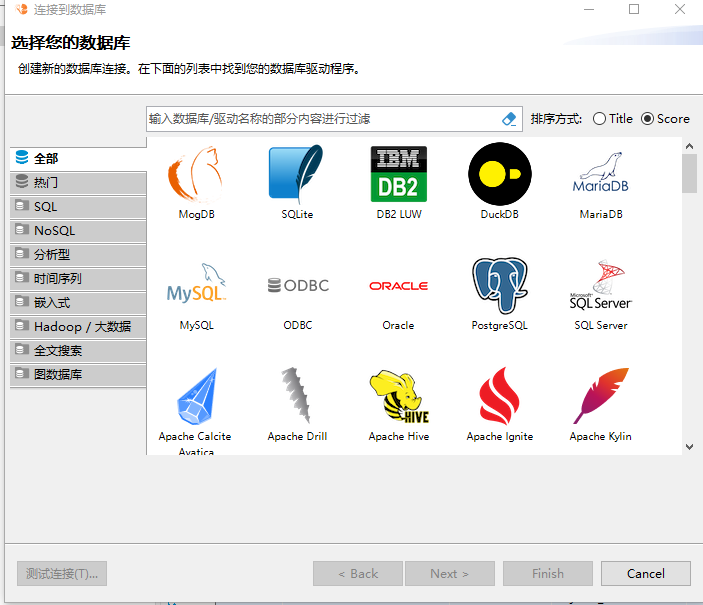
选择MogDB
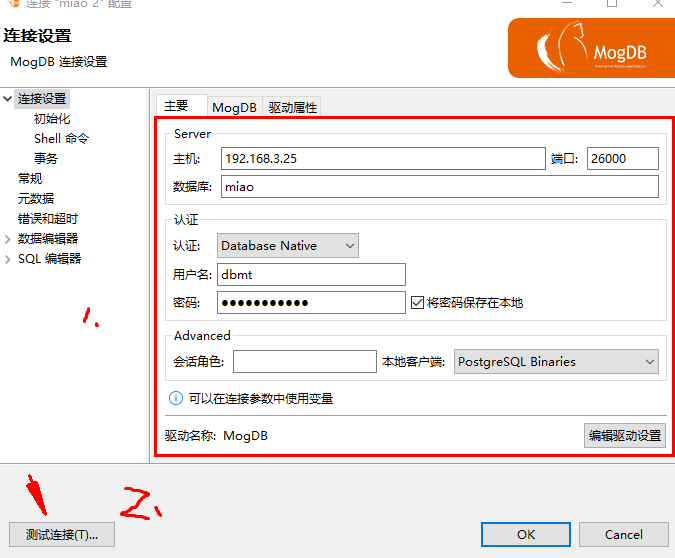
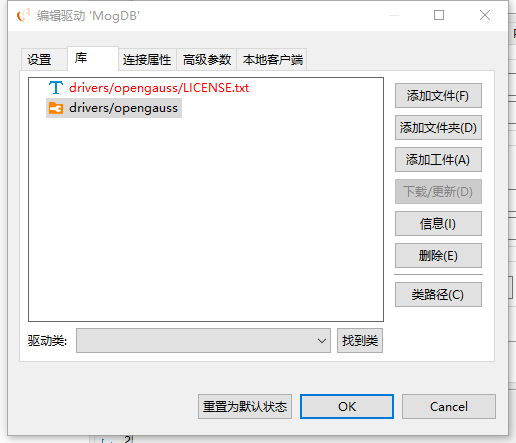
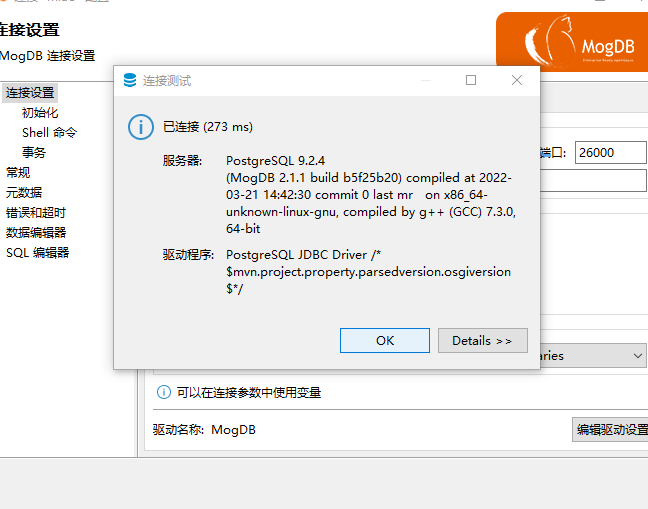
在测试连接可能会出现的问题
1、[192.168.3.100:51781/192.168.3.25:26000] FATAL: Forbid remote connection with trust method!
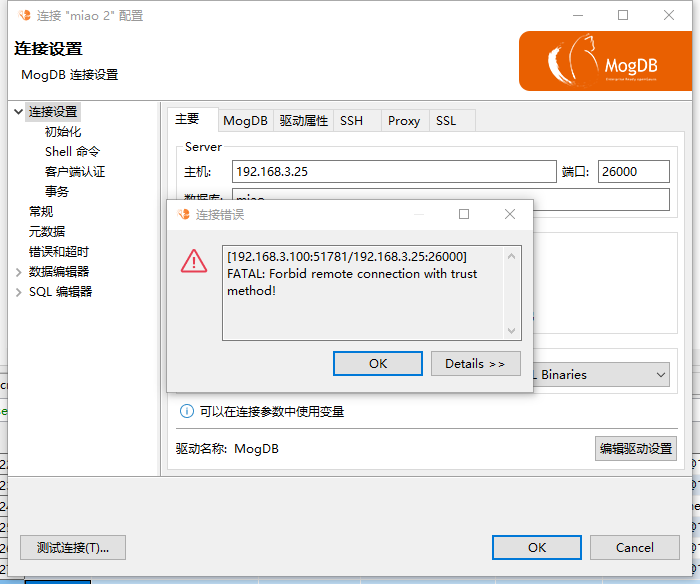
原因是:认证方式 远程连接不能用信任的方式
解决方法:
[omm@db1 ~]$
[omm@db1 ~]$
[omm@db1 ~]$ cd $PGHOME
[omm@db1 db1]$ vi pg_hba.conf
# a SIGHUP signal.  If you edit the file on a running system, you have
# to SIGHUP the postmaster for the changes to take effect.  You can
# use "pg_ctl reload" to do that.

# Put your actual configuration here
# ----------------------------------
#
# If you want to allow non-local connections, you need to add more
# "host" records.  In that case you will also need to make PostgreSQL
# listen on a non-local interface via the listen_addresses
# configuration parameter, or via the -i or -h command line switches.
#
# NOTICE:
# ----------------------------------
#
# When you configure this file, please configure it from top to bottom,
# higher priority needs to be configured in front.

# CAUTION: Configuring the system for local "trust" authentication
# allows any local user to connect as any PostgreSQL user, including
# the database sysadmin.  If you do not trust all your local users,
# use another authentication method.


# TYPE  DATABASE        USER            ADDRESS                 METHOD

# "local" is for Unix domain socket connections only
local   all             all                                     trust
host    miao   dbmt        192.168.3.25/32    sha256
# IPv4 local connections:
host    all             all             127.0.0.1/32            trust

host all all 192.168.3.25/32   md5
host all all 192.168.3.100/32  trust                                             <<<<<<<<<<<<<<<<<<<<<<<<<<<<<<<<<这个需要改成md5 或者sha256
# IPv6 local connections:
host    all             all             ::1/128                 trust
# Allow replication connections from localhost, by a user with the
# replication privilege.
#local   replication     omm                                trust
#host    replication     omm        127.0.0.1/32            trust
#host    replication     omm        ::1/128                 trust
"pg_hba.conf" 102L, 4613C written
[omm@db1 db1]$ gs_om -t stop
Stopping cluster.
=========================================
Successfully stopped cluster.
=========================================
End stop cluster.
[omm@db1 db1]$ gs_om -t start
Starting cluster.
=========================================
[SUCCESS] db1
2022-07-16 10:55:12.714 62d22890.1 [unknown] 139689208698432 [unknown] 0 dn_6001 01000  0 [BACKEND] WARNING:  Failed to initialize the memory protect for g_instance.attr.attr_storage.cstore_buffers (1024 Mbytes) or shared memory (1967 Mbytes) is larger.
=========================================
Successfully started.
[omm@db1 db1]$
2、
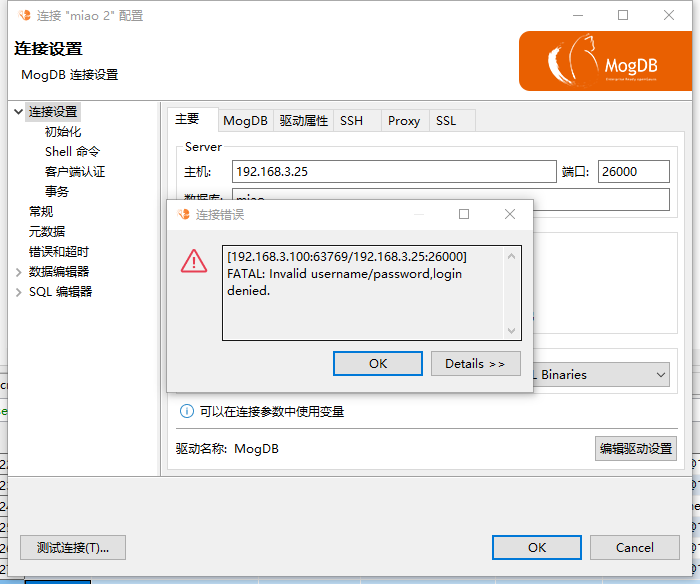
[192.168.3.100:63769/192.168.3.25:26000] FATAL: Invalid username/password,login denied.
这个报错不一定是密码的问题,可能是 加密方式不对
omm@db1 db1]$ vi pg_hba.conf
# a SIGHUP signal.  If you edit the file on a running system, you have
# to SIGHUP the postmaster for the changes to take effect.  You can
# use "pg_ctl reload" to do that.

# Put your actual configuration here
# ----------------------------------
#
# If you want to allow non-local connections, you need to add more
# "host" records.  In that case you will also need to make PostgreSQL
# listen on a non-local interface via the listen_addresses
# configuration parameter, or via the -i or -h command line switches.
#
# NOTICE:
# ----------------------------------
#
# When you configure this file, please configure it from top to bottom,
# higher priority needs to be configured in front.

# CAUTION: Configuring the system for local "trust" authentication
# allows any local user to connect as any PostgreSQL user, including
# the database sysadmin.  If you do not trust all your local users,
# use another authentication method.


# TYPE  DATABASE        USER            ADDRESS                 METHOD

# "local" is for Unix domain socket connections only
local   all             all                                     trust
host    miao   dbmt        192.168.3.25/32    sha256
# IPv4 local connections:
host    all             all             127.0.0.1/32            trust

host all all 192.168.3.25/32   md5
host all all 192.168.3.100/32  md5                                                      《《《《《《《《《需要改成sha256
# IPv6 local connections:
host    all             all             ::1/128                 trust
# Allow replication connections from localhost, by a user with the
# replication privilege.
#local   replication     omm                                trust
#host    replication     omm        127.0.0.1/32            trust
#host    replication     omm        ::1/128                 trust
测试2个用户的密码加密方式
miao=# show password_encryption_type;
 password_encryption_type
--------------------------
 2
(1 row)
miao=# create user em_ljc identified by "Nov_1308";
CREATE ROLE
miao=#
miao=#  select rolname,rolpassword from pg_authid where rolname='em_ljc';
 rolname |                                                                                                    rolpassword

---------+-----------------------------------------------------------------------------------------------------------------------------------------------------------------------------------------------------
--------------
 em_ljc  | sha25611fba856dc8494bb752f69b8c7fc376b363178b0c63ba631396adf654cd342a92ce9e008e5694908ad34340945e43499b7d6917cd822494c046ea2d9ac3aaa3a9a41588b3821d3bd0b8481a866aae555deeab6a6265b383a9b73a6f56a9f61
adecdfecefade
(1 row)
miao=#   alter system set password_encryption_type =0;
ALTER SYSTEM SET
miao=# create user em_ljc1 identified by "Nov_1308";
NOTICE:  The encrypted password contains MD5 ciphertext, which is not secure.
CREATE ROLE
miao=#  select rolname,rolpassword from pg_authid where rolname='em_ljc1';
 rolname |             rolpassword
---------+-------------------------------------
 em_ljc1 | md56c36c5816e688aec2e011a1a516e148f
(1 row)

miao=#
最后修改时间:2022-07-26 08:45:11
「喜欢这篇文章,您的关注和赞赏是给作者最好的鼓励」
关注作者
【版权声明】本文为墨天轮用户原创内容,转载时必须标注文章的来源(墨天轮),文章链接,文章作者等基本信息,否则作者和墨天轮有权追究责任。如果您发现墨天轮中有涉嫌抄袭或者侵权的内容,欢迎发送邮件至:contact@modb.pro进行举报,并提供相关证据,一经查实,墨天轮将立刻删除相关内容。
