



今天,我们一起学习使用Oracle_fdw将数据从Oracle数据库传输到PostgreSQL数据库。
什么是oracle_fdw?
Oracle_fdw是一个扩展组件,可以允许通过外部表访问 Oracle 数据库的表和视图。
当PostgreSQL客户端访问外部表时,Oracle_fdw通过PostgreSQL服务器上的OCI 库访问Oracle数据库中的相关数据。
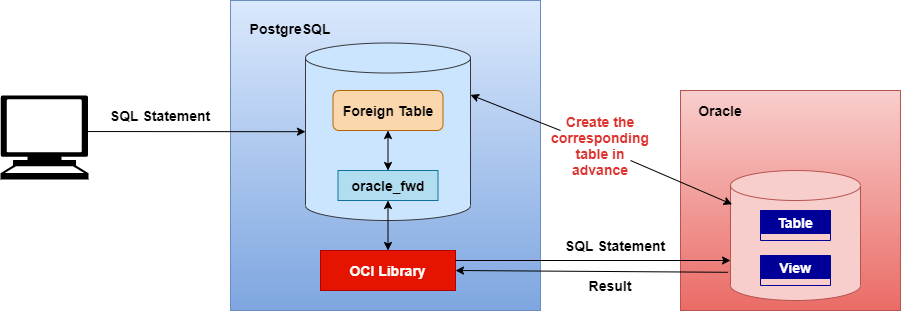
原理如上图所示。
为了将数据从Oracle数据库传输到PostgreSQL数据库,我们需要执行以下步骤,环境基于 Centos 7 和 PostgreSQL 12。
1、首先,在PostgreSQL服务器上安装Oracle 客户端。
[root@study ~]# yum install -y http://yum.oracle.com/repo/OracleLinux/OL7/oracle/instantclient/x86_64/getPackage/oracle-instantclient19.8-basic-19.8.0.0.0-1.x86_64.rpm
为了方便访问操作Oracle数据库,我们使用以下命令安装 sqlplus工具。
[root@study ~]# yum install -y http://yum.oracle.com/repo/OracleLinux/OL7/oracle/instantclient/x86_64/getPackage/oracle-instantclient19.8-sqlplus-19.8.0.0.0-1.x86_64.rpm
2、添加 Oracle 数据库服务器的 IP 和主机名信息到 /etc/hosts 文件中。
$ vi /etc/hosts
18.9.0.201 r819cs
3、通过PostgreSQL服务器测试访问。
[postgres@study ~]$ sqlplus system/PASSWORD@r819cs:1521/noc19cs
4、为了安装oracle_fdw组件,需要先安装PostgreSQL NonFree 仓库,它适用于PostgreSQL 12。
[root@study ~]# yum install https://download.postgresql.org/pub/repos/yum/reporpms/non-free/EL-7-x86_64/pgdg-redhat-nonfree-repo-latest.noarch.rpm
5、安装oracle_fdw组件。
[root@study ~]# yum install oracle_fdw12.x86_64
6、oracle_fdw扩展需要连接到数据库进行创建,创建后可使用 “\dx” 命令查验数据库中的扩展。
[postgres@study ~]$ psql -d test
psql (12.12)
Type "help" for help.

test=# \dx
                 List of installed extensions
  Name   | Version |   Schema   |         Description
---------+---------+------------+------------------------------
 plpgsql | 1.0     | pg_catalog | PL/pgSQL procedural language
(1 row)

test=# create extension oracle_fdw;
CREATE EXTENSION
test=# \dx

7、再创建一个外部服务
test=# create server oradb foreign data wrapper oracle_fdw options (dbserver '//r819cs:1521/noc19cs');
CREATE SERVER
test=# \dew
                   List of foreign-data wrappers
    Name    |  Owner   |      Handler       |      Validator
------------+----------+--------------------+----------------------
 oracle_fdw | postgres | oracle_fdw_handler | oracle_fdw_validator
(1 row)
8、创建PostgreSQL用户至Oracle数据库用户的映射。
test=# create user mapping for postgres server oradb options (USER 'SCOTT', PASSWORD 'password');
CREATE USER MAPPING
9、最后,创建外部表,并实现数据传输。
test=# create foreign table ftb1_test (empno numeric(4) not null, ename varchar(10), job varchar(9), mgr numeric(4), hiredate date, sal numeric(7,2), comm numeric(7,2), deptno numeric(2))  server oradb options (schema 'SCOTT', table 'EMP');
CREATE FOREIGN TABLE
test=# table ftb1_test;
 empno | ename  |    job    | mgr  |  hiredate  |   sal   |  comm   | deptno
-------+--------+-----------+------+------------+---------+---------+--------
  7369 | SMITH  | CLERK     | 7902 | 1980-12-17 |  800.00 |         |     20
  7499 | ALLEN  | SALESMAN  | 7698 | 1981-02-20 | 1600.00 |  300.00 |     30
  7521 | WARD   | SALESMAN  | 7698 | 1981-02-22 | 1250.00 |  500.00 |     30
  7566 | JONES  | MANAGER   | 7839 | 1981-04-02 | 2975.00 |         |     20
  7654 | MARTIN | SALESMAN  | 7698 | 1981-09-28 | 1250.00 | 1400.00 |     30
  7698 | BLAKE  | MANAGER   | 7839 | 1981-05-01 | 2850.00 |         |     30
  7782 | CLARK  | MANAGER   | 7839 | 1981-06-09 | 2450.00 |         |     10
  7788 | SCOTT  | ANALYST   | 7566 | 1987-04-19 | 3000.00 |         |     20
  7839 | KING   | PRESIDENT |      | 1981-11-17 | 5000.00 |         |     10
  7844 | TURNER | SALESMAN  | 7698 | 1981-09-08 | 1500.00 |    0.00 |     30
  7876 | ADAMS  | CLERK     | 7788 | 1987-05-23 | 1100.00 |         |     20
  7900 | JAMES  | CLERK     | 7698 | 1981-12-03 |  950.00 |         |     30
  7902 | FORD   | ANALYST   | 7566 | 1981-12-03 | 3000.00 |         |     20
  7934 | MILLER | CLERK     | 7782 | 1982-01-23 | 1300.00 |         |     10
(14 rows)

test=#
原文标题:Data Transfer From Oracle To PostgreSQL With Oracle_fdw
原文作者:Melek Durdu
原文地址:https://dbtut.com/index.php/2022/06/08/transfer-data-from-oracle-to-postgresql-with-oracle_fdw/
「喜欢这篇文章,您的关注和赞赏是给作者最好的鼓励」
关注作者
【版权声明】本文为墨天轮用户原创内容,转载时必须标注文章的来源(墨天轮),文章链接,文章作者等基本信息,否则作者和墨天轮有权追究责任。如果您发现墨天轮中有涉嫌抄袭或者侵权的内容,欢迎发送邮件至:contact@modb.pro进行举报,并提供相关证据,一经查实,墨天轮将立刻删除相关内容。
