




目录
一、从Docker Hub或阿里云镜像下载小麦苗上传的镜像文件二、创建容器并启动数据库三、尽情使用吧3.1 数据库使用3.2 创建数据库3.3 EMDC的使用3.4 使用ssh连接到容器内3.5 外部客户端连接容器内的数据库
一、从Docker Hub或阿里云镜像下载小麦苗上传的镜像文件
小麦苗的Docker Hub的地址:https://hub.docker.com/u/lhrbest Oracle 11g DB的地址:https://hub.docker.com/repository/docker/lhrbest/oracle_11g_ee_lhr_11.2.0.3/tags?page=1
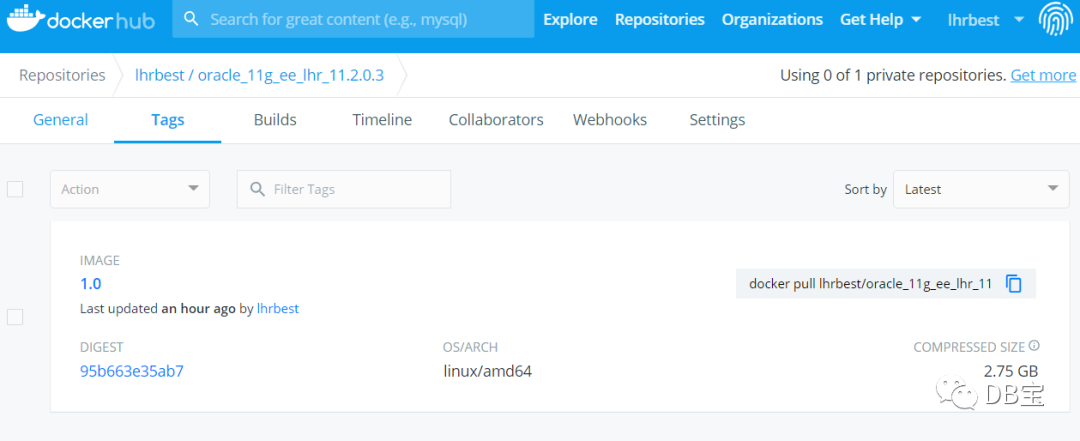
1# 从Docker hub下载,网络不好时,一般比较慢
2docker pull lhrbest/oracle_11g_ee_lhr_11.2.0.3:1.0
3# 可以选择从阿里云下载
4docker pull registry.cn-hangzhou.aliyuncs.com/lhrbest/oracle_11g_ee_lhr_11.2.0.3:1.0
5# 从阿里云下载后可以tag成如下形式
6docker tag registry.cn-hangzhou.aliyuncs.com/lhrbest/oracle_11g_ee_lhr_11.2.0.3:1.0 lhrbest/oracle_11g_ee_lhr_11.2.0.3:1.0
镜像大概2.75G左右,解压后大约7G左右,所以请保留充足的空间。执行过程如下:
 1[root@docker36 ~]# docker search 11.2.0.3
 2NAME                                 DESCRIPTION                               STARS               OFFICIAL            AUTOMATED
 3lhrbest/oracle_11g_ee_lhr_11.2.0.3   Oracle 11g 企业版, 11.2.0.3 ,QQ:646634621…   1
 4[root@docker36 ~]#
 5[root@docker36 ~]# docker pull registry.cn-hangzhou.aliyuncs.com/lhrbest/oracle_11g_ee_lhr_11.2.0.3:1.0
 61.0: Pulling from lhrbest/oracle_11g_ee_lhr_11.2.0.3
 75dd797628260: Pull complete
 872716ec4f779: Pull complete
 9Digest: sha256:95b663e35ab7a21581d6a0c2d15b18a98c1ac484cd2621778f744ef0e6d61394
10Status: Downloaded newer image for registry.cn-hangzhou.aliyuncs.com/lhrbest/oracle_11g_ee_lhr_11.2.0.3:1.0
11registry.cn-hangzhou.aliyuncs.com/lhrbest/oracle_11g_ee_lhr_11.2.0.3:1.0
12[root@docker36 ~]# docker tag registry.cn-hangzhou.aliyuncs.com/lhrbest/oracle_11g_ee_lhr_11.2.0.3:1.0 lhrbest/oracle_11g_ee_lhr_11.2.0.3:1.0
13[root@docker36 ~]# docker images | grep 11g
14lhrbest/oracle_11g_ee_lhr_11.2.0.3                                     1.0                 ac837aaa3923        2 hours ago         7.07GB
15registry.cn-hangzhou.aliyuncs.com/lhrbest/oracle_11g_ee_lhr_11.2.0.3   1.0                 ac837aaa3923        2 hours ago         7.07GB
二、创建容器并启动数据库
 1# 创建容器
 2docker run -itd --name lhrora11203 -h lhrora11203 --privileged=true -p 1521:1521 -p 222:22  -p 1158:1158 lhrbest/oracle_11g_ee_lhr_11.2.0.3:1.0 init
 3
 4# 进入容器
 5docker exec -it lhrora11203 bash
 6
 7# 启动数据库和监听
 8su - oracle
 9lsnrctl start
10sqlplus / as sysdba
11startup
执行过程:
 1[root@docker36 ~]# docker run -itd --name lhrora11203 -h lhrora11203 --privileged=true -p 1521:1521 -p 222:22 -p 1158:1158  lhrbest/oracle_11g_ee_lhr_11.2.0.3:1.0 init
 29700334260ec78f9152fc961fba75e5db0b0909afa250e33fc8215e04b5a00fa
 3[root@docker36 ~]# docker exec -it lhrora11203 bash
 4[root@localhost /]# su - oracle
 5[oracle@lhrora11203 ~]$ lsnrctl start
 6
 7LSNRCTL for Linux: Version 11.2.0.3.0 - Production on 10-JUL-2020 08:51:13
 8
 9Copyright (c) 1991, 2011, Oracle.  All rights reserved.
10
11Starting /u01/app/oracle/product/11.2.0.3/dbhome_1/bin/tnslsnr: please wait...
12
13TNSLSNR for Linux: Version 11.2.0.3.0 - Production
14System parameter file is /u01/app/oracle/product/11.2.0.3/dbhome_1/network/admin/listener.ora
15Log messages written to /u01/app/oracle/diag/tnslsnr/lhrora11203/listener/alert/log.xml
16Listening on: (DESCRIPTION=(ADDRESS=(PROTOCOL=ipc)(KEY=EXTPROC1521)))
17Listening on: (DESCRIPTION=(ADDRESS=(PROTOCOL=tcp)(HOST=lhrora11203)(PORT=1521)))
18
19Connecting to (DESCRIPTION=(ADDRESS=(PROTOCOL=IPC)(KEY=EXTPROC1521)))
20STATUS of the LISTENER
21------------------------
22Alias                     LISTENER
23Version                   TNSLSNR for Linux: Version 11.2.0.3.0 - Production
24Start Date                10-JUL-2020 08:51:13
25Uptime                    0 days 0 hr. 0 min. 0 sec
26Trace Level               off
27Security                  ON: Local OS Authentication
28SNMP                      OFF
29Listener Parameter File   /u01/app/oracle/product/11.2.0.3/dbhome_1/network/admin/listener.ora
30Listener Log File         /u01/app/oracle/diag/tnslsnr/lhrora11203/listener/alert/log.xml
31Listening Endpoints Summary...
32  (DESCRIPTION=(ADDRESS=(PROTOCOL=ipc)(KEY=EXTPROC1521)))
33  (DESCRIPTION=(ADDRESS=(PROTOCOL=tcp)(HOST=lhrora11203)(PORT=1521)))
34The listener supports no services
35The command completed successfully
36[oracle@lhrora11203 ~]$ sas
37
38SQL*Plus: Release 11.2.0.3.0 Production on Fri Jul 10 08:51:19 2020
39
40Copyright (c) 1982, 2011, Oracle.  All rights reserved.
41
42Connected to an idle instance.
43
44SYS@LHR11G> startup
45ORACLE instance started.
46
47Total System Global Area  325685248 bytes
48Fixed Size                  2228064 bytes
49Variable Size             121634976 bytes
50Database Buffers          197132288 bytes
51Redo Buffers                4689920 bytes
52Database mounted.
53Database opened.
54SYS@LHR11G>
三、尽情使用吧
3.1 数据库使用
 1[oracle@lhrora11203 ~]$ lsnrctl status
 2
 3LSNRCTL for Linux: Version 11.2.0.3.0 - Production on 10-JUL-2020 08:55:02
 4
 5Copyright (c) 1991, 2011, Oracle.  All rights reserved.
 6
 7Connecting to (DESCRIPTION=(ADDRESS=(PROTOCOL=IPC)(KEY=EXTPROC1521)))
 8STATUS of the LISTENER
 9------------------------
10Alias                     LISTENER
11Version                   TNSLSNR for Linux: Version 11.2.0.3.0 - Production
12Start Date                10-JUL-2020 08:51:13
13Uptime                    0 days 0 hr. 3 min. 48 sec
14Trace Level               off
15Security                  ON: Local OS Authentication
16SNMP                      OFF
17Listener Parameter File   /u01/app/oracle/product/11.2.0.3/dbhome_1/network/admin/listener.ora
18Listener Log File         /u01/app/oracle/diag/tnslsnr/lhrora11203/listener/alert/log.xml
19Listening Endpoints Summary...
20  (DESCRIPTION=(ADDRESS=(PROTOCOL=ipc)(KEY=EXTPROC1521)))
21  (DESCRIPTION=(ADDRESS=(PROTOCOL=tcp)(HOST=lhrora11203)(PORT=1521)))
22Services Summary...
23Service "LHR11G" has 1 instance(s).
24  Instance "LHR11G", status READY, has 1 handler(s) for this service...
25Service "LHR11GXDB" has 1 instance(s).
26  Instance "LHR11G", status READY, has 1 handler(s) for this service...
27The command completed successfully
28
29[oracle@lhrora11203 ~]$ sas
30
31SQL*Plus: Release 11.2.0.3.0 Production on Fri Jul 10 08:54:30 2020
32
33Copyright (c) 1982, 2011, Oracle.  All rights reserved.
34
35
36Connected to:
37Oracle Database 11g Enterprise Edition Release 11.2.0.3.0 - 64bit Production
38With the Partitioning, OLAP, Data Mining and Real Application Testing options
39
40SYS@LHR11G> select * from v$version;
41
42BANNER
43----------------------------------------------------------------------------------------------------------------------------------------------------------------
44Oracle Database 11g Enterprise Edition Release 11.2.0.3.0 - 64bit Production
45PL/SQL Release 11.2.0.3.0 - Production
46CORE    11.2.0.3.0      Production
47TNS for Linux: Version 11.2.0.3.0 - Production
48NLSRTL Version 11.2.0.3.0 - Production
3.2 创建数据库(可选)
我们也可以自己创建自己需要的数据库,如下所示,
 1dbca -silent -createDatabase -templateName General_Purpose.dbc -responseFile NO_VALUE \
 2-gdbname LHR11G2  -sid LHR11G2 \
 3-sysPassword lhr -systemPassword lhr \
 4-datafileDestination '/u01/app/oracle/oradata' \
 5-recoveryAreaDestination '/u01/app/oracle/flash_recovery_area' \
 6-storageType FS \
 7-characterset AL32UTF8 -nationalCharacterSet AL16UTF16 \
 8-sampleSchema true \
 9-totalMemory 300 \
10-databaseType OLTP  \
11-emConfiguration NONE
3.3 EMDC的使用
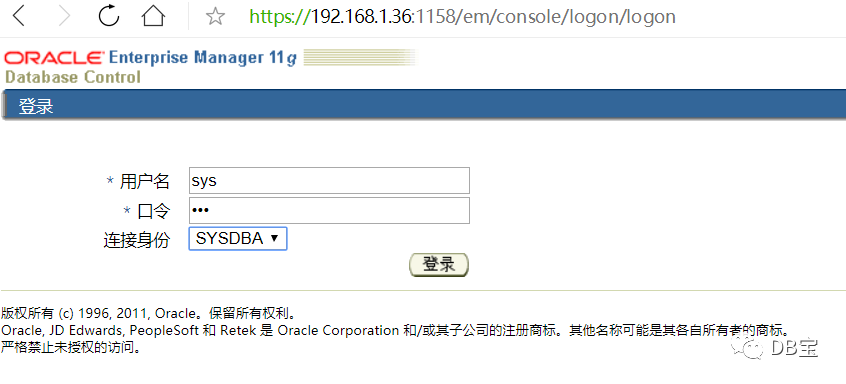
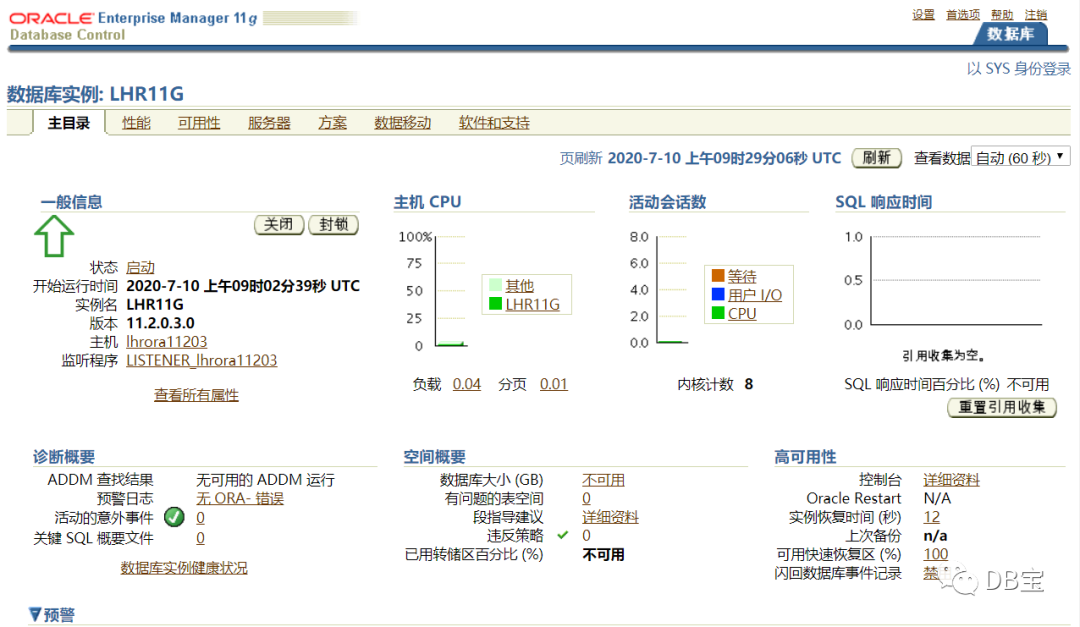
该镜像没有创建EMDC(Enterprise Manager Database Control),需要我们手动来创建,主要命令如下所示:
1# 1、解锁dbsnmp用户
2alter user dbsnmp identified by lhr account unlock;
3# 2、创建EMDC
4emca -config dbcontrol db -repos recreate
5# 查看状态
6emctl status dbconsole
7# 3、浏览器访问EM
8192.168.1.36:1158/em
创建过程:
 1[oracle@lhrora11203 ~]$ sas
 2
 3SQL*Plus: Release 11.2.0.3.0 Production on Fri Jul 10 09:06:00 2020
 4
 5Copyright (c) 1982, 2011, Oracle.  All rights reserved.
 6
 7
 8Connected to:
 9Oracle Database 11g Enterprise Edition Release 11.2.0.3.0 - 64bit Production
10With the Partitioning, OLAP, Data Mining and Real Application Testing options
11
12SYS@LHR11G> alter user dbsnmp identified by lhr account unlock;
13
14User altered.
15
16SYS@LHR11G> exit
17Disconnected from Oracle Database 11g Enterprise Edition Release 11.2.0.3.0 - 64bit Production
18With the Partitioning, OLAP, Data Mining and Real Application Testing options
19[oracle@lhrora11203 ~]$ emca -config dbcontrol db -repos recreate
20
21STARTED EMCA at Jul 10, 2020 9:06:08 AM
22EM Configuration Assistant, Version 11.2.0.3.0 Production
23Copyright (c) 2003, 2011, Oracle.  All rights reserved.
24
25Enter the following information:
26Database SID: LHR11G
27Listener port number: 1521
28Listener ORACLE_HOME [ /u01/app/oracle/product/11.2.0.3/dbhome_1 ]:
29Password for SYS user:
30Password for DBSNMP user:
31Password for SYSMAN user:
32Email address for notifications (optional):
33Outgoing Mail (SMTP) server for notifications (optional):
34-----------------------------------------------------------------
35
36You have specified the following settings
37
38Database ORACLE_HOME ................ /u01/app/oracle/product/11.2.0.3/dbhome_1
39
40Local hostname ................ lhrora11203
41Listener ORACLE_HOME ................ /u01/app/oracle/product/11.2.0.3/dbhome_1
42Listener port number ................ 1521
43Database SID ................ LHR11G
44Email address for notifications ...............
45Outgoing Mail (SMTP) server for notifications ...............
46
47-----------------------------------------------------------------
48----------------------------------------------------------------------
49WARNING : While repository is dropped the database will be put in quiesce mode.
50----------------------------------------------------------------------
51Do you wish to continue? [yes(Y)/no(N)]: y
52Jul 10, 2020 9:06:30 AM oracle.sysman.emcp.EMConfig perform
53INFO: This operation is being logged at /u01/app/oracle/cfgtoollogs/emca/LHR11G/emca_2020_07_10_09_06_08.log.
54Jul 10, 2020 9:06:31 AM oracle.sysman.emcp.EMReposConfig invoke
55INFO: Dropping the EM repository (this may take a while) ...
56Jul 10, 2020 9:12:16 AM oracle.sysman.emcp.EMReposConfig invoke
57INFO: Repository successfully dropped
58Jul 10, 2020 9:12:16 AM oracle.sysman.emcp.EMReposConfig createRepository
59INFO: Creating the EM repository (this may take a while) ...
60Jul 10, 2020 9:18:56 AM oracle.sysman.emcp.EMReposConfig invoke
61INFO: Repository successfully created
62Jul 10, 2020 9:19:01 AM oracle.sysman.emcp.EMReposConfig uploadConfigDataToRepository
63INFO: Uploading configuration data to EM repository (this may take a while) ...
64Jul 10, 2020 9:20:27 AM oracle.sysman.emcp.EMReposConfig invoke
65INFO: Uploaded configuration data successfully
66Jul 10, 2020 9:20:30 AM oracle.sysman.emcp.util.DBControlUtil secureDBConsole
67INFO: Securing Database Control (this may take a while) ...
68Jul 10, 2020 9:20:40 AM oracle.sysman.emcp.util.DBControlUtil secureDBConsole
69INFO: Database Control secured successfully.
70Jul 10, 2020 9:20:40 AM oracle.sysman.emcp.util.DBControlUtil startOMS
71INFO: Starting Database Control (this may take a while) ...
72Jul 10, 2020 9:21:08 AM oracle.sysman.emcp.EMDBPostConfig performConfiguration
73INFO: Database Control started successfully
74Jul 10, 2020 9:21:08 AM oracle.sysman.emcp.EMDBPostConfig performConfiguration
75INFO: >>>>>>>>>>> The Database Control URL is https://lhrora11203:1158/em <<<<<<<<<<<
76Jul 10, 2020 9:21:11 AM oracle.sysman.emcp.EMDBPostConfig invoke
77WARNING:
78************************  WARNING  ************************
79
80Management Repository has been placed in secure mode wherein Enterprise Manager data will be encrypted.  The encryption key has been placed in the file: /u01/app/oracle/product/11.2.0.3/dbhome_1/lhrora11203_LHR11G/sysman/config/emkey.ora. Ensure this file is backed up as the encrypted data will become unusable if this file is lost.
81
82***********************************************************
83Enterprise Manager configuration completed successfully
84FINISHED EMCA at Jul 10, 2020 9:21:11 AM
85[oracle@lhrora11203 ~]$ emctl status dbconsole
86Oracle Enterprise Manager 11g Database Control Release 11.2.0.3.0
87Copyright (c) 1996, 2011 Oracle Corporation.  All rights reserved.
88https://lhrora11203:1158/em/console/aboutApplication
89Oracle Enterprise Manager 11g is running.
90------------------------------------------------------------------
91Logs are generated in directory /u01/app/oracle/product/11.2.0.3/dbhome_1/lhrora11203_LHR11G/sysman/log
3.4 使用ssh连接到容器内
 1C:\Users\lhrxxt>ssh root@192.168.1.35 -p222
 2ssh: connect to host 192.168.1.35 port 222: Connection refused
 3
 4C:\Users\lhrxxt>ssh root@192.168.1.36 -p222
 5The authenticity of host '[192.168.1.36]:222 ([192.168.1.36]:222)' can't be established.
 6RSA key fingerprint is SHA256:BRJdHROGd6j6Q/c7IrgsFBK/4Sk+AEitaAS2rHh9xEA.
 7Are you sure you want to continue connecting (yes/no)? yes
 8Warning: Permanently added '[192.168.1.36]:222' (RSA) to the list of known hosts.
 9root@192.168.1.36's password:
10Last login: Fri Jul 10 04:35:08 2020 from 172.17.0.1
11[root@lhrora11203 ~]# ps -ef|grep pmon
12oracle     1534      0  0 09:02 ?        00:00:00 ora_pmon_LHR11G
13root       1829   1809  0 09:08 pts/0    00:00:00 grep pmon
3.5 外部客户端连接容器内的数据库
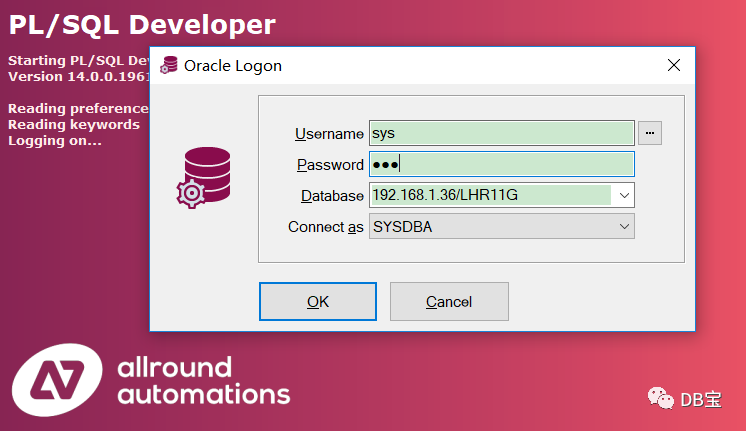
我们可以在容器外部通过sqlplus或其他工具连接容器内的数据库:
 1C:\Users\lhrxxt>sqlplus sys/lhr@192.168.1.36/LHR11G AS SYSDBA
 2
 3SQL*Plus: Release 12.1.0.2.0 Production on Fri Jul 10 17:08:53 2020
 4
 5Copyright (c) 1982, 2014, Oracle.  All rights reserved.
 6
 7
 8Connected to:
 9Oracle Database 11g Enterprise Edition Release 11.2.0.3.0 - 64bit Production
10With the Partitioning, OLAP, Data Mining and Real Application Testing options
11
12SYS@192.168.1.36/LHR11G>
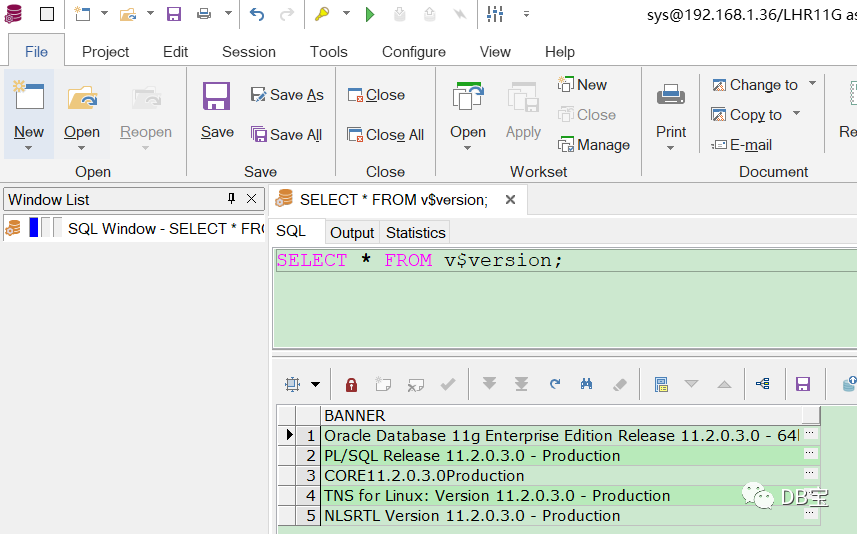
如果使用PLSQL Developer也是可以连接的,如下:
怎么样,是不是很爽,是不是非常方便呢,文末记得点赞哈。
本文结束。

• 微信公众号:DB宝,作者:小麦苗
• 作者博客地址:http://blog.itpub.net/26736162/
• 作者微信:db_bao• 作者QQ:646634621,QQ群:230161599、618766405
• 提供Oracle OCP、OCM、高可用(rac+dg+ogg)和MySQL DBA培训
• 版权所有,欢迎分享本文,转载请保留出处• 若有侵权请联系小麦苗删除
★DB宝分享的IT资料:https://mp.weixin.qq.com/s/Iwsy-zkzwgs8nYkcMz29ag★DB宝笔试面试详解:https://mp.weixin.qq.com/s/Vm5PqNcDcITkOr9cQg6T7w
长按下图识别二维码或微信扫描下图二维码来关注小麦苗的微信公众号:DB宝,学习最实用的数据库技术。



文章转载自DB宝,如果涉嫌侵权,请发送邮件至:contact@modb.pro进行举报,并提供相关证据,一经查实,墨天轮将立刻删除相关内容。
