



我们收到了许多关于自适应游标共享(ACS)和SQL执行计划管理(SPM)相互影响的问题。在文章SQL Plan Management (4-4): 用户接口和其它特性中简要讨论过它。但在这篇文章中,我们会更深入地解释两者是如何影响的,并提供一个示例。
理解这两者影响的最简单方法,就是记住它们是承担不同的任务的。ACS控制在子游标在特定的执行上是否共享。对于查询的每一次执行,ACS考虑当下的绑定变量值并决定一个已存在的子游标是否可以共享,或者是否优化器应该为当下的绑定变量值寻找更优的执行计划提供一次机会。SPM则控制优化器可以选择哪个执行计划。如果一个子游标是绑定敏感的,无论其是否被SPM所控制,都要做出共享或不共享的决定。但是,一旦查询及它当下的绑定变量值被传送给优化器去优化,SPM会限制优化器对执行计划的选择,而不会考虑该计划是因ACS而做了优化的。
让我们来看一个小的示例。加载执行计划到SPM中有很多种方法,为了简化,我们从游标缓存中手动加载执行计是。我使用了一个修改过的,来自于HR示例SCHEMA中的EMPLOYEES表–以便修改后它可以有更多的行,在JOB列上更加倾斜(只有一个总裁,而很少的副总裁),而且在该列上也没有索引(译者注:原文是说有一个索引,但从后面的实验情况来看,推测应该是并没有在JOB_ID列上有索引的)。修改后的表命名为EMPLOYEES_ACS(可以使用后在链接中的脚本来创建https//blogs.oracle.com/content/published/api/v1.1/assets/CONT426E23C76F124937952747CFC9015A3E/native?cb=_cache_a2b3&channelToken=b9f13a9766954faba97b14fc0e751730)。这仅仅是为了给你一个理想的数据分布。以下是JOB_ID列上的数据分布及其行数:
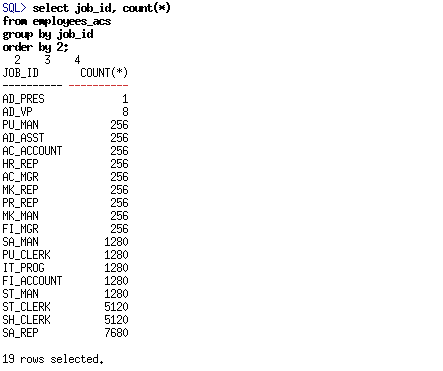
我们将使用一个在该表的JOB_ID上过滤芯,并与DEPARTMENTS关联后并聚合结果的简单查询:

我们使用的BIND_AWARE提示,是为了加快获得绑定敏感的游标并放入游标缓存的过程。
如果我们使用三个不同的绑定变量值(AD_PRES, AD_VP, 和SA_REP)来运行该查询,优化器选择了三个不同的执行计划
AD_PRES:
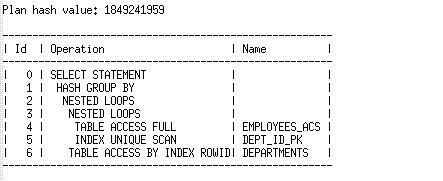
AD_VP:
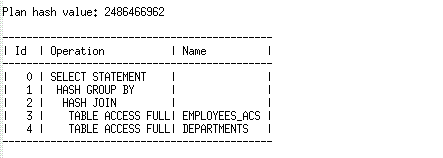
SA_REP:
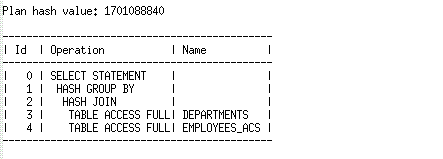
为了让其更有意思,让我们思考一下,如果我们只加载其中的两个执行计划到SPM中,会发生什么。在使用绑定变量值AD_PRES和 SA_REP运行后,我们将这两个有不同执行计划的子游标加载到SPM中。
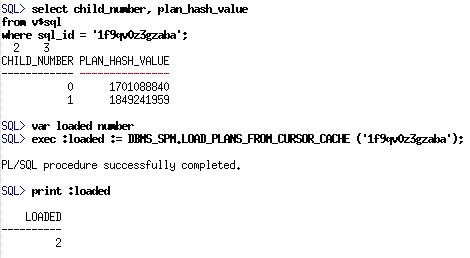
现在,如要我们使用三个不同的绑定值来运行该查询,SPM会限制优化器从SQL plan baseline中两个已接受的执行计划中选择。让我们以同样的绑定变量值的次序,再次运行查询,看看我们每一次选择的执行计划:
AD_PRES:
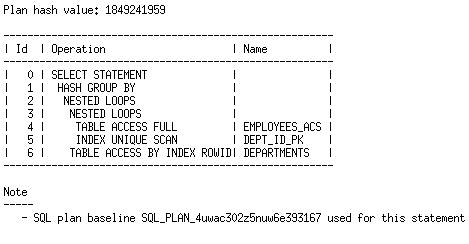
对于该绑定变量值,我们选择了与还没有混用SQL plan baseline时相同的执行计划。这是因为该执行计划是我们加载到 SQL plan baseline中,可接受的执行计划之一。所以优化器被允许去选择它。
AD_VP:
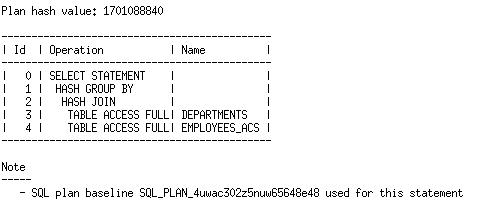
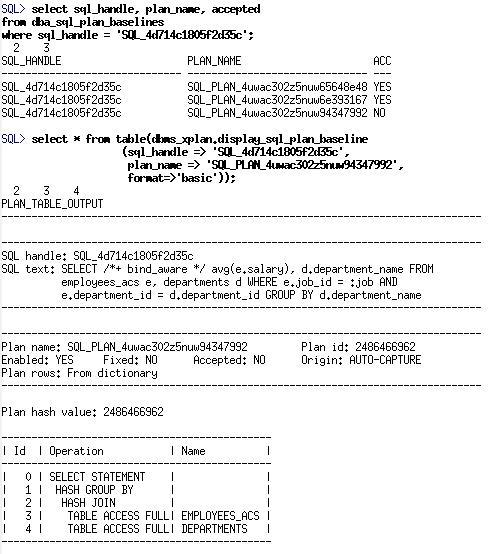
对于该绑定变量值,优化器生成了一个不在SQL plan baseline中的执行计划,因此,被替代从已接受的执行计划中选择一个最优的,即使用HASH JOIN的执行计划。优化器生成的基本成本的执行计划,被添加到SQL plan baseline,但并不会被考虑,直到它被演进。
最后,用最后一个值SA_REP来运行
SA_REP:
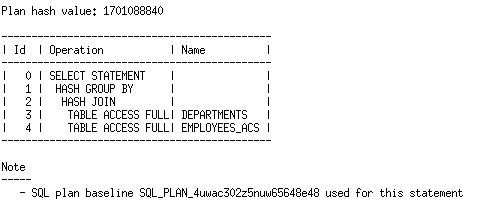
如你所愿,我们得到了为这个绑定变量值最初得到的执行计划相同的执行计划,因为它是我们加载到SPM中的一个执行计划。
由于第二次和第三次执行,我们选择了相同的执行计划,所以,对于该PLAN HASH VALUE,目前只有一个共享游标在游标缓存中。并且,该游标将会用于与绑定变量值AD_VP or或SA_REP的选择性接近(或在两者之间)的绑定变量相匹配。
如果你正在研究SPM和ACS,要么使用我们提供的演示 https://blogs.oracle.com/content/published/api/v1.1/assets/CONT2190E88522B74575B26E87058269B5F1/native?cb=_cache_a2b3&channelToken=b9f13a9766954faba97b14fc0e751730 要么是你自己的,这里有几个潜在的问题需要注意:
-
被ACS所选择的执行计划,会影响子游标的数量和受特定绑定变量值次序影响的硬解析的次数。因此,SQL plan baseline的存在,会限制会引发不同数量的子游标和硬解析的执行计划。例如,在我们的示例中,最终只有一个执行计划被用于AD_VP,SA_REP,或者选择性介于两者之间的其它绑定变量值。没有SPM,在两者之间也会产生一个额外的硬解析和新的子游标(可能会是一个新的执行计划)。
-
被优化器基于成本选择的新的,但不在SQL plan baseline中的执行计划,会被自动添加到SQL plan baseline中,作为一个不被接受的执行计划。然而,只有当游标共享不能匹配到游标时,才会触发硬解析,让优化器有机会去选择一个执行计划。如上所述,SQL plan baseline的存在,会减少硬解析的次数。
-
当SPM更新SQL plan baseline时,使用基线创建的游标是失效的。而需要更新SQL plan baseline包括两个常见原因:当一个新的执行计划(基于成本的)被添加到SQL plan baseline,或者当一个已经在SQL plan baseline中的执行计划被标记为reproduced(当其第一次重新产生时)。因此,如果你正在思考这个问题,且你不能找到你刚刚运行过的查询的游标,也许就是这个原因。在前述的示例中,在我加载执行计划到SQL plan baseline后,我使用每个绑定变量运行了数次,以确保我可以在运行查询后可以显示出其执行计划。在一个持续运行的系统,这不会有太明显的影响,但是,当你运行一个类似这样的测试用例时,这可能会有一点令人困惑。
我们希望这个小示例,可以消除在这两个功能相互影响上的一些疑惑。有多种方法可以加载执行计划到SQL plan baseline,以及将绑定敏感的游标放入游标缓存中。这些可能导致在行为上有一些细微的差异。如果你有具体的问题,请在评论区提出。
原文链接:https://blogs.oracle.com/optimizer/post/how-do-adaptive-cursor-sharing-and-sql-plan-management-interact
How do adaptive cursor sharing and SQL Plan Management interact?
January 1, 2020 | 6 minute read
Maria Colgan
Distinguished Product Manager
We’ve received a lot of questions about how adaptive cursor sharing (ACS) and SQL plan management (SPM) interact. We discussed this briefly in one of the original SPM posts, but in this post, we’ll explain the concepts of how the two features interact in more details, and show an example.
The simplest way to reason about the interaction is to remember that they are responsible for two different tasks. ACS controls whether or not a child cursor is shared on a particular execution. For each execution of the query, ACS considers the current bind values and decides if an existing child cursor can be shared or if the optimizer should be given the chance to find a better plan for the current bind values. SPM controls which plans the optimizer may choose. If a child cursor is bind-aware, the decision to share or not is made irrespective of whether the query is controlled by SPM. But once the query and its current bind values are sent to the optimizer for optimization, SPM constrains the optimizer’s choice of plans, without regard to whether this query is being optimized due to ACS.
Let’s look at a small example. There are many different ways to load plans into SPM, but for simplicity, we will manually load the plans from the cursor cache. I am using a modified version of the EMPLOYEES table from the sample HR schema - the table has been modified so that it has more rows, with more skew on the job column (there is only one president, and relatively few VPs), and there is also an index defined on it. This modified table is called EMPLOYEES_ACS (which can be created using this script). But just to give you an idea of the data distribution, here are the row counts and job distribution:
We will be working with a simple query that joins this table, filtered on job_id, to DEPARTMENTS and aggregates the results:
We are using the BIND_AWARE hint, to expedite the process of getting bind-aware cursors into the cursor cache.
If we run the query with three different bind values, AD_PRES, AD_VP, and SA_REP, the optimizer chooses three different plans.
AD_PRES:
AD_VP:
SA_REP:
To make things interesting, let’s consider what happens if we load only two of these plans into SPM. After running the query with the bind values AD_PRES and SA_REP, there are two child cursors with different plans. Let’s load these plans into SPM.
Now if we run the query with the three different bind values, SPM will constrain the optimizer to pick from the two accepted plans in the SQL plan baseline. Let’s run the query with the same sequence of bind values again (AD_PRES, AD_VP, SA_REP), and see the plans that we pick for each:
AD_PRES:
For this bind value, we pick the same plan that we picked without the SQL plan baseline in the mix. This is because this was one of the plans that we loaded into the SQL plan baseline as an accepted, so the optimizer is allowed to choose it.
AD_VP:
For this bind value, the optimizer comes up with a plan that is not in the SQL plan baseline. So instead we pick the best accepted plan, which uses a hash join. The cost-based plan the optimizer came up with is added to the SQL plan baseline, but it will not be considered until it has been evolved.
Finally lets run with the last value SA_REP.
SA_REP:
As you would expect, we get the same plan here that we originally got for this bind value, since that was one of the plans that we loaded into SPM.
Since the second and third execution picked the same plan, there is now only one shareable cursor in the cursor cache for this plan hash value. And that cursor will now match bind values with a similar selectivity to AD_VP or SA_REP (or anything in-between).
If you are playing around with SPM and ACS, either with our demo or your own, there are a few potential surprises to keep in mind:
-
The plans that are chosen by ACS impact the number of child cursors and number of hard parses that you will see for a particular sequence of bind values. Thus, the presence of a SQL plan baseline that constrain the possible plans can cause a different number of child cursors and hard parses. For instance, with our example, we end up with one child cursor that can be used for AD_VP, SA_REP, or bind values whose selectivity falls somewhere in-between. Without SPM in the picture, a bind value that falls in-between may generate an additional hard parse and a new child cursor (and possibly a new plan).
-
New cost-based plans chosen by the optimizer that are not in the SQL plan baseline are automatically added to it, as unaccepted plans. However, the optimizer only has the opportunity to choose a plan when cursor sharing fails to match a cursor and a hard parse is triggered. As mentioned in the point above, the presence of a SQL plan baseline can reduce the number of hard parses.
-
When SPM updates a SQL plan baseline, the cursor built using that baseline is invalidated. A couple of common reasons for updating the SQL plan baseline include: when a new (cost-based) plan is added to the SQL plan baseline, or when a plan in the SQL plan baseline is marked as reproduced (when it is successfully reproduced for the first time). So if you are tinkering with this, and you can’t find the cursor that you just ran with, this may be the case. In the examples I showed above, after I loaded the plans into the SQL plan baseline, I ran the queries with each bind multiple times to get over the hump and ensure that I could display the plan after I ran the query. This is not likely to have a significant impact on a running system, but when you are running small test cases like this, it can be a bit confusing.
We hope that this small example clears up some of the confusion about how these two features interact. There are many different ways to load plans into a SQL plan baseline, and to get bind-aware cursors into the cursor cache, which can cause small changes in the behavior. If you have specific questions, please post them as a comment.
