前言
之前翻译过一篇文章,PostgreSQL 使用 clickhousedb_fdw 插件访问 ClickHouse, 昨天得知新版的 ClickHouse 开始支持 PostgreSQL 数据库引擎,于是迫不及待地想体验下,没有文档,就对照着源代码和测试代码做了番尝试,并比照 MySQL 数据库引擎的文档写了版粗略的 PostgreSQL 数据库引擎的文档。
同时还测试了下ClickHouse提供的PostgreSQL引擎。
在 ClickHouse 里访问 PostgreSQL(PostgreSQL 数据库引擎)
PostgreSQL 引擎用于将远程的 PostgreSQL 服务器中的表映射到 ClickHouse 中,并允许您对表进行INSERT
和SELECT
查询,以方便您在 ClickHouse 与 PostgreSQL 之间进行数据交换。
PostgreSQL
数据库引擎会将对其的查询转换为 PostgreSQL 语法并发送到 PostgreSQL 服务器中,因此您可以执行诸如SHOW TABLES
或SHOW CREATE TABLE
之类的操作。
但您无法对其执行以下操作:
RENAMECREATE TABLEALTER
CREATE DATABASE
CREATE DATABASE [IF NOT EXISTS] db_name [ON CLUSTER cluster]
ENGINE = PostgreSQL('host:port', ['database' | database], 'user', 'password')
PostgreSQL
数据库引擎参数
host:port
— 链接的PostgreSQL
地址。database
— 链接的PostgreSQL
数据库。user
— 链接的PostgreSQL
用户。password
— 链接的PostgreSQL
用户密码。
支持的类型对应
| PostgreSQL | ClickHouse |
|---|---|
| ARRAY | Array[1] |
| SMALLINT | Int16[2] |
| SERIAL | UInt32[3] |
| INTEGER | Int32[4] |
| BIGSERIAL | UInt64[5] |
| BIGINT | Int64[6] |
| REAL | Float32[7] |
| DOUBLE PRECISION | Float64[8] |
| DATE | Date[9] |
| DATETIME, TIMESTAMP | DateTime[10] |
| BYTEA | FixString[11] |
其他的PostgreSQL
数据类型将全部都转换为String[12]。
同时以上的所有类型都支持Nullable[13]。
以上部分根据源代码整理,从目前的映射来看,还不能完整地支持 PG(都转成了字符串)。
使用示例
在PostgreSQL
中创建表:
CREATE TABLE IF NOT EXISTS test_table (
    id Integer NOT NULL, value Integer, PRIMARY KEY (id));

CREATE TABLE IF NOT EXISTS array_columns (
    b Integer[][][] NOT NULL,
    c Integer[][][]
);
在 ClickHouse 中创建PostgreSQL
类型的数据库,同时与PostgreSQL
服务器交换数据:
CREATE DATABASE pg_db ENGINE = PostgreSQL('localhost:5432', 'postgres', 'postgres', 'user_password')
SHOW DATABASES
┌─name─────┐
│ default  │
│ pg_db    │
│ system   │
└──────────┘
USE pg_db;
SHOW TABLES
or
SHOW TABLES FROM pg_db
┌─name─────────┐
│  test_table  │
└──────────────┘
DESC TABLE test_table
插入数据
INSERT INTO pg_db.test_table SELECT number, number from numbers(10000);
INSERT INTO pg_db.array_columns
        VALUES (
        [[[1, 1], [1, 1]], [[3, 3], [3, 3]], [[4, 4], [5, 5]]],
        [[[1, NULL], [NULL, 1]], [[NULL, NULL], [NULL, NULL]], [[4, 4], [5, 5]]]
        );
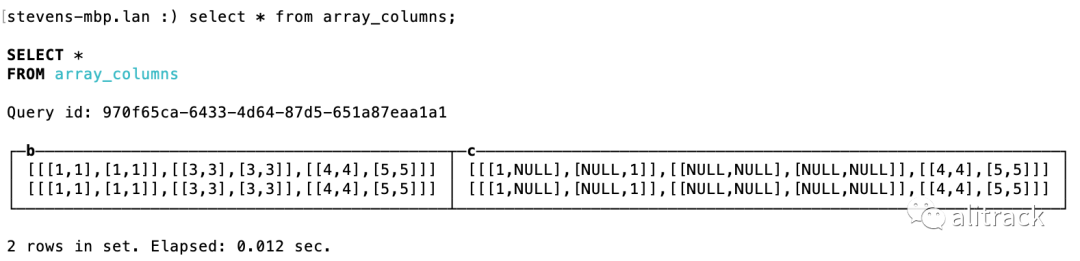
查询数据
SELECT * FROM pg_db.array_columns
附加(ATTACH) 和分离(DETACH)
DETACH TABLE pg_db.array_columns;
ATTACH TABLE pg_db.array_columns;
删除数据库
DROP DATABASE pg_db
关联表
假设 Postgres 里有表 trans(Region 中英文对照翻译表),
create table trans (en text,ch text) ;
insert into trans values ('Europe','欧洲');
与 ClickHouse 的 default 库的表 sales 关联,
SELECT  s.Region ,t.ch ,count(*) cnt
from default.sales s
left join pg_db.trans t  on s.Region =t.en
group by s.Region ,t.ch
┌─Region────────────────────────────┬─ch───┬─────cnt─┐
│ Central America and the Caribbean │ ᴺᵁᴸᴸ │  540528 │
│ Sub-Saharan Africa                │ ᴺᵁᴸᴸ │ 1297687 │
│ Middle East and North Africa      │ ᴺᵁᴸᴸ │  621539 │
│ Europe                            │ 欧洲 │ 1296674 │
│ North America                     │ ᴺᵁᴸᴸ │  108131 │
│ Asia                              │ ᴺᵁᴸᴸ │  729864 │
│ Australia and Oceania             │ ᴺᵁᴸᴸ │  405577 │
└───────────────────────────────────┴──────┴─────────┘
在 PostGreSQL 里访问 ClickHouse
FDW,多个选择,只尝试过第一个。
clickhousedb_fdw
infi.clickhouse_fdw[14]
clickhouse_fdw[15]
clickhouse-postgres-fdw[16]
使用 PostgreSQL 协议访问 ClickHouse
开启 PostgreSQL 协议支持
从 config.xml 可以看到这样的信息
    <!-- Compatibility with PostgreSQL protocol.
         ClickHouse will pretend to be PostgreSQL for applications connecting to this port.
    -->
    <!--<postgresql_port>9005</postgresql_port>-->
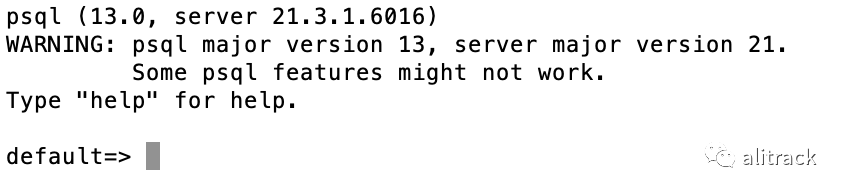
得知 ClickHouse 添加了 Postgres 协议支持,默认端口 9005,但在配置文件里默认未开放,于是去掉注释,重启 ClickHouse,使用 psql 客户端连接成功。
使用 PostgreSQL 客户端连接
$ psql -h127.0.0.1 -p9005 -Udefault default
测试
以我前面导入的数据 sales 为例,做些测试,
select count(1) from sales
 count()
---------
 5000000
(1 row)
select  "Region","Country",count(1) from sales group by "Region","Country" limit 5;
              Region               |   Country   | count()
-----------------------------------+-------------+---------
 Europe                            | Netherlands | 26874
 Central America and the Caribbean | Barbados    | 26974
 Asia                              | Bhutan      | 27089
 Europe                            | San Marino  | 27013
 Middle East and North Africa      | Libya       | 26974
(5 rows)
不支持我们平时习惯的这种写法,
select "Region","Country",count(1) from sales group by 1,2 limit 5;
失败的尝试
已知以下四种方式均告失败
DBeaver Metabase Superset postgres_fdw
参考资料
Array: https://github.com/ClickHouse/ClickHouse/blob/7de745ce77fc84df6614c45ea0eafa143e189a52/docs/en/sql-reference/data-types/array.md
[2]Int16: https://github.com/ClickHouse/ClickHouse/blob/7de745ce77fc84df6614c45ea0eafa143e189a52/docs/zh/sql-reference/data-types/int-uint.md
[3]UInt32: https://github.com/ClickHouse/ClickHouse/blob/7de745ce77fc84df6614c45ea0eafa143e189a52/docs/zh/sql-reference/data-types/int-uint.md
[4]Int32: https://github.com/ClickHouse/ClickHouse/blob/7de745ce77fc84df6614c45ea0eafa143e189a52/docs/zh/sql-reference/data-types/int-uint.md
[5]UInt64: https://github.com/ClickHouse/ClickHouse/blob/7de745ce77fc84df6614c45ea0eafa143e189a52/docs/zh/sql-reference/data-types/int-uint.md
[6]Int64: https://github.com/ClickHouse/ClickHouse/blob/7de745ce77fc84df6614c45ea0eafa143e189a52/docs/zh/sql-reference/data-types/int-uint.md
[7]Float32: https://github.com/ClickHouse/ClickHouse/blob/7de745ce77fc84df6614c45ea0eafa143e189a52/docs/zh/sql-reference/data-types/float.md
[8]Float64: https://github.com/ClickHouse/ClickHouse/blob/7de745ce77fc84df6614c45ea0eafa143e189a52/docs/zh/sql-reference/data-types/float.md
[9]Date: https://github.com/ClickHouse/ClickHouse/blob/7de745ce77fc84df6614c45ea0eafa143e189a52/docs/zh/sql-reference/data-types/date.md
[10]DateTime: https://github.com/ClickHouse/ClickHouse/blob/7de745ce77fc84df6614c45ea0eafa143e189a52/docs/zh/sql-reference/data-types/datetime.md
[11]FixString: https://github.com/ClickHouse/ClickHouse/blob/7de745ce77fc84df6614c45ea0eafa143e189a52/docs/zh/sql-reference/data-types/fixedstring.md
[12]String: https://github.com/ClickHouse/ClickHouse/blob/7de745ce77fc84df6614c45ea0eafa143e189a52/docs/zh/sql-reference/data-types/string.md
[13]Nullable: https://github.com/ClickHouse/ClickHouse/blob/7de745ce77fc84df6614c45ea0eafa143e189a52/docs/zh/sql-reference/data-types/nullable.md
[14]infi.clickhouse_fdw: https://github.com/Infinidat/infi.clickhouse_fdw
[15]clickhouse_fdw: https://github.com/adjust/clickhouse_fdw
[16]clickhouse-postgres-fdw: https://github.com/messagebird/clickhouse-postgres-fdw
欢迎关注公众号