



1、先查看mysql版本
mysql -V
mysql Ver 14.14 Distrib 5.7.22, for Linux (x86_64) using EditLine wrappe
2、修改配置文件
vim etc/my.cnf
在[mysqld]
下加入一行:lower_case_table_names=1
[mysqld]lower_case_table_names=1## Remove leading # and set to the amount of RAM for the most important data# cache in MySQL. Start at 70% of total RAM for dedicated server, else 10%.# innodb_buffer_pool_size = 128M## Remove leading # to turn on a very important data integrity option: logging# changes to the binary log between backups.# log_binserver-id=1log_bin = var/log/mysql/mysql-bin.logbinlog_format =mixedbinlog_do_db = solar#binlog_ignore_db = mysql(排除不需要同步的数据库,如果多个数据库,重复这个配置)log-bin=mysql-bin
3、重启MySQL
service mysqld restart
4、验证配置生效
1)登录mysql命令行
[bdoc@mysqlNode]$ mysql -uroot -p'123456'mysql: [Warning] Using a password on the command line interface can be insecure.
Welcome to the MySQL monitor.  Commands end with ; or \g.
Your MySQL connection id is 1715
Server version: 5.7.27 MySQL Community Server (GPL)

Copyright (c) 2000, 2019, Oracle and/or its affiliates. All rights reserved.

Oracle is a registered trademark of Oracle Corporation and/or its
affiliates. Other names may be trademarks of their respective
owners.

Type 'help;' or '\h' for help. Type '\c' to clear the current input statement.
2)查看配置:show variables like '%case%';
mysql> show variables like '%case%';+------------------------+-------+| Variable_name | Value |+------------------------+-------+| lower_case_file_system | OFF || lower_case_table_names | 1 |+------------------------+-------+2 rows in set
我们可以看到lower_case_table_names
已经是1了,表示配置更改成功了。再去创建大写英文名的表,就发现不会出现大写。
3)验证大小写忽略
mysql> create DATABASE DB01;
Query OK, 1 row affected (0.00 sec)

mysql> show databases;+--------------------+| Database           |+--------------------+| information_schema || db01               || mysql              || performance_schema || sys                |+--------------------+5 rows in set (0.00 sec)

mysql>
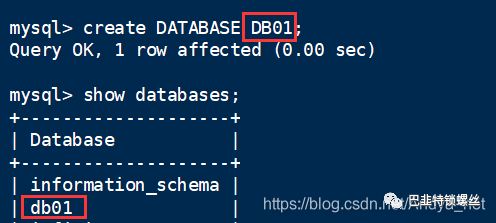
我们可以看到创建的是大写的DB01
,显示的是小写的db01
数据库。
版权声明:本文内容来自cnblogs:Andya,遵循CC 4.0 BY-SA版权协议,转载请附上原文出处链接及本声明。原文链接:https://www.cnblogs.com/Andya/p/12696302.html如有涉及到侵权,将立即予以删除处理。
文章转载自巴韭特锁螺丝,如果涉嫌侵权,请发送邮件至:contact@modb.pro进行举报,并提供相关证据,一经查实,墨天轮将立刻删除相关内容。
