



分组函数通常作用于一组数据,并对一组数据返回一个值,例如查询工资表中工资最大值。关于文章中提到的emp等表可以查看之前的文章简单的select语句获取,里面提到了scott用户的解锁与使用。
一. 常用分组函数
- AVG 求平均值
- MAX 求最大值
- MIN 求最小值
- SUM 求和
- COUNT 统计值
二. 分组函数基本语法
select group_function(column),…
from table
[where condition]
[order by column];
三. 使用分组函数
3.1 avg、max、min、sum
- 查询emp表中销售人员工资的平均值、最大值、最小值、工资总和
SCOTT@oradb>
select avg(sal),max(sal),min(sal),sum(sal)
from emp
where job like 'SALES%';

  AVG(SAL)   MAX(SAL)   MIN(SAL)   SUM(SAL)
---------- ---------- ---------- ----------
      1400       1600       1250       5600
3.2 count
- 返回表中的行数,包括重复行与数据列中含有空值的行
SCOTT@oradb> select count(*) from emp;

  COUNT(*)
----------
        14
- 返回非空值的行数,不统计含有空值的行。
SCOTT@oradb> select count(comm) from emp;

COUNT(COMM)
-----------
          4
- count(distinct),返回非空且不重复的记录数
SCOTT@oradb> select distinct mgr from emp;

       MGR
----------
      7839

      7782
      7698
      7902
      7566
      7788

7 rows selected.

SCOTT@oradb> select count(distinct mgr) from emp;

COUNT(DISTINCTMGR)
------------------
                 6
四. 分组函数和空值
- 单独使用分组函数是会忽略空值的
- 使用NVL函数嵌套可以使分组函数无法忽略空值
例如如下案例: - 我们首先查询公司员工的奖金情况
SCOTT@oradb> select ename,comm from emp;

ENAME            COMM
---------- ----------
SMITH
ALLEN             300
WARD              500
JONES
MARTIN           1400
BLAKE
CLARK
SCOTT
KING
TURNER              0
ADAMS
JAMES
FORD
MILLER
一共十四个员工,其中只有三个员工获得了奖金,其余为0或未知
- 需要计算整个公司的平均奖金,那么就应该是使用avg函数,但是在默认情况下,avg函数会忽略掉空值那一项,得到的结果如下:
SCOTT@oradb> select sum(comm),count(distinct ename),avg(comm) from emp;

 SUM(COMM) COUNT(DISTINCTENAME)  AVG(COMM)
---------- -------------------- ----------
      2200                   14        550
很明显,2200/4才等于avg(comm),其他comm为NULL的人就没有被计算在内,所以这不是真正的平均奖金
- 使用nvl函数避免忽略空值
SCOTT@oradb> select sum(comm),count(distinct ename),avg(comm),avg(nvl(comm,0)) from emp;

 SUM(COMM) COUNT(DISTINCTENAME)  AVG(COMM) AVG(NVL(COMM,0))
---------- -------------------- ---------- ----------------
      2200                   14        550       157.142857
五. group by创建聚组数据
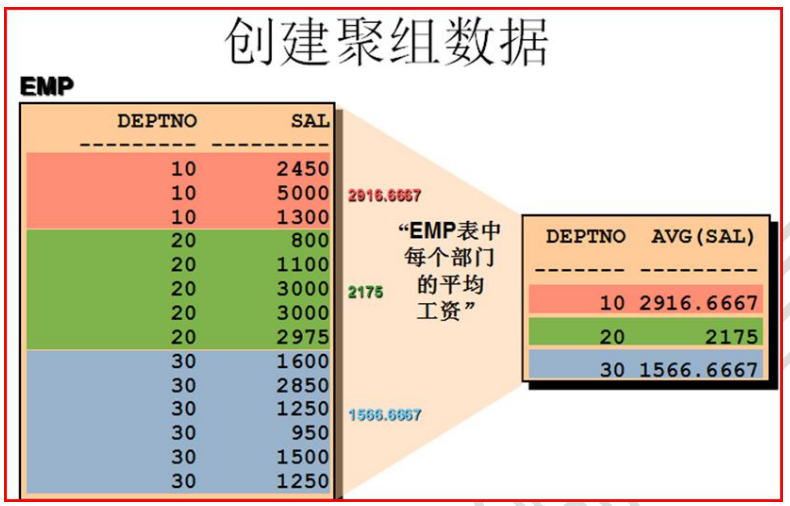
5.1 group by子句基本语法
select column,group_function(column)
from table
[where condition]
[group by group_by_expression]
[order by column];
5.2 使用group by单个列分组
- 在select列表中没有使用分组函数的列必须包含在groupby子句中
- 包含在group by子句中的列不必包含在SELECT列表中
- groupby不能使用列的别名
SCOTT@oradb> select deptno,AVG(SAL) from emp group by deptno;

    DEPTNO   AVG(SAL)
---------- ----------
        30 1566.66667
        20       2175
        10 2916.66667
- select列表中的列既没有使用分组函数,也没有在groupby子句中会报错
SCOTT@oradb> select ENAME,deptno,AVG(SAL) from emp group by deptno;
select ENAME,deptno,AVG(SAL) from emp group by deptno
       *
ERROR at line 1:
ORA-00979: not a GROUP BY expression

SCOTT@oradb> select ENAME,deptno,AVG(SAL) from emp;
select ENAME,deptno,AVG(SAL) from emp
       *
ERROR at line 1:
ORA-00937: not a single-group group function
- groupby使用别名报错
 SCOTT@oradb> select deptno dnum,avg(sal) from emp group by dnum;
select deptno dnum,avg(sal) from emp group by dnum
                                              *
ERROR at line 1:
ORA-00904: "DNUM": invalid identifier
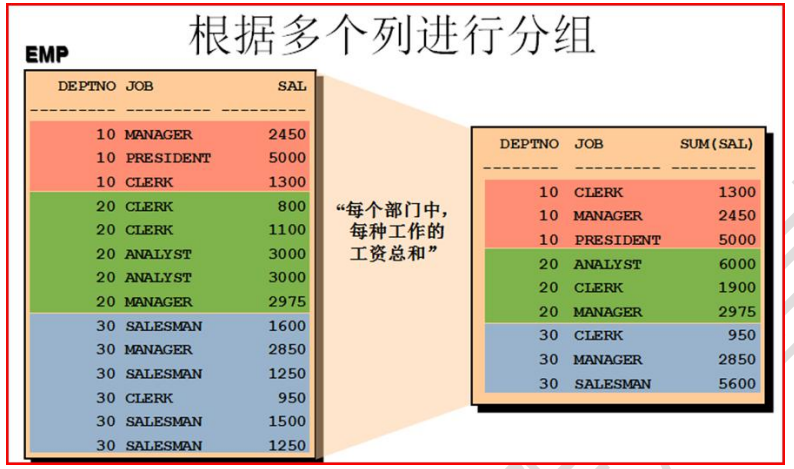
5.3 根据多个列进行分组
- 查询每个部门中,每种工作的工资总和
SCOTT@oradb> select deptno,job,sum(sal) from emp group by deptno,job;

    DEPTNO JOB         SUM(SAL)
---------- --------- ----------
        20 CLERK           1900
        30 SALESMAN        5600
        20 MANAGER         2975
        30 CLERK            950
        10 PRESIDENT       5000
        30 MANAGER         2850
        10 CLERK           1300
        10 MANAGER         2450
        20 ANALYST         6000
- 使用orderby子句让结果更直观
SCOTT@oradb> select deptno,job,sum(sal) from emp group by deptno,job order by deptno;

    DEPTNO JOB         SUM(SAL)
---------- --------- ----------
        10 CLERK           1300
        10 MANAGER         2450
        10 PRESIDENT       5000
        20 ANALYST         6000
        20 CLERK           1900
        20 MANAGER         2975
        30 CLERK            950
        30 MANAGER         2850
        30 SALESMAN        5600
5.4 having子句的使用
-
having子句的作用相当于过滤组
-
对于使用分组函数的条件过滤不能使用where子句,会报错
-
下方示例:查询各部门平均工资大于2000的信息
-
使用where子句对聚组列限定,报错:
select deptno,avg(sal) from emp where avg(sal) > 2000
 group by deptno;
select deptno,avg(sal) from emp where avg(sal) > 2000
                                      *
ERROR at line 1:
ORA-00934: group function is not allowed here
- 正确使用,having子句:
SCOTT@oradb> select deptno,avg(sal) from emp having avg(sal)>2000 group by deptno;

    DEPTNO   AVG(SAL)
---------- ----------
        20       2175
        10 2916.66667
5.4.1 使用having子句的条件
- 行已经被分组–group by子句
- 使用了组函数–类似于avg,sum等
- having可以在group by前也可以在group by后 对结果不影响
SCOTT@oradb> select deptno,job,avg(sal) from emp having avg(sal)>1500 group by deptno,job order by deptno;

    DEPTNO JOB         AVG(SAL)
---------- --------- ----------
        10 MANAGER         2450
        10 PRESIDENT       5000
        20 ANALYST         3000
        20 MANAGER         2975
        30 MANAGER         2850
5.5 分组函数嵌套
- 分组函数最多嵌套两层(两个函数),超出两层会报错
示例:分部门查询平均工资,最后显示平均工资的最大值
SCOTT@oradb> select  MAX(AVG(SAL)) from emp group by deptno;

MAX(AVG(SAL))
-------------
   2916.66667

## 多层嵌套会报错
SCOTT@oradb> select count(max(avg(sal))) from emp group by deptno;
select count(max(avg(sal))) from emp group by deptno
                 *
ERROR at line 1:
ORA-00935: group function is nested too deeply
六. 练习
6.1 查 出 所 有 员 工 的 最 高 、 最 低 、 平 均 的 工 资 , 以 及工资的总和,列名分别是maxsal,minsal,avgsal,sumsal。这些数值都用四舍五入进行处理。
SCOTT@oradb> select round(max(sal)) maxsal ,round(min(sal)) minsal,round(avg(sal)) avgsal,round(sum(sal)) sumsal from emp;

    MAXSAL     MINSAL     AVGSAL     SUMSAL
---------- ---------- ---------- ----------
      5000        800       2073      29025
6.2 .按照工作类型分类,查出每种工作的名称和其员工的最高、最低、平均的工资、工资的总和,这些数值都用四舍五入进行处理。
SCOTT@oradb> select job,round(max(sal)) maxsal ,round(min(sal)) minsal,round(avg(sal)) avgsal,round(sum(sal)) sumsal from emp group by job;

JOB           MAXSAL     MINSAL     AVGSAL     SUMSAL
--------- ---------- ---------- ---------- ----------
CLERK           1300        800       1038       4150
SALESMAN        1600       1250       1400       5600
PRESIDENT       5000       5000       5000       5000
MANAGER         2975       2450       2758       8275
ANALYST         3000       3000       3000       6000
6.3 .查出每种工作的名称和从事该工作的人数。
SCOTT@oradb> select job,count(ename) from emp group by job;

JOB       COUNT(ENAME)
--------- ------------
CLERK                4
SALESMAN             4
PRESIDENT            1
MANAGER              3
ANALYST              2
6.4 按照工作分类,查工作及最高工资和最低工资的差额,该列命名为difference。
SCOTT@oradb> select job,max(sal)-min(sal) difference from emp where job is not null group by job ;

JOB       DIFFERENCE
--------- ----------
CLERK            500
SALESMAN         350
PRESIDENT          0
MANAGER          525
ANALYST            0
「喜欢这篇文章,您的关注和赞赏是给作者最好的鼓励」
关注作者
【版权声明】本文为墨天轮用户原创内容,转载时必须标注文章的来源(墨天轮),文章链接,文章作者等基本信息,否则作者和墨天轮有权追究责任。如果您发现墨天轮中有涉嫌抄袭或者侵权的内容,欢迎发送邮件至:contact@modb.pro进行举报,并提供相关证据,一经查实,墨天轮将立刻删除相关内容。
