



欢迎关注「WeiyiGeek」公众号
点击 👇 下方卡片 即可关注我哟!
设为「星标⭐」每天带你 基础入门 到 进阶实践 再到 放弃学习!
涉及 网络安全运维、应用开发、物联网IOT、学习路径 、个人感悟 等知识
“ 花开堪折直须折,莫待无花空折枝。 ”
作者主页:[ https://www.weiyigeek.top ]
作者博客:[ https://blog.weiyigeek.top ]
作者答疑学习交流群:请关注公众号后回复【学习交流群】
文章目录:
0x00 前言简述
Docker 快速部署 nginx Web服务器
Kubernetes 快速部署 nginx Web服务器
0x00 前言简述
本章作者实践在 Docker 以及 kubernetes 环境中,快速部署生产环境中所使用的 Nginx 高性能的 HTTP 和 反向代理 web 服务器,帮助 devops 工作者以及 dev 开发者节省部署和开发时间。
如果你还不了解 Nginx 的朋友,可以参考我的【Nginx学习之路
】系列笔记帮助你快速入门Redis数据库, 关注 WeiyiGeek 公众号回复【Nginx学习之路汇总
】即可获得学习资料:
https://www.weiyigeek.top/wechat.html?key=Nginx学习之路汇总
Docker 快速部署 nginx Web服务器
步骤 01.nginx 配置文件准备执行如下命令写入到/app/nginx/conf/nginx.conf
文件中
mkdir -vp app/nginx/conf/tee app/nginx/conf/nginx.conf <<'EOF'user nginx;worker_processes auto;error_log var/log/nginx/error.log error;pid var/run/nginx.pid;# 优化选项worker_cpu_affinity 00000001 00000010 00000100 00001000;worker_rlimit_nofile 65535;events {worker_connections 65535;accept_mutex on;multi_accept on;}http {include etc/nginx/mime.types;default_type application/octet-stream;# 日志格式设置log_format main '$remote_addr - $remote_user [$time_local] "$request" ''$status $body_bytes_sent "$http_referer" ' '"$http_user_agent" "$http_x_forwarded_for"';log_format custom '$remote_addr - $remote_user [$time_local] "$request" ''$status $body_bytes_sent "$http_referer" ''"$http_user_agent" "$http_x_forwarded_for" rt=$request_time urt=$upstream_response_time';access_log var/log/nginx/access.log main buffer=128k flush=5m;# 启用GZIP压缩设置gzip on;gzip_min_length 4k;gzip_comp_level 2;# 温馨提示: 通常不建议进行图片压缩 image/jpeg image/gif image/pnggzip_types text/plain text/css text/javascript application/javascript application/x-javascript application/xml application/json application/x-httpd-php image/x-icon image/svg+xml image/avif image/webp font/ttf font/opentype;# 启用 Accept-Encoding 支持gzip_vary on;# 隐藏版本server_tokens off;# 代理链接优化keepalive_timeout 65;proxy_connect_timeout 90;proxy_read_timeout 300;proxy_send_timeout 300;fastcgi_buffers 8 128k;fastcgi_buffer_size 128k;fastcgi_busy_buffers_size 256k;fastcgi_temp_file_write_size 256k;# 客户端访问有优化client_body_buffer_size 128kclient_max_body_size 50M;sendfile on;server {listen 80;server_name localhost;access_log var/log/nginx/host.access.log custom buffer=128k flush=2m;location {root usr/share/nginx/html;index index.html index.htm;}}# include etc/nginx/conf.d/*.conf;}EOF
步骤 02.使用如下命令快速部署Nginx环境,部署后便可通过IP:8080端口进行访问Nginx。
mkdir -vp app/nginx/htmldocker run -d --name nginx-web \-v app/nginx/html:/usr/share/nginx/html:ro \-v app/nginx/conf/nginx.conf:/etc/nginx/nginx.conf \-p 8080:80 \nginx:latest
温馨提示: 我们可以自行构建带有html的Nginx镜像,例如本地的weiyigeek静态资源项目进行打包构建。
# 资源清单cd app/tee Dockerfile <<'EOF'# With Jenkins CI-CD Build ImagesFROM nginx:1.21.6-alpineLABEL Description="Jenkins-CI-CD-Build" AppName="weiyigeek-index"COPY app/weiyigeek usr/share/nginx/htmlEOF# 镜像构建docker build -t weiyigeek-nginx:1.21.6-alpine .
温馨提示: 下述实践安装配置参考来源于【Nginx安全加固与性能调优最佳指南】( https://blog.weiyigeek.top/2019/9-2-122.html )
tee app/nginx/conf/nginx.conf <<'EOF'user nginx;worker_processes auto;error_log var/log/nginx/error.log error;pid var/run/nginx.pid;events {worker_connections 1024;}http {include etc/nginx/mime.types;default_type application/octet-stream;# 日志格式设置log_format main '$remote_addr - $remote_user [$time_local] "$request" ''$status $body_bytes_sent "$http_referer" ' '"$http_user_agent" "$http_x_forwarded_for"';log_format custom '$remote_addr - $remote_user [$time_local] "$request" ''$status $body_bytes_sent "$http_referer" ''"$http_user_agent" "$http_x_forwarded_for" rt=$request_time urt=$upstream_response_time';access_log var/log/nginx/access.log main;# 启用GZIP压缩设置gzip on;gzip_min_length 3k;gzip_comp_level 2;gzip_types text/plain text/css text/javascript application/javascript application/x-javascript application/xml application/json application/x-httpd-php image/x-icon image/jpeg image/gif image/png image/svg+xml image/avif image/webp font/ttf font/opentype;# 启用 Accept-Encoding 支持gzip_vary on;# 隐藏版本server_tokens off;sendfile on;keepalive_timeout 65;server {listen 80;listen 443 ssl http2;server_name www.weiyigeek.top;charset utf-8;# Logs 日志access_log var/log/nginx/host.access.log custom buffer=128k flush=2m;# CORS 跨域add_header Access-Control-Allow-Origin '*.weiyigeek.top';add_header Access-Control-Allow-Methods 'GET,POST';add_header Access-Control-Allow-Headers 'DNT,X-Mx-ReqToken,Keep-Alive,User-Agent,X-Requested-With,If-Modified-Since,Cache-Control,Content-Type,Authorization';# HSTS 安全响应头add_header Strict-Transport-Security "max-age=15768000;includeSubDomains;preload" always;# XXS-Protectionadd_header X-XSS-Protection "1; mode=block";# 启用 ssl 证书及相关配置 (可选)ssl_certificate home/ubuntu/.acme.sh/weiyigeek.top_ecc/fullchain.cer;ssl_certificate_key home/ubuntu/.acme.sh/weiyigeek.top_ecc/weiyigeek.top.key;ssl_session_cache shared:MozSSL:10m;ssl_session_timeout 1d;ssl_protocols TLSv1 TLSv1.1 TLSv1.2 TLSv1.3;ssl_ciphers ECDHE-ECDSA-AES128-GCM-SHA256:ECDHE-RSA-AES128-GCM-SHA256:ECDHE-ECDSA-AES256-GCM-SHA384:ECDHE-RSA-AES256-GCM-SHA384:ECDHE-ECDSA-CHACHA20-POLY1305:ECDHE-RSA-CHACHA20-POLY1305:ECDHE:ECDH:AES:HIGH:EECDH+CHACHA20:EECDH+CHACHA20-draft:EECDH+AES128:RSA+AES128:EECDH+AES256:RSA+AES256:EECDH+3DES:RSA+3DES:DHE-RSA-AES128-GCM-SHA256:DHE-RSA-AES256-GCM-SHA384:!NULL:!aNULL:!eNULL:!EXPORT:!PSK:!ADH:!DH:!DES:!MD5:!RC4;ssl_prefer_server_ciphers on;# 根目录location {root usr/share/nginx/html;index index.html index.htm;}# 样式、JS、图片资源缓存location ~* \.(css|js|ico|gif|jpg|jpeg|png)$ {root usr/share/nginx/html;# 禁用404错误日志log_not_found off;# 关闭日志access_log off;# 缓存时间7天expires 7d;}# 网页资源缓存location ~* \.(xml|html|htm)$ {root usr/share/nginx/html;expires 24h;}# 字体资源缓存location ~* \.(eot|ttf|otf|woff|woff2|svg)$ {root usr/share/nginx/html;log_not_found off;access_log off;expires max;}}# include etc/nginx/conf.d/*.conf;}EOF
亲,文章都看了一半,不关注一下吗?扫描点击卡片即可关注我哟!

Kubernetes 快速部署 nginx Web服务器
步骤 01.准备nginx配置文件, 此处采用configMap方式进行装载其配置。
# Nginx 配置文件tee nginx.conf <<'EOF'user nginx;worker_processes auto;error_log var/log/nginx/error.log notice;pid var/run/nginx.pid;events {worker_connections 1024;}http {include etc/nginx/mime.types;default_type application/octet-stream;log_format main '$remote_addr - $remote_user [$time_local] "$request" ''$status $body_bytes_sent "$http_referer" ''"$http_user_agent" "$http_x_forwarded_for"';access_log var/log/nginx/access.log main;sendfile on;#tcp_nopush on;keepalive_timeout 65;#gzip on;server {listen 80;listen [::]:80;server_name localhost;#access_log var/log/nginx/host.access.log main;location {root usr/share/nginx/html;index index.html index.htm;}}# include etc/nginx/conf.d/*.conf;}EOF# 创建由 configmap 管理的名称为 nginx-conf 的 cm 配置来源于 nginx.conf 文件kubectl create configmap nginx-conf --from-file=nginx.conf -n devtest# 温馨提示后续该nginx.conf请执行如下命令,修改后将会热更新。kubectl edit cm -n devtest nginx-conf
步骤 02.准备 Nginx 的 Service 与 StatefulSet 资源部署清单。
tee > nginx-web-html.yaml <<'EOF'apiVersion: v1kind: Servicemetadata:name: nginx-web-htmlnamespace: devtestspec:type: ClusterIPports:- port: 80targetPort: 80protocol: TCP- port: 443targetPort: 443protocol: TCPselector:app: web-html---apiVersion: apps/v1kind: StatefulSetmetadata:name: nginx-web-htmlnamespace: devtestlabels:app: web-htmlspec:replicas: 1selector:matchLabels:app: web-htmlserviceName: "nginx-web-html"template:metadata:labels:app: web-htmlspec:affinity:nodeAffinity:requiredDuringSchedulingIgnoredDuringExecution:nodeSelectorTerms:- matchExpressions:- key: nodeoperator: Invalues:- workpodAntiAffinity:preferredDuringSchedulingIgnoredDuringExecution:- podAffinityTerm:labelSelector:matchExpressions:- key: appoperator: Invalues:- web-htmltopologyKey: kubernetes.io/hostnameweight: 100volumes:- name: workdiremptyDir: {}- name: upfilehostPath:path: nfsdisk-31/app/web/WeiyiGeektype: DirectoryOrCreate- name: nginx-confconfigMap:name: nginx-confitems:- key: nginx.confpath: nginx.conf- name: timezonehostPath:path: usr/share/zoneinfo/Asia/ShanghaiinitContainers:- name: sysctlimage: alpine:3.15.4imagePullPolicy: IfNotPresentcommand:- sh- -c- |mount -o remount rw proc/syssysctl -w net.core.somaxconn=10000sysctl -w net.ipv4.tcp_tw_reuse=1sysctl -w net.ipv4.ip_local_port_range="1024 65535"sysctl -w fs.file-max=1048576sysctl -w fs.inotify.max_user_instances=16384sysctl -w fs.inotify.max_user_watches=524288sysctl -w fs.inotify.max_queued_events=16384securityContext:privileged: truecontainers:- name: nginximage: nginx:1.21.6imagePullPolicy: IfNotPresentports:- name: httpprotocol: TCPcontainerPort: 80- name: httpsprotocol: TCPcontainerPort: 443volumeMounts:- name: upfilemountPath: usr/share/nginx/html- name: nginx-confmountPath: etc/nginx/nginx.confsubPath: nginx.confEOF
步骤 03.部署清单,查看部署过程及状态,部署结果。
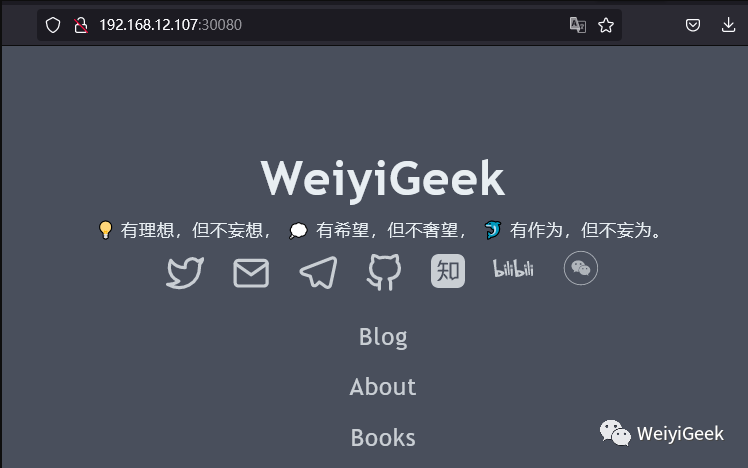
# 初始化 Pod$ kubectl get pod -n devtest# NAME READY STATUS RESTARTS AGE# nginx-web-html-0 0/1 Init:0/1 0 18s# 查看部署资源的 service StatefulSet 以及 Pod 运行正常的状态如下。kubectl get svc,sts,pod -n devtest -o wide --show-labels -l app=web-html# NAME READY AGE CONTAINERS IMAGES LABELS# statefulset.apps/nginx-web-html 1/1 3m11s nginx nginx:1.21.6 app=web-html# NAME READY STATUS RESTARTS AGE IP NODE NOMINATED NODE READINESS GATES LABELS# pod/nginx-web-html-0 1/1 Running 0 3m11s 10.66.182.214 weiyigeek-226 <none> <none> app=web-html,controller-revision-hash=nginx-web-html-74c6ff4595,statefulset.kubernetes.io/pod-name=nginx-web-html-0# 临时暴露部署的服务进行查看,此处将 statefulset.apps 资源的 80 端口转发到本机的 30080 端口。kubectl port-forward -n devtest --address 192.168.12.107 statefulset.apps/nginx-web-html 30080:80# Forwarding from 192.168.12.107:30080 -> 80
偷偷的告诉你哟?【极客全栈修炼】微信小程序已经上线了,
你可以直接在微信里面直接浏览博主博客了哟,后续将上线更多有趣的功能。
点击 👇 下方卡片,,即可进入【极客全栈修炼】微信小程序!
补充知识【2022年6月5日 11:12:31】:优化 pod 以及资源限制!
apiVersion: v1
kind: Service
metadata:
  name: weiyigeek-blog
  namespace: weiyigeek
  labels:
    app: weiyigeek-blog
    ref: prod
spec:
  type: ClusterIP
  ports:
    - name: http
      port: 80
      targetPort: 80
      protocol: TCP
  selector:
    app: weiyigeek-blog
    ref: prod
---
apiVersion: apps/v1
kind: StatefulSet
metadata:
  name: weiyigeek-blog
  namespace: weiyigeek
  labels:
    app: weiyigeek-blog
    ref: prod
    ver: 1.7.4
    track: stable
spec:
  replicas: 1
  selector:
    matchLabels:
      app: weiyigeek-blog
      ref: prod
  serviceName: "weiyigeek-blog"
  volumeClaimTemplates:
    - metadata:
        name: log
        labels:
          app: weiyigeek-blog
          ref: prod
      spec:
        accessModes: ["ReadWriteOnce"]
        storageClassName: nfs-weiyigeek
        resources:
          requests:
            storage: 5Gi
  template:
    metadata:
      labels:
        app: weiyigeek-blog
        ref: prod
        track: stable
    spec:
      affinity:
        nodeAffinity:
          requiredDuringSchedulingIgnoredDuringExecution:
            nodeSelectorTerms:
            - matchExpressions:
              - key: node
                operator: In
                values:
                - weiyigeek
        podAntiAffinity:
          preferredDuringSchedulingIgnoredDuringExecution:
          - podAffinityTerm:
              labelSelector:
                matchExpressions:
                - key: app
                  operator: In
                  values:
                  - weiyigeek-blog
              topologyKey: kubernetes.io/hostname
            weight: 100
      volumes:
      - name: workdir
        emptyDir: {}
      - name: blog-nginx
        configMap:
          name: blog-nginx
          items:
          - key: blog-nginx.conf
            path: blog-nginx.conf
      initContainers:
      - name: sysctl
        image: alpine:3.15.4
        imagePullPolicy: IfNotPresent
        command:
        - sh
        - -c
        - |
          mount -o remount rw /proc/sys
          sysctl -w net.core.somaxconn=65535
          sysctl -w net.ipv4.tcp_tw_reuse=1
          sysctl -w net.ipv4.ip_local_port_range="1024 65535"
          sysctl -w fs.file-max=1048576
          sysctl -w fs.inotify.max_user_instances=16384
          sysctl -w fs.inotify.max_user_watches=524288
          sysctl -w fs.inotify.max_queued_events=16384
        securityContext:
          privileged: true
      containers:
        - name: app
          image: harbor.weiyigeek.top/weiyigeek-blog:test
          imagePullPolicy: Always
          resources:
            requests:
              memory: 1Gi
              cpu: 2
            limits:
              memory: 8Gi
              cpu: "4"
          volumeMounts:
            - name: workdir
              mountPath: /app/
            - name: log
              mountPath: /var/log/nginx/
            - name: blog-nginx
              mountPath: /etc/nginx/nginx.conf
              subPath: blog-nginx.conf
          ports:
            - name: http
              protocol: TCP
              containerPort: 80
本文至此完毕,尽情期待下一章节,更多技术文章请关注公众号或访问作者技术站点!
原文地址: https://blog.weiyigeek.top/2022/4-24-655.html
 学习书籍推荐
往期发布文章
企业运维 | Redis内存数据库在Docker与Kubernetes环境中快速搭建部署单实例与主从集群实践
企业运维 | MySQL关系型数据库在Docker与Kubernetes容器环境中快速搭建部署主从实践
网安等保-主机安全测评之Linux服务器Ubuntu-22.04-LTS操作系统安全加固制作基线系统脚本分享与实践
欢迎各位志同道合的朋友一起学习交流,更多网络安全、系统运维、应用开发、物联网实战、全栈文章,尽在
【作者 WeiyiGeek 博客 - https://blog.weiyigeek.top 】站点!
温馨提示: 由于作者水平有限,本章错漏缺点在所难免,希望读者批评指正,并请在文章末尾留下您宝贵的经验知识,联系邮箱地址 master@weiyigeek.top 或者关注公众号 WeiyiGeek 联系我。
文章书写不易,如果您觉得此篇文章还不错的朋友,请给这篇专栏 【点个赞、投个币、收个藏、关个注、转个发、留个言、赞个助】,这将对我的肯定,我将持续发布更多优质文章,谢谢!

👇👇👇 点击下方【"阅读原文"】,即可获取更多有趣的知识!
