



类似文章
OGG有传统的经典架构,也有最新的微服务,2个都可以远程捕获和应用数据,对数据库服务器是0侵入,而传统的经典架构是纯命令行模式,最新的微服务架构是图形化界面操作,几乎所有操作都可以在界面进行。相关文章可以参考:
使用OGG for MySQL微服务快速双向同步RDS数据库:https://www.xmmup.com/shiyongoggweifuwukuaisushuangxiangtongburdsshujuku.html
OGG用于跨云RDS for MySQL之间配置双主实时同步–OGG远程捕获和投递:https://www.xmmup.com/oggyongyukuayunrdszhijianpeizhishuangzhushishitongbuyuanchengbuhuohetoudi.html
otter用于跨云RDS for mysql之间配置双主实时同步:https://www.xmmup.com/otteryongyukuayunrdszhijianpeizhishuangzhushishitongbu.html
OGG用于PG数据库之间双主实时同步(RDS for PG亦可)–OGG远程捕获和投递:https://www.xmmup.com/oggyongyupgshujukuzhijianshuangzhushishitongburds-for-pgyikeoggyuanchengbuhuohetoudi.html
使用OGG for PG微服务快速双向同步RDS数据库(双主):https://www.xmmup.com/shiyongogg-for-pgweifuwukuaisushuangxiangtongburdsshujukushuangzhu.html
使用阿里的开源工具otter,这个方案经过验证是可行的。阿里数据同步工具Otter和Canal简介请参考:https://www.xmmup.com/alishujutongbugongjuotterhecanaljianjie.html
使用OGG for Oracle微服务双向同步Oracle数据库搭建双主架构(含DDL):https://www.xmmup.com/shiyongogg-for-oracleweifuwushuangxiangtongbuoracleshujukuhanddl.html
使用OGG for mysql微服务搭建双主架构(含DDL):https://www.xmmup.com/shiyongogg-for-mysqlweifuwudajianshuangzhujiagouhanddl.html
使用数据泵+OGG微服务
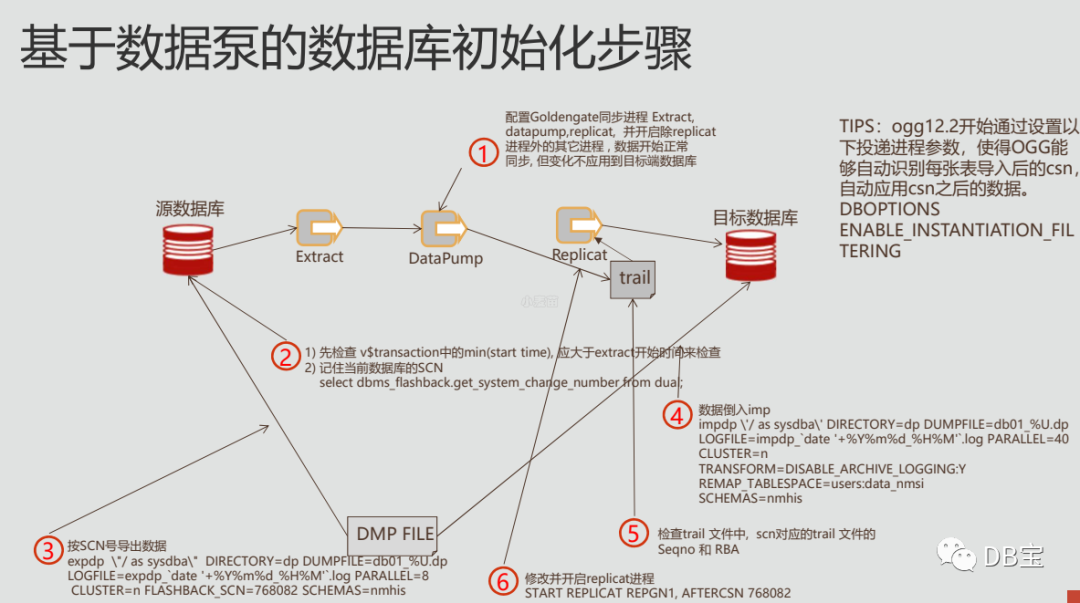
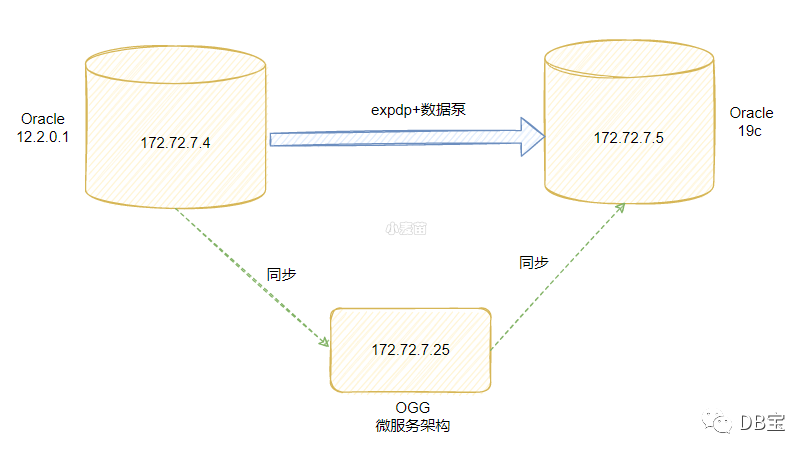
  1-- 创建专用网络
  2docker network create --subnet=172.72.7.0/24 ora-network
  3
  4
  5-- OGG微服务
  6docker pull lhrbest/ogg213maoracle:v1.0
  7
  8docker rm -f lhrogg213maoracle
  9docker run -d --name lhrogg213maoracle -h lhrogg213maoracle \
 10  --net=ora-network --ip 172.72.7.25 \
 11  -p 9391:3389 -p 29000-29005:9000-9005 \
 12  -v /sys/fs/cgroup:/sys/fs/cgroup \
 13  --privileged=true lhrbest/ogg213maoracle:v1.0 \
 14  /usr/sbin/init
 15
 16
 17-- oracle 压测工具
 18docker pull lhrbest/lhrdbbench:1.0
 19
 20docker rm -f lhrdbbench
 21docker run -d --name lhrdbbench -h lhrdbbench \
 22  --net=ora-network --ip 172.72.7.26 \
 23  -v /sys/fs/cgroup:/sys/fs/cgroup \
 24  --privileged=true lhrbest/lhrdbbench:1.0 \
 25  /usr/sbin/init
 26
 27
 28
 29-- ora12c
 30docker rm -f ora12c
 31docker run -d --name ora12c -h ora12c \
 32  -p 1554:1521 --net=ora-network --ip 172.72.7.4 \
 33  --privileged=true \
 34  lhrbest/oracle_12cr2_ee_lhr_12.2.0.1:2.0 init
 35
 36-- ora19c
 37docker rm -f ora19c
 38docker run -d --name ora19c -h ora19c \
 39  -p 1555:1521 --net=ora-network --ip 172.72.7.5 \
 40  -v /sys/fs/cgroup:/sys/fs/cgroup \
 41  --privileged=true lhrbest/oracle19clhr_rpm_db_12.2.0.3:2.0 \
 42  /usr/sbin/init
 43
 44
 45
 46 -- 数据库配置
 471.开启数据库归档--如果没有开启
 482.开启数据库级别附加日志--如果没有开始最小附加日志
 493.开启强制日志--如果没有开启强制日志
 504.设置ENABLE_GOLDENGATE_REPLICAT参数为TRUE
 515.创建OGG用户包括包括源端用户、目标端用户以及OGG抽取用户
 52
 53
 54
 55-- 2个库做配置
 56alter database add supplemental log data;
 57alter database add supplemental log data (all) columns;
 58alter database force logging;
 59alter system set enable_goldengate_replication=TRUE;
 60
 61select name,supplemental_log_data_min , force_logging, log_mode from v$database;
 62
 63
 64alter system set streams_pool_size = 128M;
 65alter system set sga_max_size = 2g scope=spfile;
 66alter system set sga_target = 2g scope=spfile;
 67alter system set pga_aggregate_target=1g;
 68startup force
 69
 70
 71-- OGG管理用户
 72CREATE USER ogg identified by lhr;
 73GRANT DBA to ogg;
 74grant SELECT ANY DICTIONARY to ogg;
 75GRANT EXECUTE ON SYS.DBMS_LOCK TO ogg;
 76grant select any transaction to ogg;
 77grant select any table to ogg;
 78grant flashback any table to ogg;
 79grant alter any table to ogg;
 80
 81exec dbms_goldengate_auth.grant_admin_privilege('OGG','*',TRUE)
 82
 83
 84-- 业务用户
 85CREATE USER lhr identified by lhr;
 86GRANT DBA to lhr ;
 87grant SELECT ANY DICTIONARY to lhr;
 88GRANT EXECUTE ON SYS.DBMS_LOCK TO lhr;
 89
 90
 91
 92-- 启动监听
 93lsnrctl start
 94lsnrctl status
 95
 96
 97
 98-- 源端数据初始化
 99/usr/local/swingbench/bin/oewizard  -s -create -c /usr/local/swingbench/wizardconfigs/oewizard.xml -create \
100-version 2.0  -cs //172.72.7.4/lhrsdb  -dba "sys as sysdba" -dbap lhr -dt thin \
101-ts users -u lhr -p lhr -allindexes  -scale 0.001  -tc 16 -v -cl
102
103
104col TABLE_NAME format a30
105SELECT a.table_name,a.num_rows FROM dba_tables a where a.OWNER='LHR'  ;
106select object_type,count(*) from dba_objects where owner='LHR' group by object_type;
107select sum(bytes)/1024/1024 from dba_segments where owner='LHR';
108
109
110
111-- 检查键是否正确:https://www.xmmup.com/ogg-01296-biaoyouzhujianhuoweiyijiandanshirengranshiyongquanbulielaijiexixing.html
112-- 否则OGG启动后,会报错:OGG-01296、OGG-06439、OGG-01169  Encountered an update where all key columns for target table LHR.ORDER_ITEMS are not present.
113select owner, constraint_name, constraint_type, status, validated from dba_constraints where owner='LHR' and VALIDATED='NOT VALIDATED';
114select 'alter table lhr.'||TABLE_NAME||' enable validate constraint '||CONSTRAINT_NAME||';' from dba_constraints where owner='LHR' and VALIDATED='NOT VALIDATED';
115
116
117-- 删除外键
118SELECT 'ALTER TABLE  '|| D.TABLE_NAME ||' DROP constraint '|| D.CONSTRAINT_NAME||';' FROM user_constraints d where d.CONSTRAINT_TYPE='R';
-s是静默,-create表示创建数据,-c是指定配置文件,就是oewizard.xml,-version指定swingbench版本,-cs表示数据库连接串,-dba表示连接到oracle数据库的用户,-dbap表示连接到oracle数据库的密码,-dt表示连接类型,-ts是指定表空间为users, -u表示压测的用户,-p表示压测用户的密码,-scale是数据量,1就是1G,0.001就是1Mb数据,-tc 是并发度,-allindexes是支持所有的索引类型,-v显示详细信息,-cl表示运行在字符模式。
源端数据初始化日志:
  1[root@docker35 ~]# docker exec -it lhrdbbench bash
  2[root@lhrdbbench /]# /usr/local/swingbench/bin/oewizard  -s -create -c /usr/local/swingbench/wizardconfigs/oewizard.xml -create \
  3> -version 2.0  -cs //172.72.7.4/lhrsdb  -dba "sys as sysdba" -dbap lhr -dt thin \
  4> -ts users -u lhr -p lhr -allindexes  -scale 0.001  -tc 16 -v -cl
  5Connecting to : jdbc:oracle:thin:@//172.72.7.4/lhrsdb
  6Connected
  7Starting run
  8Starting script ../sql/soedgdrop2.sql
  9Script completed in 0 hour(s) 0 minute(s) 0 second(s) 541 millisecond(s)
 10Starting script ../sql/soedgcreatetables2.sql
 11Script completed in 0 hour(s) 0 minute(s) 0 second(s) 514 millisecond(s)
 12Starting script ../sql/soedgviews.sql
 13Script completed in 0 hour(s) 0 minute(s) 0 second(s) 62 millisecond(s)
 14Starting script ../sql/soedgsqlset.sql
 15Script completed in 0 hour(s) 0 minute(s) 0 second(s) 217 millisecond(s)
 16Inserting data into table PRODUCT_INFORMATION
 17Inserting data into table PRODUCT_DESCRIPTIONS
 18Inserting data into table INVENTORIES
 19Inserting data into table WAREHOUSES
 20Inserting data into table ADDRESSES_16
 21Inserting data into table ADDRESSES_10
 22Inserting data into table ADDRESSES_7
 23Inserting data into table ADDRESSES_11
 24Inserting data into table ADDRESSES_14
 25Inserting data into table ADDRESSES_8
 26Inserting data into table ADDRESSES_15
 27Inserting data into table ADDRESSES_2
 28Inserting data into table ADDRESSES_1
 29Inserting data into table ADDRESSES_9
 30Inserting data into table ADDRESSES_13
 31Inserting data into table ADDRESSES_3
 32Completed processing table ADDRESSES_9 in 0:00:11
 33Completed processing table ADDRESSES_14 in 0:00:11
 34Completed processing table ADDRESSES_11 in 0:00:11
 35Completed processing table ADDRESSES_13 in 0:00:11
 36Completed processing table ADDRESSES_15 in 0:00:11
 37Completed processing table ADDRESSES_8 in 0:00:11
 38Completed processing table ADDRESSES_2 in 0:00:11
 39Completed processing table ADDRESSES_1 in 0:00:11
 40Inserting data into table ORDERS_16
 41Inserting data into table ORDER_ITEMS_1335
 42Inserting data into table ADDRESSES_5
 43Inserting data into table CUSTOMERS_16
 44Inserting data into table ADDRESSES_4
 45Inserting data into table ADDRESSES_12
 46Completed processing table ADDRESSES_10 in 0:00:11
 47Inserting data into table ADDRESSES_6
 48Inserting data into table CUSTOMERS_1
 49Completed processing table ADDRESSES_7 in 0:00:11entage completed : 12.60
 50Inserting data into table CUSTOMERS_2
 51Inserting data into table CUSTOMERS_5
 52Completed processing table ADDRESSES_3 in 0:00:11
 53Inserting data into table CUSTOMERS_9
 54Completed processing table ADDRESSES_16 in 0:00:11
 55Inserting data into table CUSTOMERS_7
 56Completed processing table WAREHOUSES in 0:00:11
 57Inserting data into table CUSTOMERS_6
 58Completed processing table ADDRESSES_4 in 0:00:00
 59Inserting data into table CUSTOMERS_12
 60Completed processing table ADDRESSES_5 in 0:00:00
 61Completed processing table ADDRESSES_6 in 0:00:00
 62Inserting data into table CUSTOMERS_4
 63Inserting data into table CUSTOMERS_15
 64Completed processing table ADDRESSES_12 in 0:00:00
 65Inserting data into table CUSTOMERS_13
 66Completed processing table CUSTOMERS_5 in 0:00:00
 67Inserting data into table CUSTOMERS_8
 68Completed processing table CUSTOMERS_15 in 0:00:00
 69Inserting data into table CUSTOMERS_3
 70Completed processing table CUSTOMERS_7 in 0:00:00
 71Inserting data into table CUSTOMERS_10
 72Completed processing table CUSTOMERS_3 in 0:00:00
 73Inserting data into table CUSTOMERS_14
 74Completed processing table CUSTOMERS_10 in 0:00:00
 75Inserting data into table CUSTOMERS_11
 76Completed processing table CUSTOMERS_8 in 0:00:00
 77Inserting data into table ORDER_ITEMS_801
 78Inserting data into table ORDERS_10
 79Completed processing table CUSTOMERS_14 in 0:00:00
 80Completed processing table CUSTOMERS_9 in 0:00:00
 81Inserting data into table ORDERS_7
 82Inserting data into table ORDER_ITEMS_534
 83Completed processing table CUSTOMERS_12 in 0:00:00
 84Completed processing table CUSTOMERS_2 in 0:00:00
 85Inserting data into table ORDER_ITEMS_1068
 86Completed processing table CUSTOMERS_1 in 0:00:00
 87Inserting data into table ORDER_ITEMS_356
 88Completed processing table CUSTOMERS_11 in 0:00:00
 89Completed processing table CUSTOMERS_13 in 0:00:00
 90Completed processing table CUSTOMERS_4 in 0:00:00
 91Completed processing table CUSTOMERS_16 in 0:00:00
 92Inserting data into table ORDER_ITEMS_712
 93Inserting data into table ORDERS_9
 94Inserting data into table ORDER_ITEMS_0
 95Inserting data into table ORDERS_5
 96Completed processing table CUSTOMERS_6 in 0:00:00
 97Inserting data into table ORDERS_1
 98Inserting data into table ORDERS_13
 99Completed processing table PRODUCT_INFORMATION in 0:00:12
100Inserting data into table ORDER_ITEMS_178
101Inserting data into table ORDERS_3
102Completed processing table ORDER_ITEMS_534 in 0:00:00ge completed : 45.57
103Completed processing table ORDER_ITEMS_712 in 0:00:00
104Completed processing table ORDER_ITEMS_0 in 0:00:00
105Inserting data into table ORDER_ITEMS_890
106Inserting data into table ORDERS_11
107Completed processing table ORDER_ITEMS_356 in 0:00:00
108Inserting data into table ORDER_ITEMS_267
109Inserting data into table ORDERS_4
110Completed processing table ORDER_ITEMS_1068 in 0:00:00
111Completed processing table ORDER_ITEMS_1335 in 0:00:00
112Completed processing table ORDER_ITEMS_178 in 0:00:00
113Inserting data into table ORDER_ITEMS_89
114Inserting data into table ORDERS_2
115Completed processing table ORDER_ITEMS_801 in 0:00:00
116Completed processing table ORDER_ITEMS_890 in 0:00:00
117Inserting data into table ORDER_ITEMS_1157
118Inserting data into table ORDERS_14
119Completed processing table PRODUCT_DESCRIPTIONS in 0:00:12
120Completed processing table ORDERS_2 in 0:00:00
121Inserting data into table ORDER_ITEMS_1246
122Inserting data into table ORDERS_15
123Completed processing table ORDERS_4 in 0:00:00
124Completed processing table ORDERS_10 in 0:00:00
125Completed processing table ORDERS_14 in 0:00:00
126Inserting data into table ORDER_ITEMS_979
127Inserting data into table ORDER_ITEMS_623
128Inserting data into table ORDERS_12
129Completed processing table ORDERS_11 in 0:00:00
130Completed processing table ORDERS_9 in 0:00:00
131Inserting data into table ORDERS_8
132Inserting data into table ORDER_ITEMS_445
133Completed processing table ORDERS_13 in 0:00:00
134Inserting data into table ORDERS_6
135Completed processing table ORDER_ITEMS_267 in 0:00:00
136Completed processing table ORDERS_5 in 0:00:00
137Inserting data into table CARD_DETAILS_16
138Completed processing table ORDERS_3 in 0:00:00
139Inserting data into table CARD_DETAILS_13
140Completed processing table ORDERS_7 in 0:00:00
141Inserting data into table CARD_DETAILS_11
142Completed processing table ORDERS_16 in 0:00:00
143Inserting data into table CARD_DETAILS_15
144Completed processing table ORDERS_8 in 0:00:00
145Inserting data into table CARD_DETAILS_10
146Completed processing table ORDERS_1 in 0:00:00
147Inserting data into table CARD_DETAILS_1
148Completed processing table ORDERS_12 in 0:00:00
149Inserting data into table CARD_DETAILS_2
150Completed processing table ORDERS_15 in 0:00:00
151Inserting data into table CARD_DETAILS_3
152Completed processing table ORDERS_6 in 0:00:00
153Inserting data into table CARD_DETAILS_5
154Completed processing table ORDER_ITEMS_89 in 0:00:00
155Inserting data into table CARD_DETAILS_8
156Completed processing table ORDER_ITEMS_1157 in 0:00:00
157Inserting data into table CARD_DETAILS_6
158Completed processing table ORDER_ITEMS_445 in 0:00:00
159Inserting data into table CARD_DETAILS_14
160Completed processing table ORDER_ITEMS_1246 in 0:00:00
161Completed processing table ORDER_ITEMS_623 in 0:00:00
162Inserting data into table CARD_DETAILS_7
163Inserting data into table CARD_DETAILS_12
164Completed processing table ORDER_ITEMS_979 in 0:00:00
165Inserting data into table CARD_DETAILS_9
166Completed processing table CARD_DETAILS_7 in 0:00:00
167Inserting data into table CARD_DETAILS_4
168Completed processing table CARD_DETAILS_12 in 0:00:00
169Completed processing table CARD_DETAILS_10 in 0:00:00
170Completed processing table CARD_DETAILS_2 in 0:00:00
171Inserting data into table LOGON_1
172Inserting data into table LOGON_16
173Inserting data into table LOGON_6
174Completed processing table CARD_DETAILS_15 in 0:00:00
175Completed processing table CARD_DETAILS_5 in 0:00:00
176Inserting data into table LOGON_11
177Completed processing table CARD_DETAILS_3 in 0:00:00
178Inserting data into table LOGON_12
179Completed processing table CARD_DETAILS_9 in 0:00:00
180Inserting data into table LOGON_13
181Inserting data into table LOGON_14
182Completed processing table CARD_DETAILS_14 in 0:00:00
183Inserting data into table LOGON_10
184Completed processing table CARD_DETAILS_1 in 0:00:00
185Inserting data into table LOGON_8
186Completed processing table CARD_DETAILS_8 in 0:00:00
187Inserting data into table LOGON_5
188Completed processing table CARD_DETAILS_4 in 0:00:00
189Inserting data into table LOGON_3
190Completed processing table CARD_DETAILS_6 in 0:00:00
191Inserting data into table LOGON_4
192Completed processing table CARD_DETAILS_13 in 0:00:00
193Completed processing table CARD_DETAILS_16 in 0:00:00
194Inserting data into table LOGON_9
195Inserting data into table LOGON_2
196Completed processing table CARD_DETAILS_11 in 0:00:00
197Inserting data into table LOGON_15
198Completed processing table LOGON_3 in 0:00:00
199Completed processing table LOGON_1 in 0:00:00
200Completed processing table LOGON_15 in 0:00:00
201Completed processing table LOGON_2 in 0:00:00
202Completed processing table LOGON_10 in 0:00:00
203Completed processing table LOGON_12 in 0:00:00
204Completed processing table LOGON_5 in 0:00:00
205Inserting data into table LOGON_7
206Completed processing table LOGON_9 in 0:00:00
207Completed processing table LOGON_11 in 0:00:00
208Completed processing table LOGON_8 in 0:00:00
209Completed processing table LOGON_4 in 0:00:00
210Completed processing table LOGON_16 in 0:00:00
211Completed processing table LOGON_13 in 0:00:00
212Completed processing table LOGON_7 in 0:00:00
213Completed processing table LOGON_6 in 0:00:00
214Completed processing table LOGON_14 in 0:00:00
215Connection cache closed
216Starting script ../sql/soedganalyzeschema2.sql
217Script completed in 0 hour(s) 0 minute(s) 9 second(s) 371 millisecond(s)
218Starting script ../sql/soedgconstraints2.sql
219Script completed in 0 hour(s) 0 minute(s) 15 second(s) 303 millisecond(s)
220Starting script ../sql/soedgindexes2.sql
221Script completed in 0 hour(s) 0 minute(s) 18 second(s) 168 millisecond(s)
222Starting script ../sql/soedgsequences2.sql
223Script completed in 0 hour(s) 0 minute(s) 0 second(s) 267 millisecond(s)
224Starting script ../sql/soedgpackage2_header.sql
225Script completed in 0 hour(s) 0 minute(s) 0 second(s) 325 millisecond(s)
226Starting script ../sql/soedgpackage2_body.sql
227Script completed in 0 hour(s) 0 minute(s) 0 second(s) 286 millisecond(s)
228Starting script ../sql/soedgsetupmetadata.sql
229Script completed in 0 hour(s) 0 minute(s) 1 second(s) 61 millisecond(s)
230
231============================================
232|           Datagenerator Run Stats        |
233============================================
234Connection Time                        0:00:00.006
235Data Generation Time                   0:00:25.528
236DDL Creation Time                      0:00:46.255
237Total Run Time                         0:01:11.795
238Rows Inserted per sec                       35,959
239Data Generated (MB) per sec                    0.9
240Actual Rows Generated                      917,133
241Commits Completed                              227
242Batch Updates Completed                      4,725
243
244Connecting to : jdbc:oracle:thin:@//172.72.7.4/lhrsdb
245Connected
246
247Post Creation Validation Report
248===============================
249The schema appears to have been created successfully.
250
251Valid Objects
252=============
253Valid Tables : 'ORDERS','ORDER_ITEMS','CUSTOMERS','WAREHOUSES','ORDERENTRY_METADATA','INVENTORIES','PRODUCT_INFORMATION','PRODUCT_DESCRIPTIONS','ADDRESSES','CARD_DETAILS'
254Valid Indexes : 'PRD_DESC_PK','PROD_NAME_IX','PRODUCT_INFORMATION_PK','PROD_SUPPLIER_IX','PROD_CATEGORY_IX','INVENTORY_PK','INV_PRODUCT_IX','INV_WAREHOUSE_IX','ORDER_PK','ORD_SALES_REP_IX','ORD_CUSTOMER_IX','ORD_ORDER_DATE_IX','ORD_WAREHOUSE_IX','ORDER_ITEMS_PK','ITEM_ORDER_IX','ITEM_PRODUCT_IX','WAREHOUSES_PK','WHS_LOCATION_IX','CUSTOMERS_PK','CUST_EMAIL_IX','CUST_ACCOUNT_MANAGER_IX','CUST_FUNC_LOWER_NAME_IX','ADDRESS_PK','ADDRESS_CUST_IX','CARD_DETAILS_PK','CARDDETAILS_CUST_IX'
255Valid Views : 'PRODUCTS','PRODUCT_PRICES'
256Valid Sequences : 'CUSTOMER_SEQ','ORDERS_SEQ','ADDRESS_SEQ','LOGON_SEQ','CARD_DETAILS_SEQ'
257Valid Code : 'ORDERENTRY'
258Schema Created
259
260
261LHR@lhrsdb> col TABLE_NAME format a30
262LHR@lhrsdb> SELECT a.table_name,a.num_rows FROM dba_tables a where a.OWNER='LHR'  ;
263
264TABLE_NAME                       NUM_ROWS
265------------------------------ ----------
266ADDRESSES                            1500
267CUSTOMERS                            1000
268CARD_DETAILS                         1500
269WAREHOUSES                           1000
270ORDER_ITEMS                          7141
271ORDERS                               1430
272INVENTORIES                        899179
273PRODUCT_INFORMATION                  1000
274LOGON                                2383
275PRODUCT_DESCRIPTIONS                 1000
276ORDERENTRY_METADATA                     0
277
27811 rows selected.
279
280LHR@lhrsdb>
281LHR@lhrsdb> select object_type,count(*) from dba_objects where owner='LHR' group by object_type;
282
283OBJECT_TYPE               COUNT(*)
284----------------------- ----------
285SEQUENCE                         5
286PACKAGE                          1
287PACKAGE BODY                     1
288TABLE                           11
289VIEW                             2
290INDEX                           27
291
2926 rows selected.
293
294LHR@lhrsdb>
295LHR@lhrsdb> select sum(bytes)/1024/1024 from dba_segments where owner='LHR';
296
297SUM(BYTES)/1024/1024
298--------------------
299            279.5625
访问:http://192.168.66.35:29000 ,用户名:oggadmin,密码:lhr
创建身份证明
访问:http://192.168.66.35:29001/
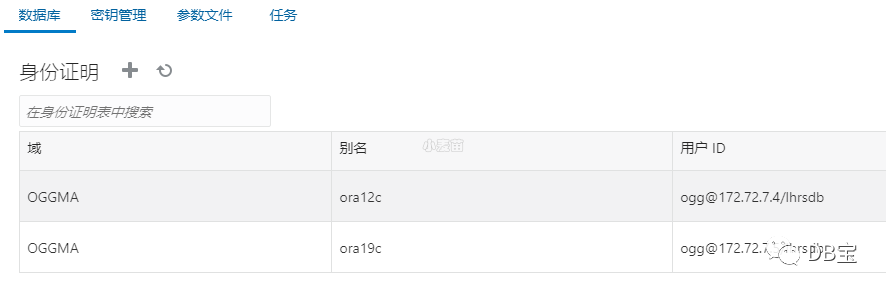
目标端创建检查点表和心跳表(脉动表)
在目标端ora19c中,创建检查点表ogg.ckpt
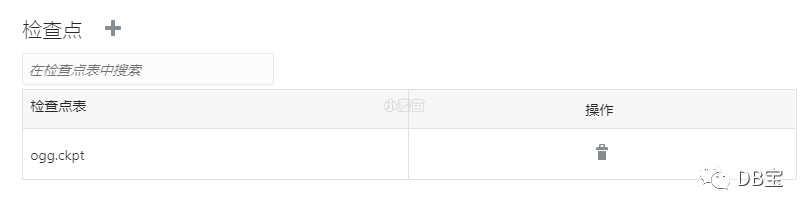
创建脉动表(Heartbeattable):
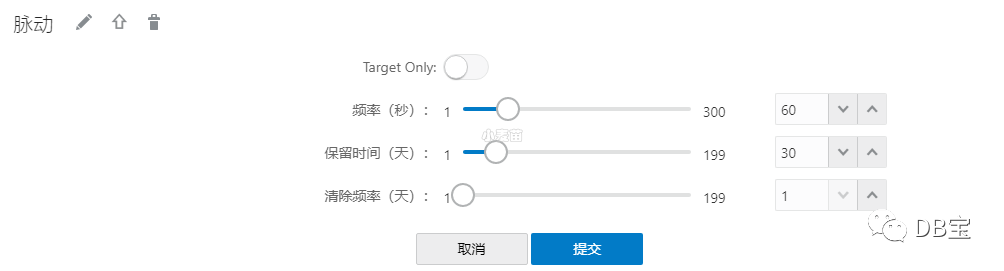
目标库查询:
 1OGG@lhrsdb> col tname format a20
 2OGG@lhrsdb> select * from tab;
 3
 4TNAME                TABTYPE                     CLUSTERID
 5-------------------- -------------------------- ----------
 6CKPT                 TABLE
 7CKPT_LOX             TABLE
 8GG_HEARTBEAT         TABLE
 9GG_HEARTBEAT_HISTORY TABLE
10GG_HEARTBEAT_SEED    TABLE
11GG_LAG               VIEW
12GG_LAG_HISTORY       VIEW
13
147 rows selected.
源端添加trandata和脉动表
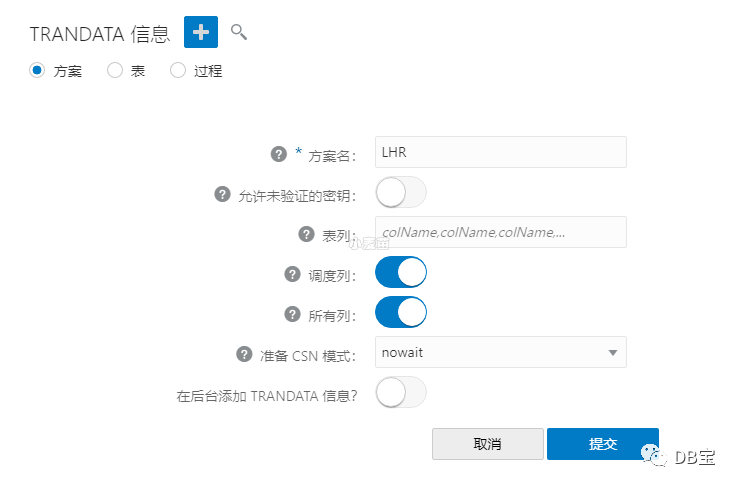
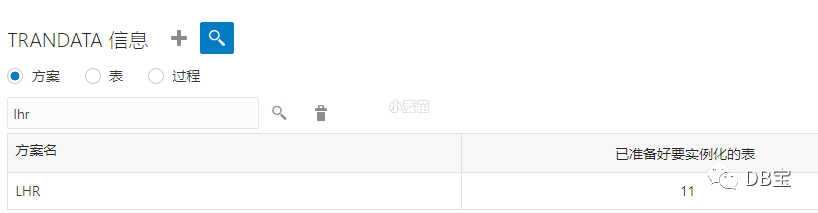
查询验证:
配置ora12c到ora19c的实时同步
创建extract进程
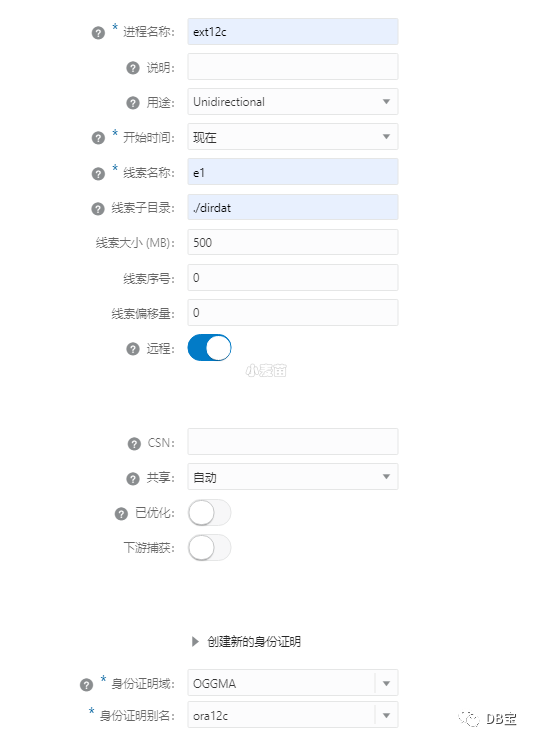
数据目录:/ogg213c/ogg_deploy/var/lib/data/dirdat
1EXTRACT ext12c
2USERIDALIAS ora12c DOMAIN OGGMA
3DDL INCLUDE MAPPED
4DDLOPTIONS REPORT
5TRANLOGOPTIONS EXCLUDETAG 99
6EXTTRAIL ./dirdat/e1
7table LHR.*;
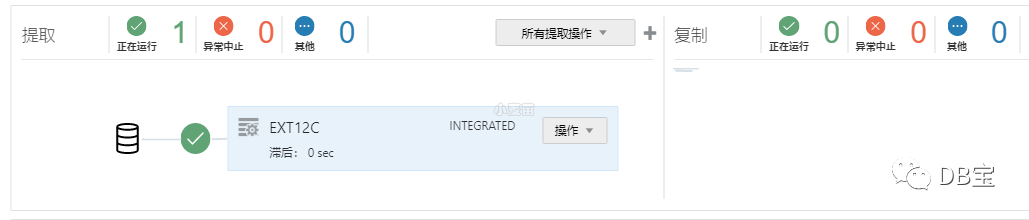
创建replicate进程
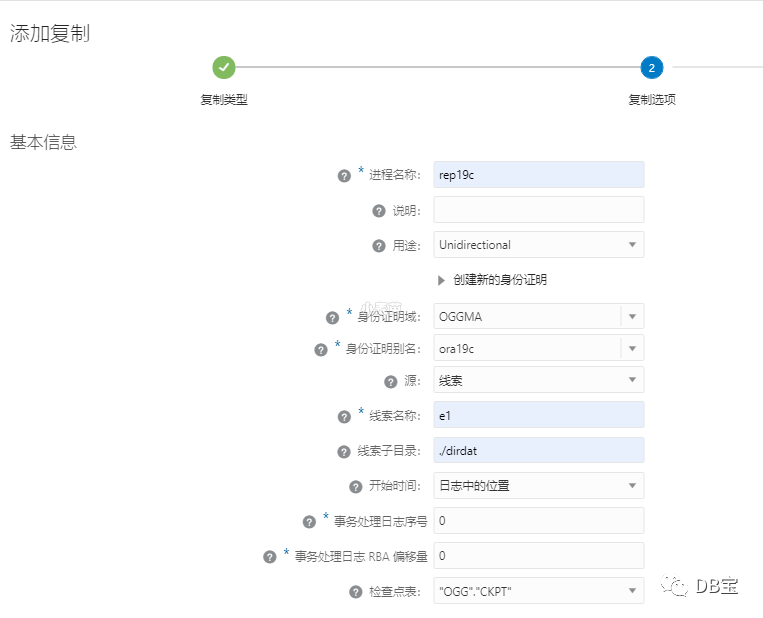
1REPLICAT rep19c
2USERIDALIAS ora19c DOMAIN OGGMA
3DDL INCLUDE MAPPED
4DDLOPTIONS REPORT
5MAP LHR.*, TARGET LHR.*;
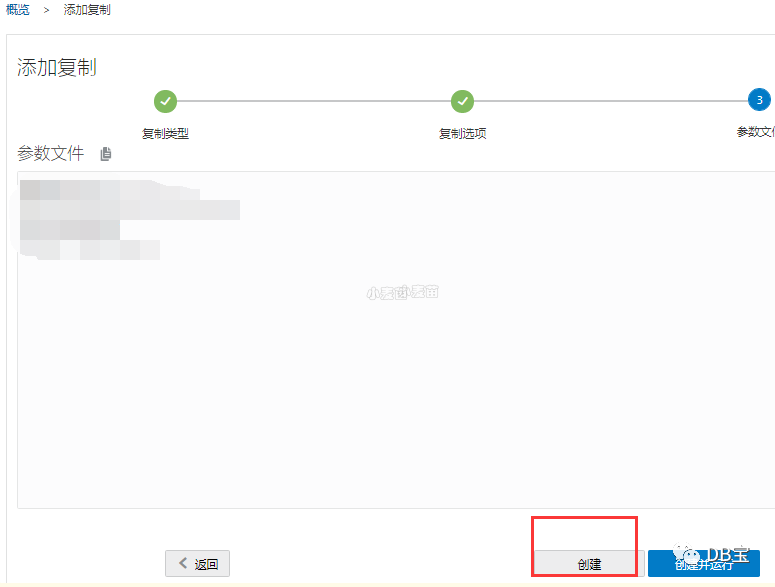
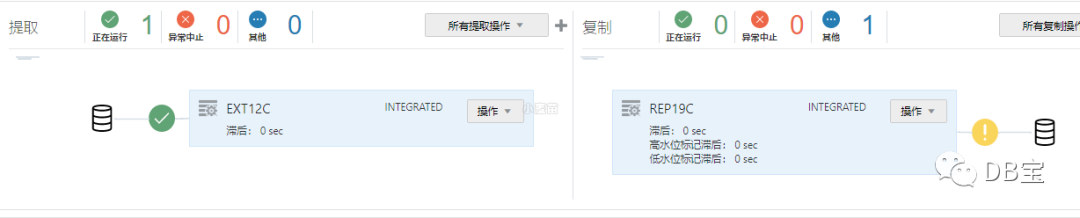
这里,注意不要运行!!!因为目标端的数据还没有初始化完成,等用expdp导入完成后,再根据csn号进行启用!
impdp+network导入目标端数据
 1-- 让源端一直产生事务
 2/usr/local/swingbench/bin/charbench -c /usr/local/swingbench/configs/SOE_Server_Side_V2.xml \
 3-u lhr -p lhr -cs //172.72.7.4/lhrsdb -dt thin  -uc 100 \
 4-a -v "users,tpm,tps,dml,cpu" \
 5-rr 5 -rt "00:30" -min 50 -max 50 -r "/tmp/test_lhrsdb.xml"
 6
 7
 8
 9-- 选择最小的scn号
10SELECT TO_CHAR(MIN(start_scn) ) AS "Please select the minimum SCN" FROM v$transaction
11UNION ALL
12SELECT TO_CHAR(current_scn) FROM v$database;
13
14Please select the minimum SCN
15----------------------------------------
162410272
172410467
18
19
20create directory d1 as '/home/oracle/';
21grant all on directory d1 to public;
22create public database link DBL
23connect to system identified by lhr
24 using '(DESCRIPTION =  (ADDRESS_LIST =  (ADDRESS = (PROTOCOL = TCP)
25(HOST = 172.72.7.4)(PORT = 1521))) (CONNECT_DATA = (SERVICE_NAME = lhrsdb )))';
26
27
28-- 这里的flashback_scn选择最小的scn号
29impdp lhr/lhr@127.0.0.1/lhrsdb directory=D1 \
30NETWORK_LINK=DBL flashback_scn=2410272 exclude=statistics parallel=12 \
31cluster=no schemas=LHR logfile=impdp_dbl.log logtime=ALL \
32TRANSFORM=DISABLE_ARCHIVE_LOGGING:Y TABLE_EXISTS_ACTION=REPLACE
33
34
35
36
37-- 也可以使用expdp+impdp
38
39expdp lhr/lhr directory=DATA_PUMP_DIR dumpfile=LHR.dmp SCHEMAS=LHR FLASHBACK_SCN=2410272
40scp /opt/oracle/admin/lhrsdb/dpdump/LHR.dmp 172.72.7.21:/home/oracle/
41
42conn lhr/lhr@127.0.0.1/pdb2
43create directory d1 as '/home/oracle/';
44grant all on directory d1 to public;
45impdp  lhr/lhr@127.0.0.1/pdb2  DIRECTORY=D1 schemas=LHR dumpfile=LHR.dmp TABLE_EXISTS_ACTION=REPLACE
参考:https://www.xmmup.com/dbbao63xiangmufenxiangshiyongora2pgqianyioracle19cdaopg13bingshiyongoggpeizhishi.html
参数介绍:
-c 使用配置文件:SOE_Server_Side_V2.xml
-cs 指定数据库连接字符串://172.72.7.20/lhrsdb
-a 自动运行
-v 显示运行统计值(使用逗号分隔,不能有空格),就是对应的指标
Users:用户数;
Tpm:每分钟事务数;
Tps:每秒事务数;
Trans:事务信息,对应swingbench的Transactions页签中的Short Name
Dml:包括:查询、插入、更新、删除、提交
-r 指定测试结果文件名称,默认为results.xml
-rr 控制台刷新显示频率(单位:秒),默认每秒显示一次;
-rt 设置负载运行时间,格式:hh:mm.sec,默认一直运行;
-min
设置内部事务最小思考时间;Min. Intra Delay Within Transactions(ms),线程思考时间(暂停时间),用于模拟实际用户操作。 -max
设置内部事务最大思考时间;Min. Intra Delay Within Transactions(ms),线程思考时间(暂停时间),用于模拟实际用户操作。 -vo 输出测试结果到文件,默认输出到控制台;
-env 打印出环境变量的信息
-bg是后台运行
执行过程:
基于csn号启用replicate进程
在启用之前,可以查询表数据,发现和源端数据量相差很大,因为源端一直在做压测产生新数据。
 1LHR@ora12c>  select count(*) from "LHR"."ORDERS";
 2
 3  COUNT(*)
 4----------
 5     53051
 6
 7LHR@ora19c>  select count(*) from "LHR"."ORDERS";
 8
 9  COUNT(*)
10----------
11      47436
12
13
14
15su - oracle
16adminclient
17CONNECT http://127.0.0.1:9000 deployment deploy213 as oggadmin password lhr
18start REPLICAT REP19c , AFTERCSN 2410272
注意:这里的scn使用最小的scn号
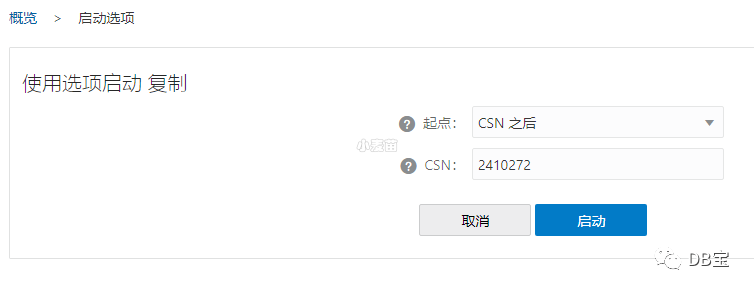
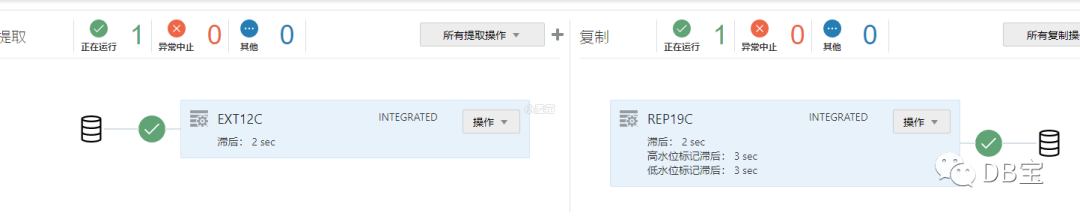
数据已经实时同步了。
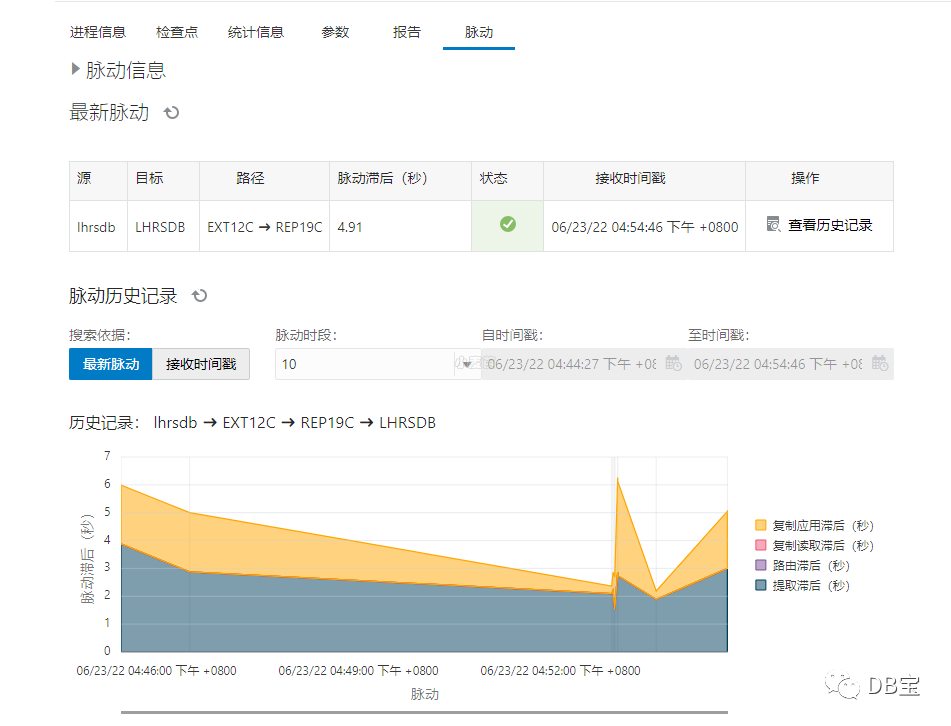
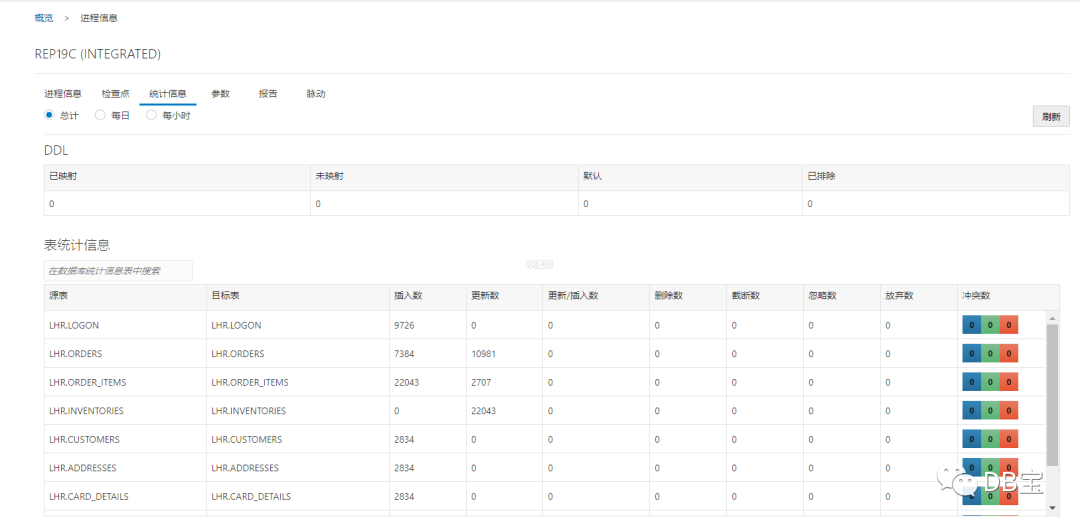
测试DDL和DML同步
在Oracle 12c端建表和插入数据:
 1create table t1 (id number primary key,name varchar2(255));
 2insert into t1 select object_id,object_name from dba_objects where object_id<=20;
 3commit;
 4select count(*) from t1;
 5
 6
 7LHR@lhrsdb> select count(8) from t1;
 8
 9  COUNT(8)
10----------
11        19
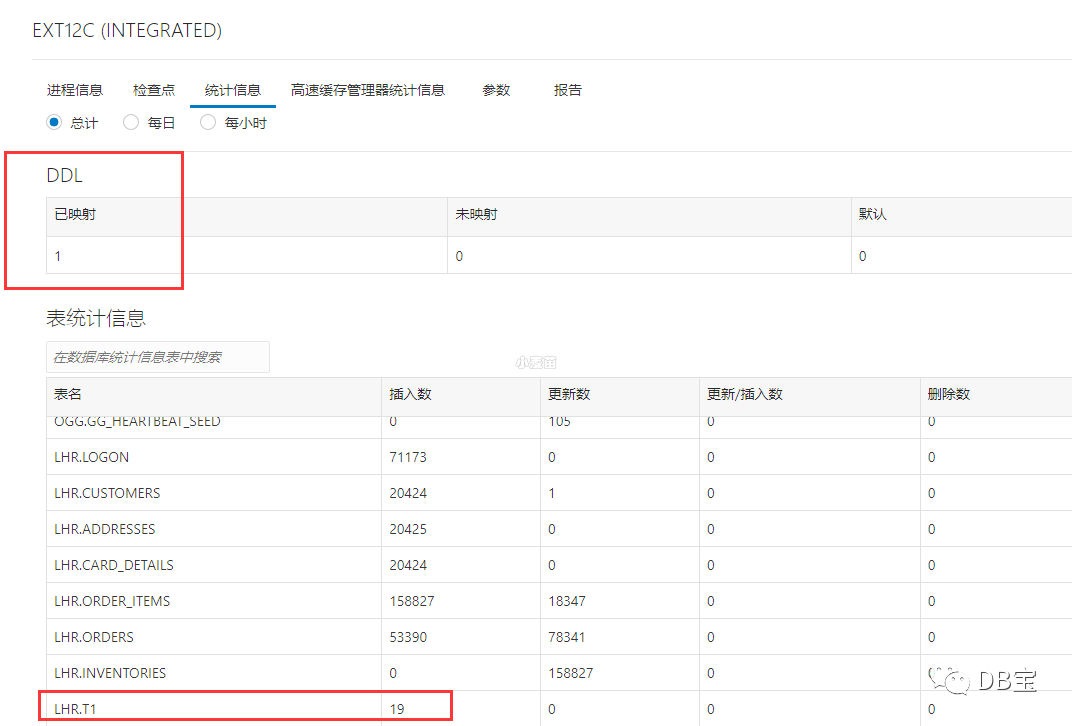
从源端查看:
查看目标端:
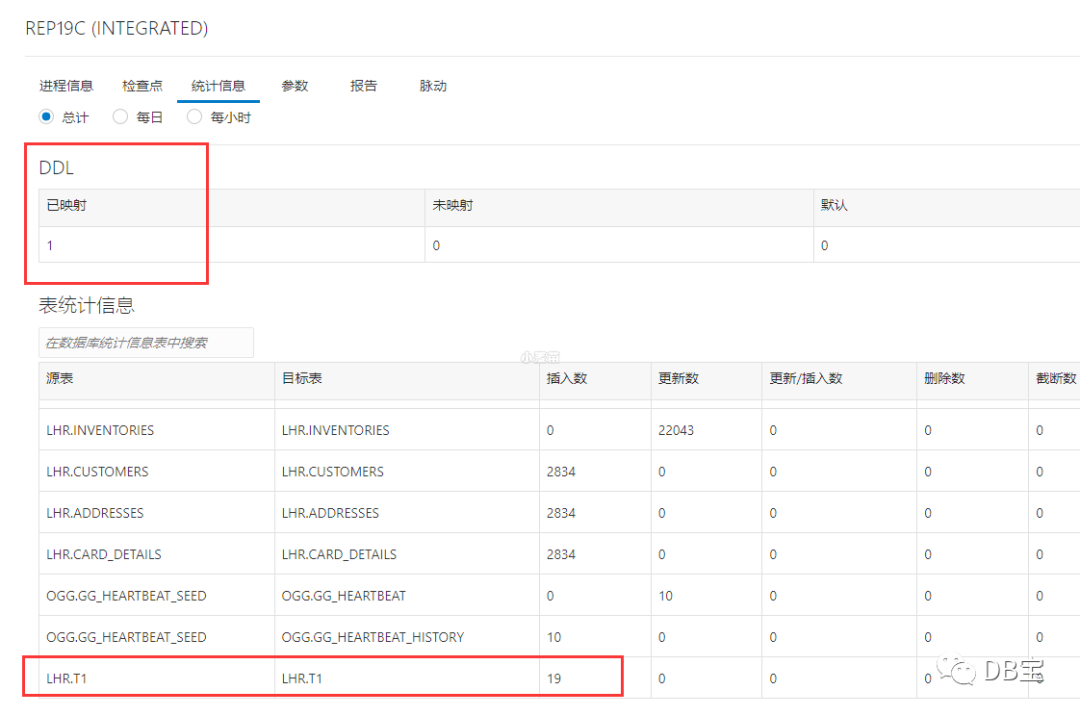
可见,DDL和DML同步都已经完成!
配置ora19c到ora12c的实时同步
创建extract进程
1extract ext19c
2USERIDALIAS ora19c, DOMAIN OGGMA
3DDL INCLUDE MAPPED
4DDLOPTIONS REPORT
5TRANLOGOPTIONS EXCLUDETAG 99
6exttrail ./dirdat/e2
7table lhr.*;
创建replicate进程
1REPLICAT rep12c
2USERIDALIAS ora12c DOMAIN OGGMA
3DDL INCLUDE MAPPED
4DDLOPTIONS REPORT
5DBOPTIONS SETTAG 99
6MAP lhr.*, TARGET lhr.*;
测试DDL和DML同步
在Oracle 21c操作:
1create table t2 (id number primary key,name varchar2(255));
2insert into t2 select object_id,object_name from dba_objects where object_id<=20;
3commit;
4select count(8) from t2;
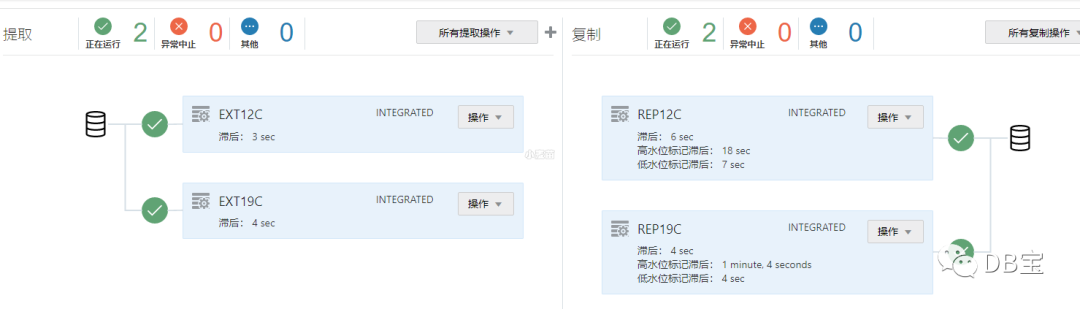
可见,DDL和DML同步都已经完成!
反向同步也正常,可以作为回退方案!!!
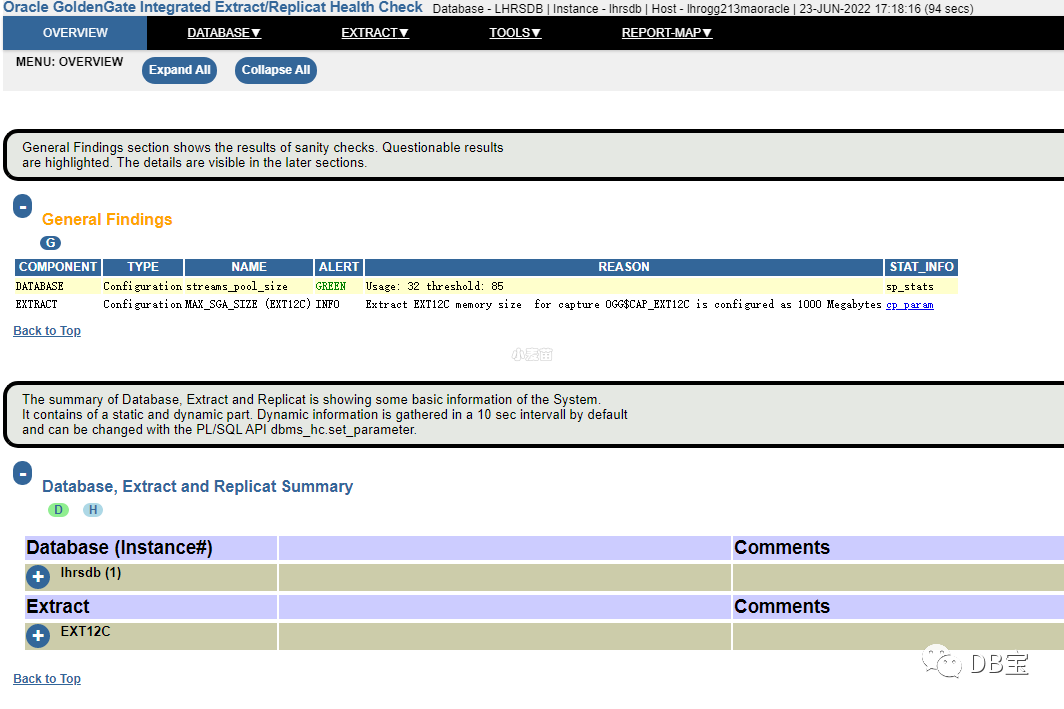
OGG健康巡检
参考:https://www.xmmup.com/ogg-for-oraclejiankangxunjianguanfangjiaoben.html
1cd $OGG_HOME/lib/sql/healthcheck
2cd /ogg213c/ogg_ma/lib/sql/healthcheck
3sqlplus sys/lhr@172.72.7.4/lhrsdb as sysdba
4@ogghc_install.sql
5@ogghc_run.sql
报错
若源端事务量很大,例如本文的压测,则replicate应用的时候有一定几率会报错:
WARNING OGG-01154 SQL error 1403 mapping source table LHR.ORDERS to target tableLHR.ORDERS. Database error: No data found.
WARNING OGG-02544 Unhandled error (ORA-26787: The row with key ("ORDER_ID") = (3245) does not exist in table LHR.ORDERS ORA-01403: no data found) while processing the record at SEQNO 0, RBA 11148203 in Integrated mode. REPLICAT will retry in Direct mode.
ERROR OGG-01296 Error mapping from LHR.ORDERS to LHR.ORDERS.
ERROR OGG-00664 OCI Error ORA-26804: Apply "OGG REP19C').
解决:
1、尽量选择数据库无事务的时候的scn号或业务低的时候进行导出,一般是半夜进行
2、可以尝试将scn号往后倒退一些
3、可以尝试参数HANDLECOLLISIONS
,但可能会导致数据不一致
4、查询源端和目标端所有的表是否存在外键关系,我的环境就是因为存在外键导致以上的报错(心累,这个排查花了好几天。。。)。
1SELECT 'ALTER TABLE  '|| D.TABLE_NAME ||' DROP constraint '|| D.CONSTRAINT_NAME||';' FROM user_constraints d where d.CONSTRAINT_TYPE='R';
2
3ALTER TABLE   ORDERS DROP   constraint ORDERS_CUSTOMER_ID_FK;
5、使用ogg 12.2 replicate参数DBOPTIONS ENABLE_INSTANTIATION_FILTERING
(推荐)。从ogg 12.2开始通过设置replicate参数DBOPTIONS ENABLE_INSTANTIATION_FILTERING
,可以使得OGG能够自动识别每张表导入后的csn,自动应用csn之后的数据,从而可以使导出数据不再需要flashback_scn号了。
其它SQL
 1select count(*) from ORDER_ITEMS
 2union all
 3select count(*) from LOGON
 4union all
 5select count(*) from CUSTOMERS
 6union all
 7select count(*) from ORDERS
 8union all
 9select count(*) from PRODUCT_DESCRIPTIONS
10union all
11select count(*) from ORDERENTRY_METADATA
12union all
13select count(*) from CARD_DETAILS
14union all
15select count(*) from PRODUCT_INFORMATION
16union all
17select count(*) from ADDRESSES
18union all
19select count(*) from WAREHOUSES
20union all
21select count(*) from INVENTORIES
22;
23
24
25SELECT * FROM dba_apply_error;
26SELECT * FROM dba_apply_progress;
27
28SELECT * FROM dba_capture;
29SELECT * FROM dba_capture_prepared_schemas;
30
31
32-- 源端
33SELECT * FROM dba_capture_prepared_tables d where TABLE_OWNER='LHR';
34
35-- 目标端scn
36select source_object_name, instantiation_scn, ignore_scn from dba_apply_instantiated_objects;
