



Oracle11g开始,我们可以将索引设置为不可见索引,也可以叫隐藏索引。Oracle在对表进行DML操作时仍然会维护不可见索引,但不会让优化器选择不可见索引。
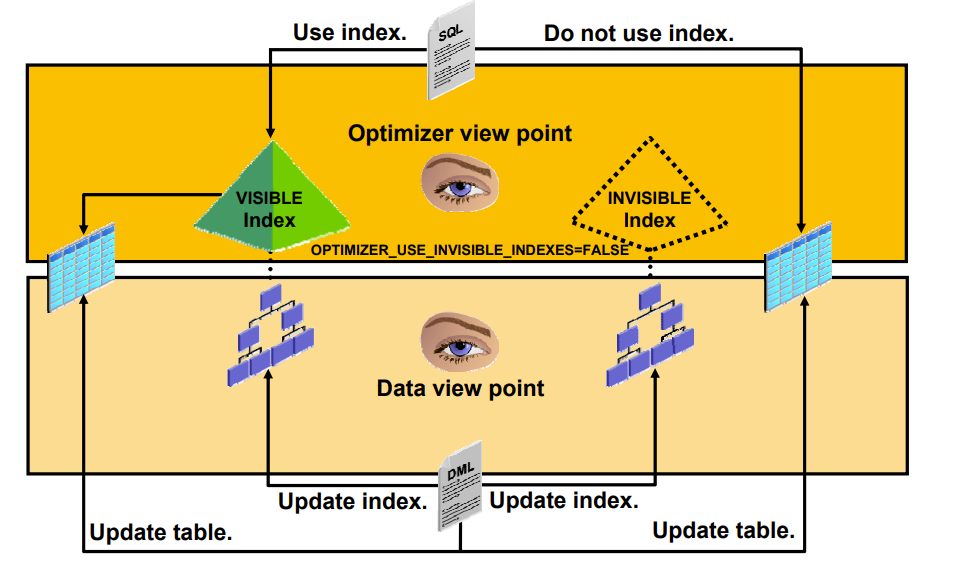
不可见索引可以在以下场景使用:
1、在删除索引之前,可以将器设置为不可见索引,如果后续需要可以将快速恢复。
2、在不影响现有程序和代码情况下,创建不可见索引。
以下时不可见索引的实验:
–连接到CDB
[oracle@]$ sqlplus / as sysdba
SYS@HFXFCDB > show pdbs
CON_ID CON_NAME OPEN MODE RESTRICTED
     2 PDB$SEED                       READ ONLY  NO
     3 XFPDB1                         READ WRITE NO
–切换到PDB:XFPDB1
SYS@HFXFCDB > alter session set container=XFPDB1;
Session altered.
–创建用户hfxrf
SYS@HFXFCDB > create user hfxf identified by hfxf;
User created.
–给用户授权
SYS@HFXFCDB > grant resource,connect to hfxf;
–创建用户表空间hfxf_tbs
SYS@HFXFCDB > create tablespace hfxf_tbs datafile ‘+DATA/xfpdb1/hfxf_tbs01.bdf’ size 50m;
Tablespace created.
–创建索引表空间hfxf_tbs_inx
SYS@HFXFCDB > create tablespace hfxf_tbs_inx datafile ‘+DATA/xfpdb1/hfxf_tbs_inx01.dbf’ size 20m;
Tablespace created.
-通过以下命令验证hfxf用户的默认表空间
SYS@HFXFCDB > select USERNAME,DEFAULT_TABLESPACE from dba_users where username=‘HFXF’;
USERNAME DEFAULT_TABLESPACE
HFXF HFXF_TBS
–使用hfxf用户连接到xfpdb1中
SYS@HFXFCDB > conn hfxf/hfxf@xfpdb1
Connected.
–创建cust表
HFXF@xfpdb1 > CREATE TABLE cust
2 (cust_id NUMBER
3 ,last_name VARCHAR2(30)
4 ,first_name VARCHAR2(30)
5 );
Table created.
–向cust表中插入数据
HFXF@xfpdb1 > insert into cust values(7,‘ACER’,‘SCOTT’);
insert into cust values(7,‘ACER’,‘SCOTT’)
*
ERROR at line 1:
ORA-01950: no privileges on tablespace ‘HFXF_TBS’
HFXF@xfpdb1 > insert into cust values(5,‘STARK’,‘JIM’);
insert into cust values(5,‘STARK’,‘JIM’)
*
ERROR at line 1:
ORA-01950: no privileges on tablespace ‘HFXF_TBS’
HFXF@xfpdb1 > insert into cust values(3,‘GREY’,‘BOB’);
insert into cust values(3,‘GREY’,‘BOB’)
*
ERROR at line 1:
ORA-01950: no privileges on tablespace ‘HFXF_TBS’
HFXF@xfpdb1 > insert into cust values(11,‘KAHN’,‘BRAD’);
insert into cust values(11,‘KAHN’,‘BRAD’)
*
ERROR at line 1:
ORA-01950: no privileges on tablespace ‘HFXF_TBS’
HFXF@xfpdb1 > insert into cust values(21,‘DEAN’,‘ANN’);
insert into cust values(21,‘DEAN’,‘ANN’)
*
ERROR at line 1:
ORA-01950: no privileges on tablespace ‘HFXF_TBS’
–hfxf用户对表空间HFXF_TBS的操作权限不足,为用户授权
HFXF@xfpdb1 >
SYS@HFXFCDB > grant unlimited tablespace to hfxf;
Grant succeeded.
–在同一列创建多个索引
HFXF@xfpdb1 > create index cust_idx1 on cust(cust_id) tablespace hfxf_tbs_inx;
Index created.
HFXF@xfpdb1 > create index cust_idx2 on cust(cust_id) invisible tablespace hfxf_tbs_inx;
create index cust_idx2 on cust(cust_id) invisible tablespace hfxf_tbs_inx
*
ERROR at line 1:
ORA-01408: such column list already indexed
提示该列已经有索引
HFXF@xfpdb1 > create bitmap index cust_idx2 on cust(cust_id) invisible tablespace hfxf_tbs_inx;
Index created.
验证不可见索引
HFXF@xfpdb1 > select index_name,status,visibility from user_indexes;
INDEX_NAME STATUS VISIBILIT
CUST_IDX2 VALID INVISIBLE
CUST_IDX1 VALID VISIBLE
SYS@HFXFCDB > show parameter visible
NAME TYPE VALUE
optimizer_use_invisible_indexes boolean FALSE
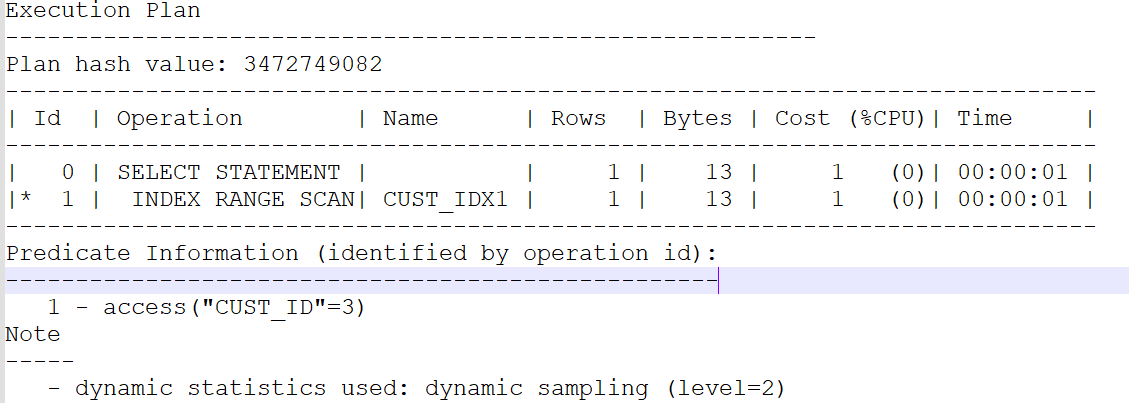
查看执行计划,验证不可见索引是否在使用
HFXF@xfpdb1 > set autotrace trace explain
HFXF@xfpdb1 > select cust_id from cust where cust_id=3;
HFXF@xfpdb1 >
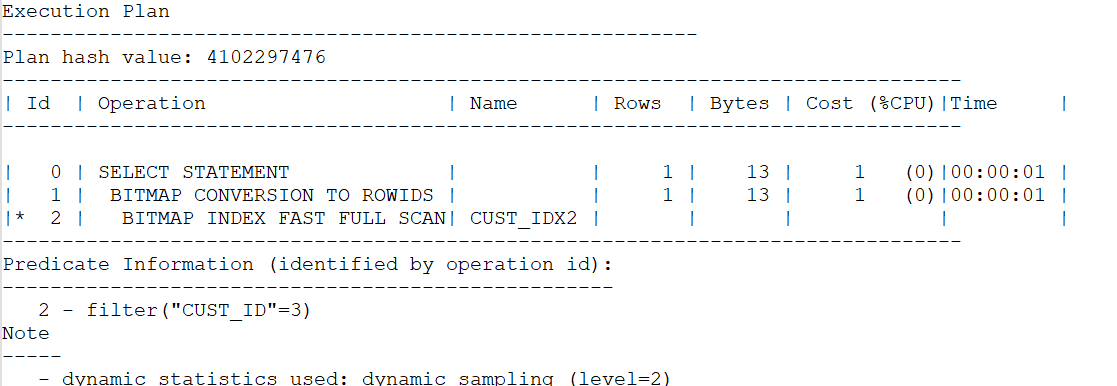
HFXF@xfpdb1 > alter session set optimizer_use_invisible_indexes=true;
Session altered.
HFXF@xfpdb1 > select cust_id from cust where cust_id=3;
HFXF@xfpdb1 >
–使用invisible和visible子句进行可见/不可见索引的切换
HFXF@xfpdb1 > alter index cust_idx1 invisible;
Index altered.
HFXF@xfpdb1 > alter index cust_idx2 visible;
Index altered.
–通过以下SQL查询索引的不可见索引
HFXF@xfpdb1 > select index_name,status,visibility from user_indexes;
INDEX_NAME STATUS VISIBILIT
CUST_IDX2 VALID VISIBLE
CUST_IDX1 VALID INVISIBLE
小结:通过 optimizer_use_invisible_indexes参数可以控制优化器是否选择隐藏索引,默认值时false 即默认情况下优化器不选择
不可见索引。不可见索引是默认情况让优化器看不到该索引,和其他类型索引一样在DML操作时,不可见索引会占用空间和资源。
-the end-
