本篇文章为系列文章,未读前几集的同学请猛戳这里:
本篇文章讲解 Gateway 网关过滤器和全局过滤器以及自定义过滤器。
过滤器
Spring Cloud Gateway 根据作用范围划分为 GatewayFilter
和 GlobalFilter
,二者区别如下:
GatewayFilter
:网关过滤器,需要通过spring.cloud.routes.filters
配置在具体路由下,只作用在当前路由上或通过spring.cloud.default-filters
配置在全局,作用在所有路由上。GlobalFilter
:全局过滤器,不需要在配置文件中配置,作用在所有的路由上,最终通过GatewayFilterAdapter
包装成GatewayFilterChain
可识别的过滤器,它为请求业务以及路由的 URI 转换为真实业务服务请求地址的核心过滤器,不需要配置系统初始化时加载,并作用在每个路由上。
网关过滤器 GatewayFilter
网关过滤器用于拦截并链式处理 Web 请求,可以实现横切与应用无关的需求,比如:安全、访问超时的设置等。修改传入的 HTTP 请求或传出 HTTP 响应。Spring Cloud Gateway 包含许多内置的网关过滤器工厂一共有 22 个,包括头部过滤器、 路径类过滤器、Hystrix 过滤器和重写请求 URL 的过滤器, 还有参数和状态码等其他类型的过滤器。根据过滤器工厂的用途来划分,可以分为以下几种:Header、Parameter、Path、Body、Status、Session、Redirect、Retry、RateLimiter 和 Hystrix。
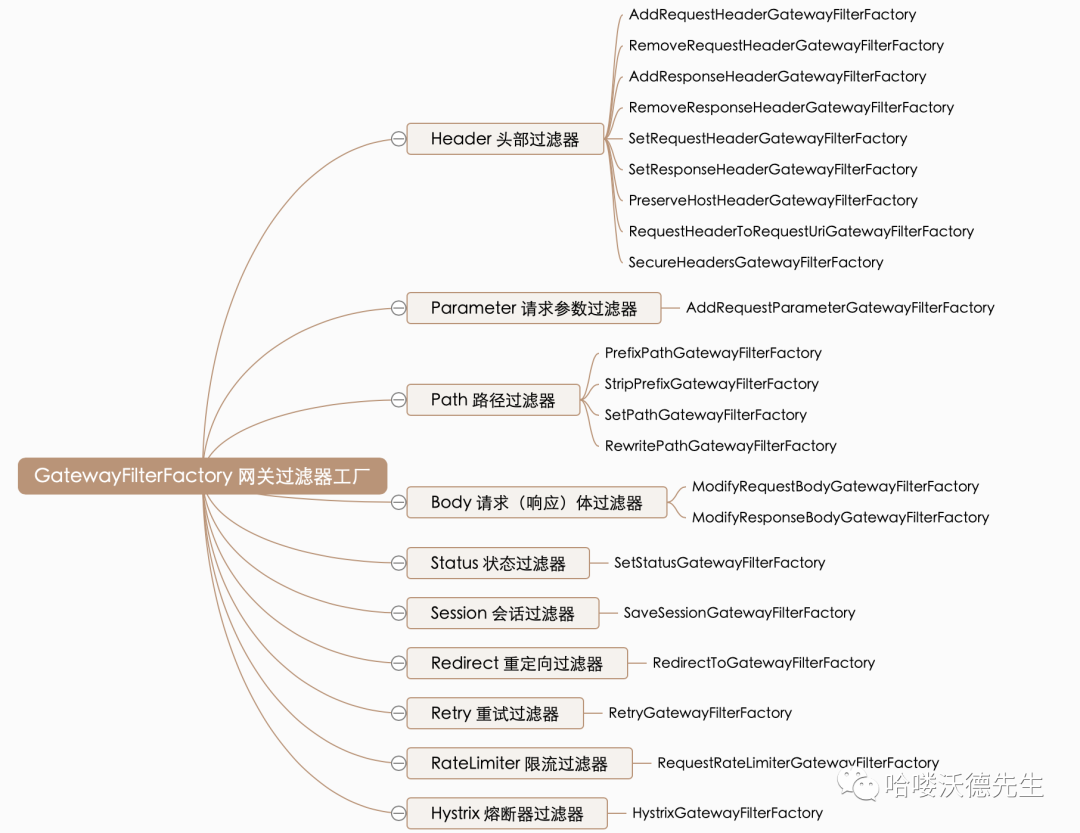
接下来我们举例说明其中一部分如何使用,其余等大家工作中需要应用时再查询资料学习或者咨询我也可以。
Path 路径过滤器
Path 路径过滤器可以实现 URL 重写,通过重写 URL 可以实现隐藏实际路径提高安全性,易于用户记忆和键入,易于被搜索引擎收录等优点。实现方式如下:
RewritePathGatewayFilterFactory
RewritePath 网关过滤器工厂采用路径正则表达式参数和替换参数,使用 Java 正则表达式来灵活地重写请求路径。
spring:
  application:
    name: gateway-server # 应用名称
  cloud:
    gateway:
      # 路由规则
      routes:
        - id: product-service           # 路由 ID,唯一
          uri: lb://product-service     # lb:// 根据服务名称从注册中心获取服务请求地址
          predicates:                   # 断言(判断条件)
            # 匹配对应 URI 的请求,将匹配到的请求追加在目标 URI 之后
            - Path=/product/**, /api-gateway/**
          filters:                      # 网关过滤器
            # 将 api-gateway/product/1 重写为 product/1
            - RewritePath=/api-gateway(?<segment>/?.*), $\{segment}
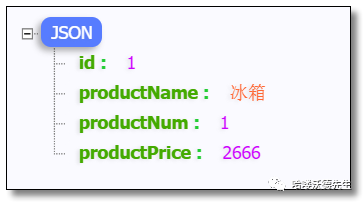
访问:http://localhost:9000/api-gateway/product/1 结果如下:
PrefixPathGatewayFilterFactory
PrefixPath 网关过滤器工厂为匹配的 URI 添加指定前缀。
spring:
  application:
    name: gateway-server # 应用名称
  cloud:
    gateway:
      # 路由规则
      routes:
        - id: product-service           # 路由 ID,唯一
          uri: lb://product-service     # lb:// 根据服务名称从注册中心获取服务请求地址
          predicates:                   # 断言(判断条件)
            # 匹配对应 URI 的请求,将匹配到的请求追加在目标 URI 之后
            - Path=/**
          filters:                       # 网关过滤器
            # 将 1 重写为 product/1
            - PrefixPath=/product
访问:http://localhost:9000/1 结果如下:
StripPrefixGatewayFilterFactory
StripPrefix 网关过滤器工厂采用一个参数 StripPrefix,该参数表示在将请求发送到下游之前从请求中剥离的路径个数。
spring:
  application:
    name: gateway-server # 应用名称
  cloud:
    gateway:
      # 路由规则
      routes:
        - id: product-service           # 路由 ID,唯一
          uri: lb://product-service     # lb:// 根据服务名称从注册中心获取服务请求地址
          predicates:                   # 断言(判断条件)
            # 匹配对应 URI 的请求,将匹配到的请求追加在目标 URI 之后
            - Path=/**
          filters:                       # 网关过滤器
            # 将 api/123/product/1 重写为 product/1
            - StripPrefix=2
访问:http://localhost:9000/api/123/product/1 结果如下:
SetPathGatewayFilterFactory
SetPath 网关过滤器工厂采用路径模板参数。 它提供了一种通过允许模板化路径段来操作请求路径的简单方法,使用了 Spring Framework 中的 uri 模板,允许多个匹配段。
spring:
  application:
    name: gateway-server # 应用名称
  cloud:
    gateway:
      # 路由规则
      routes:
        - id: product-service           # 路由 ID,唯一
          uri: lb://product-service     # lb:// 根据服务名称从注册中心获取服务请求地址
          predicates:                   # 断言(判断条件)
            # 匹配对应 URI 的请求,将匹配到的请求追加在目标 URI 之后
            - Path=/api/product/{segment}
          filters:                       # 网关过滤器
            # 将 api/product/1 重写为 product/1
            - SetPath=/product/{segment}
访问:http://localhost:9000/api/product/1 结果如下:
Parameter 参数过滤器
AddRequestParameter 网关过滤器工厂会将指定参数添加至匹配到的下游请求中。
spring:
  application:
    name: gateway-server # 应用名称
  cloud:
    gateway:
      # 路由规则
      routes:
        - id: product-service           # 路由 ID,唯一
          uri: lb://product-service     # lb:// 根据服务名称从注册中心获取服务请求地址
          predicates:                   # 断言(判断条件)
            # 匹配对应 URI 的请求,将匹配到的请求追加在目标 URI 之后
            - Path=/api-gateway/**
          filters:                       # 网关过滤器
            # 将 api-gateway/product/1 重写为 product/1
            - RewritePath=/api-gateway(?<segment>/?.*), $\{segment}
            # 在下游请求中添加 flag=1
            - AddRequestParameter=flag, 1
修改商品服务的控制层代码。
package com.example.controller;

import com.example.pojo.Product;
import com.example.service.ProductService;
import org.springframework.beans.factory.annotation.Autowired;
import org.springframework.web.bind.annotation.GetMapping;
import org.springframework.web.bind.annotation.PathVariable;
import org.springframework.web.bind.annotation.RequestMapping;
import org.springframework.web.bind.annotation.RestController;

@RestController
@RequestMapping("/product")
public class ProductController {

    @Autowired
    private ProductService productService;

    /**
     * 根据主键查询商品
     *
     * @param id
     * @return
     */
    @GetMapping("/{id}")
    public Product selectProductById(@PathVariable("id") Integer id, String flag) {
        System.out.println("flag = " + flag);
        return productService.selectProductById(id);
    }

}
访问:http://localhost:9000/api-gateway/product/1 控制台结果如下:
flag = 1
Status 状态过滤器
SetStatus 网关过滤器工厂采用单个状态参数,它必须是有效的 Spring HttpStatus。它可以是整数 404 或枚举 NOT_FOUND 的字符串表示。
spring:
  application:
    name: gateway-server # 应用名称
  cloud:
    gateway:
      # 路由规则
      routes:
        - id: product-service           # 路由 ID,唯一
          uri: lb://product-service     # lb:// 根据服务名称从注册中心获取服务请求地址
          predicates:                   # 断言(判断条件)
            # 匹配对应 URI 的请求,将匹配到的请求追加在目标 URI 之后
            - Path=/api-gateway/**
          filters:                       # 网关过滤器
            # 将 api-gateway/product/1 重写为 product/1
            - RewritePath=/api-gateway(?<segment>/?.*), $\{segment}
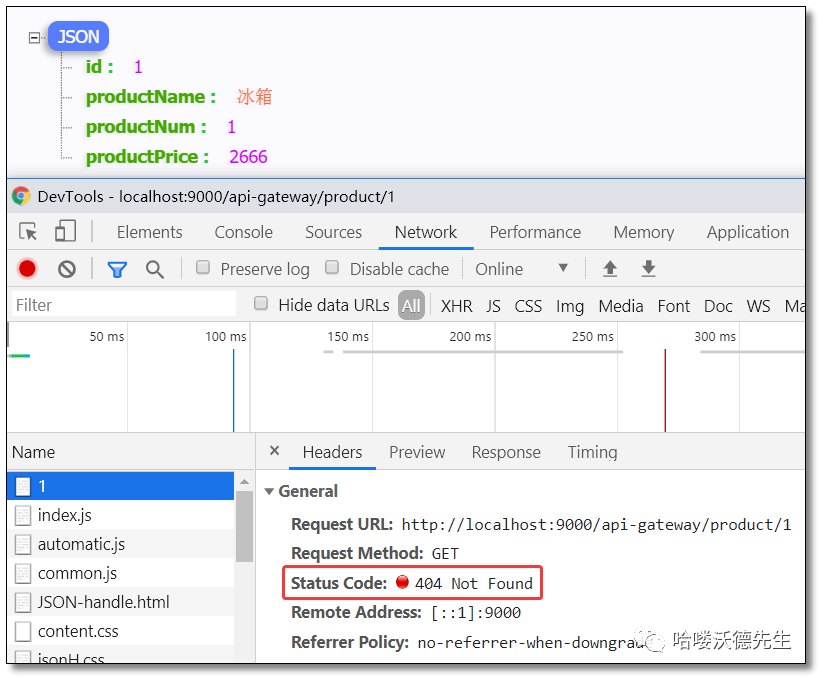
            # 任何情况下,响应的 HTTP 状态都将设置为 404
            - SetStatus=404 			 # 404 或者对应的枚举 NOT_FOUND
访问:http://localhost:9000/api-gateway/product/1 结果如下:
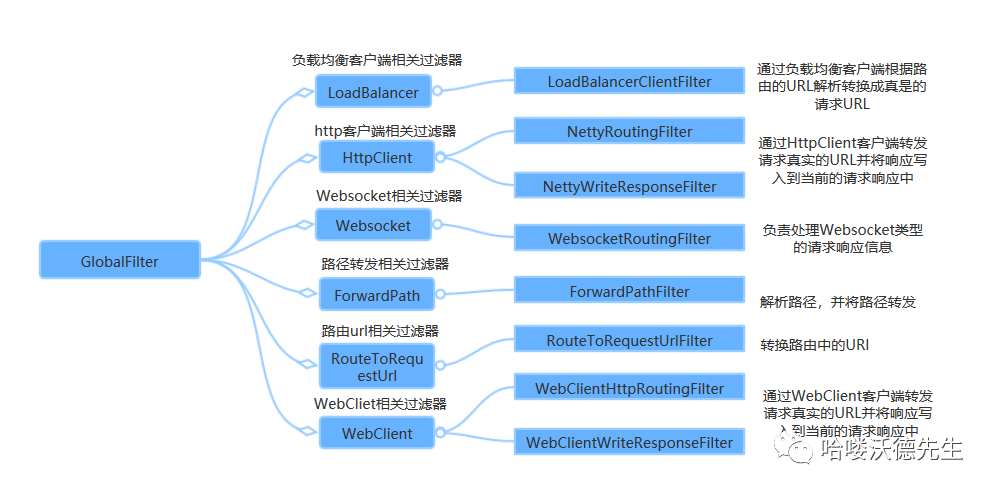
全局过滤器 GlobalFilter
全局过滤器不需要在配置文件中配置,作用在所有的路由上,最终通过 GatewayFilterAdapter 包装成 GatewayFilterChain 可识别的过滤器,它是请求业务以及路由的 URI 转换为真实业务服务请求地址的核心过滤器,不需要配置系统初始化时加载,并作用在每个路由上。
自定义过滤器
即使 Spring Cloud Gateway
自带许多实用的 GatewayFilter Factory、Gateway Filter、Global Filter
,但是在很多情景下我们仍然希望可以自定义自己的过滤器,实现一些骚操作。
自定义网关过滤器
自定义网关过滤器需要实现以下两个接口 :GatewayFilter
,Ordered
。
创建过滤器
CustomGatewayFilter.java
package com.example.filter;

import org.springframework.cloud.gateway.filter.GatewayFilter;
import org.springframework.cloud.gateway.filter.GatewayFilterChain;
import org.springframework.core.Ordered;
import org.springframework.web.server.ServerWebExchange;
import reactor.core.publisher.Mono;

/**
 * 自定义网关过滤器
 */
public class CustomGatewayFilter implements GatewayFilter, Ordered {

    /**
     * 过滤器业务逻辑
     *
     * @param exchange
     * @param chain
     * @return
     */
    @Override
    public Mono<Void> filter(ServerWebExchange exchange, GatewayFilterChain chain) {
        System.out.println("自定义网关过滤器被执行");
        return chain.filter(exchange); // 继续向下执行
    }

    /**
     * 过滤器执行顺序,数值越小,优先级越高
     *
     * @return
     */
    @Override
    public int getOrder() {
        return 0;
    }

}
注册过滤器
package com.example.config;

import com.example.filter.CustomGatewayFilter;
import org.springframework.cloud.gateway.route.RouteLocator;
import org.springframework.cloud.gateway.route.builder.RouteLocatorBuilder;
import org.springframework.context.annotation.Bean;
import org.springframework.context.annotation.Configuration;

/**
 * 网关路由配置类
 */
@Configuration
public class GatewayRoutesConfiguration {

    @Bean
    public RouteLocator routeLocator(RouteLocatorBuilder builder) {
        return builder.routes().route(r -> r
                // 断言(判断条件)
                .path("/product/**")
                // 目标 URI,路由到微服务的地址
                .uri("lb://product-service")
                // 注册自定义网关过滤器
                .filters(new CustomGatewayFilter())
                // 路由 ID,唯一
                .id("product-service"))
                .build();
    }

}
访问
注释配置文件中所有网关配置,重启并访问:http://localhost:9000/product/1 控制台结果如下:
自定义网关过滤器被执行
自定义全局过滤器
自定义全局过滤器需要实现以下两个接口 :GlobalFilter
,Ordered
。通过全局过滤器可以实现权限校验,安全性验证等功能。
创建过滤器
实现指定接口,添加 @Component
注解即可。
CustomGlobalFilter.java
package com.example.filter;

import org.springframework.cloud.gateway.filter.GatewayFilterChain;
import org.springframework.cloud.gateway.filter.GlobalFilter;
import org.springframework.core.Ordered;
import org.springframework.stereotype.Component;
import org.springframework.web.server.ServerWebExchange;
import reactor.core.publisher.Mono;

/**
 * 自定义全局过滤器
 */
@Component
public class CustomGlobalFilter implements GlobalFilter, Ordered {

    /**
     * 过滤器业务逻辑
     *
     * @param exchange
     * @param chain
     * @return
     */
    @Override
    public Mono<Void> filter(ServerWebExchange exchange, GatewayFilterChain chain) {
        System.out.println("自定义全局过滤器被执行");
        return chain.filter(exchange); // 继续向下执行
    }

    /**
     * 过滤器执行顺序,数值越小,优先级越高
     *
     * @return
     */
    @Override
    public int getOrder() {
        return 0;
    }

}
访问
访问:http://localhost:9000/product/1 控制台结果如下:
自定义全局过滤器被执行
统一鉴权
接下来我们在网关过滤器中通过 token 判断用户是否登录,完成一个统一鉴权案例。
创建过滤器
AccessFilter.java
package com.example.filter;

import org.slf4j.Logger;
import org.slf4j.LoggerFactory;
import org.springframework.cloud.gateway.filter.GatewayFilterChain;
import org.springframework.cloud.gateway.filter.GlobalFilter;
import org.springframework.core.Ordered;
import org.springframework.core.io.buffer.DataBuffer;
import org.springframework.http.HttpStatus;
import org.springframework.http.server.reactive.ServerHttpResponse;
import org.springframework.stereotype.Component;
import org.springframework.web.server.ServerWebExchange;
import reactor.core.publisher.Mono;

/**
 * 权限验证过滤器
 */
@Component
public class AccessFilter implements GlobalFilter, Ordered {

    private Logger logger = LoggerFactory.getLogger(AccessFilter.class);

    /**
     * 过滤器业务逻辑
     *
     * @param exchange
     * @param chain
     * @return
     */
    @Override
    public Mono<Void> filter(ServerWebExchange exchange, GatewayFilterChain chain) {
        // 获取请求参数
        String token = exchange.getRequest().getQueryParams().getFirst("token");
        // 业务逻辑处理
        if (null == token) {
            logger.warn("token is null...");
            ServerHttpResponse response = exchange.getResponse();
            // 响应类型
            response.getHeaders().add("Content-Type", "application/json; charset=utf-8");
            // 响应状态码,HTTP 401 错误代表用户没有访问权限
            response.setStatusCode(HttpStatus.UNAUTHORIZED);
            // 响应内容
            String message = "{\"message\":\"" + HttpStatus.UNAUTHORIZED.getReasonPhrase() + "\"}";
            DataBuffer buffer = response.bufferFactory().wrap(message.getBytes());
            // 请求结束,不在继续向下请求
            return response.writeWith(Mono.just(buffer));
        }
        // 使用 token 进行身份验证
        logger.info("token is OK!");
        return chain.filter(exchange);
    }

    /**
     * 过滤器执行顺序,数值越小,优先级越高
     *
     * @return
     */
    @Override
    public int getOrder() {
        return 1;
    }

}
访问
访问:http://localhost:9000/product/1 结果如下:
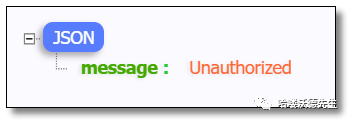
访问:http://localhost:9000/product/1?token=abc123 结果如下:
下一篇我们讲解 Gateway 网关如何实现限流、整合Sentinel实现限流以及高可用网关环境搭建,记得关注噢~

微信扫描二维码(长按识别) 关注我的公众号