

本篇文章为系列文章,未读第一集的同学请猛戳这里:微服务系列之Gateway服务网关(一)
本篇文章讲解 Gateway 网关的多种路由规则、动态路由规则(配合服务发现的路由规则)。
路由规则
Spring Cloud Gateway 创建 Route 对象时, 使用 RoutePredicateFactory 创建 Predicate 对象,Predicate 对象可以赋值给 Route。
Spring Cloud Gateway 包含许多内置的 Route Predicate Factories。 所有这些断言都匹配 HTTP 请求的不同属性。 多个 Route Predicate Factories 可以通过逻辑与(and)结合起来一起使用。
路由断言工厂 RoutePredicateFactory 包含的主要实现类如图所示,包括 Datetime、 请求的远端地址、 路由权重、 请求头、 Host 地址、 请求方法、 请求路径和请求参数等类型的路由断言。

接下来我们举例说明其中一部分如何使用,其余等大家工作中需要应用时再查询资料学习或者咨询我也可以。
Path
spring:
  application:
    name: gateway-server # 应用名称
  cloud:
    gateway:
      # 路由规则
      routes:
        - id: product-service           # 路由 ID,唯一
          uri: http://localhost:7070/   # 目标 URI,路由到微服务的地址
          predicates:                   # 断言(判断条件)
            - Path=/product/**          # 匹配对应 URL 的请求,将匹配到的请求追加在目标 URI 之后
请求 http://localhost:9000/product/1
将会路由至http://localhost:7070/product/1
Query
spring:
  application:
    name: gateway-server # 应用名称
  cloud:
    gateway:
      # 路由规则
      routes:
        - id: product-service           # 路由 ID,唯一
          uri: http://localhost:7070/   # 目标 URI,路由到微服务的地址
          predicates:                   # 断言(判断条件)
            #- Query=token               # 匹配请求参数中包含 token 的请求
            - Query=token, abc.         # 匹配请求参数中包含 token 并且其参数值满足正则表达式 abc. 的请求
Query=token
:比如,http://localhost:9000/product/1?token=123Query=token, abc.
:比如,http://localhost:9000/product/1?token=abc1
Method
spring:
  application:
    name: gateway-server # 应用名称
  cloud:
    gateway:
      # 路由规则
      routes:
        - id: product-service           # 路由 ID,唯一
          uri: http://localhost:7070/   # 目标 URI,路由到微服务的地址
          predicates:                   # 断言(判断条件)
            - Method=GET                # 匹配任意 GET 请求
Datetime
spring:
  application:
    name: gateway-server # 应用名称
  cloud:
    gateway:
      # 路由规则
      routes:
        - id: product-service           # 路由 ID,唯一
          uri: http://localhost:7070/   # 目标 URI,路由到微服务的地址
          predicates:                   # 断言(判断条件)
            # 匹配中国上海时间 2020-02-02 20:20:20 之后的请求
            - After=2020-02-02T20:20:20.000+08:00[Asia/Shanghai]
RemoteAddr
spring:
  application:
    name: gateway-server # 应用名称
  cloud:
    gateway:
      # 路由规则
      routes:
        - id: product-service           # 路由 ID,唯一
          uri: http://localhost:7070/   # 目标 URI,路由到微服务的地址
          predicates:                   # 断言(判断条件)
            - RemoteAddr=192.168.10.1/0 # 匹配远程地址请求是 RemoteAddr 的请求,0表示子网掩码
RemoteAddr=192.168.10.1/0
:比如,http://192.168.10.1:9000/product/1
Header
spring:
  application:
    name: gateway-server # 应用名称
  cloud:
    gateway:
      # 路由规则
      routes:
        - id: product-service           # 路由 ID,唯一
          uri: http://localhost:7070/   # 目标 URI,路由到微服务的地址
          predicates:                   # 断言(判断条件)
            # 匹配请求头包含 X-Request-Id 并且其值匹配正则表达式 \d+ 的请求
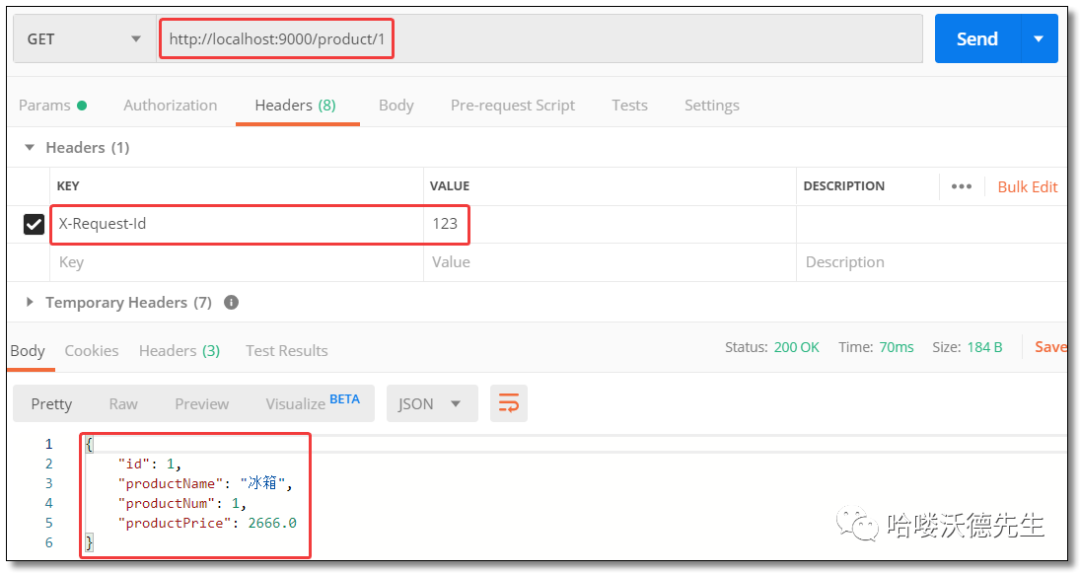
            - Header=X-Request-Id, \d+
动态路由(服务发现的路由规则)
动态路由其实就是面向服务的路由,Spring Cloud Gateway 支持与 Eureka 整合开发,根据 serviceId 自动从注册中心获取服务地址并转发请求,这样做的好处不仅可以通过单个端点来访问应用的所有服务,而且在添加或移除服务实例时不用修改 Gateway 的路由配置。
添加依赖
<!-- netflix eureka client 依赖 -->
<dependency>
    <groupId>org.springframework.cloud</groupId>
    <artifactId>spring-cloud-starter-netflix-eureka-client</artifactId>
</dependency>
动态获取 URI
配置文件
配置注册中心和动态路由规则。
server:
  port: 9000 # 端口

spring:
  application:
    name: gateway-server # 应用名称
  cloud:
    gateway:
      # 路由规则
      routes:
        - id: product-service           # 路由 ID,唯一
          uri: lb://product-service     # lb:// 根据服务名称从注册中心获取服务请求地址
          predicates:                   # 断言(判断条件)
            - Path=/product/**          # 匹配对应 URL 的请求,将匹配到的请求追加在目标 URI 之后

# 配置 Eureka Server 注册中心
eureka:
  instance:
    prefer-ip-address: true       # 是否使用 ip 地址注册
    instance-id: ${spring.cloud.client.ip-address}:${server.port} # ip:port
  client:
    service-url:                  # 设置服务注册中心地址
      defaultZone: http://localhost:8761/eureka/,http://localhost:8762/eureka/
启动类
package com.example;

import org.springframework.boot.SpringApplication;
import org.springframework.boot.autoconfigure.SpringBootApplication;

// 开启 EurekaClient 注解,目前版本如果配置了 Eureka 注册中心,默认会开启该注解
//@EnableEurekaClient
@SpringBootApplication
public class GatewayServerApplication {

    public static void main(String[] args) {
        SpringApplication.run(GatewayServerApplication.class, args);
    }

}
访问
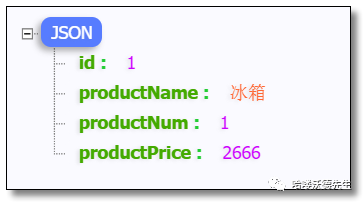
访问:http://localhost:9000/product/1 结果如下:
服务名称转发
即使配置了动态获取 URI 的方式,项目中微服务一旦过多几十上百个时,配置中仍然要写很多配置,这时候就可以使用服务名称转发,与服务发现组件进行结合,通过 serviceId
转发到具体服务实例。默认匹配URL /微服务名称/**
路由到具体微服务。
配置文件
配置注册中心和动态路由规则。
server:
  port: 9000 # 端口

spring:
  application:
    name: gateway-server # 应用名称
  cloud:
    gateway:
      discovery:
        locator:
          # 是否与服务发现组件进行结合,通过 serviceId 转发到具体服务实例。
          enabled: true                  # 是否开启基于服务发现的路由规则
          lower-case-service-id: true    # 是否将服务名称转小写

# 配置 Eureka Server 注册中心
eureka:
  instance:
    prefer-ip-address: true       # 是否使用 ip 地址注册
    instance-id: ${spring.cloud.client.ip-address}:${server.port} # ip:port
  client:
    service-url:                  # 设置服务注册中心地址
      defaultZone: http://localhost:8761/eureka/,http://localhost:8762/eureka/
启动类
package com.example;

import org.springframework.boot.SpringApplication;
import org.springframework.boot.autoconfigure.SpringBootApplication;

// 开启 EurekaClient 注解,目前版本如果配置了 Eureka 注册中心,默认会开启该注解
//@EnableEurekaClient
@SpringBootApplication
public class GatewayServerApplication {

    public static void main(String[] args) {
        SpringApplication.run(GatewayServerApplication.class, args);
    }

}
访问
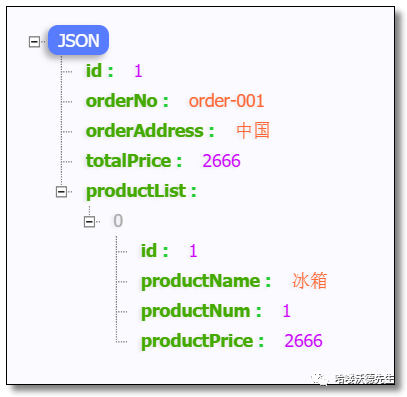
配置文件中没有配置任何订单服务的信息,访问:http://localhost:9000/order-service/order/1 结果如下:
❝下一篇我们讲解 Gateway 网关过滤器和全局过滤器以及自定义过滤器的使用,记得关注噢~
❞

微信扫描二维码(长按识别) 关注我的公众号