



前言
考虑到Tomcat 使用场景,很多客户都在考虑如何对Tomcat做高可用以实现业务的连续性。
Tomcat服务器是一个免费的开放源代码的Web 应用服务器,如期货的CTP历史就是通过Tomcat实现的查询服务。业务通过在Tomcat服务上部署静态的业务代码即可实现业务的访问。基于Tomcat的特性,单就高可用而言实现不需要考虑数据同步一致性的问题也不需要考虑负载均衡下的Session共享问题。我们只需要考虑如何保证软件的持续运行,类似的方案可以选择Linux的RHCS或者AIX的HACMP/PowerHA这些方案。但是Linux的RHCS一旦出现故障很难去分析,可以分析的日志量非常的少,AIX系统运行的代价较高。当然Tomcat也有自己的集群,也可以通过Nginx在前端做负载和高可用端口检查。我们今天就讨论下基于Oracle 12C FlexCluster的tomcat高可用实现方案。
FlexCluster架构
如图FlexCluter和传统的RAC cluster区别在于其多出了一些叶节点(Leaf nodes),传统的RAC中的节点被称之为Hub节点。Hub就是和12c之前的RAC一样需要通过心跳连接私网,通过存储链路连接共享存储。而如果只Leaf节点不需要连接存储,只需要和Hub节点接入到同一个网络即可,其上面运行着Oracle12.2 Clusterware软件。Leaf节点之间也没有心跳线连接,Leaf节点之前是独立的。一个或多个Leaf节点连接到Hub节点上。Leaf节点故障会将资源在leaf节点之间做切换,其连接的Hub节点故障则会将leaf节点切换到其他存活的Hub节点上。通过这种松耦合的架构可以方便地对FlexCluster做横向扩展。
我们也可以将Leaf节点连上共享存储,继而在上面运行只读的Oracle实例。这个时候该只读实例称之为(Reader Nodes)。这将会是一个不错的读写分离的方案,不涉及数同步问题。因为他们访问的同一套存储。如果目前的架构中的读瓶颈在CPU上,可以通过横向扩展leaf节点来实现压力分散。
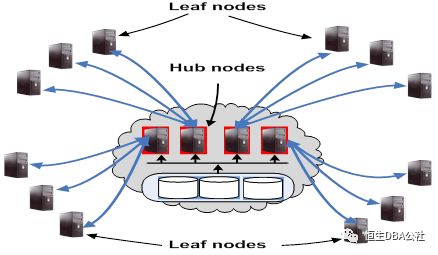
Leaf节点应用及Reader Nodes
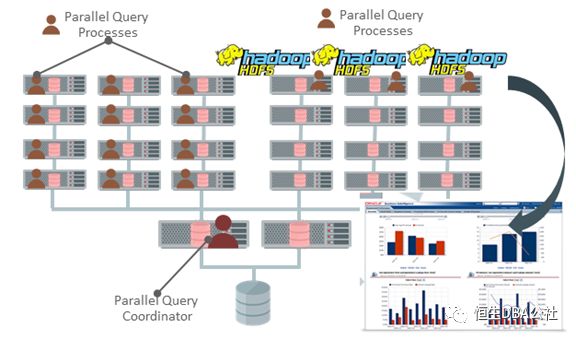
Leaf节点的架构特点就是松耦合的架构。得益于leaf节点之前没有心跳,网络链接的链路要比传统相同节点数的RAC要少很多。在Leaf节点上可以运行大量的查询和并行,Leaf可以被认为是一个完全的计算节点。通过几个运算节点的资源并行提高数据分析的效率。同样可以在计算节点部署第三方应用,如Hadoop的HDFS。如图
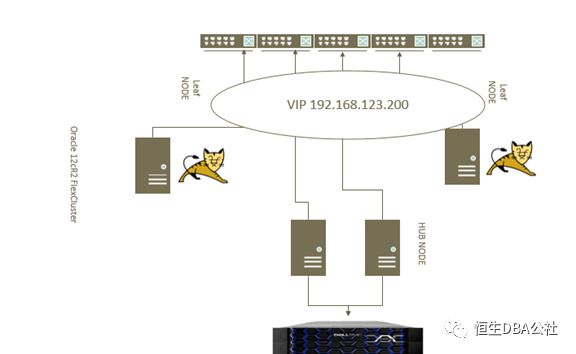
在FlexCluster Leaf节点上运行Tomcat服务
OracleRAC(real application clusters) 真正的应用集群。Oracle的集群同样可以管理非Oracle的资源实现资源的节点间切换,进而实现软件层面的高可用。我们需要在集群中配置一个Tomcatvip资源,该资源启后会激活一个vip地址和Oracle RAC VIP一样可以在节点间切换。同时需要为tomcat的配置一个服务,由Oracle集群管理服务的启动和管理操作。Tomcatavip资源是tomcat资源的依赖资源。启动tomcat集群服务的前提是tomcatvip资源能够正常启动。如果tomcatvip资源故障则一起切换到其他节点leaf节点。
部署Tomcat
[root@we2flexdb3 soft]# mkdir -p u01/local/
[root@we2flexdb3 soft]# tar -zxvf apache-tomcat-7.0.42.tar.gz -d u01/local/
[root@we2flexdb3 soft]# cd u01/local/
[root@we2flexdb3 soft]# mv apache-tomcat-7.0.42 tomcat
[root@we2flexdb3 soft]# cd u01/local/tomcat/bin/
[root@we2flexdb3 bin]# chmod 777 *.sh
[root@we2flexdb3bin]# sh startup.sh
配置Oracle集群tomcat虚拟IP资源
在测试环境中,flexdb3/flexdb4为FlexCluster的leaf节点。我们在flexdb3上开始配置tomcat服务使用的vip地址192.168.123.200
[root@we2flexdb3 ~]# appvipcfg create -h Using configuration parameter file: /u01/app/12.2.0/grid/crs/install/crsconfig_params The log of current session can be found at: /u01/app/grid/crsdata/we2flexdb3/scripts/appvipcfg.log Usage: appvipcfg create -network=<network_number> -ip=<ip_address> -vipname=<vipname> -user=<user_name>[-group=<group_name>] [-resource_group=<rg_name>] [-failback=0 | 1] delete -vipname=<vipname> [-force] modify -vipname=<vipname> [-network=<network_number>] [-ip=<ipaddress>] [root@we2flexdb3 ~]# srvctl add network -netnum 2 -subnet 192.168.123.0/255.255.255.0/ens33 -leaf [root@we2flexdb3 ~]# appvipcfg create -network=2 -ip=192.168.123.200 -vipname=tomcatvip -user=root
[root@we2flexdb3 ~]# crsctl stat res tomcatvip NAME=tomcatvip TYPE=app.appviptypex2.type TARGET=OFFLINE STATE=OFFLINE
[root@we2flexdb3 ~]# crsctl start res tomcatvip CRS-2672: Attempting to start 'ora.net2.network' on 'we2flexdb3' CRS-2676: Start of 'ora.net2.network' on 'we2flexdb3' succeeded CRS-2672: Attempting to start 'tomcatvip' on 'we2flexdb3' CRS-2676: Start of 'tomcatvip' on 'we2flexdb3' succeeded
[root@we2flexdb3 ~]# ping -c 3 192.168.123.200 PING 192.168.123.200 (192.168.123.200) 56(84) bytes of data. 64 bytes from 192.168.123.200: icmp_seq=1 ttl=64 time=0.019 ms 64 bytes from 192.168.123.200: icmp_seq=2 ttl=64 time=0.041 ms 64 bytes from 192.168.123.200: icmp_seq=3 ttl=64 time=0.035 ms |
修改tomcat配置监听vip地址 增加红色部分
[root@we2flexdb3 ~]# cd /u01/local/tomcat/conf/ [root@we2flexdb3 conf]# cat server.xml | more <Connector port="8080" protocol="HTTP/1.1" connectionTimeout="20000" redirectPort="8443" > <Connector port="8080" protocol="HTTP/1.1" address="192.168.123.200" maxPostSize="2147483647" connectionTimeout="20000" redirectPort="8443" > |
编辑集群配置文件
集群配置文件主要负载启动、关闭、检查、清理tomcat的操作。后续由Oracle集群统一调配和切换实现高可用切换。检查的原理通过访问localhost和vip的8080端口下的一个测试文件检查当前server的tomcat是否存活。通过echo $?返回指令执行结果进行判断。
[root@we2flexdb3 public]# cat tomcat_action.sh #!/bin/bash
WEBPAGECHECK=http://192.168.123.200:8080/icons/check.alive case $1 in 'start') u01/local/tomcat/bin/startup.sh RET=$? ;; sleep(10) ;; 'stop') u01/local/tomcat/bin/shutdown.sh RET=$? ;; 'clean') u01/local/tomcat/bin/shutdown.sh RET=$? ;; 'check') usr/bin/wget -q --delete-after $WEBPAGECHECK RET=$? ;; *) RET=0 ;; esac # 0: success; 1 : error if [ $RET -eq 0 ]; then exit 0 else exit 1 fi |
测试集群配置文件执行情况
[root@we2flexdb3 public]# ls -l u01/local/tomcat/webapps/icons/check.alive -rw-r--r-- 1 root root 0 Apr 20 17:45 u01/local/tomcat/webapps/icons/check.alive
[root@we2flexdb3 public]# chmod 777 tomcat_action.sh [root@we2flexdb3 public]# sh tomcat_action.sh start Using CATALINA_BASE: u01/local/tomcat Using CATALINA_HOME: u01/local/tomcat Using CATALINA_TMPDIR: /u01/local/tomcat/temp Using JRE_HOME: / Using CLASSPATH: /u01/local/tomcat/bin/bootstrap.jar:/u01/local/tomcat/bin/tomcat-juli.jar [root@we2flexdb3 public]# [root@we2flexdb3 public]# echo $? 0 [root@we2flexdb3 public]# [root@we2flexdb3 public]# sh tomcat_action.sh stop Using CATALINA_BASE: u01/local/tomcat Using CATALINA_HOME: /u01/local/tomcat Using CATALINA_TMPDIR: /u01/local/tomcat/temp Using JRE_HOME: / Using CLASSPATH: /u01/local/tomcat/bin/bootstrap.jar:/u01/local/tomcat/bin/tomcat-juli.jar [root@we2flexdb3 public]# [root@we2flexdb3 public]# echo $? 0 [root@we2flexdb3 public]# [root@we2flexdb3 public]# sh tomcat_action.sh start Using CATALINA_BASE: /u01/local/tomcat Using CATALINA_HOME: /u01/local/tomcat Using CATALINA_TMPDIR: /u01/local/tomcat/temp Using JRE_HOME: / Using CLASSPATH: /u01/local/tomcat/bin/bootstrap.jar:/u01/local/tomcat/bin/tomcat-juli.jar [root@we2flexdb3 public]# [root@we2flexdb3 public]# sh tomcat_action.sh check [root@we2flexdb3 public]# echo $? 0 [root@we2flexdb3 public]# [root@we2flexdb3 public]# sh tomcat_action.sh clean Using CATALINA_BASE: /u01/local/tomcat Using CATALINA_HOME: /u01/local/tomcat Using CATALINA_TMPDIR: /u01/local/tomcat/temp Using JRE_HOME: / Using CLASSPATH: /u01/local/tomcat/bin/bootstrap.jar:/u01/local/tomcat/bin/tomcat-juli.jar [root@we2flexdb3 public]# [root@we2flexdb3 public]# echo $? 0 |
添加tomcat资源到Oracle集群
crsctl add resource tomcatha -type cluster_resource -attr "ACTION_SCRIPT=/u01/app/12.2.0/grid/crs/public/tomcat_action.sh, AUTO_START=always, CHECK_INTERVAL=10,OFFLINE_CHECK_INTERVAL=10, RELOCATE_BY_DEPENDENCY=1,SCRIPT_TIMEOUT=60, RESTART_ATTEMPTS=10, START_DEPENDENCIES=hard(tomcatvip), STOP_DEPENDENCIES=hard(tomcatvip), HOSTING_MEMBERS=we2flexdb3 we2flexdb4 PLACEMENT=restricted"
Action_script 为集群调用的启动关闭脚本文件 Auto_start 机器重启后自动启动tomcatha资源 Check_* 为检查资源状态的时间间隔 参数的详细说明可以参考官方手册: https://docs.oracle.com/en/database/oracle/oracle-database/12.2/cwadd/making-applications-highly-available-using-oracle-clusterware.html#GUID-30DC08E5-72CE-4E93-B6D6-E209DEADF83E |
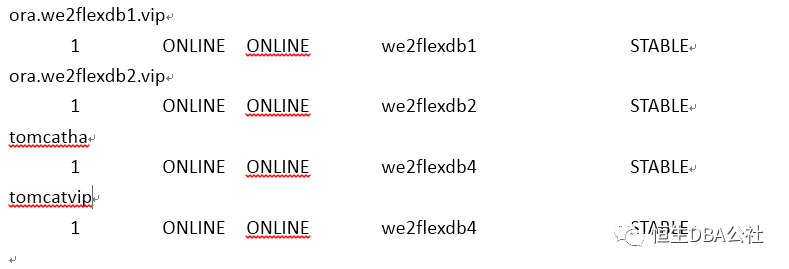
资源切换测试
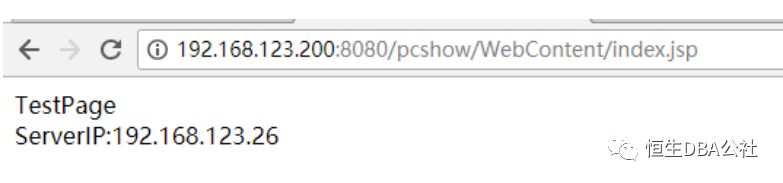
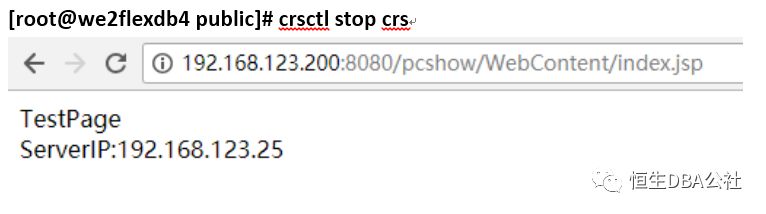

日志分析
脚本日志位于leaf节点的:
/u01/app/grid/diag/crs/we2flexdb4/crs/trace/ crsd_scriptagent_root.trc
两个leaf节点的crsd_scriptagent_root.trc分别记录的资源在原始节点oflline及在新的节点online的过程
2018-04-23 14:30:50.790 :CLSDYNAM:2277496576: [tomcatha]{101:17472:1060} [check] Executing action script: /u01/app/12.2.0/grid/crs/public/tomcat_action.sh[check] 2018-04-23 14:30:50.790 : AGFW:2273294080: {101:17472:1060} Agent sending reply for: RESOURCE_STOP[tomcatha 1 1] ID 4099:4770 2018-04-23 14:30:51.944 : AGFW:2273294080: {101:17472:1060} tomcatha 1 1 state changed from: STOPPING to: OFFLINE 2018-04-23 14:30:51.944 : AGFW:2273294080: {101:17472:1060} Switching online monitor to offline one 2018-04-23 14:30:51.944 : AGFW:2273294080: {101:17472:1060} Starting offline monitor 2018-04-23 14:30:51.944 : AGFW:2273294080: {101:17472:1060} Started implicit monitor for [tomcatha 1 1] interval=10000 delay=10000 2018-04-23 14:30:51.944 : AGFW:2273294080: {101:17472:1060} Agent sending last reply for: RESOURCE_STOP[tomcatha 1 1] ID 4099:4770 2018-04-23 14:31:01.946 :CLSDYNAM:2277496576: [tomcatha]{101:17472:1060} [check] Executing action script: /u01/app/12.2.0/grid/crs/public/tomcat_action.sh[check] 2018-04-23 14:31:03.499 : CRSCOMM:2485782272: IpcC: IPC client connection 19 to member 0 has been removed 2018-04-23 14:31:03.499 :CLSFRAME:2485782272: Removing IPC Member:{Relative|Node:0|Process:0|Type:1} 2018-04-23 14:31:03.499 :CLSFRAME:2485782272: Disconnected from CRSD:we2flexdb4 process: {Relative|Node:0|Process:0|Type:1} 2018-04-23 14:31:03.499 : AGENT:2273294080: {0:19:35} {0:19:35} Created alert : (:CRSAGF00117:) : Disconnected from server, Agent is shutting down. 2018-04-23 14:31:03.500 : AGENT:2273294080: {0:19:35} Agfw calling user exitCB, will exit on return 2018-04-23 14:31:03.500 : USRTHRD:2273294080: {0:19:35} Script agent is exiting..
2018-04-23 14:31:03.500 : AGENT:2273294080: {0:19:35} Agent is exiting with exit code: 2 |
2018-04-23 14:31:03.413 : AGFW:1976366848: {101:17472:1060} tomcatha 1 1 state changed from: UNKNOWN to: STARTING 2018-04-23 14:31:03.414 :CLSDYNAM:1980569344: [tomcatha]{101:17472:1060} [start] Executing action script: /u01/app/12.2.0/grid/crs/public/tomcat_action.sh[start] 2018-04-23 14:31:03.465 : AGFW:1980569344: {101:17472:1060} Command: start for resource: tomcatha 1 1 completed with status: SUCCESS 2018-04-23 14:31:03.466 :CLSDYNAM:1980569344: [tomcatha]{101:17472:1060} [check] Executing action script: /u01/app/12.2.0/grid/crs/public/tomcat_action.sh[check] 2018-04-23 14:31:03.466 :CLSFRAME:2180321344: TM [MultiThread] is changing desired thread # to 3. Current # is 2 2018-04-23 14:31:03.467 : AGFW:1976366848: {101:17472:1060} Agent sending reply for: RESOURCE_START[tomcatha 1 1] ID 4098:617 2018-04-23 14:31:03.518 : AGFW:1976366848: {101:17472:1060} tomcatha 1 1 state changed from: STARTING to: OFFLINE 2018-04-23 14:31:03.518 : AGFW:1976366848: {101:17472:1060} Starting offline monitor 2018-04-23 14:31:03.518 : AGFW:1976366848: {101:17472:1060} Started implicit monitor for [tomcatha 1 1] interval=10000 delay=10000 2018-04-23 14:31:03.518 : AGFW:1976366848: {101:17472:1060} Agent sending last reply for: RESOURCE_START[tomcatha 1 1] ID 4098:617 2018-04-23 14:31:13.520 :CLSDYNAM:1984771840: [tomcatha]{101:17472:1060} [check] Executing action script: /u01/app/12.2.0/grid/crs/public/tomcat_action.sh[check] 2018-04-23 14:31:13.672 : AGFW:1976366848: {101:17472:1060} tomcatha 1 1 state changed from: OFFLINE to: ONLINE |
总结
期货的CTP历史目前通过Tomcat实现的查询服务。业务通过在Tomcat服务上部署静态的业务代码实现业务的访问,考虑到业务连续性的需求,通过对Tomcat做高可用不失为另一种可选选项,尤其以后大量面临生产系统上oracle 12c后,合理利用好新特性的优势可以给未来提供更多的可能性。
