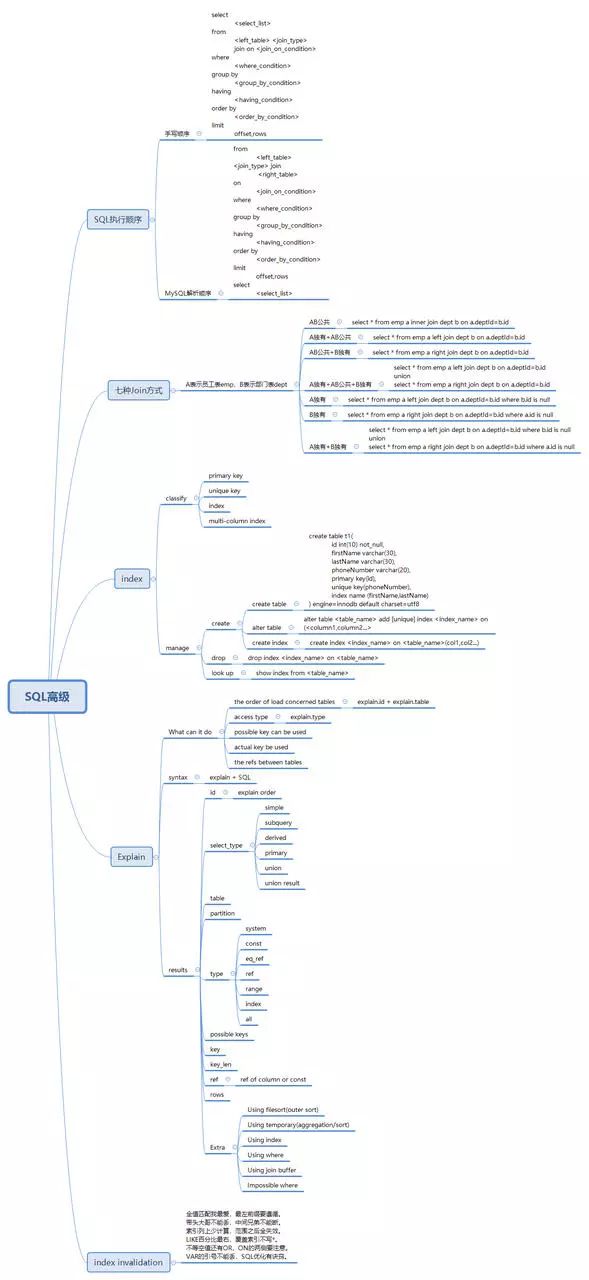
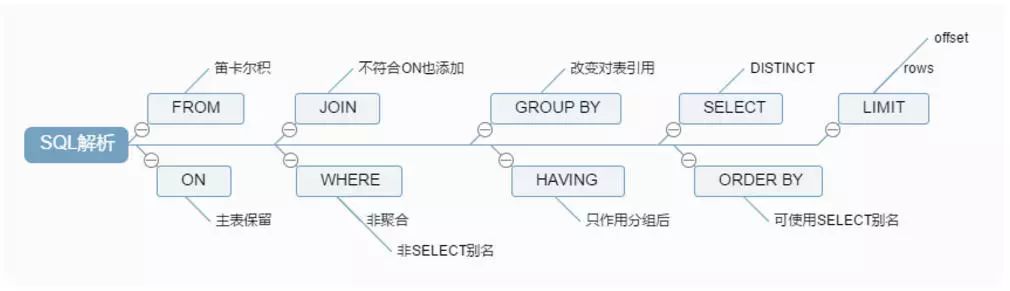
selectdistinct <select_list> from <left_table> <join_type> join <right_table> on <join_condition> where <where_condition> groupby <group_by_list> having <having_condition> orderby <order_by_condition> limit <offset>,<rows>
from <left_table> on <join_condition> <join_type>join <right_table> where <where_condition> group by <group_by_list> having <having_condition> select <select_list> order by <order_by_condition> limit offset,rows
mysql> select * from tbl_emp; +----+-------+--------+ | id | name | deptId | +----+-------+--------+ | 1 | jack | 1 | | 2 | tom | 1 | | 3 | alice | 2 | | 4 | john | 3 | | 5 | faker | 4 | | 7 | ning | NULL | | 8 | mlxg | NULL | +----+-------+--------+ 7 rows in set (0.00 sec)
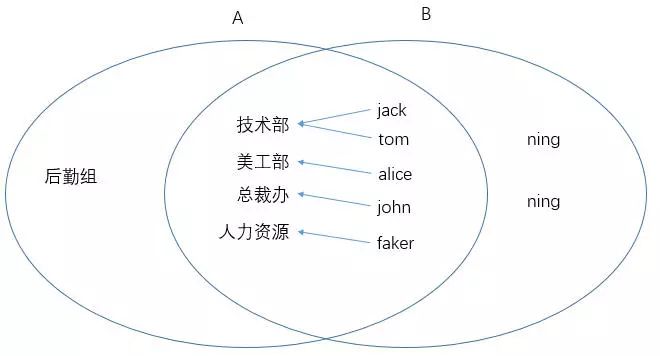
两表的关联关系如图所示:
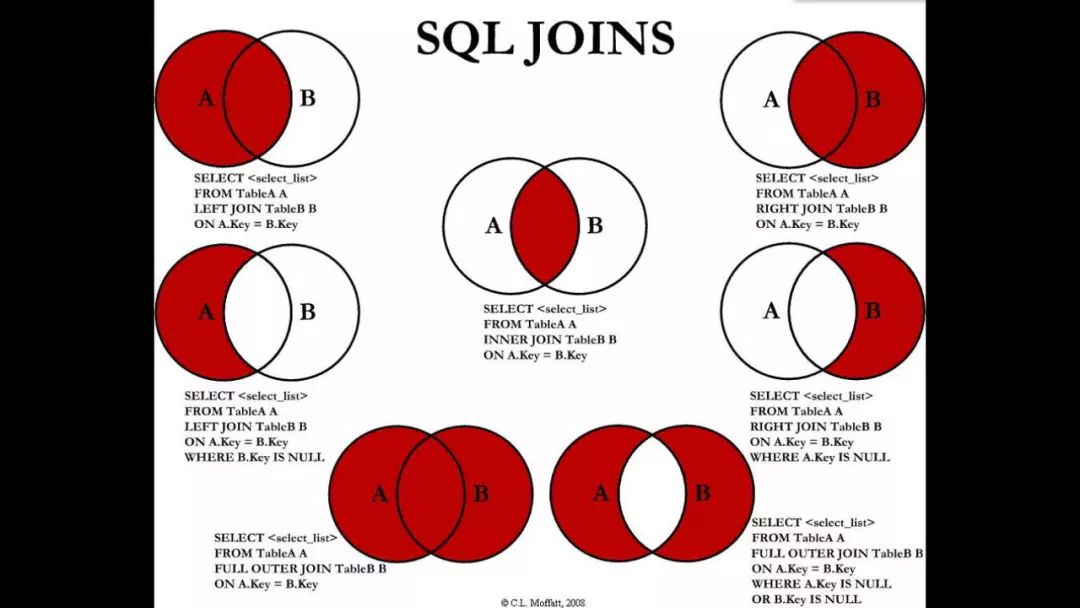
1、左连接(A独有+AB共有)
查询所有部门以及各部门的员工数:
mysql> select t1.id,t1.deptName,count(t2.name) as emps from tbl_dept t1 left join tbl_emp t2 on t2.deptId=t1.id group by deptName order by id;
+----+----------+------+
| id | deptName | emps |
+----+----------+------+
|  1 | 技术部   |    2 |
|  2 | 美工部   |    1 |
|  3 | 总裁办   |    1 |
|  4 | 人力资源 |    1 |
|  5 | 后勤组   |    0 |
+----+----------+------+
5 rows in set (0.00 sec)
2、右连接(B独有+AB共有)
查询所有员工及其所属部门:
mysql> select t2.id,t2.name,t1.deptName from tbl_dept t1 right join tbl_emp t2 on t2.deptId=t1.id;
+----+-------+----------+
| id | name  | deptName |
+----+-------+----------+
|  1 | jack  | 技术部   |
|  2 | tom   | 技术部   |
|  3 | alice | 美工部   |
|  4 | john  | 总裁办   |
|  5 | faker | 人力资源 |
|  7 | ning  | NULL     |
|  8 | mlxg  | NULL     |
+----+-------+----------+
7 rows in set (0.04 sec)
3、内连接(AB共有)
查询两表共有的数据:
mysql> select deptName,t2.name empName from tbl_dept t1 inner join tbl_emp t2 on t1.id=t2.deptId;
+----------+---------+
| deptName | empName |
+----------+---------+
| 技术部   | jack    |
| 技术部   | tom     |
| 美工部   | alice   |
| 总裁办   | john    |
| 人力资源 | faker   |
+----------+---------+
4、A独有
即在(A独有+AB共有)的基础之上排除B即可(通过b.id is null即可实现):
mysql> select a.deptName,b.name empName from tbl_dept a left join tbl_emp b on a.id=b.deptId where b.id isnull; +----------+---------+ | deptName | empName | +----------+---------+ | 后勤组 | NULL | +----------+---------+
5、B独有
与(A独有)同理:
mysql> select a.name empName,b.deptName from tbl_emp a leftjoin tbl_dept b on a.deptId=b.id where b.id isnull; +---------+----------+ | empName | deptName | +---------+----------+ | ning | NULL | | mlxg | NULL | +---------+----------+
6、A独有+B独有
使用union将(A独有)和(B独有)联合在一起:
mysql> select a.deptName,b.name empName from tbl_dept a leftjoin tbl_emp b on a.id=b.deptId where b.id isnull union select b.deptName,a.name emptName from tbl_emp a leftjoin tbl_dept b on a.deptId=b.id where b.id isnull; +----------+---------+ | deptName | empName | +----------+---------+ | 后勤组 | NULL | | NULL | ning | | NULL | mlxg | +----------+---------+
7、A独有+AB公共+B独有
使用union(可去重)联合(A独有+AB公共)和(B独有+AB公共)
mysql> select a.deptName,b.name empName  from tbl_dept a left join tbl_emp b on a.id=b.deptId union select a.deptName,b.name empName from tbl_dept a right join tbl_emp b on a.id=b.deptId;
+----------+---------+
| deptName | empName |
+----------+---------+
| 技术部   | jack    |
| 技术部   | tom     |
| 美工部   | alice   |
| 总裁办   | john    |
| 人力资源 | faker   |
| 后勤组   | NULL    |
| NULL     | ning    |
| NULL     | mlxg    |
+----------+---------+
Using filesort:说明mysql会对数据使用一个外部的索引排序,而不是按照表内的索引顺序进行读取。MySQL中无法利用索引完成的排序操作称为“文件排序”
mysql> explain select * from person order by lastName\G
*************************** 1. row ***************************
           id: 1
  select_type: SIMPLE
        table: person
   partitions: NULL
         type: index
possible_keys: NULL
          key: idx_name
      key_len: 186
          ref: NULL
         rows: 1
     filtered: 100.00
        Extra: Using index; Using filesort
使用\G代替;结尾可以使执行计划垂直显示。
mysql> explain select * from person order by firstName,lastName\G
*************************** 1. row ***************************
           id: 1
  select_type: SIMPLE
        table: person
   partitions: NULL
         type: index
possible_keys: NULL
          key: idx_name
      key_len: 186
          ref: NULL
         rows: 1
     filtered: 100.00
        Extra: Using index
Using temporary:使用了临时表保存中间结果。MySQL在对查询结果聚合时使用临时表。常见于排序 order by 和分组查询 group by。
mysql> alter table test add c5 varchar(10) defaultnull, add c6 varchar(10) defaultnull, add c7 varchar(10) defaultnull;
mysql> create index idx_c5_c6_c7 ontest(c5,c6,c7);
如果没有左前缀列则不会利用索引:
mysql> explain select * from test where c6=''\G
*************************** 1. row ***************************
           id: 1
  select_type: SIMPLE
        table: test
   partitions: NULL
         type: ALL
possible_keys: NULL
          key: NULL
      key_len: NULL
          ref: NULL
         rows: 1
     filtered: 100.00
        Extra: Using where

mysql> explain select * from test where c6='' and c7=''\G
*************************** 1. row ***************************
           id: 1
  select_type: SIMPLE
        table: test
   partitions: NULL
         type: ALL
possible_keys: NULL
          key: NULL
      key_len: NULL
          ref: NULL
         rows: 1
     filtered: 100.00
        Extra: Using where
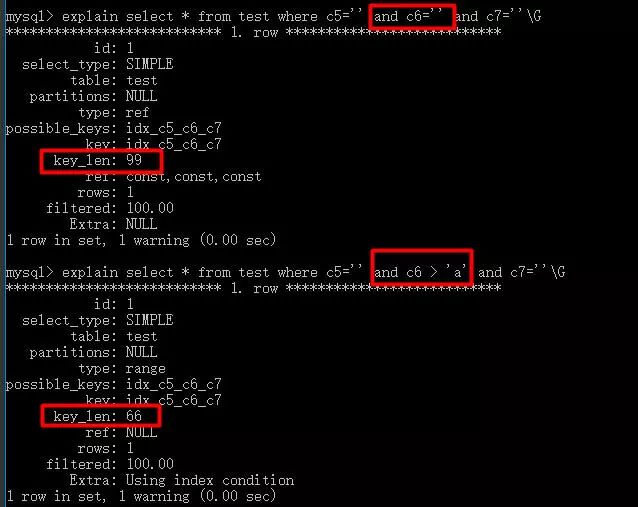
mysql> explain select * from test where c5='' and c7=''\G *************************** 1. row *************************** id: 1 select_type: SIMPLE table: test partitions: NULL type: ref possible_keys: idx_c5_c6_c7 key: idx_c5_c6_c7 key_len: 33 ref: const rows: 1 filtered: 100.00 Extra: Using index condition 1 row inset, 1 warning (0.00 sec)
mysql> explain select * from test where c5='' and c7='' and c6=''\G *************************** 1. row *************************** id: 1 select_type: SIMPLE table: test partitions: NULL type: ref possible_keys: idx_c5_c6_c7 key: idx_c5_c6_c7 key_len: 99 ref: const,const,const rows: 1 filtered: 100.00 Extra: NULL 1 row inset, 1 warning (0.00 sec)
最优的做法是:
mysql> explain select * from test where c5=''\G

mysql> explain select * from test where c5='' and c6=''\G

mysql> explain select * from test where c5='' and c6='' and c7=''\G
3、不在列名上添加任何操作
有时我们会在列名上进行计算、函数运算、自动/手动类型转换,这会直接导致索引失效。
mysql> explain select * from person where left(firstName,1)='张'\G
*************************** 1. row ***************************
           id: 1
  select_type: SIMPLE
        table: person
   partitions: NULL
         type: index
possible_keys: NULL
          key: idx_name
      key_len: 186
          ref: NULL
         rows: 4
     filtered: 100.00
        Extra: Using where; Using index

mysql> explain select * from person where firstName='张'\G
*************************** 1. row ***************************
           id: 1
  select_type: SIMPLE
        table: person
   partitions: NULL
         type: ref
possible_keys: idx_name
          key: idx_name
      key_len: 93
          ref: const
         rows: 1
     filtered: 100.00
        Extra: Using index