




目录
1.表
2.表空间
3.表空间扩展


表
我们对数据库的操作,90%以上是对表的操作。最常用的规则表,也就是heap table(堆表),本节讲到的表。另外还有partition talbe、Index-organized table、Cluster 三种表类型,这里先不介绍,留着以后再说。
例:
建立一个表scott.xs,表名xs 。
SEGMENT CREATION IMMEDIATE 当建立表的时候立即建立段名xs
段是由区组成,区是连续的数据块,这些数据库块从表空间来。
$ sqlplus as sysdba
SQL> create table scott.xs (id number,name char(10) ) SEGMENT CREATION IMMEDIATE tablespace users;
以上语句即是在users表空间里面找连续的数据块,分配给段xs。
一个数据块由三部分组成(示意图如下)
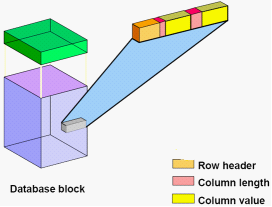
Block header:The block header contains the segment type (such as table or index), data block address, table directory, row directory, and transaction slots of approximately 23 bytes each, which are used when modifications are made to rows in the block. The block header grows downward from the top.
Row data:This is the actual data for the rows in the block. Row data space grows upward from the bottom.
Free space:Free space is in the middle of the block, enabling the header and the row data space to grow when necessary. Row data takes up free space as new rows are inserted or as columns of existing rows are updated with larger values.
Database Block Size 最小值 2048
Database Block Size 最大值 32k (范围2k 4k 8k 16k 32k)
查看数据库块大小
SQL> show parameter db_block_size
8K
dbca 指定的

表空间
概念:逻辑上是最大的存储单位,物理上对应数据文件。
例:
创建一个数据表空间tools,大小50M,自动增长每次50M,最大限制20G,本地管理。
SQL> create tablespace tools
datafile '+DATA'
size 50m
autoextend on
next 50m maxsize 20480m
extent management local;
创建一个临时表空间temp_t
SQL> create temporary tablespace temp_t
tempfile '+DATA'
size 50m
autoextend on
next 50m maxsize 20480m
extent management local;
创建用户同时指定表空间
SQL> create user sw identified by oracle
default tablespace toolstemporary tablespace temp_t;
如果创建用户没有指定表空间,就会使用用户默认的表空间,如果没有设置,就会用数据库的默认表空间。
查看数据库默认表空间
SQL> select * from database_properties;
PROPERTY_NAME PROPERTY_VALUE DESCRIPTION
------------------------------ ------------------------------ ---------------
DICT.BASE 2 dictionary base
tables version
#
DEFAULT_TEMP_TABLESPACE TEMP Name of default
temporary tabl
espace
DEFAULT_PERMANENT_TABLESPACE USERS Name of default
permanent tabl
espace
如果不指定表空间,就会使用数据库默认表空间user
设置默认表空间
SQL> ALTER DATABASE DEFAULT TABLESPACE tools;
SQL>select * from database_properties;
DEFAULT_PERMANENT_TABLESPACE TOOLS Name of default
permanent tablespace
表空间的状态status:
Read Write 读写
Read Only 只读
Offline 离线

表空间扩展
默认使用小表空间,还有大表空间。(smallfile 和 bigfile)
PROPERTY_NAME PROPERTY_VALUE DESCRIPTION
------------------------------ ------------------------------ ---------------
DEFAULT_TBS_TYPE SMALLFILE Default tablesp
ace type
大文件表空间有且仅有一个数据文件 ,文件最多可以拥有4G 个块 。
表空间大小=数据文件的个数 * 每个文件允许最多的块 * 块大小
大文件表空间=1*4M*8K =32T
=1*4M*32K=128T
小文件表空间最多可以有1022个数据文件
每个小文件最多可以拥有4K个块
小文件表空间大小=数据文件的个数 * 每个文件允许最多的块 * 块大小
单个数据文件最大=每个文件允许最多的块 * 块大小
=4M*8K=32G
=4M*32K=128G
Tips:小文件表空间可以有多个数据文件, 单个文件最多4M 块。
大文件表空间只能有一个数据文件,单个文件最多4G 块。
Extent Allocation 区的管理方式(对象每次从表空间中获得的空间)
例:
SQL> create table xs (id number ) storage (initial 1M ) tablespace users;
Automatic : 按照你的数据量,动态分配
Uniform : 每次分配固定大小
例:
SQL> create table xs (id number ) tablespace users;
SQL> select TABLESPACE_NAME, SEGMENT_NAME , EXTENT_ID, BLOCKS
from user_extents
where SEGMENT_NAME='XS';
TABLESPACE_NAME SEGMENT_NA EXTENT_ID BLOCKS
------------------------------ ---------- ---------- ----------
USERS XS 0 8
建立表系统初始一个空间给xs,默认至少给一个Extent ,区号从0开始,实际表有64K。
插入数据
SQL> insert into xs values(1);
SQL> commit;
继续向表xs插入数据,原来分配的1个区满了,则会向表空间申请空间,表空间的Extent Allocation 决定怎么分配空间给你,看usres表空间的Extent Allocation管理方式 Allocation Type Automatic
SQL> insert into xs select * from xs ;
/
/
SQL>
SQL> select TABLESPACE_NAME, SEGMENT_NAME , EXTENT_ID, BLOCKS
from user_extents
where SEGMENT_NAME='XS';
TABLESPACE_NAME SEGMENT_NA EXTENT_ID BLOCKS
------------------------------ ---------- ---------- ----------
USERS XS 11 8
USERS XS 12 8
USERS XS 13 8
USERS XS 14 8
USERS XS 15 8
USERS XS 16 128
USERS XS 17 128
USERS XS 18 128
判断一个段是自动管理还是手工管理
例:
$ conn scott/oracle
SQL> create table t1 tablespace users as select * from scott.emp;
SQL> create table t2 tablespace system as select * from scott.emp;
查看表属性
SQL> SELECT TABLE_NAME, TABLESPACE_NAME ,PCT_FREE , PCT_USED ,FREELISTS
from user_tables;
TABLE_NAME TABLESPACE_NAME PCT_FREE PCT_USED FREELISTS
---------- ------------------------------ ---------- ---------- ----------
DEPT USERS 10
EMP USERS 10
BONUS USERS 10
SALGRADE USERS 10
O1 USERS 10
XS USERS 10
XS2 T 10
E1 USERS 10
E2 SYSTEM 10 40 1
PCT_FREE 表示一个块中至少10%作为空闲空间
看到pct_used freelist则该对象一定存在表空间的段的管理方式是manual
得知:USERS --> auto 自动管理; SYSTEM --> manual 手动管理
PCT_FREE 10%
PCT_USED 40%
如果一个块空闲率高于10% 且使用率低于40% 则为空闲块(表示可以用的)
如果空闲率低于10% 或者使用率高于40% 则块满块(不能insert update )
增加表空间的四种方法:
1.给表空间增加数据文件
SQL> ALTER TABLESPACE tools ADD DATAFILE '+DATA' SIZE 50M;
2.新增加数据文件并且允许数据文件自动增长
SQL> ALTER TABLESPACE tools ADD DATAFILE '+DATA' SIZE 50M AUTOEXTEND ON NEXT 5M MAXSIZE 100M;
3. 允许已存在的数据文件自动增长
SQL> ALTER DATABASE DATAFILE '+DATA/APP03.DBF'
AUTOEXTEND ON NEXT 5M MAXSIZE 100M;
4.手工改变已存在数据文件的大小
SQL> ALTER DATABASE DATAFILE '+DATA/APP03.DBF' RESIZE 100M;
查看表空间的建立的源代码
SQL> set long 1000
SQL> select dbms_metadata.get_ddl('TABLESPACE','TOOLS') from dual;
CREATE TABLESPACE "TOOLS" DATAFILE
SIZE 10485760
LOGGING ONLINE PERMANENT BLOCKSIZE 8192
EXTENT MANAGEMENT LOCAL AUTOALLOCATE DEFAULT NOCOMPRESS SEGMENT SPACE MANAGEM
ENT AUTO
创建一个非标准块表空间
例:
要创建一个表空间apple,只有一个数据文件,数据量比较大,在数据仓库环境下可以设置为16K块大小
SQL> create tablespace apple datafile '+data' size 10m blocksize 16k;
*
ERROR at line 1:
ORA-29339: tablespace block size 16384 does not match configured block sizes
SQL> show parameter db_block_size
NAME TYPE VALUE
------------------------------------ ----------- ------------------------------
db_block_size integer 8192
默认只能建立8k块的大小的表空间
必须配置16k块内存区域
SQL> show parameter _size
NAME TYPE VALUE
------------------------------------ ----------- ------------------------------
db_16k_cache_size big integer 0
db_2k_cache_size big integer 0
db_32k_cache_size big integer 0
db_4k_cache_size big integer 0
db_8k_cache_size big integer 0
SQL> alter system set db_16k_cache_size=32M;
SQL> show parameter db_16k_cache_size
NAME TYPE VALUE
------------------------------------ ----------- ------------------------------
db_16k_cache_size big integer 32M
SQL> create tablespace apple datafile '+data' size 10m blocksize 16k;
SQL> select dbms_metadata.get_ddl('TABLESPACE','APPLE') from dual;
CREATE TABLESPACE "APPLE" DATAFILE
SIZE 10485760
LOGGING ONLINE PERMANENT BLOCKSIZE 16384 -->非标准块
EXTENT MANAGEMENT LOCAL AUTOALLOCATE DEFAULT NOCOMPRESS SEGMENT SPACE MANAGEM
ENT AUTO
apple表空间单个数据文件可以扩大到多少
SQL> select TABLESPACE_NAME, BIGFILE , BLOCK_SIZE from dba_tablespaces;
TABLESPACE_NAME BIG BLOCK_SIZE
------------------------------ --- ----------
SYSTEM NO 8192
SYSAUX NO 8192
UNDOTBS1 NO 8192
TEMP NO 8192
USERS NO 8192
EXAMPLE NO 8192
T NO 8192
TOOLS NO 8192
APPLE NO 16384
apple是小文件表空间
BLOCK_SIZE 16k
apple在不增加数据文件的场景下,最多可以扩展 4M*16K =64G

参考文档:
Oracle 11g Concepts -- 关于数据块的解释
联机文档 --> books --> Reference --> A Database Limits --> Physical Database Limits
