



vim /etc/yum.repos.d/henry.repo
yum install -y vim tree net-tools unzip binutils compat-libcap1 compat-libstdc++-33 compat-libstdc++-33.i686 glibc glibc.i686 glibc-devel glibc-devel.i686 ksh libaio libaio.i686 libaio-devel libaio-devel.i686 libX11 libX11.i686 libXau libXau.i686 libXi libXi.i686 libXtst libXtst.i686 libgcc libgcc.i686 libstdc++ libstdc++.i686 libstdc++-devel libstdc++-devel.i686 libxcb libxcb.i686 make nfs-utils net-tools smartmontools sysstat unixODBC unixODBC-devel gcc gcc-c++ libXext libXext.i686 zlib-devel zlib-devel.i686
cat >> /etc/sysctl.conf << EOF
kernel.sem = 250 32000 100 128
net.core.rmem_default = 262144
net.core.wmem_default = 262144
net.ipv4.conf.all.rp_filter = 2
net.ipv4.conf.default.rp_filter = 2
net.ipv4.ip_local_port_range = 9000 65500
cat >> /etc/security/limits.d/20-nproc.conf <<EOF
useradd -u 9999 -g oinstall -G dba oracle
echo "oracle:oracle" | chpasswd
[root@standby19c ~]# su - oracle
[oracle@standby19c ~]$ vi ~/.bash_profile
export ORACLE_HOSTNAME=primary19c
export ORACLE_BASE=/u01/app/oracle
export ORACLE_HOME=$ORACLE_BASE/product/19.3.0.0/db_1
export PATH=$ORACLE_HOME/bin:$PATH
export LD_LIBRARY_PATH=$ORACLE_HOME/lib:/lib:/usr/lib
export CLASSPATH=$ORACLE_HOME/jlib:$ORACLE_HOME/rdbms/jlib
export PATH=$ORACLE_HOME/bin:$PATH
export LD_LIBRARY_PATH=$ORACLE_HOME/lib:/lib:/usr/lib
export CLASSPATH=$ORACLE_HOME/jlib:$ORACLE_HOME/rdbms/jlib
[oracle@standby19c ~]$ echo $ORACLE_HOME ##环境变量没有生效
[oracle@standby19c ~]$ source ~/.bash_profile ##使环境变量生效
[oracle@standby19c ~]$ echo $ORACLE_HOME
/u01/app/oracle/product/19.3.0.0/db_1
mkdir -p /u01/app/oraInventory
mkdir -p /u01/app/oracle/product/19.3.0.0/db_1
chown -R oracle:oinstall /u01/app/
chown -R oracle:oinstall /soft/
unzip -q /soft/07-/LINUX.X64_193000_db_home.zip
cd $ORACLE_HOME/install/response
oracle.install.option=INSTALL_DB_SWONLY
INVENTORY_LOCATION=/u01/app/oraInventory
ORACLE_HOME=/u01/app/oracle/product/19.3.0.0/db_1
oracle.install.db.InstallEdition=EE
oracle.install.db.OSDBA_GROUP=dba
oracle.install.db.OSOPER_GROUP=dba
oracle.install.db.OSBACKUPDBA_GROUP=dba
oracle.install.db.OSDGDBA_GROUP=dba
oracle.install.db.OSKMDBA_GROUP=dba
oracle.install.db.OSRACDBA_GROUP=dba
oracle.install.db.config.starterdb.type=GENERAL_PURPOSE
oracle.install.db.config.starterdb.SID=oracle
[oracle@oracle db_1]$ ./runInstaller -silent -responseFile /soft/db_install.rsp -ignorePrereq
Launching Oracle Database Setup Wizard...
[WARNING] [INS-32047] The location (/u01/app/oraInventory) specified for the central inventory is not empty.
ACTION: It is recommended to provide an empty location for the inventory.
[WARNING] [INS-13014] Target environment does not meet some optional requirements.
CAUSE: Some of the optional prerequisites are not met. See logs for details. installActions2023-02-08_05-02-35PM.log
ACTION: Identify the list of failed prerequisite checks from the log: installActions2023-02-08_05-02-35PM.log. Then either from the log file or from installation manual find the appropriate configuration to meet the prerequisites and fix it manually.
The response file for this session can be found at:
/u01/app/oracle/product/19.3.0.0/db_1/install/response/db_2023-02-08_05-02-35PM.rsp
You can find the log of this install session at:
/tmp/InstallActions2023-02-08_05-02-35PM/installActions2023-02-08_05-02-35PM.log
As a root user, execute the following script(s):
1. /u01/app/oraInventory/orainstRoot.sh
2. /u01/app/oracle/product/19.3.0.0/db_1/root.sh
Execute /u01/app/oraInventory/orainstRoot.sh on the following nodes:
Execute /u01/app/oracle/product/19.3.0.0/db_1/root.sh on the following nodes:
Successfully Setup Software with warning(s).
Moved the install session logs to:
/u01/app/oraInventory/logs/InstallActions2023-02-08_05-02-35PM
[oracle@oracle db_1]$ netca -silent -responseFile $ORACLE_HOME/assistants/netca/netca.rsp
Parsing command line arguments:
Parameter "responsefile" = /u01/app/oracle/product/19.3.0.0/db_1/assistants/netca/netca.rsp
Done parsing command line arguments.
Oracle Net Services Configuration:
Profile configuration complete.
/u01/app/oracle/product/19.3.0.0/db_1/bin/lsnrctl start LISTENER
Listener started successfully.
Listener configuration complete.
Oracle Net Services configuration successful. The exit code is 0
[oracle@oracle db_1]$ cd $ORACLE_HOME/assistants/dbca
[oracle@oracle dbca]$ cp dbca.rsp /tmp
[oracle@oracle dbca]$ vim /tmp/dbca.rsp
templateName=General_Purpose.dbc
datafileDestination=/u01/app/oradata
nationalCharacterSet=AL16UTF16
[oracle@oracle dbca]$ dbca -silent -createDatabase -responseFile /tmp/dbca.rsp
[WARNING] [DBT-06208] The 'SYS' password entered does not conform to the Oracle recommended standards.
a. Oracle recommends that the password entered should be at least 8 characters in length, contain at least 1 uppercase character, 1 lower case character and 1 digit [0-9].
b.The password entered is a keyword that Oracle does not recommend to be used as password
ACTION: Specify a strong password. If required refer Oracle documentation for guidelines.
[WARNING] [DBT-06208] The 'SYSTEM' password entered does not conform to the Oracle recommended standards.
a. Oracle recommends that the password entered should be at least 8 characters in length, contain at least 1 uppercase character, 1 lower case character and 1 digit [0-9].
b.The password entered is a keyword that Oracle does not recommend to be used as password
ACTION: Specify a strong password. If required refer Oracle documentation for guidelines.
Creating and starting Oracle instance
Executing Post Configuration Actions
Database creation complete. For details check the logfiles at:
/u01/app/oracle/cfgtoollogs/dbca/oracle.
Look at the log file "/u01/app/oracle/cfgtoollogs/dbca/oracle/oracle.log" for further details
[oracle@oracle dbca]$ sqlplus / as sysdba
SQL*Plus: Release 19.0.0.0.0 - Production on Wed Feb 8 17:28:43 2023
Copyright (c) 1982, 2019, Oracle. All rights reserved.
Oracle Database 19c Enterprise Edition Release 19.0.0.0.0 - Production
SQL> select instance_name,status from v$instance;
主要修改hostname、uniquename以及sid,其余部分可与主库保持相同
export ORACLE_HOSTNAME=oracle --修改
export ORACLE_UNQNAME=oracle --修改
export ORACLE_BASE=/u01/app/oracle
export ORACLE_HOME=$ORACLE_BASE/product/19.3.0.0/db_1
export PATH=$ORACLE_HOME/bin:$PATH
export LD_LIBRARY_PATH=$ORACLE_HOME/lib:/lib:/usr/lib
export CLASSPATH=$ORACLE_HOME/jlib:$ORACLE_HOME/rdbms/jlib
export PATH=$ORACLE_HOME/bin:$PATH
export LD_LIBRARY_PATH=$ORACLE_HOME/lib:/lib:/usr/lib
export CLASSPATH=$ORACLE_HOME/jlib:$ORACLE_HOME/rdbms/jlib
[oracle@oraclestd soft]$ source ~/.bash_profile
[oracle@oraclestd soft]$ echo $ORACLE_SID
mkdir -p /u01/app/oraInventory
mkdir -p /u01/app/oracle/product/19.3.0.0/db_1
chown -R oracle:oinstall /u01/app/
chown -R oracle:oinstall /soft/
unzip 07-LINUX.X64_193000_db_home.zip
[oracle@standby19c tmp]$ cd $ORACLE_HOME/install/response
[oracle@standby19c response]$ cp db_install.rsp /tmp/
[oracle@standby19c response]$ vim /tmp/db_install.rsp
oracle.install.option=INSTALL_DB_SWONLY
INVENTORY_LOCATION=/u01/app/oraInventory
ORACLE_HOME=/u01/app/oracle/product/19.3.0.0/db_1
oracle.install.db.InstallEdition=EE
oracle.install.db.OSDBA_GROUP=dba
oracle.install.db.OSOPER_GROUP=dba
oracle.install.db.OSBACKUPDBA_GROUP=dba
oracle.install.db.OSDGDBA_GROUP=dba
oracle.install.db.OSKMDBA_GROUP=dba
oracle.install.db.OSRACDBA_GROUP=dba
oracle.install.db.config.starterdb.type=GENERAL_PURPOSE
oracle.install.db.config.starterdb.SID=oraclestd
[oracle@oraclestd response]$ cd $ORACLE_HOME
[oracle@oraclestd db_1]$ ./runInstaller -silent -responseFile /tmp/db_install.rsp -ignorePrereq
[root@oraclestd ~]# sh /u01/app/oraInventory/orainstRoot.sh
Changing permissions of /u01/app/oraInventory.
Adding read,write permissions for group.
Removing read,write,execute permissions for world.
Changing groupname of /u01/app/oraInventory to oinstall.
The execution of the script is complete.
[root@oraclestd ~]# sh /u01/app/oracle/product/19.3.0.0/db_1/root.sh
Check /u01/app/oracle/product/19.3.0.0/db_1/install/root_oraclestd_2023-02-08_23-56-25-708689649.log for the output of root script
[oracle@oraclestd ~]$ netca -silent -responseFile $ORACLE_HOME/assistants/netca/netca.rsp
Parsing command line arguments:
Parameter "responsefile" = /u01/app/oracle/product/19.3.0.0/db_1/assistants/netca/netca.rsp
Done parsing command line arguments.
Oracle Net Services Configuration:
Profile configuration complete.
/u01/app/oracle/product/19.3.0.0/db_1/bin/lsnrctl start LISTENER
Listener started successfully.
Listener configuration complete.
Oracle Net Services configuration successful. The exit code is 0
[oracle@oraclestd ~]$ lsnrctl status
LSNRCTL for Linux: Version 19.0.0.0.0 - Production on 08-FEB-2023 23:59:09
Copyright (c) 1991, 2019, Oracle. All rights reserved.
Connecting to (DESCRIPTION=(ADDRESS=(PROTOCOL=TCP)(HOST=oraclestd)(PORT=1521))) STATUS of the LISTENER
Version TNSLSNR for Linux: Version 19.0.0.0.0 - Production
Start Date 08-FEB-2023 23:58:51
Uptime 0 days 0 hr. 0 min. 18 sec
Security ON: Local OS Authentication
Listener Parameter File /u01/app/oracle/product/19.3.0.0/db_1/network/admin/listener.ora
Listener Log File /u01/app/oracle/diag/tnslsnr/oraclestd/listener/alert/log.xml
Listening Endpoints Summary...
(DESCRIPTION=(ADDRESS=(PROTOCOL=tcp)(HOST=oraclestd)(PORT=1521)))
(DESCRIPTION=(ADDRESS=(PROTOCOL=ipc)(KEY=EXTPROC1521)))
The listener supports no services
The command completed successfully
Total System Global Area 1258290752 bytes
Database Buffers 922746880 bytes
SQL> alter system set log_archive_dest_1='location=/u01/app/archive';
SQL> alter database archivelog;
SQL> alter database force logging;
Database log mode Archive Mode
Archive destination /u01/app/archive
Next log sequence to archive 6
SQL> alter system switch logfile;
SQL> select group#,type,member from v$logfile;
3 ONLINE /u01/app/oradata/ORACLE/redo03.log
2 ONLINE /u01/app/oradata/ORACLE/redo02.log
1 ONLINE /u01/app/oradata/ORACLE/redo01.log
SQL> select group#,bytes/1024/1024 as MB,status from v$log;
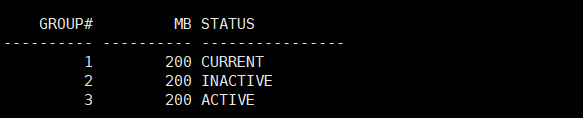
SQL> alter database add standby logfile
group 6 ('/u01/app/oradata/ORACLE/standby_redo04.log') size 200m reuse,
group 7 ('/u01/app/oradata/ORACLE/standby_redo05.log') size 200m reuse,
group 8 ('/u01/app/oradata/ORACLE/standby_redo06.log') size 200m reuse, 2 3 4
group 9 ('/u01/app/oradata/ORACLE/standby_redo07.log') size 200m reuse;
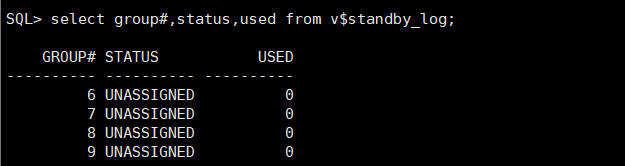
SQL> create pfile from spfile;
* SQL> create pfile='/tmp/spfile.ora.bak' from spfile;
spfile的优先级高于pfile,数据库会优先选择spfile启动
SQL> create spfile from pfile;
SQL> show parameter fal_server
------------------------------------ ----------- ------------------------------
scp $ORACLE_HOME/dbs/orapworacle oracle@192.168.6.135:/tmp/orapworaclestd
scp $ORACLE_HOME/dbs/initoracle.ora oracle@192.168.6.135:/tmp/initoraclestd.ora
(ADDRESS = (PROTOCOL = TCP)(HOST = oracle)(PORT = 1522))
(ADDRESS = (PROTOCOL = TCP)(HOST = oracle)(PORT = 1521))
(ADDRESS = (PROTOCOL = TCP)(HOST = 192.168.6.135)(PORT = 1522))
(ADDRESS = (PROTOCOL = TCP)(HOST = oracle)(PORT = 1521))
(ADDRESS = (PROTOCOL = IPC)(KEY = EXTPROC1521))
(ADDRESS = (PROTOCOL = TCP)(HOST = 192.168.6.135)(PORT = 1522))
(ORACLE_HOME = /u01/app/oracle/product/19.3.0.0/db_1)
[oracle@oracle admin]$ lsnrctl start LSNR
LSNRCTL for Linux: Version 19.0.0.0.0 - Production on 09-FEB-2023 09:03:32
Copyright (c) 1991, 2019, Oracle. All rights reserved.
Starting /u01/app/oracle/product/19.3.0.0/db_1/bin/tnslsnr: please wait...
TNSLSNR for Linux: Version 19.0.0.0.0 - Production
System parameter file is /u01/app/oracle/product/19.3.0.0/db_1/network/admin/listener.ora
Log messages written to /u01/app/oracle/diag/tnslsnr/oracle/lsnr/alert/log.xml
Listening on: (DESCRIPTION=(ADDRESS=(PROTOCOL=tcp)(HOST=192.168.6.136)(PORT=1522)))
Connecting to (DESCRIPTION=(ADDRESS=(PROTOCOL=TCP)(HOST=192.168.6.136)(PORT=1522))) STATUS of the LISTENER
Version TNSLSNR for Linux: Version 19.0.0.0.0 - Production
Start Date 09-FEB-2023 09:03:32
Uptime 0 days 0 hr. 0 min. 0 sec
Security ON: Local OS Authentication
Listener Parameter File /u01/app/oracle/product/19.3.0.0/db_1/network/admin/listener.ora
Listener Log File /u01/app/oracle/diag/tnslsnr/oracle/lsnr/alert/log.xml
Listening Endpoints Summary...
(DESCRIPTION=(ADDRESS=(PROTOCOL=tcp)(HOST=192.168.6.136)(PORT=1522)))
Service "oracle" has 1 instance(s).
Instance "oracle", status UNKNOWN, has 1 handler(s) for this service
先将远程传输的口令文件和参数文件拷贝至$ORACLE_HOME/dbs
[oracle@oraclestd tmp]$ cp orapworaclestd initoraclestd.ora $ORACLE_HOME/dbs/
[oracle@oraclestd tmp]$ ll $ORACLE_HOME/dbs/
-rwxrwxr-x 1 oracle oinstall 3079 May 14 2015 init.ora
-rw-r--r-- 1 oracle oinstall 1661 Feb 9 09:06 initoraclestd.ora
-rw-r----- 1 oracle oinstall 2048 Feb 9 09:06 orapworaclestd
*.audit_file_dest='/u01/app/oracle/admin/oraclestd/adump'
*.control_files='/u01/app/oradata/ORACLESTD/control01.ctl','/u01/app/oradata/ORACLESTD/control02.ctl'
*.diagnostic_dest='/u01/app/oracle'
*.dispatchers='(PROTOCOL=TCP) (SERVICE=oracleXDB)'
*.local_listener='LISTENER_ORACLE'
*.log_archive_dest_1='location=/u01/app/archive'
*.remote_login_passwordfile='EXCLUSIVE'
*.log_archive_config='dg_config=(oracle,oraclestd)'
*.log_archive_dest_1='LOCATION=/u01/app/archive valid_for=(all_logfiles,all_roles) db_unique_name=oraclestd'
*.log_archive_dest_2='service=oracle lgwr async valid_for=(online_logfiles,primary_role) db_unique_name=oracle'
*.log_archive_format='%t_%s_%r.arc'
*.db_file_name_convert='/u01/app/oradata/ORACLE/','/u01/app/oradata/ORACLESTD/'
*.log_file_name_convert='/u01/app/oradata/ORACLE/','/u01/app/oradata/ORACLESTD/'
[root@oraclestd admin]# mkdir -p /u01/app/oracle/admin/oraclestd/adump
[oracle@oraclestd ~]$ mkdir -p /u01/app/oradata/ORACLESTD
[root@oraclestd admin]# ls -ld /u01/app/archive/
drwxrwxr-x 2 oracle oinstall 6 Feb 8 16:41 /u01/app/archive/
[root@oraclestd admin]# chown -R oracle:oinstall /u01/app/oracle/admin/oraclestd/adump
[oracle@oraclestd ~]$ sqlplus / as sysdba
SQL*Plus: Release 19.0.0.0.0 - Production on Thu Feb 9 09:18:15 2023
Copyright (c) 1982, 2019, Oracle. All rights reserved.
Connected to an idle instance.
SQL> create spfile from pfile;
Total System Global Area 1258290752 bytes
Database Buffers 922746880 bytes
------------------------------------ ----------- ------------------------------
db_file_name_convert string /u01/app/oradata/ORACLE/, /u01
db_unique_name string oraclestd
instance_name string oraclestd
log_file_name_convert string /u01/app/oradata/ORACLE/, /u01
------------------------------------ ----------- ------------------------------
service_names string oraclestd
可与备库保持一致,如果没有配置/etc/hosts尽量把host写成ip
(ADDRESS = (PROTOCOL = TCP)(HOST = 192.168.6.135)(PORT = 1522))
(ADDRESS = (PROTOCOL = TCP)(HOST = 192.168.6.135)(PORT = 1522))
(ADDRESS = (PROTOCOL = TCP)(HOST = 192.168.6.135)(PORT = 1522))
(ORACLE_HOME = /u01/app/oracle/product/19.3.0.0/db_1)
[oracle@oraclestd admin]$ lsnrctl start LSNR
LSNRCTL for Linux: Version 19.0.0.0.0 - Production on 09-FEB-2023 10:29:48
Copyright (c) 1991, 2019, Oracle. All rights reserved.
Starting /u01/app/oracle/product/19.3.0.0/db_1/bin/tnslsnr: please wait...
TNSLSNR for Linux: Version 19.0.0.0.0 - Production
System parameter file is /u01/app/oracle/product/19.3.0.0/db_1/network/admin/listener.ora
Log messages written to /u01/app/oracle/diag/tnslsnr/oraclestd/lsnr/alert/log.xml
Listening on: (DESCRIPTION=(ADDRESS=(PROTOCOL=tcp)(HOST=192.168.6.135)(PORT=1522)))
Connecting to (DESCRIPTION=(ADDRESS=(PROTOCOL=TCP)(HOST=192.168.6.135)(PORT=1522))) STATUS of the LISTENER
Version TNSLSNR for Linux: Version 19.0.0.0.0 - Production
Start Date 09-FEB-2023 10:29:48
Uptime 0 days 0 hr. 0 min. 0 sec
Security ON: Local OS Authentication
Listener Parameter File /u01/app/oracle/product/19.3.0.0/db_1/network/admin/listener.ora
Listener Log File /u01/app/oracle/diag/tnslsnr/oraclestd/lsnr/alert/log.xml
Listening Endpoints Summary...
(DESCRIPTION=(ADDRESS=(PROTOCOL=tcp)(HOST=192.168.6.135)(PORT=1522)))
Service "oraclestd" has 1 instance(s).
Instance "oraclestd", status UNKNOWN, has 1 handler(s) for this service
[oracle@oracle admin]$ tnsping oracle
TNS Ping Utility for Linux: Version 19.0.0.0.0 - Production on 09-FEB-2023 10:30:31
Copyright (c) 1997, 2019, Oracle. All rights reserved.
/u01/app/oracle/product/19.3.0.0/db_1/network/admin/sqlnet.ora
Used TNSNAMES adapter to resolve the alias
Attempting to contact (DESCRIPTION = (ADDRESS = (PROTOCOL = TCP)(HOST = oracle)(PORT = 1522)) (CONNECT_DATA = (SERVER = DEDICATED) (SERVICE_NAME = oracle)))
[oracle@oracle admin]$ tnsping oraclestd
TNS Ping Utility for Linux: Version 19.0.0.0.0 - Production on 09-FEB-2023 10:30:49
Copyright (c) 1997, 2019, Oracle. All rights reserved.
/u01/app/oracle/product/19.3.0.0/db_1/network/admin/sqlnet.ora
Used TNSNAMES adapter to resolve the alias
Attempting to contact (DESCRIPTION = (ADDRESS = (PROTOCOL = TCP)(HOST = 192.168.6.135)(PORT = 1522)) (CONNECT_DATA = (SERVER = DEDICATED) (SERVICE_NAME = oraclestd)))
[oracle@oracle admin]$ rman target / auxiliary sys/oracle@ORACLESTD
Recovery Manager: Release 19.0.0.0.0 - Production on Thu Feb 9 10:32:10 2023
Copyright (c) 1982, 2019, Oracle and/or its affiliates. All rights reserved.
connected to target database: ORACLE (DBID=2001350911)
connected to auxiliary database: ORACLE (not mounted)
RMAN> duplicate target database for standby from active database;
Starting Duplicate Db at 09-FEB-23
using target database control file instead of recovery catalog
allocated channel: ORA_AUX_DISK_1
channel ORA_AUX_DISK_1: SID=19 device type=DISK
passwordfile auxiliary format '/u01/app/oracle/product/19.3.0.0/db_1/dbs/orapworaclestd' ;
channel ORA_DISK_1: SID=288 device type=DISK
backup as copy current controlfile for standby auxiliary format '/u01/app/oradata/ORACLE/control01.ctl';
restore clone primary controlfile to '/u01/app/oradata/ORACLE/control02.ctl' from
'/u01/app/oradata/ORACLE/control01.ctl';
channel ORA_DISK_1: starting datafile copy
output file name=/u01/app/oracle/product/19.3.0.0/db_1/dbs/snapcf_oracle.f tag=TAG20230209T142952
channel ORA_DISK_1: datafile copy complete, elapsed time: 00:00:01
channel ORA_AUX_DISK_1: copied control file copy
sql clone 'alter database mount standby database';
sql statement: alter database mount standby database
"/u01/app/oradata/ORACLESTD/temp01.dbf";
"/u01/app/oradata/ORACLESTD/system01.dbf";
"/u01/app/oradata/ORACLESTD/sysaux01.dbf";
"/u01/app/oradata/ORACLESTD/undotbs01.dbf";
"/u01/app/oradata/ORACLESTD/users01.dbf";
"/u01/app/oradata/ORACLESTD/system01.dbf" datafile
"/u01/app/oradata/ORACLESTD/sysaux01.dbf" datafile
"/u01/app/oradata/ORACLESTD/undotbs01.dbf" datafile
"/u01/app/oradata/ORACLESTD/users01.dbf" ;
sql 'alter system archive log current';
executing command: SET NEWNAME
renamed tempfile 1 to /u01/app/oradata/ORACLESTD/temp01.dbf in control file
executing command: SET NEWNAME
executing command: SET NEWNAME
executing command: SET NEWNAME
executing command: SET NEWNAME
channel ORA_DISK_1: starting datafile copy
input datafile file number=00001 name=/u01/app/oradata/ORACLE/system01.dbf
output file name=/u01/app/oradata/ORACLESTD/system01.dbf tag=TAG20230209T143002
channel ORA_DISK_1: datafile copy complete, elapsed time: 00:00:25
channel ORA_DISK_1: starting datafile copy
input datafile file number=00003 name=/u01/app/oradata/ORACLE/sysaux01.dbf
output file name=/u01/app/oradata/ORACLESTD/sysaux01.dbf tag=TAG20230209T143002
channel ORA_DISK_1: datafile copy complete, elapsed time: 00:00:15
channel ORA_DISK_1: starting datafile copy
input datafile file number=00004 name=/u01/app/oradata/ORACLE/undotbs01.dbf
output file name=/u01/app/oradata/ORACLESTD/undotbs01.dbf tag=TAG20230209T143002
channel ORA_DISK_1: datafile copy complete, elapsed time: 00:00:03
channel ORA_DISK_1: starting datafile copy
input datafile file number=00007 name=/u01/app/oradata/ORACLE/users01.dbf
output file name=/u01/app/oradata/ORACLESTD/users01.dbf tag=TAG20230209T143002
channel ORA_DISK_1: datafile copy complete, elapsed time: 00:00:01
sql statement: alter system archive log current
datafile 1 switched to datafile copy
input datafile copy RECID=1 STAMP=1128349847 file name=/u01/app/oradata/ORACLESTD/system01.dbf
datafile 3 switched to datafile copy
input datafile copy RECID=2 STAMP=1128349847 file name=/u01/app/oradata/ORACLESTD/sysaux01.dbf
datafile 4 switched to datafile copy
input datafile copy RECID=3 STAMP=1128349847 file name=/u01/app/oradata/ORACLESTD/undotbs01.dbf
datafile 7 switched to datafile copy
input datafile copy RECID=4 STAMP=1128349847 file name=/u01/app/oradata/ORACLESTD/users01.dbf
Finished Duplicate Db at 09-FEB-23
SQL> select name,database_role,protection_mode,open_mode from v$database;
NAME DATABASE_ROLE PROTECTION_MODEOPEN_MODE
ORACLE PRIMARY MAXIMUM PERFORMANCEREAD WRITE
SQL> select name,database_role,protection_mode,open_mode from v$database;
NAME DATABASE_ROLE PROTECTION_MODEOPEN_MODE
ORACLE PHYSICAL STANDBY MAXIMUM PERFORMANCEMOUNTED
SQL> select name,database_role,protection_mode,open_mode from v$database;
NAME DATABASE_ROLE PROTECTION_MODE OPEN_MODE
--------- ---------------- -------------------- --------------------
ORACLE PHYSICAL STANDBY MAXIMUM PERFORMANCE READ ONLY
--------------------------------------19C-ADG-主-备搭建完成------------------------------------------
