



本文转自Cute-Rui的博客:https://blog.csdn.net/coder_gwr/article/details/86563709
由于通过ResultSet
的光标实现数据分页存在占用大量资源等性能方便的缺陷,所以,在实际开发中,通过采用数据库的分页机制来实现分页查询功能更为上上之策。
下面我就通过MySQL
数据库提供的分页机制来作为案例。
创建Product类
,用于封装商品信息。该类是商品信息的JavaBean
。
package bean;

import java.math.BigDecimal;

public class Product {
    public static final int PAGE_SIZE = 2;//每页记录数
    private int p_id;//编号
    private String p_name;//名称
    private BigDecimal p_price;//价格

    public int getP_id() {
        return p_id;
    }

    public void setP_id(int p_id) {
        this.p_id = p_id;
    }

    public String getP_name() {
        return p_name;
    }

    public void setP_name(String p_name) {
        this.p_name = p_name;
    }

    public BigDecimal getP_price() {
        return p_price;
    }

    public void setP_price(BigDecimal p_price) {
        this.p_price = p_price;
    }
}
在Product
类中,主要封装了商品对象的基本信息。除此之外,我还定义了分页的每页记录数。
创建ProductDao
类,主要用于封装商品对象的数据库相关操作。该类是商品信息的Dao
层。
package dao;

import bean.Product;
import util.DBUtil;

import java.sql.Connection;
import java.sql.PreparedStatement;
import java.sql.ResultSet;
import java.util.ArrayList;
import java.util.List;

public class ProductDao {

    /**
     * 分页查询所有商品信息
     *
     * @param page 页数
     * @return List<Product>
     */
    public List<Product> findAllProduct(int page) {
        List<Product> productList = new ArrayList<>();//实例化List对象
        Connection conn = null;//数据库连接
        PreparedStatement pstmt = null;//PreparedStatement
        ResultSet rs = null;//结果集
        //limit arg0,arg1 指定查询起始位置,指定查询数据所返回的记录数
        String sql = "select p_id,p_name,p_price from product order by p_id limit ?,?";//分页查询的SQL语句

        try {
            conn = DBUtil.getCon();//获取数据库连接
            pstmt = conn.prepareStatement(sql);//获取PreparedStatement
            pstmt.setInt(1, (page - 1) * Product.PAGE_SIZE);//对SQL语句第一个参数赋值
            pstmt.setInt(2, Product.PAGE_SIZE);//对SQL语句第二个参数赋值
            rs = pstmt.executeQuery();//执行查询操作
            while (rs.next()) {
                Product product = new Product();
                product.setP_id(rs.getInt("p_id"));//对p_id属性赋值
                product.setP_name(rs.getString("p_name"));//对p_name属性赋值
                product.setP_price(rs.getBigDecimal("p_price"));//对p_price属性赋值
                productList.add(product);//将Product对象添加到List集合中
            }
        } catch (Exception e) {
            e.printStackTrace();
        } finally {
            DBUtil.close(rs, pstmt, conn);//关闭进行回收资源
        }
        return productList;
    }

    /**
     * 查询总记录数
     *
     * @return count总记录数
     */
    public int findAllProductCount() {
        int count = 0;//总记录数
        Connection conn = null;//数据库连接
        PreparedStatement pstmt = null;//PreparedStatement
        ResultSet rs = null;//结果集
        String sql = "select count(*) from product";//查询总记录数的SQL语句

        try {
            conn = DBUtil.getCon();//获取数据库连接
            pstmt = conn.prepareStatement(sql);//获取PreparedStatement
            rs = pstmt.executeQuery();//执行查询操作
            if (rs.next()) {//光标向后移动,并判断是否有效
                count = rs.getInt(1);//对总记录数赋值
            }

        } catch (Exception e) {
            e.printStackTrace();
        } finally {
            DBUtil.close(rs, pstmt, conn);//关闭回收资源
        }
        return count;//返回总记录数
    }

}
findAllProduct(int page) ;
方法,用来查询指定页数的商品。page参数,用来指定页数。findAllProductCount();
方法,用来查询总记录数。这样一次查询,即可知道总记录数。
缺点在于,一旦有新的记录产生,在下一次查询后,有一些记录不会被查询到,因此待优化。
创建FindAllProduct
类,该类是分页查询商品信息的Servlet
对象。在doGet()
方法中,对分页请求进行处理。
package servlet;

import bean.Product;
import dao.ProductDao;

import javax.servlet.ServletException;
import javax.servlet.annotation.WebServlet;
import javax.servlet.http.HttpServlet;
import javax.servlet.http.HttpServletRequest;
import javax.servlet.http.HttpServletResponse;
import java.io.IOException;
import java.util.List;

@WebServlet("/FindAllProduct")
public class FindAllProduct extends HttpServlet {
    protected void doPost(HttpServletRequest request, HttpServletResponse response) {

    }

    protected void doGet(HttpServletRequest request, HttpServletResponse response) throws ServletException, IOException {
        int currPage = 1;//当前页码
        if (request.getParameter("page") != null) {//判断传递页面是否有效
            currPage = Integer.parseInt(request.getParameter("page"));//对当前页码赋值
        }
        ProductDao dao = new ProductDao();//实例化ProductDao
        List<Product> productList = dao.findAllProduct(currPage);//查询所有商品的信息
        request.setAttribute("productList", productList);//将list放置到request中
        int pages;//总页数
        int count = dao.findAllProductCount();//查询总记录数
        if (count % Product.PAGE_SIZE == 0) {
            pages = count  Product.PAGE_SIZE;//对总页数赋值
        } else {
            pages = count  Product.PAGE_SIZE + 1;//对总页数赋值
        }
        StringBuilder sb = new StringBuilder();//实例化StringBuffer
        for (int i = 1; i <= pages; i++) {
            if (i == currPage) {
                sb.append("[").append(i).append("]");//构建分页条
            } else {
                sb.append("<a href='FindAllProduct?page=").append(i).append("'>").append(i).append("</a>");//构建分页条
            }
        }
        sb.append("  ");//构建分页条
        request.setAttribute("bar", sb.toString());//将分页条的字符串放置到request中
        request.getRequestDispatcher("product.jsp").forward(request, response);//将请求转发到product.jsp页面中
    }
}
FindAllProduct类
主要做两件事,获取分页查询结果集和构造分页条对象。
分页查询结果集的实现,通过调用ProductDao
类的findAllProduct(page)
方法。
构造分页条对象是通过拼接html
字符串进行构造,然后使用Servlet
中的HttpServletRequest
对象,将请求转发至product.jsp
页面做出展示。
创建product.jsp
页面,该页面通过EL表达式
和JavaAPI
获取查询的结果集与分页条来分页显示商品信息数据。
<%@ taglib prefix="c" uri="http://java.sun.com/jsp/jstl/core" %>
<%--
Created by IntelliJ IDEA.
  User: wen
  Date: 2019/1/20
  Time: 15:43
  To change this template use File | Settings | File Templates.
--%>
<%@ page contentType="text/html;charset=UTF-8" %>
<html>
<head>
    <title>商品展示</title>
</head>
<body>
<table align="center" width="450" border="1">
    <tr>
        <td align="center" colspan="3">
            <h2>商品信息展示</h2>
        </td>
    </tr>
    <tr align="center">
        <td>ID</td>
        <td>商品名称</td>
        <td>价格</td>
    </tr>
    <c:forEach items="${requestScope.productList}" var="item">
        <tr>
            <td>${item.p_id}</td>
            <td>${item.p_name}</td>
            <td>${item.p_price}</td>
        </tr>
    </c:forEach>
    <tr>
        <td align="center" colspan="5">
            <%=request.getAttribute("bar")%>
        </td>
    </tr>
</table>
</body>
</html>
最后附上我封装的JDBC连接数据库的工具类DBUtil
package util;

/**
 * 连接数据库
 */

import java.sql.CallableStatement;
import java.sql.Connection;
import java.sql.DriverManager;
import java.sql.PreparedStatement;
import java.sql.ResultSet;
import java.sql.SQLException;
import java.sql.Statement;

public class DBUtil {

    /**
     * 获取连接
     *
     * @return Connection
     * @throws Exception 异常
     */
    public static Connection getCon() throws Exception {
        //数据库驱动名字
        String jdbcName = "com.mysql.jdbc.Driver";
        Class.forName(jdbcName);
        //数据库协议地址
        String dbUrl = "jdbc:mysql://129.204.104.108:3306/guowenrui?useUnicode=true&characterEncoding=UTF-8";
        //数据库用户名
        String dbUser = "guowenrui";
        //数据库密码
        String dbPassword = "gwr123";
        Connection conn = DriverManager.getConnection(dbUrl, dbUser, dbPassword);
        return conn;
    }

    /**
     * 关闭连接
     *
     * @param stmt Statement
     * @param conn Connection
     * @throws Exception 异常
     */
    public static void close(Statement stmt, Connection conn) throws Exception {
        if (stmt != null) {
            stmt.close();
            if (conn != null) {
                conn.close();
            }
        }
    }

    /**
     * 关闭连接
     *
     * @param cstmt CallableStatement
     * @param conn  Connection
     * @throws Exception 异常
     */
    public static void close(CallableStatement cstmt, Connection conn) throws Exception {
        if (cstmt != null) {
            cstmt.close();
            if (conn != null) {
                conn.close();
            }
        }
    }


    /**
     * 关闭连接
     *
     * @param pstmt PreparedStatement
     * @param conn  Connection
     * @throws SQLException SQL异常
     */
    public static void close(PreparedStatement pstmt, Connection conn) {
        if (pstmt != null) {
            try {
                pstmt.close();
                if (conn != null) {
                    conn.close();
                }
            } catch (SQLException e) {
                e.printStackTrace();
            }
        }
    }

    /**
     * 重载关闭方法
     *
     * @param pstmt PreparedStatement
     * @param conn  Connection
     * @throws Exception 异常
     */
    public static void close(ResultSet rs, PreparedStatement pstmt, Connection conn) {
        if (rs != null) {
            try {
                rs.close();
                if (pstmt != null) {
                    pstmt.close();
                    if (conn != null) {
                        conn.close();
                    }
                }
            } catch (SQLException e) {
                e.printStackTrace();
            }
        }
    }

}
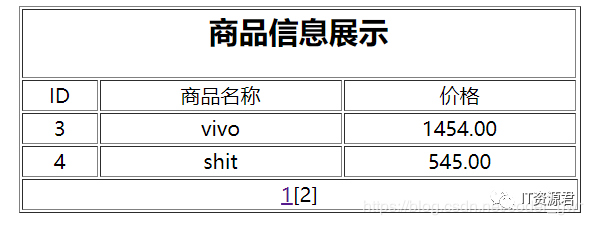
展示效果图如下:

关注IT资源君
学习更多技术
