



客户在搭建Oracle 19c ADG时,发现/u03/data目录的数据文件无法同步。
1.问题环境
操作系统:Centos 7.9
数据库版本:Oracle Database 19.15
2.环境查看
随后远程查看主库相关一些信息,数据文件状态是否存在异常状态的(read only,recover)
select name,status from v$datafile主库上的数据文件都是online状态,正常。
随后查看备库的文件系统,数据目录有三个u02、u03、u09,跟主库对应,这样就无需设置convert参数了。某个目录对应一个vg的lv
查看lv时,发现不常用的操作
lvs -a
  LV              VG    Attr       LSize    Pool  Origin Data%  Meta%  Move Log Cpy%Sync Convert
  pool00          ol   twi-aotz--   1.95T                 99.75   99.59  u02             ol   -wi-aotz--   3.9T
  u03             ol   Vwi-aotz--   3.95T   pool00       49%     u09             ol   -wi-aotz--   2.9T
出现Pool信息,关于thin pool介绍
Blocks in a standard lvm(8) Logical Volume (LV) are allocated
       when the LV is created, but blocks in a thin provisioned LV are
       allocated as they are written.  Because of this, a thin
       provisioned LV is given a virtual size, and can then be much
       larger than physically available storage.  The amount of physical
       storage provided for thin provisioned LVs can be increased later
       as the need arises.

       Blocks in a standard LV are allocated (during creation) from the
       Volume Group (VG), but blocks in a thin LV are allocated (during
       use) from a special "thin pool LV".  The thin pool LV contains
       blocks of physical storage, and blocks in thin LVs just reference
       blocks in the thin pool LV.

       A thin pool LV must be created before thin LVs can be created
       within it.  A thin pool LV is created by combining two standard
       LVs: a large data LV that will hold blocks for thin LVs, and a
       metadata LV that will hold metadata.  The metadata tracks which
       data blocks belong to each thin LV.

       Snapshots of thin LVs are efficient because the data blocks
       common to a thin LV and any of its snapshots are shared.
       Snapshots may be taken of thin LVs or of other thin snapshots.
       Blocks common to recursive snapshots are also shared in the thin
       pool.  There is no limit to or degradation from sequences of
       snapshots.

       As thin LVs or snapshot LVs are written to, they consume data
       blocks in the thin pool.  As free data blocks in the pool
       decrease, more free blocks may need to be supplied.  This is done
       by extending the thin pool data LV with additional physical space
       from the VG.  Removing thin LVs or snapshots from the thin pool
       can also free blocks in the thin pool.  However, removing LVs is
       not always an effective way of freeing space in a thin pool
       because the amount is limited to the number of blocks not shared
       with other LVs in the pool.

       Incremental block allocation from thin pools can cause thin LVs
       to become fragmented.  Standard LVs generally avoid this problem
       by allocating all the blocks at once during creation.THIN TERMS         top
       ThinDataLV
              thin data LV
              large LV created in a VG
              used by thin pool to store ThinLV blocks

       ThinMetaLV
              thin metadata LV
              small LV created in a VG
              used by thin pool to track data block usage

       ThinPoolLV
              thin pool LV
              combination of ThinDataLV and ThinMetaLV
              contains ThinLVs and SnapLVs

       ThinLV
              thin LV
              created from ThinPoolLV
              appears blank after creation

       SnapLV
              snapshot LV
              created from ThinPoolLV
              appears as a snapshot of another LV after creation
3.问题分析
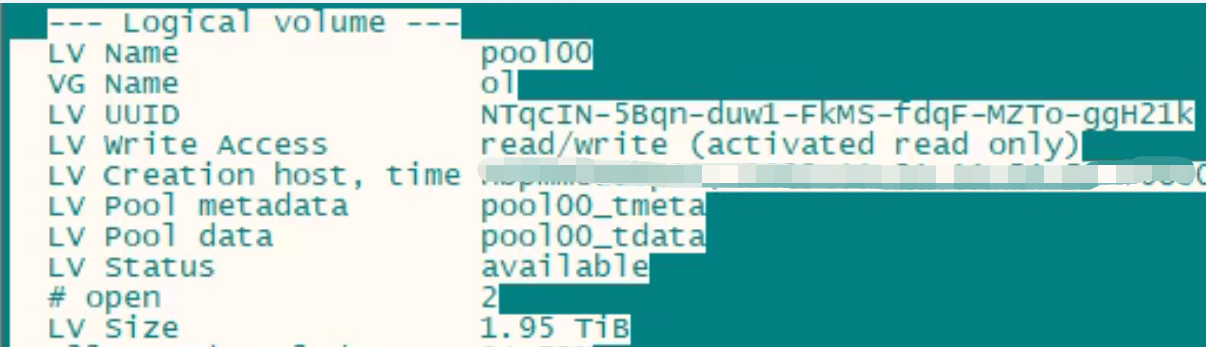
u03的lv采用thin pool的thin lv分布在pool00内,不过pool00大小1.95T,而u03确实3.95T大小,超分配太多了。同时pool00处于read only状态
4.问题处理
由于环境是新搭建的,建议删掉thin pool,重新创建跟u02和u09一样的标准的lv
lvremove /dev/ol/pool00lvcreate -L 3.95T -n u03 ol如果继续使用该模式的话,需要扩容pool00,根据主库u03存放数据文件的大小,至少扩容到4T。
lvextend -L +2T /dev/ol/pool00 并修改pool00的状态
lvchange -an ol/pool00关于更多thin pool,请参考https://www.man7.org/linux/man-pages/man7/lvmthin.7.html
最后修改时间:2023-05-24 19:33:57
「喜欢这篇文章,您的关注和赞赏是给作者最好的鼓励」
关注作者
【版权声明】本文为墨天轮用户原创内容,转载时必须标注文章的来源(墨天轮),文章链接,文章作者等基本信息,否则作者和墨天轮有权追究责任。如果您发现墨天轮中有涉嫌抄袭或者侵权的内容,欢迎发送邮件至:contact@modb.pro进行举报,并提供相关证据,一经查实,墨天轮将立刻删除相关内容。
